 Mowo
How-to: a pickup that adds to an inventory
Build a pickup that, when the player walks into it, adds its item name to the player's inventory array and removes itself.
This guide builds two classes that talk to each other: a pickup that, when the player walks into it, hands its item name to the player and removes itself, and a player that keeps the names in an array. You will use an array variable, the overlap payload, Cast To, and Call On Target into another class's function.
Build the door first if you have not used a Trigger slot yet.
- Player enters pickup trigger
- BP_Pickup: OnTriggerEnter
- Cast To BP_Player
- Call On Target: AddItem
- Inventory grows, pickup removed
Part 1: the player's inventory
- Create the player class
In the Content Browser, choose Visual Script Class > Character and name it
BP_Player. Use it as your game mode's player pawn. - Add the inventory variable
In Variables, add
Inventoryof type String. - Add AddItem
Click + in Functions, name the function
AddItemand give it one String input,item. - Write the body
Wire the entry node into an Array Add node, set its variable to
Inventory, and feed the entry node'sitempin into its value. The first Array Add turns the String variable into an empty array and appends to it. - Compile and save
Click Compile, then Save.
The pickup calls one function instead of writing the player's variables. If the player later caps the inventory or plays a sound, that change lives in AddItem and no pickup changes.
Part 2: the pickup
- Create the class
Choose Visual Script Class > Actor and name it
BP_Pickup. - Add variables
Add
ItemName(String, defaultCoin, Instance Editable on) andCollected(Bool, defaultfalse). Placed pickups can then grant a coin, a key or a potion from the same class. - Add components
Add a MeshRenderer component so the pickup is visible, and a Trigger component with shape Sphere and a radius that covers it.
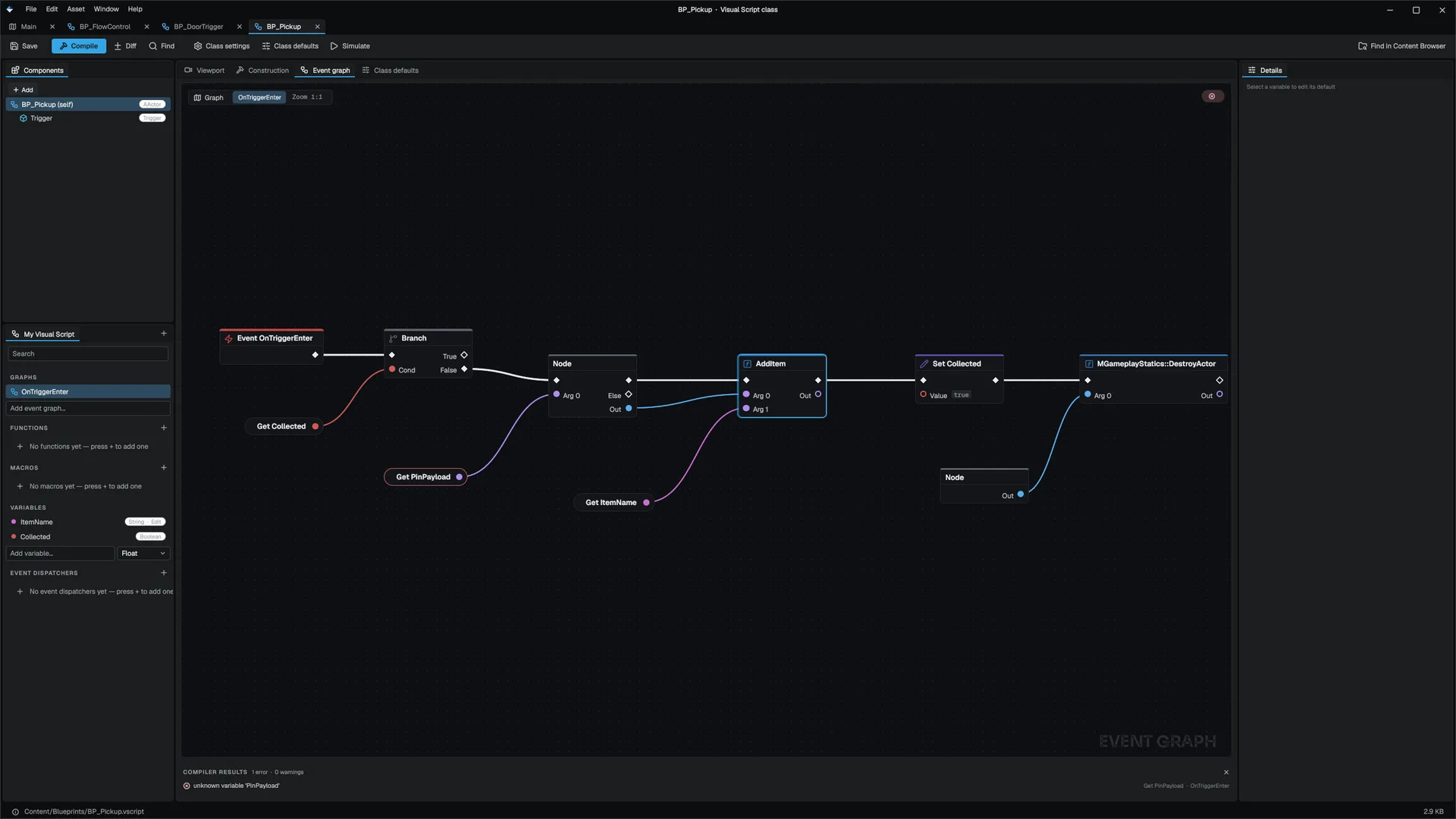
- Handle OnTriggerEnter
Add an
OnTriggerEnterevent graph and wire:- Event into a Branch on Get Variable
Collected. Continue from False only. - Cast To
BP_Player, with Get VariablePinPayloadas the object.PinPayloadholds the actor that entered. - From the cast's success output, Call On Target with the function
AddItem. Wire the cast's object output into Target and Get VariableItemNameinto the argument. - Set Variable
Collectedtotrue. DestroyActorfrom the Gameplay Library, with Self as the actor MGameplayStatics.
- Event into a Branch on Get Variable
- Compile and save
Compile, then save.
Call On Target finds no reflected AddItem on the player's class, so it runs the player's visual function in the player's context, and the string lands in the player's Inventory. If something other than the player brushes the trigger, the cast fails and nothing happens.
Part 3: place and play
Drop several BP_Pickup instances in the level and set each one's ItemName in its Details panel. Start Play-In-Editor and walk over them.
To watch it, open BP_Player while playing and put a breakpoint on the Array Add node in AddItem. Each pickup pauses there, and the watch strip shows Inventory growing. A logpoint with the message got {item} prints each pickup without stopping. See Debugging.
Take it further
- No duplicates. In
AddItem, check Array Contains onInventoryand Branch before adding. - Counts instead of names. Use a map of item name to count: read the current count with Map Find and write it back with Map Add.
- Tell the HUD. Give
BP_PlayeranOnInventoryChangedevent dispatcher and Broadcast it fromAddItem, so a listener updates without polling. See Functions, macros and dispatchers.
Engine sources
This page describes behavior implemented in these files of the engine repository, checked against commit 5922e6e5e.
- Engine/Source/Runtime/Game/Public/Game/MGameplayStatics.h