 Mowo
How-to: a door that opens on overlap
Build two visual classes, a door and a trigger, so a door slides open when the player walks up and closes when they leave.
This guide builds a door that slides open when the player walks into a trigger, and slides shut when they leave. You will use a component slot, the OnTriggerEnter and OnTriggerExit events, functions, and a call from one visual class into another.
You build two classes:
BP_SlidingDoorknows how to open and close itself. It has two functions and no idea what triggers it.BP_DoorTriggercarries a trigger volume. When something enters or leaves, it finds the door by tag and calls the door's functions.
- Player enters trigger
- BP_DoorTrigger: OnTriggerEnter
- Get Actor By Tag
- Call On Target: OpenDoor
- BP_SlidingDoor moves
Why two actors? A trigger slot lives on its actor. If the door carried its own trigger and moved itself out of the way, the trigger would move with it, the player would "leave" it, and the door would close again.
Before you start
You need a project open in Mowo Editor with a level that has a player character. A trigger reports actors whose origin is inside its volume, and character controllers.
Part 1: the door
- Create the class
In the Content Browser, right-click a folder and choose Visual Script Class > Actor. Name it
BP_SlidingDoorand double-click it. - Add a variable
In Variables, add
IsOpenof type Bool. Leave its default atfalse. - Give it a mesh
Click + in the My Visual Script header and add a MeshRenderer component. The editor switches to the class layout. Select the slot, set its mesh, and save. See Component slots.
- Write OpenDoor
Open the Event graph tab and click + in Functions and name the function
OpenDoor. In its graph, wire:- The entry node into a SetActorLocation call. This is
AActor's ownMFUNCTION, so it runs on the door itself AActor. - A Make Vector node into its location pin. Type the open position into X, Y and Z.
- SetActorLocation into a Set Variable for
IsOpen, with the valuetrue.
- The entry node into a SetActorLocation call. This is
- Write CloseDoor
Add a second function,
CloseDoor, the same way. Use the closed position in Make Vector and setIsOpentofalse. - Compile and save
Click Compile, then Save.
The FirstPerson template's BP_SlidingDoor.vscript uses the same SetActorLocation pattern, driven by an OnInteract graph Templates/TP_FirstPerson/Content/Blueprints/BP_SlidingDoor.vscript.
Part 2: the trigger
- Create the class
Create another class with Visual Script Class > Actor, named
BP_DoorTrigger. - Add the door tag variable
Add a String variable
DoorTagwith the defaultFrontDoor. Turn on Instance Editable, so each placed trigger can point at a different door. - Add a Trigger slot
Add a Trigger component the same way. Set its shape to Sphere and its radius to cover the doorway. Save.
A class with a
Triggerslot gets a live trigger component when it spawns, and stays in the tick schedule so the overlap check runs. The trigger's shape can be Box, with half extents, or Sphere, with a radius MTriggerComponent. - Handle OnTriggerEnter
In Graphs, type
OnTriggerEnterinto Add event graph.... In the new graph, wire:- The Event node into a Call On Target node. In its details, set the function to
OpenDoor. - Get Variable
DoorTaginto a Get Actor By Tag node. - Get Actor By Tag into the Target pin of Call On Target.
- The Event node into a Call On Target node. In its details, set the function to
- Handle OnTriggerExit
Add an
OnTriggerExitgraph that is the same, but callsCloseDoor. - Compile and save
Compile, then save.
When the trigger fires, OnTriggerEnter runs with the overlapping actor in PinPayload. Call On Target finds no reflected OpenDoor on the door's class, so it runs the door's visual function in the door's own context, where IsOpen lives.
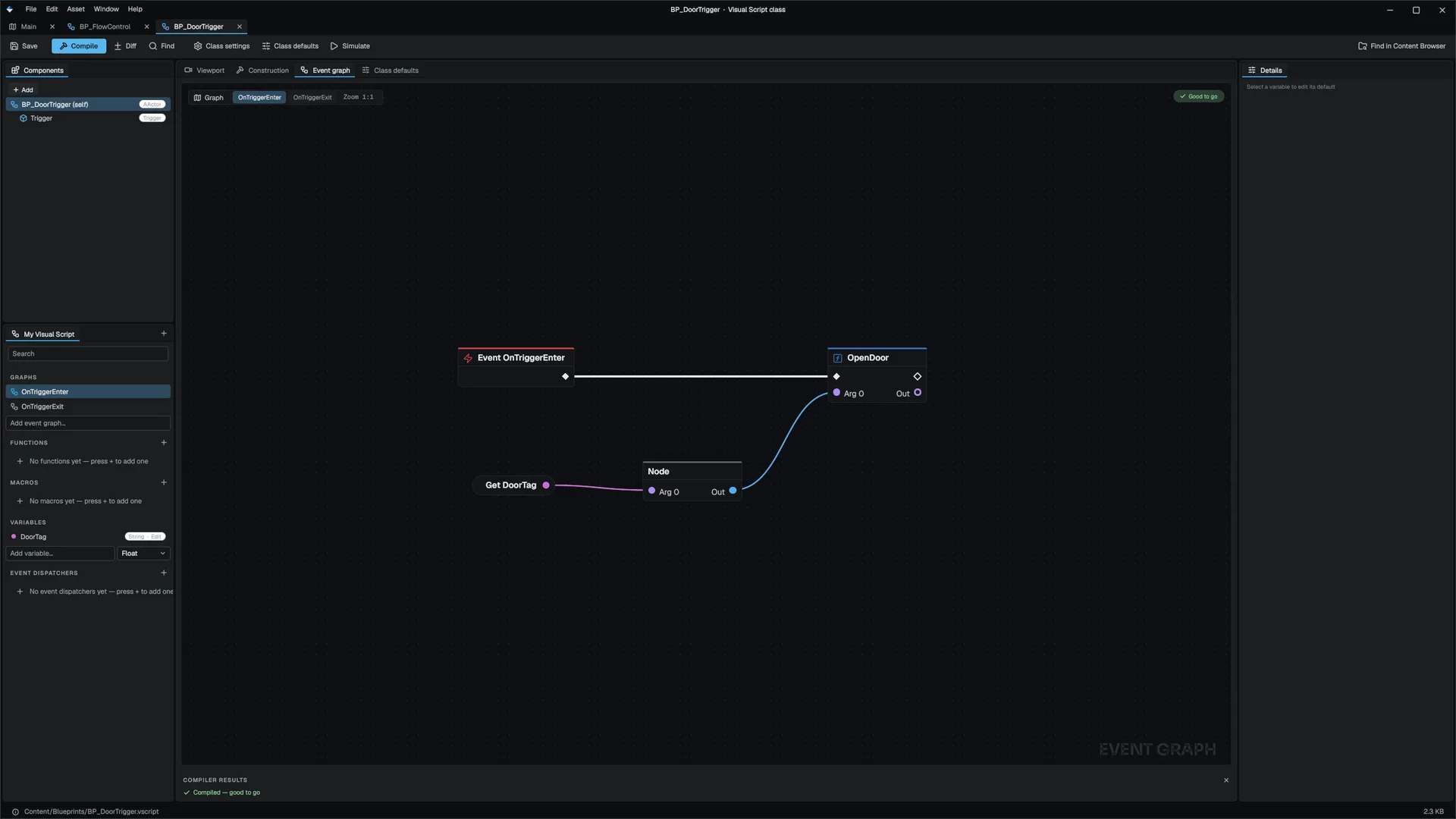
What the trigger class looks like on disk
Saved, BP_DoorTrigger.vscript has this shape. Defaults are written only when they differ from the built-in default, which is why execElse does not appear.
VisualScriptClass {
    schema: 9
    class: "BP_DoorTrigger"
    parent: "AActor"

    Variable {
        name: "DoorTag"
        editable: true
        vtype: "String"
        val: "FrontDoor"
    }
    Component {
        name: "Trigger"
        type: "Trigger"

        Default {
            prop: "shape"
            vtype: "Int"
            val: 1
        }
        Default {
            prop: "radius"
            vtype: "Float"
            val: 3.0
        }
    }
    Graph {
        event: "OnTriggerEnter"
        entry: 0

        Node {
            kind: "Event"
            name: "OnTriggerEnter"
            execNext: 1
        }
        Node {
            kind: "CallOn"
            function: "OpenDoor"
            execNext: -1

            Input {
                link: 2
                pin: 0
            }
        }
        Node {
            kind: "GetActorByTag"
            execNext: -1

            Input {
                link: 3
                pin: 0
            }
        }
        Node {
            kind: "GetVar"
            var: "DoorTag"
            execNext: -1
        }
    }
}
The OnTriggerExit graph is the same with CloseDoor. A shape of 1 is Sphere.
Part 3: place and play
- Place the door
Drag
BP_SlidingDoorinto the level. In its Details panel, add the tagFrontDoorunder Tags AActor. - Place the trigger
Drag
BP_DoorTriggerin front of the door. ItsDoorTagrow already readsFrontDoor. - Play
Start Play-In-Editor and walk into the trigger. The door moves to its open position. Walk away and it closes.
If it does not work
| Symptom | Check |
|---|---|
| Nothing happens | Is the trigger's radius large enough to contain the player's origin? |
| The log says "CallOn 'OpenDoor': target is null/invalid" | The door has no tag matching DoorTag, so Get Actor By Tag returned null. |
| The log names an unknown function | OpenDoor is misspelled on the Call On Target node, or the door class was not compiled. |
| The door opens once and never closes | There is no OnTriggerExit graph, or it calls OpenDoor. |
To see the calls happen, open BP_DoorTrigger while playing: the nodes pulse as they run. Put a breakpoint on Call On Target with F9 to stop there. See Debugging.
Take it further
- Only open for the player. In
OnTriggerEnter, Cast To your player class onPinPayloadbefore calling the door. - Guard against repeats. In
OpenDoor, Branch onIsOpenfirst and do nothing when it is already open. - Animate the slide or close on a timer. A Timeline or Delay only suspends in an event graph. Inside a function it runs instantly, and Call On Target reaches functions, not event graphs. To animate, put the Timeline in an event graph on the door, for example
Open, and fire it as an input pin: from the trigger withSetTimerByPinfrom the Timer Library and a short delay, or from C++ withReceivePin. See Calling C++.
Engine sources
This page describes behavior implemented in these files of the engine repository, checked against commit 5922e6e5e.
- Engine/Source/Runtime/Game/Public/Game/MTriggerComponent.h
- Engine/Source/Runtime/Game/Public/Game/AActor.h
- Templates/TP_FirstPerson/Content/Blueprints/BP_SlidingDoor.vscript