 Mowo
Smart Props
The Smart Props plugin's parametric prop assemblies with parameters, variants, expression-driven parts, sockets, placement rules, scatter, prop sets and baking.
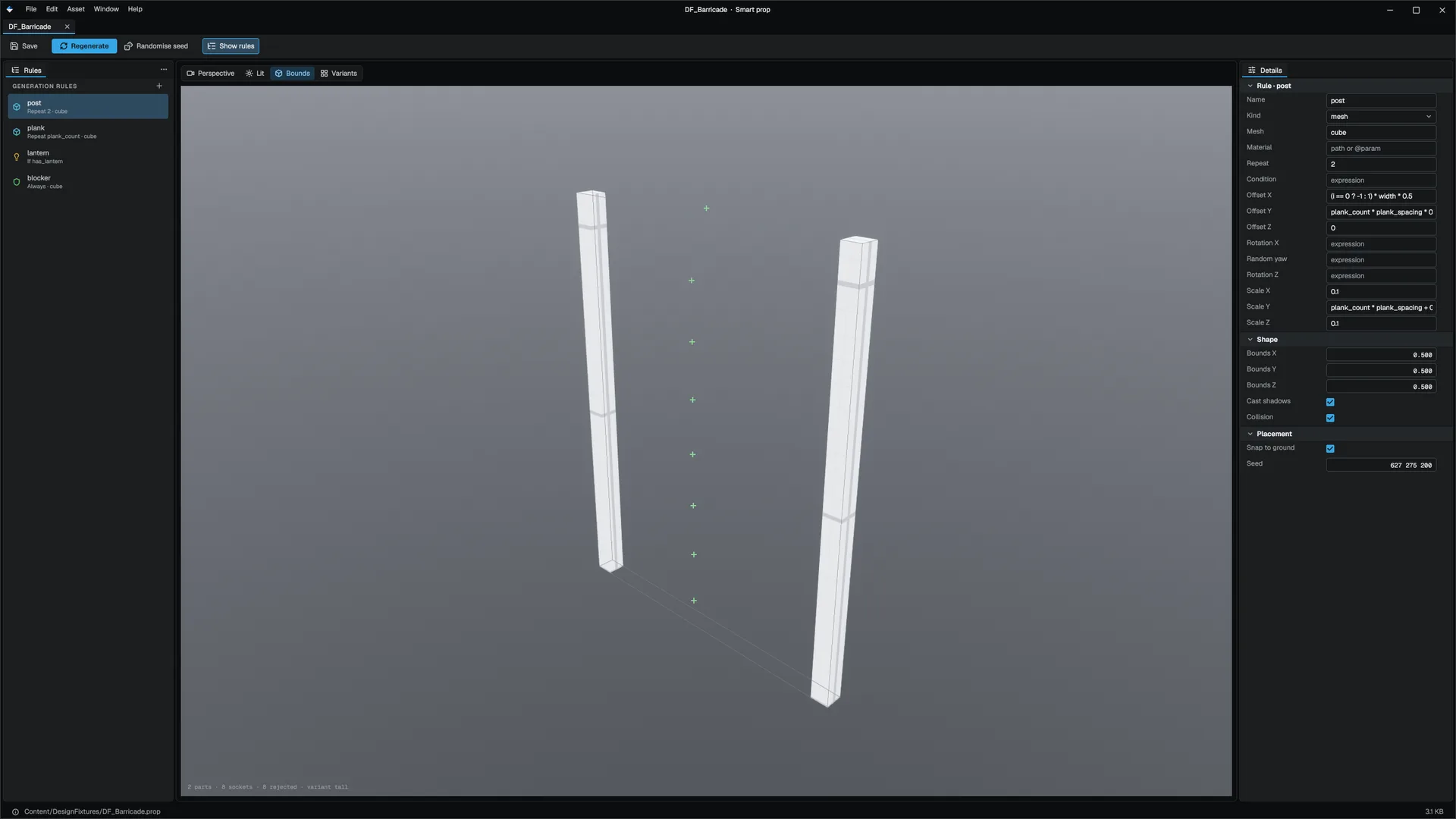
A Smart Prop is a parametric assembly saved as a .prop asset. One asset describes a family of objects: a shelf with any number of boards, a crate stack of any height, a desk whose lamp appears only when has_lamp is on. A placed instance stores only a reference, its parameter overrides and a seed; the parts are regenerated whenever an input changes and are never written into the level until you bake. Enable the Smart Props plugin in the Plugins window. Engine/Plugins/SmartProps/SmartProps.mplugin
The asset
SmartProp "Shelf" {
    schema_version: 1

    Param "count" { type: "int" default: 4 min: 1 max: 12 step: 1 }
    Param "spacing" { type: "float" default: 0.4 min: 0.05 max: 2.0 step: 0.05 }
    Param "has_lamp" { type: "bool" default: false }

    Variant "tall" { weight: 3 count: "7" spacing: "0.3" }
    Variant "short" { weight: 1 count: "2" }

    Part "board" {
        kind: "mesh"
        source: "cube"
        repeat: "count"
        position: [ "0", "i * spacing", "0" ]
        scale: [ "1", "0.05", "0.4" ]
    }

    Part "lamp" {
        kind: "light"
        condition: "has_lamp"
        position: [ "0.4", "count * spacing", "0" ]
        intensity: 2.5
    }

    Socket "top" {
        repeat: "count"
        position: [ "0", "i * spacing + 0.06", "0" ]
        provides: [ "shelf_surface", "small_item" ]
        capacity: 3
    }

    Rules {
        keep_upright: true
    }
}| Block | Holds |
|---|---|
Param | A typed input: float, int, bool, enum, asset, color or vec3, with range, step, tooltip and category. The Details panel and the Smart Prop editor draw the control from it. |
Variant | A named set of overrides with a weight. An instance names one, or lets its seed pick by weight. |
Part | One thing the prop emits: mesh, prefab, light, particle, a nested prop, collider or socket_only. Every transform field is an expression over parameters; repeat is an expression too, with i the index and n the count; condition gates the part; @name refers to an asset parameter. |
Socket | A named attach point that provides tags, with a capacity. A prop that accepts a tag attaches to it. Sockets work with the ordinary AttachToComponent(component, socketName). |
Rules | Placement rules, below |
Scatter | Turns one prop into many over its own sockets, a surface, a volume or a spline, by weighted entries |
Placement rules
| Rule | Effect |
|---|---|
surface_snap | Drops the prop onto the first surface below |
align_to_normal, keep_upright | Tilts to the surface, or keeps world up |
random_yaw_min, random_yaw_max, offset_jitter | Seeded rotation and position jitter |
avoid_overlap, min_spacing | Rejects placements that collide or crowd |
must_touch_tag, world_overlap | Requires a tagged surface, or free space |
Named rules add stack and clutter_fill, which work on the prop's own parts, and lean, hang and align_to_wall, which look at the world once at placement and store the result on the instance.
Instances
Place an ASmartPropActor, or add an MSmartPropComponent to an actor. It stores the propPath, a seed (0 derives one from the entity), a variant, and only the parameters that differ from the asset's defaults, so changing a default in the .prop reaches every instance that did not override it.
Generation is a pure function of the asset, the overrides, the variant and the seed: the same inputs always give the same parts. Parts are created as runtime entities that never appear in the Outliner and are never saved.
From Visual Scripting or C++, MSmartPropComponent offers SetSmartProp, SetSeed, SetVariant, SetParameter, GetParameter and RequestRegenerate.
Bake and unbake
Bake turns the generated parts into real, individually editable level entities in one undo step and makes the instance inert. Unbake goes back, but only while the source asset is unchanged since the bake, so hand edits are never silently regenerated away.
Prop sets and volumes
A .propset names props by role, with weights and spacing, for example clutter and seating for a kitchen. Fill Selected Volume in the viewport scatters a role across the selected volume's floor.
An ASmartPropVolume fills its volume from a prop set and role (SetPropSet), or runs a Visual Scripting graph (SetGraph) that places props with the MSmartPropStatics nodes: ScatterInVolume, ScatterOnSurface, ScatterAlongSpline, FillFromPropSet, ApplyStackRule, ApplyClutterFillRule, ApplyMinSpacing and EmitProp.
The engine content includes a library of interior props under Content/SmartProps/Interior.
Related
- Procedural content (PCG) for landscape-wide scattering
- World building
Engine sources
This page describes behavior implemented in these files of the engine repository, checked against commit 5922e6e5e.
- Engine/Plugins/SmartProps/SmartProps.mplugin