 Mowo
Crash reporting
How the crash handler and out-of-process reporter capture a crash, how a game sets its own endpoint and consent, and how mbt archives and uploads symbols.
When a packaged game crashes, Mowo writes a report to disk and shows the player a crash dialog. With the player's consent the report goes to your own Sentry project, and with the build's symbols uploaded too, Sentry turns the raw dump into a readable call stack. A game that names no Sentry project keeps its reports on the player's disk.
This page follows a crash from the fault to the server, then covers what you configure before a release.
How a crash is captured
- Crash handler installed
- Fault
- Watchdog writes .dmp
- Crash dialog
- Upload with consent
- Server symbolicates
The handler. Every shippable host calls FCrashHandler::Install first thing, before engine initialization, so even startup faults are caught. On Windows it hooks the unhandled-exception filter plus the C runtime's terminate, pure-virtual and invalid-parameter handlers Engine/Source/Runtime/Core/Public/Core/FCrashHandler.h.
The watchdog. On Windows, Install() also starts the crash reporter executable in watchdog mode. When the game faults, the watchdog writes the minidump of the crashed process from outside, so the dump survives heap and stack corruption the crashed process could not write around. Without a watchdog, the handler writes the dump itself.
Hangs. The main loop sends a heartbeat every frame. If it stops for 60 seconds, the watchdog writes a hang report with every thread's stack, without killing the game.
Ensures. MOWO_ENSURE(expr) and MOWO_ENSURE_MSG(expr, ...) write a non-fatal report the first time a call site fails, and let execution continue Engine/Source/Runtime/Core/Public/Core/FAssertions.h.
What a report contains
Each report is a group of files named crash_<YYYYMMDD_HHMMSS> in the crash folder:
| File | Contents |
|---|---|
.dmp | The minidump |
.txt | Exception details, a symbolized stack of the crashing thread, the other threads, the loaded modules, the tags, and the game's crash settings |
.log | The last 128 KB of the game's log |
Only the newest 5 report groups are kept Engine/Source/Runtime/Core/Public/Core/Constants.h. A packaged game writes them to its per-user Saved/Crashes folder.
Tags describe the machine and the run: OS, CPU, memory and displays, then GPU, driver, graphics API and configuration once the renderer starts, and the package's build_id. Add your own with FCrashHandler::SetTag(key, value), for example the current level; every tag set before the fault rides along.
#include "Core/FCrashHandler.h"

Mowo::FCrashHandler::SetTag("level", "Content/Scenes/Swamp.mmap");Minidumps are Windows-only. On macOS the handler writes a text report from backtrace(), with no minidump Engine/Source/Runtime/Core/Public/Core/FCrashHandler.h.
The crash dialog
After a crash the player sees the reporter window, headed "<Product> closed unexpectedly". It has a "What were you doing?" field, Attach log and Attach minidump checkboxes with their sizes, a Technical details disclosure with the call stack and modules, a privacy note, and three buttons: Close without sending, Send and close and Send and restart. Close without sending is recorded in the report, so a later launch does not send it either.
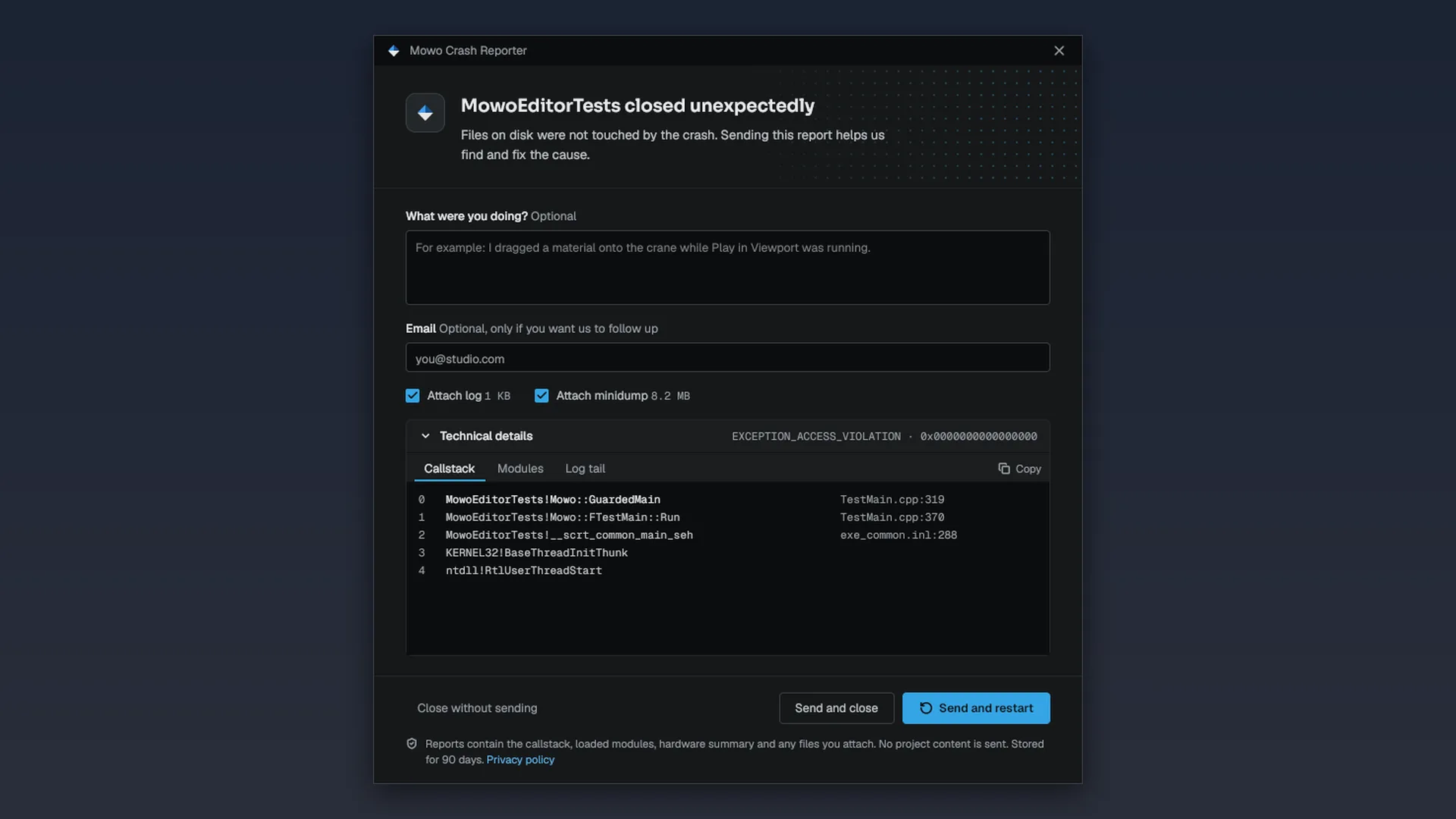
The reporter ships as Binaries/<platform>/<Product>CrashReporter.exe in both link modes, and BuildInfo.json tells the game where it is. Dedicated server packages do not include it.
The player-facing switches --no-crash-reporter and --silent suppress the dialog. The environment variable MOWO_NO_CRASH_REPORTER=1 does the same for automated runs. None of them stop the dump from being written.
Endpoint and consent
A game's crash reports go to its own Sentry project, and to nowhere until you name one: a game without a DSN writes its reports to the player's disk and sends nothing. Set it in Project Settings › Crash Reporting, which writes the [CrashReportClient] section of the project's Config/Engine.ini, as in Unreal Engine/Source/Runtime/Core/Public/Core/CrashReportClientSettings.h:
[CrashReportClient]
bEnabled=True
Dsn=https://<public-key>@o<org-id>.ingest.de.sentry.io/<project-id>
bAgreeToCrashUpload=False
bSendUnattendedBugReports=False
SentryOrg=<your-org-slug>
SentryProject=<your-project-slug>| Key | Meaning |
|---|---|
bEnabled | False keeps reports on disk; nothing is sent |
Dsn | Your Sentry project's DSN, from its Client Keys (DSN) settings. Empty (the default) keeps reports on disk |
bAgreeToCrashUpload | The player already consented, for example in your EULA or an options toggle: the next launch sends reports without asking |
bSendUnattendedBugReports | Send with no reporter window, for servers and kiosks. Needs bAgreeToCrashUpload |
SentryOrg, SentryProject | Where mbt package uploads the build's symbols (see Symbols). Not shipped |
A DSN from any Sentry region or a self-hosted Sentry works: the report goes to the host the DSN names, at /api/<project-id>/minidump/ (or /envelope/ when the player kept the minidump back).
mbt package copies the section into BuildInfo.json as crashReporter.*. Priority for the DSN: mbt package --crash-dsn <dsn>, then Config/Engine.ini, then the legacy crashReporter.dsn block in the .mproject. With none of them the package has no DSN. --no-crash-reporter writes enabled: false and an empty DSN.
The game applies the manifest before engine initialization, and every report carries the game's DSN and consent in its .txt. That decides what leaves the machine:
- With no
Dsn, reports stay on disk and the dialog has nothing to send. - With
bAgreeToCrashUpload=False(the default), nothing is sent until the player presses a Send button in the dialog. - With consent given, the next launch uploads pending reports.
Engine::InitializecallsSentryCrashUploader::FlushPending(), which posts each dump with its text report and log and deletes it on success. A failed upload stays on disk for the next try. - With
bEnabled=False, reports stay on disk, and the dialog says sending is disabled.
Reports are never uploaded from the crashing process, whose heap may be corrupt. See SentryCrashUploader for the API.
Crashes of Mowo Editor, Mowo Project Launcher and their crash reporter go to the engine team's Sentry project. A game in its own process never does: standalone or packaged, it uses the DSN you set, or none. Play-In-Editor runs inside the editor, so a crash there is an editor crash.
Symbols
A minidump holds addresses, not function names. For the server to show a readable stack, it needs the build's symbols. Every configuration emits them, release included, and they stay beside the binaries in Engine/Binaries/<platform>/<config>/; they never ship in a package.
mbt package handles symbols as its symbol step:
- It copies every shipped binary and its symbol file into
<Product>-symbols/<buildId>/beside the package, so the next build cannot overwrite the only copy. - It converts each one to a smaller Breakpad
.symwithdump_syms, falling back to the raw file when a conversion fails, and uploads them withsentry-cli debug-files upload. - For
release, it waits until the server has processed the files, and an upload that was attempted and failed fails the package: a build whose crashes cannot be read should not ship. Retry withmbt symbols <archive> --org <org> --project <project> --wait, or package with--no-symbols.
The symbols go to the game's own project: --sentry-org / --sentry-project on mbt package, else SentryOrg / SentryProject in [CrashReportClient], else crashReporter.sentryOrg / crashReporter.sentryProject in the .mproject, else SENTRY_ORG / SENTRY_PROJECT. A game that names no project skips the upload with a warning; its symbols are never sent to the engine team's project.
A machine without sentry-cli or an auth token skips the upload with a warning and keeps the archive.
On Linux and macOS, release and profile packages first split debug information out of each shipped image into <binary>.debug or <binary>.dSYM beside the build, and those are what the archive and the upload pick up. This path has not run on a POSIX host yet.
To upload separately, use mbt symbols:
./mbt.cmd symbols -c release
./mbt.cmd symbols D:/Projects/MyGame/Saved/Packaged/MyGame-symbols/<buildId> --wait
Without paths it scans Engine/Binaries/<platform>/<config>, and -c picks which configuration's folder. Standalone mbt symbols fails when it cannot upload.
Point the upload at your own project:
| Setting | Purpose |
|---|---|
SENTRY_AUTH_TOKEN (environment) | Required. A token with upload rights. It is a secret; keep it in your CI secret store or shell, never in a file in the repository. mbt never logs it |
SENTRY_URL, SENTRY_ORG, SENTRY_PROJECT (environment) | Your Sentry's web address, organization and project |
--url, --org / --sentry-org, --project / --sentry-project | The same, on the mbt symbols command line |
Engine/Config/CrashReporting.ini, section [CrashReporting], keys Url, Org, Project | A developer machine's defaults. Gitignored; copy CrashReporting.example.ini. An auth token in this file is ignored |
Options win over environment variables, which win over the file. The URL is the Sentry web address, not the ingest host in a DSN: https://de.sentry.io for the EU region (the default), https://sentry.io for the US region, or your self-hosted server. Without an organization or project, standalone mbt symbols uploads to the engine team's project, so name yours.
Before a release
- Set your own
Dsnin Project Settings › Crash Reporting and decide onbAgreeToCrashUpload. - Set
SentryOrgandSentryProjectthere,SENTRY_AUTH_TOKEN(andSENTRY_URLoutside the EU region) on the build machine, and check the package log for the symbol line. - Keep the
<Product>-symbols/archive of every build you release. - Crash a test build on purpose, send the report, and confirm it arrives with a readable stack.
Related
Engine sources
This page describes behavior implemented in these files of the engine repository, checked against commit 8510fff13.
- Engine/Source/Runtime/Core/Public/Core/FCrashHandler.h
- Engine/Source/Runtime/Core/Public/Core/CrashReportClientSettings.h
- Engine/Source/Runtime/Core/Public/Core/FAssertions.h
- Engine/Source/Runtime/Core/Public/Core/Constants.h
- Engine/Source/Runtime/Http/Public/Http/SentryCrashUploader.h
- Engine/Config/CrashReporting.example.ini