 Mowo
Plugins and editor extensions
Enable, build and create plugins in the Plugins window, and extend the editor with menu entries, toolbar buttons, Details rows, dock panels and viewport modes.
A plugin is a folder with a .mplugin manifest that can carry content, runtime modules and editor modules. This page covers the Plugins window, where you turn plugins on and off, build and create them, and the EditorFramework module that editor plugins use to add to the editor. How plugins load and package is covered in Programming.
The Plugins window
Tools ▸ Plugins… (editor.pluginManager) opens Plugins as a document beside the level. The Content Browser's Manage Plugins… opens it too.
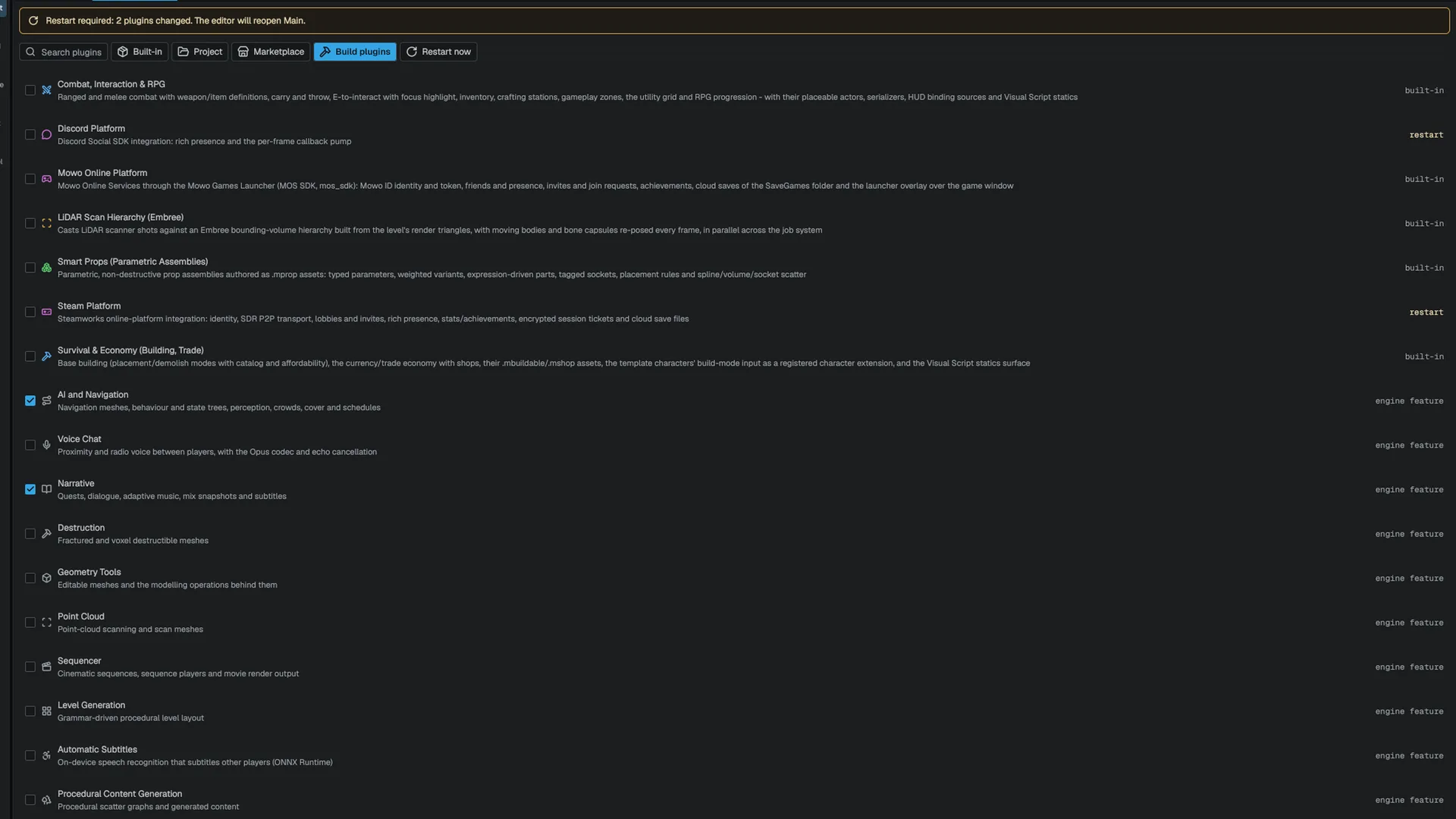
| Part | What it shows |
|---|---|
| Restart banner | While a change waits for a restart, how many plugins changed and which level the editor will reopen |
| Toolbar | Search plugins, the Built-in, Project and Marketplace filters, Build plugins and Restart now |
| Build progress | While a plugin builds: the plugin, the build's own file counter, a bar and Cancel |
| List | One row per plugin: check box, icon, name, the first sentence of its description, and a status |
The status reads building, restart (what is ticked differs from what is loaded), blocked (a dependency or engine version keeps it from loading, with the reason in red), beta, or where the plugin comes from with its version (built-in · 1.2, project, marketplace, engine feature).
The filters combine: Built-in is Engine/Plugins, Project is <Project>/Plugins, Marketplace is a plugin whose manifest names a marketplaceUrl. Search matches name, author, category and description.
The engine's feature modules (AI and Navigation, Narrative, Voice Chat, Sequencer, Destruction, Procedural Content Generation and the rest) are listed as built-in rows in the Engine Features category. Their switch is the project's: it decides what the game loads and packages. The editor itself keeps every feature module registered, so their asset editors open whatever the switch says, and a feature row has no Build entry because it builds with the engine. See Writing a plugin for the defaults.
Enabling and disabling
The check box writes enabled.<Name> to <Project>/Config/Plugins.ini, which overrides the manifest's enabledByDefault. Ticking a plugin also ticks the plugins it depends on; unticking one that others depend on warns that they stop loading.
Content mounts and unmounts immediately. C++ modules stay loaded once loaded, so a change to a plugin with modules waits for a restart. Restart now saves every unsaved document and relaunches the editor on the same project and level.
Building
Build plugins builds every ticked plugin that has C++ modules, one after another; Build on a row builds one. Each module builds with mbt build -t <Module> --frozen-engine. Cancel stops the build and drops the queued plugins. A failed module shows its first error line; the full output is in the log. New binaries load on the next start, not live.
Right-click a row for Enable / Disable, Build, Show in Explorer, Copy Name and, for a store plugin, Open Store Page. Right-click the list for New Plugin… and Clear Filters.
Creating a plugin
New Plugin… asks for the name, display name, author, category and description, and three choices: Location (Project or Engine), Content folder and Editor module. The name must be a valid C++ identifier and not already taken. Create Plugin writes:
<Plugins>/MyPlugin/
  MyPlugin.mplugin                     manifest
  MyPlugin.Build.cs                    runtime module rules
  Public/MyPlugin/MyPluginAPI.h        the plugin's export macro
  Public/MyPlugin/MyPluginModule.h
  Private/MyPluginModule.cpp
  MyPluginEditor/                      with Editor module: a "type": "Editor" module
  Content/                             with Content folder
The files come from the plugin template that ships with mbt. Creating over an existing folder is refused. The new plugin has no binary yet: build it with mbt build -t <Name>, then restart the editor. To declare reflected types, enable the header tool in the generated .Build.cs.
The window lists what discovery found. It does not download or update plugins; Marketplace only filters by the manifest field.
Extending the editor
An editor module (manifest "type": "Editor") depends on the EditorFramework module (API). It loads only in the editor and never ships in a package.
| You want to add | Use |
|---|---|
| A menu entry in File, Edit, Tools, Window, Build or Help | FEditorExtensionRegistry::AddMenuEntry with an FEditorMenuExtension |
| A toolbar button, right of the play controls | FEditorExtensionRegistry::AddToolbarButton |
| Rows in a component's Details block, or a full replacement | FEditorExtensionRegistry::AddDetailsCustomization with an IEditorDetailsCustomization |
| A mode on the viewport's modes bar | FEditorExtensionRegistry::AddViewportMode with an IEditorViewportMode |
| A dockable panel, listed under Window ▸ Plugins | FEditorDockPanelRegistry with an FEditorDockPanelDesc |
| An asset editor document kind | FEditorPanelRegistry with an FEditorPanelDesc |
| A tool AI agents can call | FMcpToolRegistry; see MCP server |
Register in your module's InitializeModule and remove everything in ShutdownModule. Removal tells the editor to rebuild its menus, toolbar and Details view while your code is still loaded, so nothing the editor holds runs your code after the module unloads. A second registration with the same id or type replaces the first.
#include <EditorFramework/EditorExtensionRegistry.h>

#include <memory>
#include <string>
#include <utility>
#include <vector>

static const char* const kReimportId = "MyPlugin.ReimportAll";

class FHealthDetails : public Mowo::IEditorDetailsCustomization {
public:
	void AddRows(const Mowo::FDetailsCustomizationContext& context, std::vector<Mowo::FDetailsCustomRow>& rows) override {
		Mowo::FDetailsCustomRow row;
		row.Label = "Owner";
		row.Value = context.Entity == Mowo::INVALID_ENTITY ? "none" : "selected entity";

		rows.push_back(std::move(row));
	}
};

void RegisterMyPluginEditor() {
	Mowo::FEditorMenuExtension entry;
	entry.Id = kReimportId;
	entry.Menu = Mowo::EEditorMenu::Tools;
	entry.Label = "Reimport All Props";
	entry.Execute = []() {
	};

	Mowo::FEditorExtensionRegistry& registry = Mowo::FEditorExtensionRegistry::Get();
	registry.AddMenuEntry(std::move(entry));
	registry.AddDetailsCustomization("HealthComponent", std::make_shared<FHealthDetails>());
}

void UnregisterMyPluginEditor() {
	Mowo::FEditorExtensionRegistry& registry = Mowo::FEditorExtensionRegistry::Get();
	registry.RemoveMenuEntry(kReimportId);
	registry.RemoveDetailsCustomization("HealthComponent");
}
A Details customization edits its component through FDetailsCustomizationContext::EditComponent, which records the change as one undo entry; it is null when the component cannot be edited, such as in a play world. A viewport mode gets the same: FEditorViewportModeContext::EditComponent. Its pointer callbacks return true when they consume an event; an unconsumed press falls through to the camera. Removing the active mode switches the viewport back to Select, which ends any gesture through the mode's OnExit.
Engine sources
This page describes behavior implemented in these files of the engine repository, checked against commit 8f1cfbd42.
- Engine/Source/Editor/EditorFramework/Public/EditorFramework/EditorExtensionRegistry.h
- Engine/Source/Editor/EditorFramework/Public/EditorFramework/EditorPanelRegistry.h
- Engine/Source/Editor/EditorFramework/Public/EditorFramework/EditorViewportMode.h