 Mowo
Quality tiers
The five scalability tiers, what each one turns on, how the auto-tier picks one, and the cvars, sg groups and Scalability.ini that override it.
A quality tier is one setting that decides which rendering features run and how much each one may spend. Mowo has five tiers: Low, Medium, High, Epic and Cinematic (). High is the code default.
A tier only scales what the project enabled. Global Illumination, ray tracing, MegaLights, the volumetric cloud volume, volumetric fog and frame generation are project switches in Project Settings > Rendering > Features, all off for a new project (Project Settings). A tier, a device profile, an sg.* group or an r.* cvar never turns one of them on while its switch is off, and the renderer does not build its targets or pipelines.
The rule is the tier sets, the cvar refines. A tier writes a whole row of values into SceneRenderer::Options; any r.* cvar that is not -1 then overrides its one value. A tier change applies at the next BeginScene, and resources that change size, such as the shadow atlas or the probe grid, are recreated then. No restart is needed.
Pick a tier
- In the editor
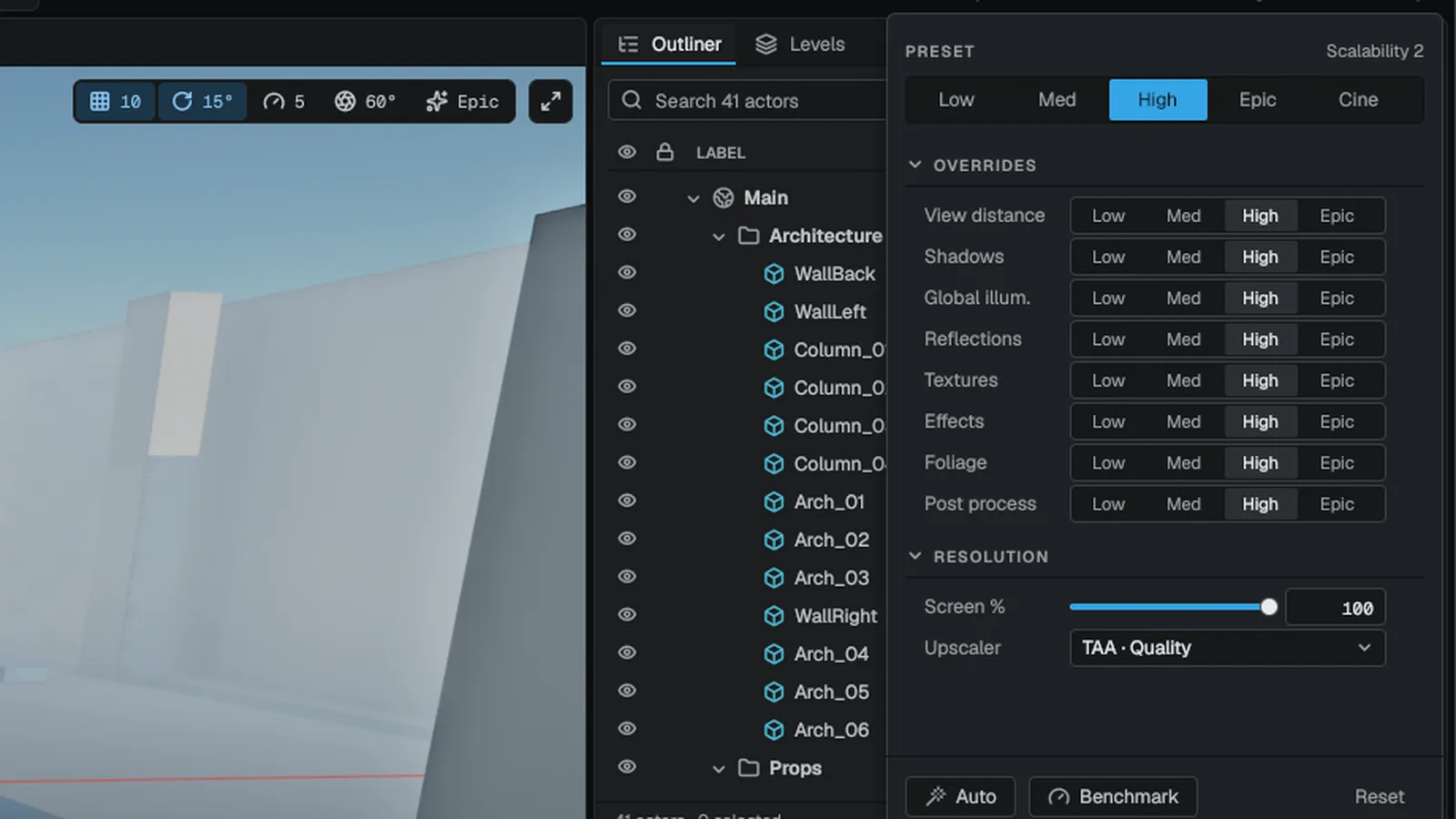
Open Edit > Engine Quality and choose Low, Medium, High, Epic or Cinematic. Auto (GPU-detected) removes your choice and runs the detection again. The choice is saved to your user config and reapplied at every launch. On a GPU with less than 10 GB of memory the card shows a warning line under Epic and Cinematic with the frame rate they cost the 8 GB reference card against High; both stay selectable.
- From the viewport
Click Quality on the viewport toolbar. The card shows the active preset, a Low to Cinematic selector, one override row per category (View distance, Shadows, Global illum., Reflections, Textures, Effects, Foliage, Post process) that offers the same Low to Cinematic tiers, the upscaler, and Auto, Benchmark and Reset buttons.
- In Project Settings
Open Project Settings > Engine > Scalability. It lists the preset and each category with its tier value and lets you pin individual ones.
- In a shipped game
The player settings screen has a Quality Preset row in the Graphics category that writes
r.Quality, one row per category that pins it to any tier or leaves it on the preset, and rows for the most important single knobs (). A row the player sets stays where they put it when the preset changes. - From code or the console
Set
r.Quality:0is Low,4is Cinematic,-1means not set.
#include "Core/IConsoleManager.h"

Mowo::IConsoleManager::Get().SetByName("r.Quality", "3");
To inspect what a tier would set without a GPU, call the static ApplyQualityPreset:
#include "Renderer/SceneRenderer.h"

Mowo::SceneRenderer::Options opts;
Mowo::SceneRenderer::ApplyQualityPreset(opts, Mowo::EQualityPreset::Epic);

const bool vsm = opts.EnableVSM;
const bool rtReflections = opts.RTReflections;
const uint32_t cascades = opts.ShadowCascadeCount;

(void)vsm;
(void)rtReflections;
(void)cascades;
Where the tier comes from
The active tier is resolved in this order, highest first:
- An explicit
r.Quality: the user config,Scalability.ini, the editor menu, the in-game settings or--cvar=r.Quality=Nin a development build. - A tier the platform recommends for the device. On Steam this is the recommended profile the developer set for that hardware.
- The auto-tier, which fills only an unset slot, capped by the matched device profile.
- The code default, High.
The editor and the game run the same auto-tier, so the editor viewport, Play In Editor and the shipped game pick the same tier on the same machine. Each logs a [Quality] line with the tier and why it was chosen.
The auto-tier
decides from a measurement when it has one and from the GPU's name and memory when it does not.
Measured
On the first launch on a machine the engine runs a short synthetic GPU and CPU benchmark once and stores the result; later launches read it. The Benchmark button in the viewport Quality card runs it again. The GPU index maps to a tier, with 100 as a reference mid-range card:
| GPU index | Tier |
|---|---|
| Under 25 | Low |
| 25 to 55 | Medium |
| 55 to 150 | High |
| 150 to 240 | Epic |
| 240 and up | Cinematic |
VRAM still caps a measured tier: under 4 GB caps it at Medium, under 6 GB at High. The matched device profile's TierCap caps it as well, so a benchmark never picks a tier the profile rules out for that GPU family. r.AutoQuality.Benchmark 0 ignores the measurement.
From the device
Without a measurement:
| Device | Tier |
|---|---|
| Apple silicon Max or Ultra | Epic |
| Other Apple silicon | High |
| Integrated GPU | Low |
| Under 4 GB VRAM | Low |
| Under 6 GB VRAM | Medium |
| Older discrete GPUs matched by name | Medium |
| 20 GB or more, and a known high-end GPU or mesh shaders plus ray query | Cinematic |
| 12 GB or more, and a known high-end GPU or mesh shaders plus ray query | Epic |
| Anything else | High |
Caps
- A device without mesh shaders is capped at High; one without ray query is capped at Epic.
- A slow CPU caps the tier: by its measured index when there is one, otherwise 4 or fewer logical cores cap at Medium and 8 or fewer at High.
- Under 8 GB of system RAM drops to Low; under 16 GB caps at High.
An unknown core count or RAM size never lowers the tier.
Simulate another machine with r.AutoQuality.ForceVRAMMB, r.AutoQuality.ForceIntegrated, r.AutoQuality.ForceName, r.AutoQuality.ForceCores and r.AutoQuality.ForceRamMB. Forcing a device skips the stored measurement.
Device profiles
A device profile, matched from DeviceProfiles.ini by GPU vendor, name, device-id range, VRAM, driver, graphics API and platform, caps the auto-detected tier and sets cvars at device-profile priority: above the tier, below every INI, the player's settings and the command line. The engine ships profiles for the RTX 20 to 50 series, GTX 16, Radeon RX 6000 to 9000, Arc A and B, Intel and AMD integrated graphics, Apple M-series and the Steam Deck; the Deck's applies at Low and moves sg.GlobalIlluminationQuality to Medium so the Deck keeps Global Illumination, renders through FSR at Quality, caps the frame rate at 40 with t.MaxFPS and sets the dynamic-resolution target to 22 ms. See Device profiles for the rules, the driver blocklist and how to add your own.
Upscaler choice
The auto-tier also picks the anti-aliasing method. It chooses the engine's TSR, or TAA when the tier renders at a fixed native resolution (Cinematic). Low, Medium and High pick their quality mode from the output resolution (Auto upscaling), in the editor viewport as in the game. Vendor upscalers (DLSS, FSR, XeSS, MetalFX) are picked automatically only when r.AutoQuality.VendorUpscalers is 1. See Upscaling and anti-aliasing.
What each tier turns on
Values come from the tier rows in. The Project switch column names the switch a row also needs; with it off the row is off at every tier (FScalabilityTiers::GetComposed clears it, and FScalabilityTiers::Get keeps the raw table).
| Feature | cvar | Project switch | Low | Medium | High | Epic | Cinematic |
|---|---|---|---|---|---|---|---|
| Clustered lighting | — | — | on | on | on | on | on |
| Auto-exposure | — | — | on | on | on | on | on |
| Bloom, motion blur, contact shadows | — | — | off | on | on | on | on |
| Global Illumination | r.DDGI | Global Illumination | off | on | on | on | on |
| Screen-space reflections | r.SSR | — | off | on | on | on | on |
| GTAO | r.GTAO | — | off | on | on | on | on |
| Screen-space subsurface scattering | — | — | off | on | on | on | on |
| SDF far sun shadows | r.Shadow.SdfFar | Global Illumination | off | on | on | on | on |
| Screen-probe final gather | — | Global Illumination | off | off | on | on | on |
| Depth prepass | r.DepthPrepass | — | off | off | on | on | on |
| PCSS soft shadows | r.Shadow.Soft | — | off | off | on | on | on |
| Translucent reflections | r.Reflections.Translucent | Global Illumination | off | off | on | on | on |
| Terrain runtime virtual texture | r.Terrain.RVT | — | off | off | on | on | on |
| Cloud shadows | r.Clouds.Shadows | Volumetric Clouds | off | off | on | on | on |
| Virtual shadow maps | r.VSM | — | off | off | off | on | on |
| MegaLights | r.MegaLights | MegaLights | off | off | off | on | on |
| Ray-traced reflections | r.RTReflections | Ray Tracing | off | off | off | on | on |
| Ray-traced AO | r.RTAO | Ray Tracing | off | off | off | on | on |
| Hardware ray-traced GI gather | r.GI.HWRTGather | Global Illumination + Ray Tracing | off | off | off | on | on |
| SDF reflections and the near radiance cascade | r.GI.NearCascade | Global Illumination | off | off | off | on | on |
| Volumetric fog | r.VolumetricFog | Volumetric Fog | off | off | off | on | on |
| Meshlet G-Buffer | r.MeshletGBuffer | — | off | off | off | on | on |
| Ray-traced sun shadows | r.RTShadows | Ray Tracing | off | off | off | off | on |
Most of these cvars take -1 for the tier value and 0 or 1 to force the feature. r.GI.NearCascade and r.Reflections.Translucent are gates instead: they default to 1 and let the tier's choice through; set 0 to turn the feature off.
Ray-traced rows need ray query on the device, and the meshlet path needs mesh shaders. Without them the feature falls back each frame, see Ray tracing. SSGI is off at every tier; r.SSGI 1 forces it when Global Illumination is on. The raymarched cloud volume (Epic and Cinematic pick it once clouds are on) also needs Volumetric Clouds; without it a cloud actor draws the flat cloud layer at every tier.
Numeric budgets per tier
Every row has an r.* cvar that defaults to -1 (the tier value).
| Knob | cvar | Low | Medium | High | Epic | Cinematic |
|---|---|---|---|---|---|---|
| Sun shadow map size | r.Shadow.Resolution | 1024 | 2048 | 2048 | 4096 | 4096 |
| Sun shadow cascades | r.Shadow.Cascades | 2 | 3 | 4 | 4 | 4 |
| PCSS penumbra ceiling (texels) | r.Shadow.MaxPenumbraTexels | 8 | 16 | 20 | 48 | 64 |
| Local shadow view budget | r.Shadow.MaxLocalViews | 16 | 32 | 48 | 128 | 128 |
| Largest local shadow tile | r.Shadow.LocalTileSize | 512 | 1024 | 1024 | 1024 | 2048 |
| Contact shadow steps | r.ContactShadowSteps | 6 | 8 | 12 | 16 | 20 |
| Probe rays per probe | r.DDGI.RaysPerProbe | 16 | 24 | 32 | 48 | 64 |
| Probes per axis | r.DDGI.ProbesPerAxis | 8 | 12 | 16 | 16 | 16 |
| Radiance cache interval (frames) | r.GI.RadianceInterval | 8 | 8 | 8 | 2 | 1 |
| Screen-probe rays | r.GI.ScreenProbes.Rays | 32 | 32 | 48 | 64 | 96 |
| SSR max steps | r.SSR.MaxSteps | 32 | 64 | 96 | 128 | 160 |
| SSR trace resolution divisor | r.SSR.TraceDivisor | 2 | 2 | 2 | 2 | 1 |
| GTAO slices | r.GTAO.Slices | 2 | 3 | 4 | 4 | 4 |
| AO resolution divisor | r.AO.Divisor | 2 | 2 | 2 | 1 | 1 |
| Bloom mips | r.Bloom.Mips | 4 | 5 | 5 | 6 | 6 |
| Depth of field kernel | r.DoF.Bokeh | gaussian | gaussian | gaussian | disk | disk |
| Render scale | r.RenderScale | 0.75 | 1.0 | 1.0 | 1.0 | 1.0 |
| Upscaler quality | r.UpscalerQuality | Auto, 2 steps lower | Auto, 1 step lower | Auto | Quality | Native |
| Mesh LOD bias | r.MeshLODBias | +2 | +1 | 0 | 0 | 0 |
| Small-object cull (fraction of vertical FOV) | r.MinScreenCoverage | 0.0025 | 0.0015 | 0.001 | 0.0006 | off |
| Hi-Z occlusion cull | r.OcclusionCull | on | on | on | on | off |
| Max anisotropy | r.MaxAnisotropy | 4 | 8 | 16 | 16 | 16 |
| View distance scale | r.ViewDistanceScale | 0.6 | 0.8 | 1.0 | 1.0 | 1.5 |
| Foliage density | r.Foliage.DensityScale | 0.4 | 0.7 | 1.0 | 1.0 | 1.0 |
| Ray-traced sun shadow samples | r.RTShadows.Samples | 2 | 2 | 2 | 3 | 4 |
| MegaLights samples per pixel | r.MegaLights.Samples | — | — | — | 2 | 3 |
| Particle spawn rate scale | r.Effects.SpawnRateScale | 0.35 | 0.6 | 1.0 | 1.0 | 1.0 |
| Emitters per view | r.Effects.MaxActiveEmitters | 16 | 32 | 64 | unlimited | unlimited |
The upscaler-quality row only matters when a scaling method (TSR, FSR, DLSS, XeSS, MetalFX or Spatial) is active. Auto picks the mode from the output resolution (Quality at 1080p, Balanced at 1440p, Performance at 4K) and shifts it toward Performance on the lower tiers, so at 1080p Low renders at Performance and Medium at Balanced, the modes these tiers fixed before; with r.Upscaler.AutoQuality 0 they use those fixed modes at every resolution. TAA and None render at full resolution. An explicit r.RenderScale wins over the quality mode.
Scalability groups
One dial is sometimes too blunt: a machine can be short of fill rate and long on memory. The sg.* cvars pick which tier row a group of settings comes from, while everything else follows r.Quality ().
| cvar | Controls |
|---|---|
sg.ViewDistanceQuality | LOD thresholds and bias, small-object and occlusion culling, view distance, meshlet G-Buffer, depth prepass |
sg.ShadowQuality | Clustered lighting, sun and local shadows, contact shadows, PCSS, VSM, MegaLights, SDF far and ray-traced sun shadows |
sg.GlobalIlluminationQuality | Global Illumination on or off and its budgets, GTAO and ray-traced AO |
sg.ReflectionQuality | SSR, SDF, ray-traced and translucent reflections |
sg.PostProcessQuality | Bloom, motion blur, depth of field kernel, auto-exposure, subsurface scattering |
sg.AntiAliasingQuality | Render scale and upscaler quality |
sg.TextureQuality | Anisotropy, terrain virtual texture |
sg.EffectsQuality | Particle budgets, volumetric fog, clouds |
sg.FoliageQuality | Foliage density |
Each group defaults to -1 (follow r.Quality). Set one to 0 through 4 to pin it. For example, sg.GlobalIlluminationQuality=0 keeps everything else at the base tier and turns Global Illumination off, because its on/off switch is part of the row.
Category selectors
Every place that lets you set a category offers the same tiers as the overall preset, Cinematic included, and a pick pins the whole group: every knob in the group's row moves to that tier, not a single value.
| Where | What a category pick writes |
|---|---|
| Viewport Quality card, one row per category | the group's sg.* cvar and a cvars.sg.* key in your user config, so it survives a restart and shows again when the card reopens |
| Project Settings > Engine > Scalability, Global Illumination, Reflections and Effects rows | the same sg.* pin in the project config; the other rows pin their own cvar to the value in the clicked column |
| Settings > Graphics in a shipped game | one row per group (Shadow Quality, Global Illumination Quality and so on) with Follow the preset and the five tiers |
A category set to a tier other than the preset puts the card and the Scalability page in a Custom state, and picking the preset's own tier on that row, or Reset, hands the category back to the preset. Pinning or releasing a group applies on the next frame without a restart.
Everything a tier carries
The two tables above list the switches and the headline budgets. These are the remaining values the tier rows set, so the whole ladder is in one place. A value that rises with quality never drops on a higher tier, and the checks that hold the table to that are the quality-tier-audit test row.
| Knob | Low | Medium | High | Epic | Cinematic |
|---|---|---|---|---|---|
| Global SDF resolution | 64 | 64 | 64 | 64 | 128 |
| GI probe trace steps | 96 | 128 | 192 | 192 | 256 |
| GI screen trace steps | 32 | 48 | 64 | 64 | 96 |
| SDF reflection trace steps | 96 | 128 | 160 | 160 | 224 |
| Surface-cache atlas edge | 1024 | 1024 | 1024 | 2048 | 2048 |
| Surface-cache card edge | 64 | 64 | 128 | 256 | 256 |
| Ray-traced AO rays | 2 | 2 | 2 | 2 | 3 |
| LOD 1 / LOD 2 coverage | 0.12 / 0.045 | 0.10 / 0.035 | 0.08 / 0.025 | 0.06 / 0.02 | 0.04 / 0.015 |
| PCSS blocker / filter samples | 8 / 8 | 12 / 12 | 12 / 16 | 16 / 24 | 24 / 32 |
| Smallest local shadow tile | 128 | 256 | 256 | 256 | 256 |
| Cheap shadow march for atlas losers | on | on | on | off, MegaLights covers them | off, MegaLights covers them |
| SDF far shadow steps | 24 | 24 | 24 | 48 | 64 |
| Foliage shadow cascades | 0 | 2 | 3 | 3 | 4 |
| Volumetric fog grid | 120 x 68 x 48 | 160 x 90 x 64 | 160 x 90 x 64 | 160 x 90 x 64 | 240 x 135 x 128 |
| Cloud march / light steps | 32 / 4 | 48 / 5 | 64 / 6 | 80 / 6 | 128 / 8 |
| Cloud implementation | 2.5D | 2.5D | 2.5D | raymarched | raymarched |
| Particle overdraw budget (screens) | 6 | 12 | 24 | unlimited | unlimited |
| Hi-Z occlusion cull | on | on | on | on | off, so a capture never loses a caster |
Low gives up Global Illumination, screen-space reflections, ambient occlusion, bloom and motion blur and renders at 0.75 of the output resolution with Performance upscaling, which is the budget of an RTX 3050 class card at 1440p. The Steam Deck device profile borrows the Medium Global Illumination row on top of Low. Ray-traced passes, the hardware GI gather, virtual shadow maps, MegaLights, volumetric fog and the meshlet path start at Epic, and ray-traced sun shadows only on Cinematic.
Scalability.ini
A project can tune tiers and groups in config. The engine reads Scalability.ini through the usual layers: Engine/Config/BaseScalability.ini, the project's Config/DefaultScalability.ini, a platform folder, then Saved/Config/Scalability.ini ().
[ConsoleVariables]
r.Quality=2

[ScalabilityGroups]
sg.ShadowQuality=3

[ShadowQuality@3]
r.Shadow.MaxDistance=250[ConsoleVariables]sets cvars.[ScalabilityGroups]pinssg.*groups.- A
[<Group>@<Level>]section sets extra cvars while that group is pinned to that level. The group name drops thesg.prefix.
Values from this file sit below every other INI and below the player's own settings.
Dynamic resolution
r.DynamicRes 1 steers the render scale toward a GPU frame-time target between r.DynamicRes.MinScale and r.DynamicRes.MaxScale. The default, -1, turns it on in the shipped game and off in the editor viewport.
| cvar | Default | Meaning |
|---|---|---|
r.DynamicRes | -1 | -1 auto, 0 off, 1 on |
r.DynamicRes.TargetMs | 16.6 | GPU frame-time target in milliseconds |
r.DynamicRes.MinScale | 0.6 | Lowest render scale |
r.DynamicRes.MaxScale | 1.0 | Highest render scale |
A scale step reallocates nothing: passes render into a sub-rectangle of full-size targets, so temporal histories survive it.
Troubleshooting
- A tier change does not show. Setting
r.Qualityback to-1at runtime leaves the current options in place. Set0to4, or pick Auto in the editor menu to run detection again. - An RT feature is on but nothing changes. The device or backend has no ray query, so the raster fallback runs. D3D11 never has it.
- Every knob jumps when you pick a preset in the game's settings. Only rows still at their tier value follow the preset; a row the player changed keeps its value.
API reference
- SceneRenderer module:
EQualityPreset,SceneRenderer::Options,FScalabilityTiers,FScalabilityTierValues,FScalabilityGroups,FQualityAutoTier - Core module:
IConsoleManager - Console variables
Engine sources
This page describes behavior implemented in these files of the engine repository, checked against commit 4312aef10.
- Engine/Source/Runtime/SceneRenderer/Public/Renderer/SceneRenderer.h
- Engine/Source/Runtime/SceneRenderer/Public/Renderer/ScalabilityTiers.h
- Engine/Source/Runtime/RHI/Public/RHI/ProjectRenderFeatures.h
- Engine/Source/Runtime/SceneRenderer/Public/Renderer/QualityAutoTier.h
- Engine/Source/Runtime/SceneRenderer/Public/Renderer/DeviceProfiles.h
- Engine/Config/BaseDeviceProfiles.ini