 Mowo
Audio
Play sounds on actors, route them through buses and submixes, vary them with sound cues, drive them with parameters, and keep the mix inside a voice budget.
Mowo's audio runs on miniaudio. An audio engine owns the output device and a tree of submixes; sound sources play clips into it; and an AudioSource ECS component, wrapped by MAudioComponent on actors, brings sound into a scene. Source files can be WAV, MP3, FLAC, Ogg Vorbis or Opus; they import as .sound assets.
Play a sound on an actor
Add an MAudioComponent to an actor, or place an AAmbientSoundActor. The component mirrors an AudioSource component onto the actor's entity, and the audio system positions the voice from the entity's transform. MAudioComponent
#include "Game/AActor.h"
#include "Game/MAudioComponent.h"

Mowo::AActor* pickup = nullptr;

if (Mowo::MAudioComponent* chime = pickup->FindComponent<Mowo::MAudioComponent>()) {
	chime->Play();
}Play(), Stop() and IsPlaying() control it; volume, pitch, loop, spatial and playOnStart are editable in the Details panel.
For a one-shot with no actor, use MAudioStatics: PlaySound2D(clip, volume) for UI and stingers, PlaySoundAtLocation(clip, x, y, z, volume) for a positioned sound. MAudioStatics
The AudioSource component
The ECS component holds everything a source needs. AudioSourceComponent
| Field | Effect |
|---|---|
clipPath, cuePath, soundCuePath | What plays: a clip, or a sound cue (a cue takes over the component's own playback settings) |
bus | The submix it plays into, such as SFX, Music, Voice, Ambient or one of yours |
volume, pitch, loop, playOnCreate, streaming | Playback |
spatial, minDistance, maxDistance, attenuationModel, rolloff | 3D falloff; a curve or a .attenuation asset can replace the model |
dopplerScale, coneInnerAngle, coneOuterAngle, coneOuterGain | Doppler and directional cones |
priority | 0 to 100; decides which voices stay audible over budget |
soundClass, concurrencyGroup | Category controls and play-count limits, below |
useOcclusion, occlusionSmoothing | Walls muffle the sound; see Acoustics |
modulationParameter | A game parameter that modulates the source |
Buses and submixes
Every source plays into a submix, and submixes form a tree that ends at Master. The engine creates Master and its four children Music, SFX, Voice and Ambient. Each submix has its own fader, pitch, mute and effect chain. AudioSubmix
Add your own submixes under any of them with the audio.submixes engine config key (entries of the form Name:Parent:Volume, parents first) or at runtime with AudioEngine::CreateSubmix(name, parent). A source names its submix by string, so a project submix works in the Details panel like a default bus. AudioEngine::CreateSubmix
A source can also send a copy of itself to another submix, such as a shared reverb, with AudioSource::SetSend(submix, level, preFader). AudioSource::SetSend
Change bus levels from gameplay or the settings screen with MAudioStatics::SetBusVolume and SetMasterVolume.
Sound classes, mixes and concurrency
On top of routing, three category controls work across submixes: Engine/Source/Runtime/Audio/Public/Audio/SoundClass.h
- Sound classes form their own tree with volume, pitch and low-pass.
FSoundClasses::SetClassVolume("Footsteps", 0.5f)turns every footstep down wherever it is routed. Declare them withaudio.sound_classes. - Sound mixes:
FSoundClasses::PushMix(name, adjusters)scales named classes untilPopMix(name). - Concurrency groups (
audio.concurrency, entriesName:MaxCount:Rule) cap how many sounds of a kind play at once. When a group is full, the rule decides what gives way:PreventNew,StopOldest,StopFarthest,StopLowestPriorityorStopQuietest.
For whole-mix states such as a pause menu or underwater, use mix snapshots; see Music and mixing.
Voice budget
Only the highest-scoring voices are audible. Each playing voice scores its priority plus its effective volume at the listener. The top audio.max_voices (default 32) play; per-bus caps audio.max_voices_sfx, audio.max_voices_music and so on apply on top. Voices below the cap are virtualized: they cost no mixing, but their playback position keeps advancing, so a voice that wins its slot back resumes where it would have been.
Large clips stream from disk instead of loading whole. audio.resident_budget_mb caps the memory used by fully loaded clips; 0 picks a budget from the machine's memory.
Sound cues
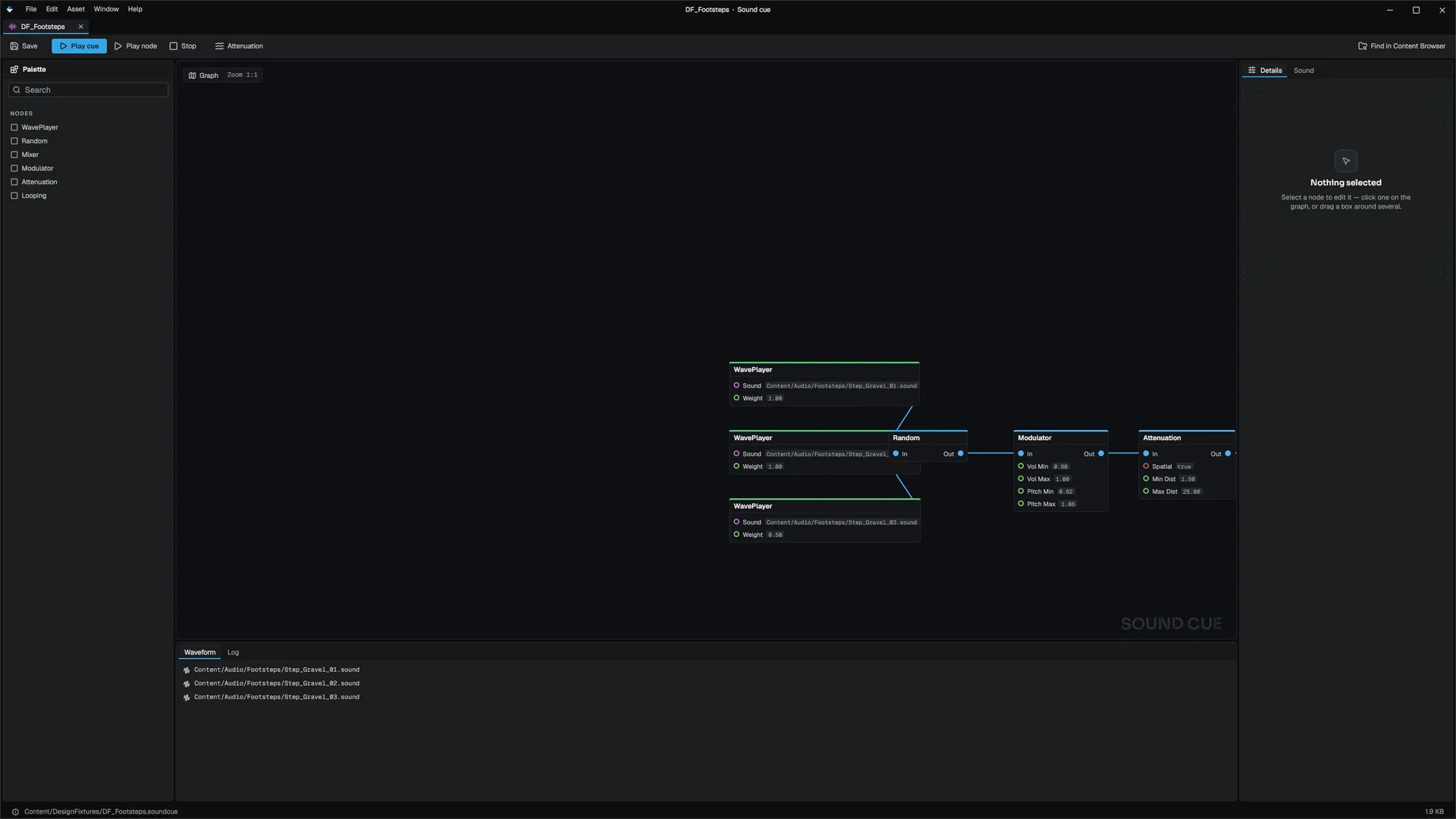
A sound cue varies a repeated sound so a footstep or an impact never plays the same sample twice in a row. Two forms exist: SoundCue
| Asset | Authored in | Behavior |
|---|---|---|
.soundcue | Sound Cue editor (WavePlayer, Random, Mixer, Modulator, Attenuation, Looping, Output nodes) | A Mixer plays each input branch as its own voice, for layered sounds |
.cuegraph | A simpler MDF cue graph | Picks one clip by weight and rolls volume and pitch inside ranges |
Cue settings include the bus, a cooldown, an instance cap, avoid-repeat and a caption for subtitles. Each trigger is a fresh one-shot at the entity's position at that moment. FSoundCueAsset
Footsteps
A Footstep component plays a cue each time the character travels a stride, picked by the surface under its feet. The cue for a surface is <cueFolder>/<Surface>.cuegraph, falling back to Default.cuegraph, so adding gravel footsteps means dropping Gravel.cuegraph in the folder. strideDistance, sprintStrideScale, crouchStrideScale and stepOnLanding tune it. FootstepComponent
MetaSounds
A MetaSound (.metasound) is a DSP graph that synthesizes or processes sound live. Play one with a MetaSound component (metaSoundPath, bus, volume, spatial, playOnCreate); its inputs can be set from code or bound to game parameters. MetaSoundComponent
Game parameters
Audio parameters are named floats that gameplay sets and sources read, like Wwise RTPCs: tension, health, speed. MAudioStatics::SetAudioParameter(name, value) sets one and SetAudioParameterSmoothing glides it. A source modulates by the parameter named in modulationParameter. MAudioStatics
What the player can hear
MAudioStatics::GetAudibleSoundCount(minLoudness) and its GetAudibleSoundAzimuth, GetAudibleSoundLoudness and GetAudibleSoundCaption siblings list the audible sounds, loudest first, with their direction around the listener and their caption. Use them for a sound compass or directional captions.
Debugging
| Command or variable | Effect |
|---|---|
au.Debug | Prints voices, submix meters, concurrency groups, the memory budget and parameters |
au.Debug.Attenuation | Draws each spatial voice's min and max distance in the viewport |
audio.Spatializer | Native (miniaudio), Panner, or a spatializer plugin's name |
audio.DopplerScale | Global doppler multiplier; 0 disables doppler |
The editor's Audio panel shows the submix tree with faders and meters. FAudioDebug
Related
- Acoustics for occlusion, reverb and rooms
- Music and mixing
- Narrative for dialogue and subtitles
- Console variables
- API: Audio module, Game module
Engine sources
This page describes behavior implemented in these files of the engine repository, checked against commit 5922e6e5e.
- Engine/Source/Runtime/Audio/Public/Audio/AudioEngine.h
- Engine/Source/Runtime/Audio/Public/Audio/AudioSubmix.h
- Engine/Source/Runtime/Audio/Public/Audio/AudioSource.h
- Engine/Source/Runtime/Audio/Public/Audio/AudioSystem.h
- Engine/Source/Runtime/Audio/Public/Audio/AudioAttenuation.h
- Engine/Source/Runtime/Audio/Public/Audio/AudioParameters.h
- Engine/Source/Runtime/Audio/Public/Audio/AudioDebug.h
- Engine/Source/Runtime/Audio/Public/Audio/AudioSpatialization.h
- Engine/Source/Runtime/Audio/Public/Audio/SoundClass.h
- Engine/Source/Runtime/Audio/Public/Audio/SoundCue.h
- Engine/Source/Runtime/Audio/Public/Audio/SoundCueAsset.h
- Engine/Source/Runtime/Audio/Public/Audio/MetaSoundGraph.h
- Engine/Source/Runtime/Audio/Public/Audio/MAudioStatics.h
- Engine/Source/Runtime/Audio/Public/Audio/Components/AudioSourceComponent.h
- Engine/Source/Runtime/Audio/Public/Audio/Components/MetaSoundComponent.h
- Engine/Source/Runtime/Game/Public/Game/MAudioComponent.h
- Engine/Source/Runtime/Game/Public/Game/AAmbientSoundActor.h
- Engine/Source/Runtime/Game/Public/Game/Components/FootstepComponent.h
- Engine/Source/Runtime/Game/Public/Audio/FootstepSystem.h