 Mowo
Mods and the Steam Workshop
Let players add content to a shipped game as signed mod paks, make mods in the editor over the game's content, and publish them to the Steam Workshop.
Players add content to a shipped game as mods: signed content paks that mount above the game's own archives. A mod replaces a game file by carrying the same path, and adds files under new paths. Mods carry content only; no code loads from a mod.
Make a mod
./mbt.cmd mod new BetterLamps --game D:/Projects/MyGame/MyGame.mproject
./mbt.cmd mod edit --mod BetterLamps
./mbt.cmd package-mod --mod BetterLamps
mbt mod new creates a mod project from the mod template: a folder with <Name>.mplugin, a Content/ folder for the mod's files, and a <Name>.mproject that names the game the mod sits on.
{
  "name": "BetterLamps",
  "version": "1.0.0",
  "mod": true,
  "dependencies": ["CoreFixes"],
  "loadAfter": ["NightSky"],
  "workshopId": 0
}dependenciesnames mods that must be installed and enabled, and load first. Without them the mod is refused.loadAfternames mods to load before this one when they are present; they are not required.workshopIdis filled in by the first Workshop upload.
The mod editor
mbt mod edit opens the mod project in the editor, over the game's content (--editor picks another editor build, for example an installed engine's). The title bar carries a MOD badge, and the Content Browser shows the mod's content above the game's, which is read-only.
The game is never written. Opening a game asset asks Copy <name> into the mod?: Copy and open copies it into the mod at the same path, with its sidecar so it keeps its UUID and every reference still resolves, and opens the copy, which then overrides the game's file. Open read-only looks without copying. A game level is copied without asking, together with its external actor files.
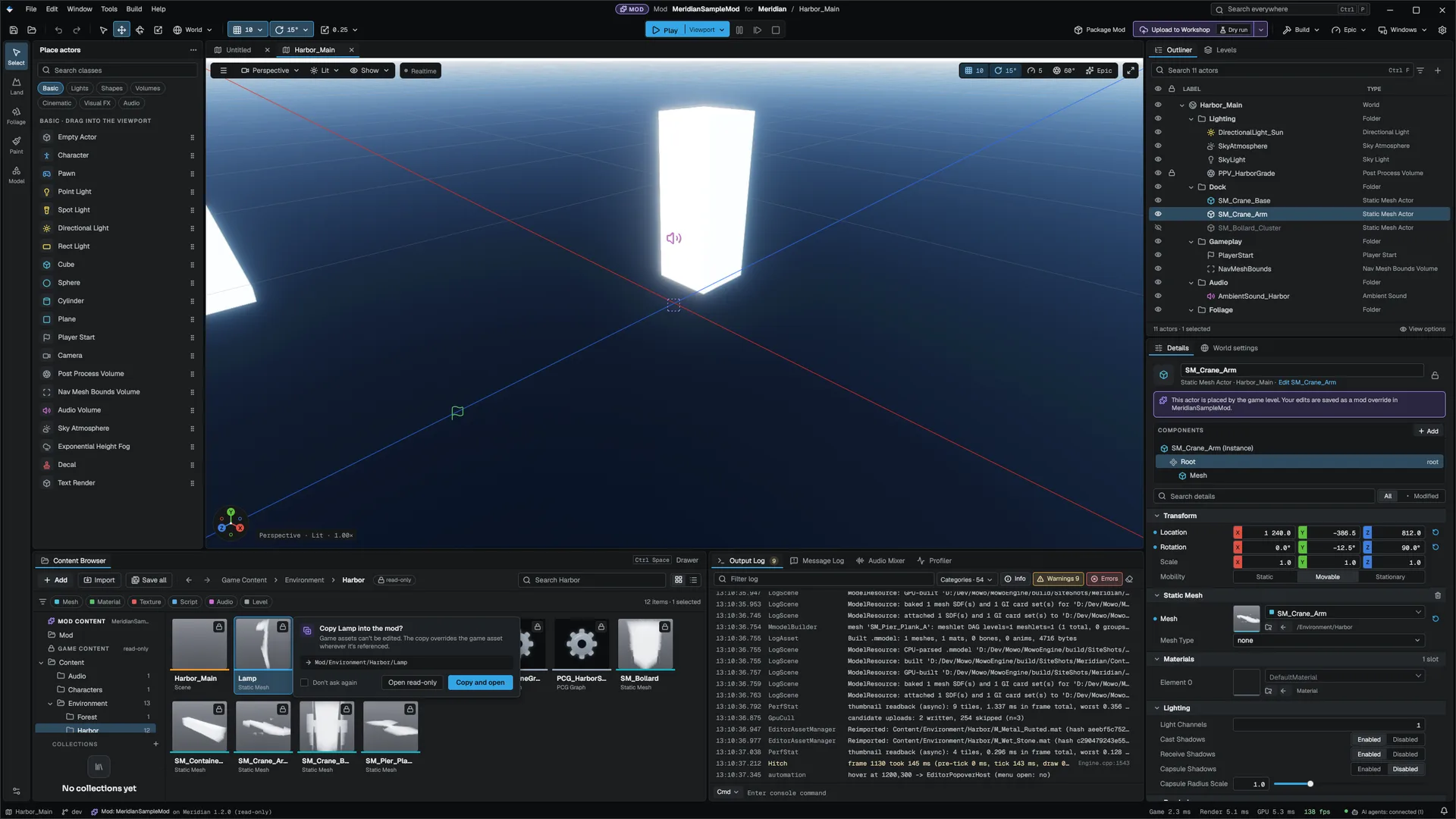
The toolbar has Package Mod and Upload to Workshop (with a dry-run choice, on by default), which run the commands below in the background.
Package and sign
mbt package-mod packs the mod's Content/ into <Name>.meaf, signs it, and writes the staged manifest naming the pak and the signer's public key, in <mod>/Packaged/<Name> by default. The signer is, in order:
--key <meaf_signing.key>, with itsmeaf_signing.pubbeside it;--project <game>.mproject: the game's own signing key, for the studio's official mods;- the mod's own key, made on first use in the mod's
Saved/ModSigning/.
Keep the mod's key. An update signed with another key is refused by every player who already enabled the mod.
How the game loads mods
The packaged game looks for mods in <package>/Mods/, in its per-user Saved/Mods/, and in every registered provider such as the Steam Workshop, one folder per mod. FModManager then:
- Discovers the manifests. The same name twice is reported, and the first root wins.
- Applies the enable list in
Saved/Config/Mods.ini. A mod it has not seen before starts disabled, so the player turns it on. - Orders the enabled mods: dependencies and
loadAfterfirst, then the player's order, then the name. A missing or disabled dependency refuses the mod and everything that depends on it; a cycle refuses every mod in it. - Verifies each pak's signature before it mounts. A pak signed by a key other than the one its manifest names is refused, and so is an unsigned pak. The key a mod was first enabled with is pinned in
Mods.ini, and an update signed by another key is refused until the player enables the mod again. - Mounts each mod above the game, its patches and DLC, at priority 300 plus its load index, so a later mod wins a file two mods carry.
Every refusal and every file two sources share is a conflict. The report is logged at start when there is anything in it.
| Console variable | Default | Meaning |
|---|---|---|
mods.Enabled | 1 | Load mods at start |
mods.RequireSigned | 1 | Refuse unsigned paks |
mods.TrustedOnly | 0 | Accept only the keys in mods.TrustedKeys and the game's own signing key |
mods.TrustedKeys | empty | Comma-separated hex public keys |
mods.EnableNew | 0 | Start a newly found mod enabled |
An in-game mod menu
MModStatics exposes what a mod menu needs to C++ and Visual Scripting Engine/Source/Runtime/Game/Public/Game/MModStatics.h: GetInstalledModCount, GetLoadedModCount, GetInstalledModName, IsModLoaded, IsModEnabled, GetModRefusal, GetModConflictCount, GetModReport, SetModEnabled, MoveModInLoadOrder, and ApplyModChanges, which saves the list and remounts.
The Steam Workshop
./mbt.cmd workshop-upload --mod BetterLamps/Packaged/BetterLamps --app-id 480 --dry-run
./mbt.cmd workshop-upload --mod BetterLamps/Packaged/BetterLamps --app-id 480 --visibility 0 --change-note "Brighter lamps"
mbt workshop-upload writes the Workshop item script (content folder, preview image, title, description, change note, visibility) and runs steamcmd. The first upload creates the item and records its id in the staged manifest's workshopId; later uploads update it. Visibility is 0 public, 1 friends only, 2 private (the default) or 3 unlisted. Log in once with steamcmd +login <user> so the password never reaches a command line.
In the game, the SteamPlatform plugin registers the player's subscribed, installed Workshop items as mod roots. A Workshop item is verified exactly like a local mod.
Publishing to the Workshop needs a real Steam app and account, so the engine's own tests cover the upload only up to the generated script.
Related
- Content protection: the signing key behind
mods.TrustedOnly - Patches, chunks and DLC: the mount priorities mods sit above
- mbt command reference
Engine sources
This page describes behavior implemented in these files of the engine repository, checked against commit 5922e6e5e.
- Engine/Source/Runtime/Game/Public/Mods/ModManager.h
- Engine/Source/Runtime/Game/Public/Game/MModStatics.h
- Templates/TemplateResources/Mod/Template.mplugin.in