 Mowo
Sky, fog and reflections
The sky light, atmosphere and clouds, height and volumetric fog, VDB volumes, and how reflection captures and traced reflections combine.
The environment around a scene is built from a few actors: a sky light for ambient and reflected sky light, a sky atmosphere and clouds for the visible sky, height fog and volumetric fog for the air, and reflection captures for interiors. This page covers how each one renders and the settings that matter. Placing and animating them (time of day, weather) belongs to the Gameplay section.
Sky light
ASkyLightActor (a SkyLightComponent) lights the scene from the sky. Its Source Type picks where that sky comes from:
| Source Type | Sky |
|---|---|
| Captured Scene (default) | The sky as rendered, including atmosphere and clouds, captured into a cubemap every Capture Interval frames while Real Time Capture is on |
| Specified Cubemap | An HDR environment you pick in Cubemap |
| Procedural Atmosphere | The procedural sky atmosphere |
From that cubemap the renderer derives a diffuse irradiance map and a prefiltered specular map with one mip per roughness step, plus a BRDF lookup table, through IBLGenerator (). The irradiance map and the rough specular mips integrate over a box-filtered 16×16-per-face copy of the capture, and a real-time sky light that re-captures under moving clouds spreads each capture over about twenty frames: the capture and its fold, then the irradiance one cube face a frame and the prefilter a fixed GPU budget of faces a frame. Each frame pays a fraction of a millisecond; done whole, the two convolutions cost one frame about 4.5 ms on an RTX 3050 every half second. The new maps crossfade in once the last face is written. Intensity and Tint scale the result; Lower Hemisphere Is Black removes light from below the horizon.
Sky Rotation turns the visible cubemap sky and its lighting together, in degrees; r.Sky.Rotation adds to it. A procedural atmosphere ignores rotation, because its sun disc follows the directional light.
| Variable | Default | Meaning |
|---|---|---|
r.SkyLight.CaptureSize | 128 | Face size of the sky capture cubemap |
r.SkyLight.CaptureClouds | 1 | Include clouds in the capture, so they shade the ambient and show in reflections |
r.SkyIBL.CrossfadeSeconds | 1 | Blend time between two captures, so time-of-day changes do not pop |
r.SkyLight.CloudRecaptureSeconds | 0.5 | Shortest time between real-time captures that only drifting clouds asked for; sun and atmosphere changes still re-capture on the sky light's interval |
r.Sky.CoupleAmbient | 1 | Derive the sky that Global Illumination sees from the sky on screen |
Sky atmosphere and clouds
ASkyAtmosphereActor renders a physically based sky from the directional light's direction, with stars (r.Sky.Stars) and a moon (r.Sky.MoonIntensity) at night. It also tints distant geometry with aerial perspective (r.SkyAtmosphere.AerialPerspective) and reddens and dims the sun toward the horizon (r.Atmosphere.SunTransmittance). Translucent surfaces and particles get the same aerial perspective (r.SkyAtmosphere.Translucency).
AVolumetricCloudActor adds a cloud layer. From Epic up the clouds are a raymarched volume when the project turns on Volumetric Clouds (Project Settings > Rendering > Features, off for a new project); otherwise, and below Epic, they are a cheaper 2.5D sky plane. Raymarched clouds cast cloud shadows onto the scene and into the fog.
Fog
- Height fog:
AExponentialHeightFogActoradds exponential height fog over everything opaque (r.HeightFog, default 1). - Volumetric fog: from Epic up, once the project turns on Volumetric Fog (off for a new project), a froxel grid integrates height fog and fog volumes lit by the sun (with cascade shadows), the sky and up to
r.VolumetricFog.MaxLocalLightspoint and spot lights (default 32, nearest first). A light's Volumetric Scattering scales its share. Volumetric fog runs after reflections, so reflections see unfogged surfaces, and applies to translucent surfaces at their own depth (r.VolumetricFog.Translucency).
| Variable | Default | Meaning |
|---|---|---|
r.VolumetricFog | tier | Volumetric fog on or off |
r.VolumetricFog.Anisotropy | 0.6 | Forward scattering of sunlight; higher gives sharper light shafts |
r.VolumetricFog.HeightFalloff | 0.02 | Height-fog falloff per world unit |
r.VolumetricFog.Temporal | 0.9 | Blend with the previous frame |
r.VolumetricFog.GiAmbient | 1 | Light the fog from the Global Illumination probes, so sealed rooms stay dark |
VDB volumes
A VdbVolumeComponent ray-marches a sparse volume from a .vdb file: smoke, explosions or a single cloud. You choose the density and temperature grids by name, and set Density Scale, Albedo, Anisotropy, a temperature scale for blackbody emission and an emission strength. The volume shadows itself toward the sun.
| Variable | Default | Meaning |
|---|---|---|
r.VdbVolumes | 1 | Draw VDB volumes |
r.VdbVolumes.Steps | 64 | Samples along each view ray |
r.VdbVolumes.ShadowSteps | 6 | Self-shadow samples toward the sun; 0 is unshadowed |
Reflections
Reflections come from several sources. Each pixel takes the best one that has an answer:
- Sky
- Reflection captures
- Distance field or ray tracing
- Screen space
- Screen-space reflections (Medium and up,
r.SSR) trace the depth buffer. Withr.Reflections.Continuation(default 1) a ray that leaves the screen continues in the world instead of giving up. Up to High the screen leg traces a quarter of the pixels each frame (r.SSR.TraceDivisor 2, a 2×2 pattern that rotates every frame) and a depth- and normal-aware upsample rebuilds the rest before the temporal filter; Epic and Cinematic trace every pixel. The spatial filter after it is a 3×3 à-trous (r.SSR.FilterTaps 3;5is the 5×5 kernel). - The world leg of that ray traces the Global Illumination distance field and shades from its radiance cache, or, with
r.RTReflections(Epic and up), traces the ray-tracing scene. See Ray tracing. - Reflection captures cover the pixels where tracing found nothing.
- The sky covers everything else.
Translucent surfaces with reflective materials get a one-ray reflection from High up (r.Reflections.Translucent).
Reflection captures
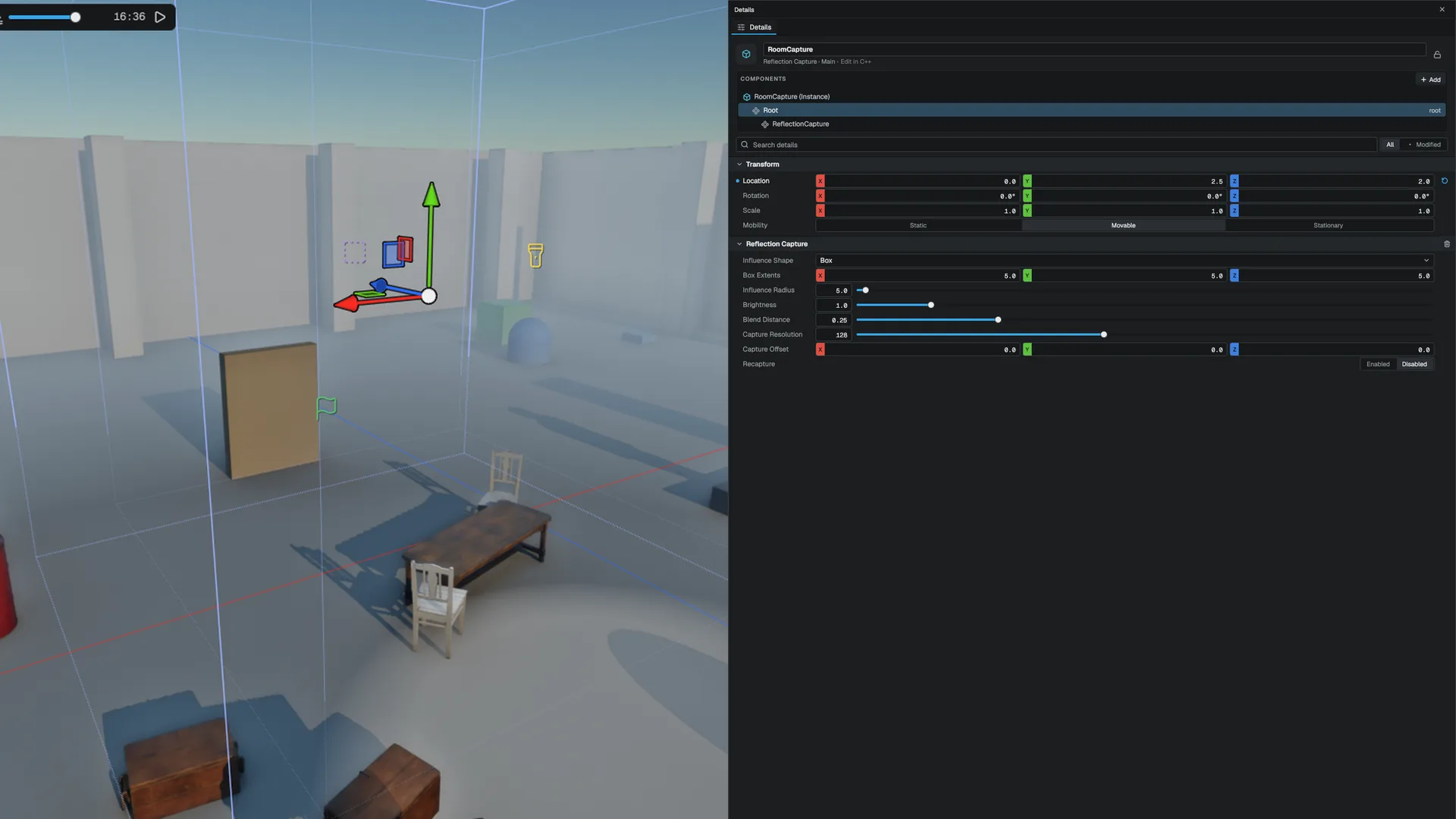
The sky light is one environment for the whole scene, so an interior would reflect the sky. Place an AReflectionCapture to fix that locally: the scene is rendered into a cubemap from the capture's position, prefiltered like the sky, and blended over the sky inside the capture's volume.
| Property | Meaning |
|---|---|
| Influence Shape | Box (oriented by the entity) or sphere |
| Box Extents, Influence Radius | The volume the capture owns |
| Brightness | Multiplier on the captured light |
| Blend Distance | Fraction of the volume spent fading out at its edge |
| Capture Resolution | Cube face size, 32 to 256 (default 128) |
| Capture Offset | Moves the capture point off the entity origin |
| Recapture | Render the capture again |
Captures are parallax-corrected to their volume, so a captured room lines up with the room. Four captures are bound per frame, those around the camera first, then by distance; a scene may hold any number.
A capture holds static lighting: skinned meshes and translucent surfaces stay out. While Global Illumination runs, captures include local lights and indirect light, so a lamp-lit room does not reflect black. A capture is redrawn when its inputs change and the scene has settled, at most one per frame.
Captures are baked to the project's derived-data cache and reloaded on scene open (r.ReflectionProbes.Bake, default 1). mbt cook and mbt package ship them, so a packaged game never captures at runtime. See the Shipping section.
Planar reflections
A PlanarReflectionComponent renders the scene a second time, mirrored across a plane, for flat mirrors and calm water. Extent sets the size of the plane, Intensity its strength. It is a second view of the scene, so it costs about as much as the visible part of the mirrored scene.
API reference
- SceneTypes module:
SkyLightComponent,ReflectionCaptureComponent - Game module:
ASkyLightActor,ASkyAtmosphereActor,AVolumetricCloudActor,AExponentialHeightFogActor,AReflectionCapture,PlanarReflectionComponent,VdbVolumeComponent - SceneRenderer module:
FReflectionProbes
Engine sources
This page describes behavior implemented in these files of the engine repository, checked against commit 903f01eb8.
- Engine/Source/Runtime/SceneTypes/Public/SceneTypes/Components/SkyLightComponent.h
- Engine/Source/Runtime/SceneTypes/Public/SceneTypes/Components/ReflectionCaptureComponent.h
- Engine/Source/Runtime/Game/Public/Game/Components/PlanarReflectionComponent.h
- Engine/Source/Runtime/Game/Public/Game/Components/VdbVolumeComponent.h
- Engine/Source/Runtime/Game/Public/Game/ASkyLightActor.h
- Engine/Source/Runtime/Game/Public/Game/ASkyAtmosphereActor.h
- Engine/Source/Runtime/Game/Public/Game/AVolumetricCloudActor.h
- Engine/Source/Runtime/Game/Public/Game/AExponentialHeightFogActor.h
- Engine/Source/Runtime/Game/Public/Game/AReflectionCapture.h
- Engine/Source/Runtime/RHI/Public/RHI/IBLGenerator.h
- Engine/Source/Runtime/SceneRenderer/Public/Renderer/ReflectionProbes.h