 Mowo
Graphics backends
Choose between Direct3D 12, Vulkan, Metal and Direct3D 11, understand the selection order and fallbacks, and see what each API can do.
Mowo has four rendering backends behind one RHI: D3D11RHI, D3D12RHI, MetalRHI, VulkanRHI. The renderer, Global Illumination, the editor and the tests run the same code on each. What changes between them is the feature ceiling, and which one starts by default on each platform.
Defaults per platform
| Platform | Default | Other backends |
|---|---|---|
| Windows x64 | Direct3D 12 | Vulkan (selectable). Direct3D 11 is an automatic fallback when a D3D12 device cannot start; the editor picker does not offer it. |
| macOS, Apple silicon | Metal | None. Metal is the only backend; there is no MoltenVK. |
| Linux x64 | Vulkan | None. In development |
The defaults are compiled into SelectRendererAPI (). Backends that do not belong to a platform compile as stubs that log a fatal error if called.
Linux is not available yet: there is no Linux installed build.
Minimum API versions
| Backend | Requirement |
|---|---|
| Direct3D 12 | Feature level 12_0 |
| Direct3D 11 | Feature level 11_1, falling back to 11_0 |
| Vulkan | API 1.3 |
| Metal | Apple silicon; ray query needs a device that reports ray-tracing support |
How the engine picks a backend
At startup the engine walks this list and stops at the first entry that names a backend:
- -d3d12 / -dx12 / -d3d11 / -dx11 / -vulkan / -metal
- --rhi=<name>
- User config rendering.graphics_api
- Project Config/Engine.ini
- Config/Engine.ini next to the game or exe
- Platform default
- Shorthand switches.
-d3d12,-dx12,-d3d11,-dx11,-vulkanand-metalforce a backend. A switch for a backend this build does not contain logs a warning and keeps the default. --rhi=withvulkan,d3d12,d3d11ormetal. An unknown name logs a warning and uses the platform default.- The persisted setting
rendering.graphics_api. The engine reads your user config first, then the project'sConfig/Engine.ini(withDefaultEngine.iniunder it), then aConfigfolder beside the packaged game root, the executable or the working directory. - The platform default.
A persisted backend that this platform cannot run (for example vulkan saved on Windows and opened on a Mac) logs a warning and falls back to the default instead of failing.
A release build of the player keeps only the player-facing command-line switches. The six backend shorthands are on that list; --rhi= and --cvar= are dropped (). Tell players to use -dx11 or -vulkan, not --rhi=.
Automatic fallback
The chosen backend is only the first candidate. If it fails to initialize, Renderer::Init tries the rest of the platform's list in order ():
| Platform | Fallback order after the requested backend |
|---|---|
| Windows | D3D12, D3D11, Vulkan |
| macOS | Metal (the only real backend there) |
| Linux | Vulkan |
When a fallback wins, the log says Requested backend X unavailable — running on Y instead. If nothing starts, the engine stops with a fatal error. D3D11's job on Windows is to catch a machine whose D3D12 device will not come up.
Choose a backend for your project
- Open the Rendering settings
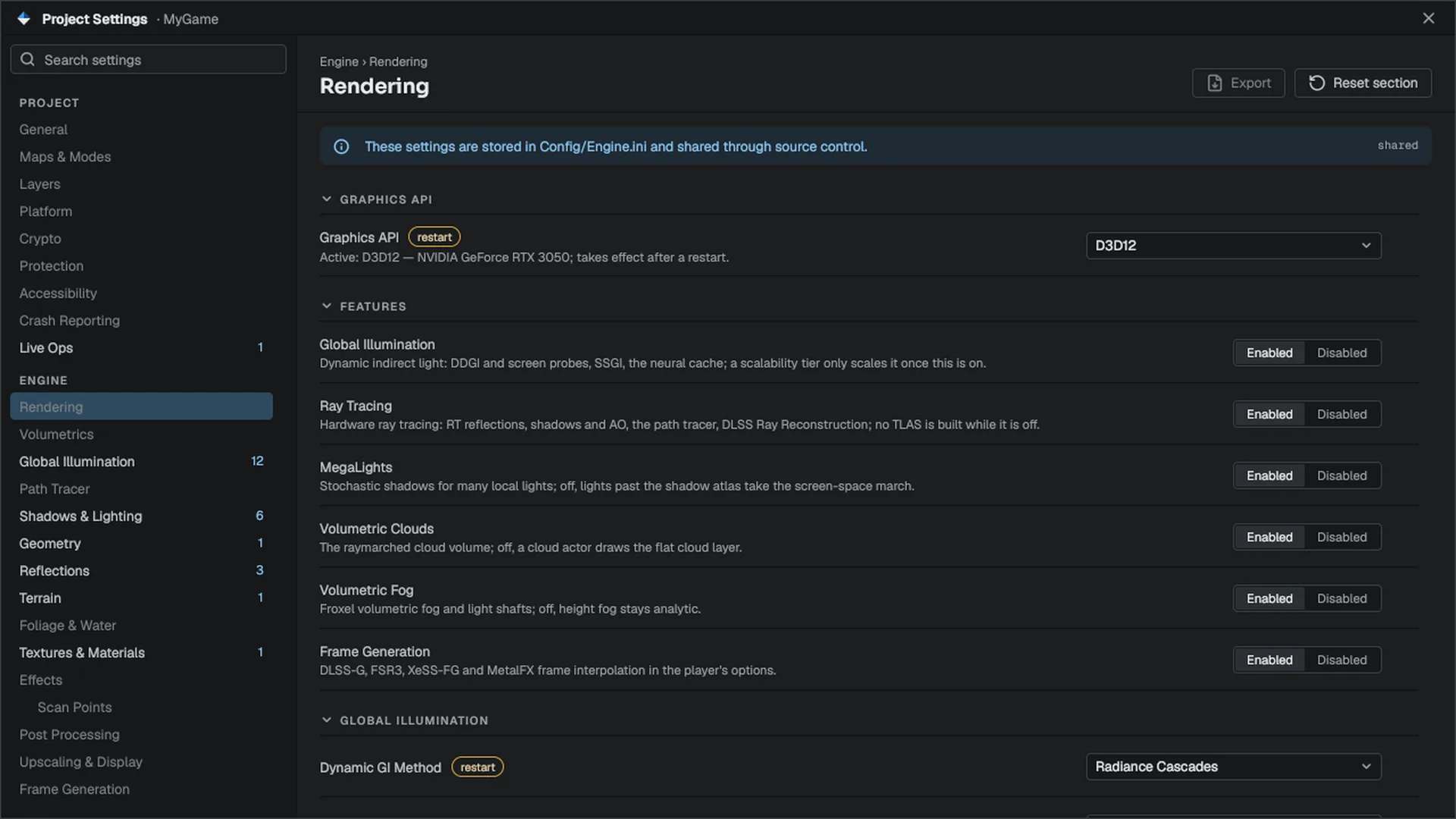
In Mowo Editor, open Project Settings, then the Rendering page, and find the Graphics API row ().
- Pick the backend
The dropdown lists only backends that exist on this machine. The caption under it names the backend and GPU that are running now.
- Restart
The change is written to your project's
Config/Engine.iniasrendering.graphics_apiand takes effect on the next launch of the editor or the game. The setting ships with a packaged build.
For a single run, pass a switch instead:
& .\MowoEditor.exe --project D:\Projects\MyGame\MyGame.mproject -vulkanMetal is the only backend on macOS. A switch or a saved setting that names another backend logs a warning and runs on Metal.
From gameplay code or Visual Scripting
MRenderingStatics exposes the same selector to graphs (MRenderingStatics). GetGraphicsApi() returns the live backend name. RequestGraphicsApi("d3d12") writes the project setting and flags a restart that IsGraphicsApiRestartPending() reports; it never switches the live device.
In C++ you can ask which backend is running and what its API allows:
#include "RHI/RendererAPI.h"
#include "RHI/Renderer.h"

const Mowo::RendererAPIType api = Mowo::RendererAPI::GetCurrent();
const char* name = Mowo::RendererAPI::Name(api);

const bool apiCanRayTrace = Mowo::FRHIApiCeiling::SupportsRayTracing(api);
const bool apiHasRtPipelines = Mowo::FRHIApiCeiling::SupportsRayTracingPipeline(api);
const bool deviceCanRayTrace = Mowo::Renderer::GetCapabilities().SupportsRayQuery;

(void)name;
(void)apiCanRayTrace;
(void)apiHasRtPipelines;
(void)deviceCanRayTrace;
Ask FRHIApiCeiling whether a feature is possible on the API, and RendererCapabilities whether this device supports it now. The editor uses the same two axes: it hides a control the active API can never support and greys one that this GPU or build lacks.
What each API can do
This is the API ceiling from FRHIApiCeiling. A specific GPU can support less.
| Feature | D3D12 | Vulkan | Metal | D3D11 |
|---|---|---|---|---|
| Ray query (inline ray tracing) | Yes | Yes | Yes | No |
| Ray-tracing pipelines and shader binding table | Yes | Yes | No | No |
| Mesh shaders (meshlet path) | Yes | Yes | Experimental, off by default (r.Metal.MeshShaders) | No |
| Bindless resources | Yes | Yes | API allows it; reported off today | No |
| 64-bit shader integers | Yes | Yes | API allows it; reported off today | No |
| Async compute queue | Yes | Yes | Yes | No |
| Vendor upscalers | DLSS, FSR, XeSS | DLSS, FSR, XeSS | MetalFX | DLSS, XeSS |
| Low latency | Reflex, Anti-Lag 2, XeLL | Reflex | None | Reflex |
| Frame generation In development | FSR3, DLSS-G, XeSS-FG | FSR3, DLSS-G | MetalFX | No |
Notes on the table:
- Metal traces through
intersection_query, so it has ray query but no ray-tracing pipeline objects. A feature that needs a shader binding table checksSupportsRayTracingPipeline, which is true only for Vulkan and D3D12. - Metal reports bindless and 64-bit shader integers as unavailable (). These are engine gaps, not API limits.
- On D3D11, XeSS uses its native D3D11 path and DLSS and Reflex go through Streamline. FSR and every frame-generation backend need D3D12 or Vulkan ().
- XeSS frame generation only exists as a DXGI proxy swapchain, so it can never run on Vulkan.
- The D3D12 async-compute lane is on by default;
r.D3D12.AsyncCompute 0records every async candidate on the direct queue instead. - Frame generation is written for every listed backend but has not been verified on hardware. Treat it as in development.
What D3D11 costs you
D3D11 has no meshlets, no ray tracing, no bindless resources, no async compute, no indirect-count draws and no frame generation. Features that need them fall back or switch off. Because players reach D3D11 automatically when D3D12 fails, test your game on it with -dx11.
Fallbacks inside a backend
Features that the device lacks fall back each frame without configuration:
- The meshlet G-Buffer falls back to the classic vertex pipeline.
- A vendor upscaler that is missing falls back to TAA.
- Ray-traced reflections, AO and sun shadows fall back to screen-space reflections, GTAO and shadow maps.
Backend console variables
A few variables tune one backend. They are listed with the rest at Console variables.
| Variable | Default | Effect |
|---|---|---|
r.D3D12.AsyncCompute | 1 | The D3D12 async-compute lane. 0 records the work on the direct queue. |
r.D3D12.FrameLatencyWaitable | 1 | Throttle D3D12 on a frame-latency waitable swapchain. |
r.D3D12.MaxFrameLatency | 2 | Presents D3D12 may queue ahead of the display. 1 is lowest latency. |
r.D3D11.RenderThread | 1 | Run D3D11 with the render and RHI threads. Read at startup. |
r.Vulkan.PipelineReuse | 1 | Share one VkPipeline between identical pipeline specs. |
r.Metal.MeshShaders | 0 | Report mesh-shader support on Metal. Experimental. |
r.Metal.MTL4 | 0 | Use the Metal 4 command model where the OS supports it. |
r.GpuMarkers | 1 | Name every GPU scope for PIX, RenderDoc, Nsight or Xcode captures. |
API reference
- Game module:
MRenderingStatics
Engine sources
This page describes behavior implemented in these files of the engine repository, checked against commit 3f3a08d31.
- Engine/Source/Runtime/RHI/Public/RHI/RendererAPI.h
- Engine/Source/Runtime/RHI/Public/RHI/RendererTypes.h
- Engine/Source/Runtime/Game/Public/Game/MRenderingStatics.h