 Mowo
Materials
The PBR material model, the material graph and how it compiles, domains, shading models, blend modes, material instances and Substrate slabs.
A Mowo material is a physically based parameter set: base color, metallic, roughness, normal, emissive, ambient occlusion and opacity, plus a shading model and flags for clear coat, anisotropy, subsurface, hair, detail maps and parallax. You author it as a node graph in the Material Editor and save it as a .mat file. Material instances (.matinst) override a parent's parameters, and material functions (.matfunc) are reusable sub-graphs. The renderer draws opaque materials in the G-Buffer pass and translucent ones in the forward pass.
How a material graph compiles
Each graph produces two things:
- Material graph
- Fold to flat Material fields
- Emit per-material HLSL
- Background compile in the editor
- Per-material shader blobs
- Renderer swaps the pipeline per draw
- The fold. The graph is reduced to the flat
Materialfields and texture slots the G-Buffer already reads. A textured, tinted or blended material renders through this path with no new pipeline. - A compiled permutation. The graph's evaluator is compiled against every pass that draws materials: G-Buffer (static, skinned, instanced), shadows, velocity, post-process, decals, forward translucent and, where mesh shaders exist, the meshlet passes. The renderer finds the blobs by the graph's hash and swaps the pipeline for each draw. The blobs are named by that hash, so an edited graph never runs stale code.
Compiling in the editor
You never run a command to see a material. The first time the editor draws a graph whose shader has not been compiled yet, it compiles it in the background:
- The material draws with its folded parameters meanwhile, so the viewport keeps running at full speed. Writing the graph's source and starting the compiler happen off the editor's frame as well. The log has one line saying the compile started, with the time it took from that frame, and one saying how long the compiler took to start.
- A Compiling shaders card, and the status bar, count the materials as they finish. Cancel stops the compile; those materials keep the folded look until you save them or open the project again.
- Each material switches to its compiled shader as soon as its own blobs land, without a hitch or a restart.
Saving a material in the Material Editor starts its compile straight away. A graph that fails to compile is reported in the Message Log and as a notification, and keeps the folded look.
The compiled blobs go into the project's shader cache, Intermediate/ShaderCache/, one folder per graphics backend and engine version. The next session reads them from there, so a material compiles once per machine. The cache is disposable: delete it and the editor compiles again on demand. A different backend or an engine update compiles into a new folder rather than reusing blobs built for other shaders.
Cooking
On save the editor also writes the graph's evaluator next to the asset (<name>.mat.material.hlsl, plus one file per static-switch combination). Commit those files: the cook (mbt cook, mbt package) compiles every one of them into the game's shader archive. A packaged game never compiles shaders. If a material's shader is missing from the cooked archive, the game logs an error naming the material's blob and draws the folded parameters; save the material in the editor so its file exists, then cook again.
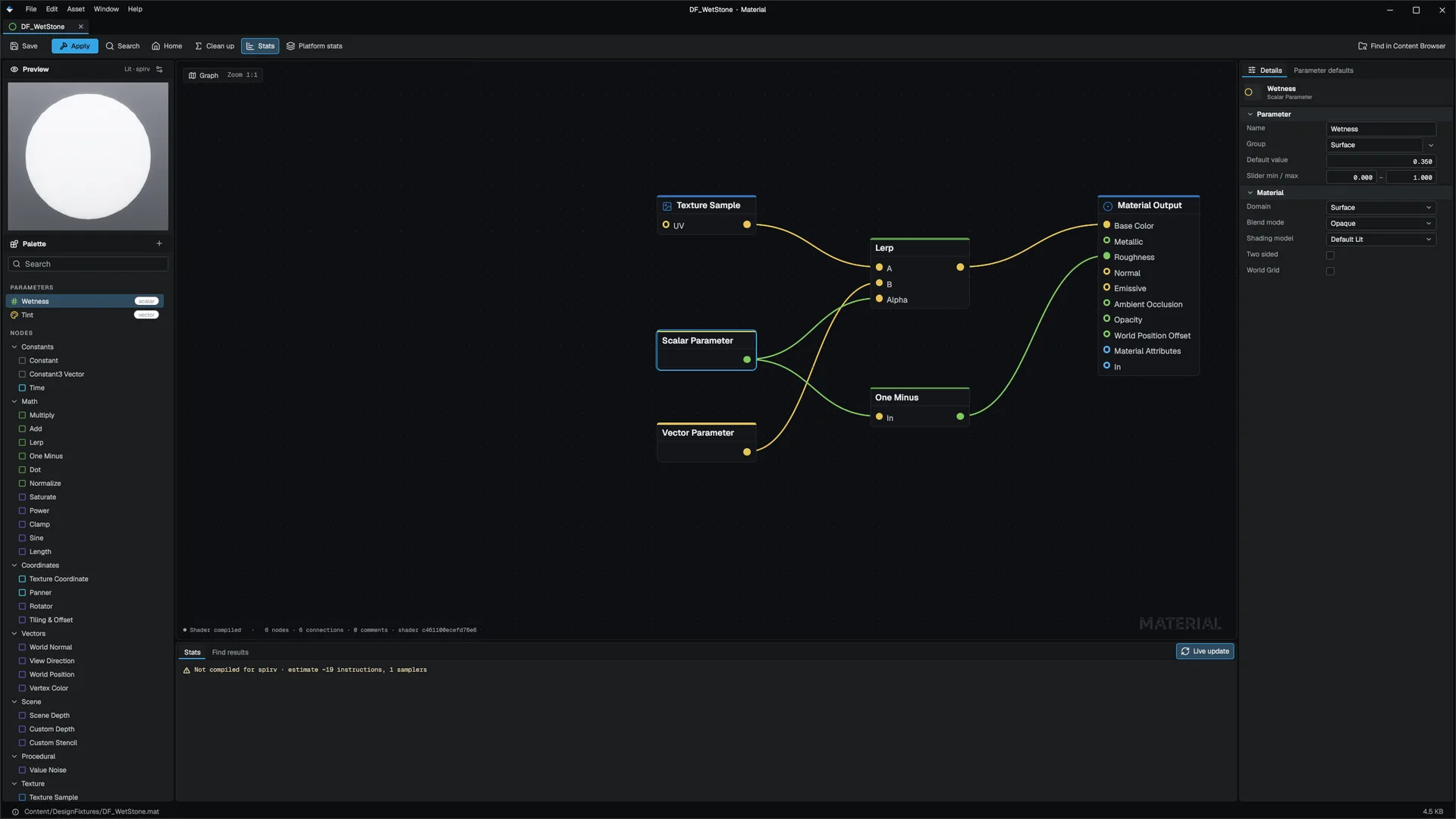
The Material Output node
The output node has one pin per channel: Base Color, Metallic, Roughness, Normal, Emissive, AO and Opacity, plus Substrate. It also stores a fallback value for every channel, the shading model, and flags for clear coat, anisotropy, subsurface, hair, double-sided and alpha-masked.
Its Domain decides where the graph runs (MaterialGraph):
| Domain | Use |
|---|---|
| Surface | Meshes, the default |
| Post Process | A fullscreen pass after tonemapping. Can read Scene Depth, Custom Depth and Custom Stencil, for outlines and screen effects. |
| Decal | A deferred decal projector: base color, opacity, normal, metallic and roughness |
| Light Function | A filter projected through a light; its Emissive is the filter. See Lights. |
Node palette
| Group | Nodes |
|---|---|
| Constants | Constant, Constant3 Vector, Time |
| Math | Multiply, Add, Lerp, One Minus, Dot, Normalize, Saturate, Power, Clamp, Sine, Length |
| Coordinates | Texture Coordinate, Panner, Rotator, Tiling & Offset |
| Vectors | World Normal, View Direction, World Position, Vertex Color |
| Scene | Scene Depth, Custom Depth, Custom Stencil (Post Process domain only; they read zero elsewhere) |
| Procedural | Value Noise |
| Texture | Texture Sample, Texture Sample Array |
| Parameters | Scalar Parameter, Vector Parameter, Static Bool, Static Switch |
| Utility | Fresnel, Normal Map, Mask, Custom HLSL, Material Function Call |
| Layers | Make Material Attributes, Material Layer Blend |
| Substrate | Substrate Slab, Substrate Layer Blend |
| Function Pins | Function Input, Function Output |
What the larger features give you:
- Layers: whole surfaces blended under a mask. All layers compile into one shader and one draw.
- Functions: reusable sub-graphs saved as
.matfuncassets, called with Material Function Call. - Static switches: compile-time branches. The unselected branch emits no code and uses no texture slot. A material may produce at most
r.Material.MaxStaticPermutations(default 32) permutations. - Parameters: named scalar and vector lanes that material instances change without recompiling.
- Custom HLSL: an expression of your own, compiled into the graph's evaluator.
Shading models
The shading model is a per-material setting, not a graph expression (EShadingModel).
| Model | Use for |
|---|---|
DefaultLit | Ordinary GGX surfaces |
Unlit | Emissive-only surfaces; lighting is skipped |
Subsurface | Wrap diffuse, blurred by the screen-space subsurface pass (skin, wax) |
ClearCoat | A second specular lobe (car paint, lacquer). r.Material.ClearCoat 0 turns the lobe off everywhere. |
Hair | Kajiya-Kay strands over the anisotropy tangent frame |
TwoSidedFoliage | Back-lit transmission for leaves |
Cloth | A sheen lobe for velvet, felt and brushed fabric |
ThinTranslucent | Colored glass that tints what is behind it |
Eye | Iris and cornea shading |
Opacity and blending
- Opaque: opacity 1, drawn in the G-Buffer.
- Masked: turn on alpha-masked and set a cutoff. Masked surfaces stay in the G-Buffer, cast shadows through their mask and are alpha-tested in ray-traced passes.
- Translucent: opacity below 1, drawn in the forward pass, sorted back to front.
EMaterialBlendModepicks how it combines:Alpha,Additive(fire, glows) orModulate(stained glass). A translucent mesh with Cast Shadows on casts a partial shadow by its opacity (water casts none; see Water), and it is visible to ray-traced reflections.
r.OIT 1 switches the standard translucent path to weighted-blended order-independent transparency; water keeps the sorted pass.
Translucent surfaces take their ambient light from the Global Illumination probes (without Global Illumination they use the sky-over-ground hemisphere scaled by the material's ambient occlusion, not a flat term), and reflective glass casts one reflection ray from High up. See Sky, fog and reflections.
Translucent surfaces are shadowed the way the opaque surfaces beside them are. The sun reaches them through the same cascades, soft shadows, virtual shadow map, far SDF shadows and cloud shadows, and its glint on water and clear coat is shadowed too. They take the sun, point and spot lights through the same surface response and falloff as an opaque surface, so a translucent and an opaque surface of the same colour under the same light match. Point, spot and Rect lights light them, Rect lights through the same area integral, each with its local shadow. A light that MegaLights shades gets a short screen-space shadow ray on translucent surfaces instead. A few light features still reach opaque surfaces only: IES profiles, cookies and light functions, contact and capsule shadows, and light channels. See Shadows.
Materials from C++
You can create and change materials in code through the Renderer module's Material class (Material). Instances point at a parent and override only the fields you set:
#include "Renderer/Material.h"

Mowo::Ref<Mowo::Material> paint = Mowo::Material::CreatePBR(Mowo::Vec4(0.6f, 0.05f, 0.05f, 1.0f), 0.0f, 0.4f);
paint->SetShadingModel(Mowo::EShadingModel::ClearCoat);
paint->SetClearCoatIntensity(1.0f);
paint->SetClearCoatRoughness(0.05f);

Mowo::Ref<Mowo::Material> bluePaint = Mowo::Material::CreateInstance(paint.Get());
bluePaint->SetBaseColor(Mowo::Vec4(0.05f, 0.1f, 0.6f, 1.0f));

Mowo::Ref<Mowo::Material> glass = Mowo::Material::CreatePBRDielectric(Mowo::Vec4(0.9f, 0.95f, 1.0f, 1.0f), 0.05f);
glass->SetOpacity(0.3f);
glass->SetBlendMode(Mowo::EMaterialBlendMode::Alpha);
glass->SetReflective(true);An instance does not own its parent. Whoever holds the parent's reference, usually its asset, must outlive the instance. In-place hot reload replaces a material's internals, so hold the Ref and never cache a raw Material*.
Textures
- Normal maps are block-compressed to BC5, which stores two channels. Every shader rebuilds Z with
MowoUnpackTangentNormal; do the same in your own HLSL. - While a temporal upscaler is active, texture samples take a negative mip bias so they keep output-resolution detail (
r.MaterialMipBias.Auto). - Terrain and large surfaces can use virtual texturing.
- Each texture picks its own filter: Nearest for pixel art, Bilinear, Trilinear or Anisotropic with a level. See Filtering and pixel art.
Texture arrays
A Texture Sample Array node samples one layer of a texture array asset (see Texture arrays). Its pins are UV and Layer; the layer is the x of whatever is wired, rounded to the nearest layer, and an unwired pin uses the Layer number in the node's Details. Wire a Scalar Parameter to change the layer at run time without recompiling, or a Vertex Color channel times the layer count to choose it per vertex (voxel and tile meshes carry the tile index in the vertex color).
An array fixes what an atlas cannot: every layer has its own mip chain, so a tile never bleeds into its neighbour in the distance, and tiles need no gutter. Pair it with a Nearest filter and a nearest upscale for crisp pixel art at any angle.
- An array takes one of the graph's eight texture slots like any texture, but never the Height slot (slot 6); the compiler leaves it free for a plain texture.
- It works in the opaque (G-Buffer), translucent (forward) and masked-shadow paths on Direct3D 12, Vulkan and Direct3D 11. In the Decal, Post Process and Light Function domains the node reads white.
- It cannot feed World Position Offset, as no texture can.
- An array texture wired to a plain Texture Sample node, or a plain texture wired to an array node, renders white rather than reading the wrong view type.
- Draws that do not run the graph's own shader (reflection and probe captures, terrain, foliage, the Global Illumination surface cache) see the array's slot as white.
Substrate In development
Substrate replaces "pick one shading model" with "stack two BSDF slabs": a coat, a snow deposit or fabric fuzz layered over the base surface. It is off by default behind r.Substrate.
- Turn it on
Set
r.Substrate 1in the console, or under[ConsoleVariables]in your project'sConfig/DefaultEngine.ini. - Recompile the materials that use it
The gate is in the material compiler. Save the material again; the editor compiles it in the background. A graph compiled while Substrate was off has no slab.
- Add a slab
Add a Substrate Slab node and wire it into the Output node's Substrate pin. The base slab is the ordinary Base Color, Metallic, Roughness and Normal. Set the slab's Coverage, Roughness, Specular (F0) and Albedo mode (None, White, Base Color or Base Sheen). Use Substrate Layer Blend to crossfade two slabs under a mask.
What Substrate cannot do yet:
- The slab has no normal of its own.
- Albedo is one of four modes, not a color, because the slab rides sixteen G-Buffer bits. Both sides of a blend must use the same mode.
- Two slabs only; there is no vertical stacking.
- Meshlet meshes fall back to the default shader, so a slab on a meshlet mesh does not appear.
- A slab reaches ray tracing and the Global Illumination surface cache only when it is constant over the material.
API reference
- Renderer module:
Material,EShadingModel,EMaterialBlendMode - AssetSystem module:
MaterialGraph,FMaterialFunction
Engine sources
This page describes behavior implemented in these files of the engine repository, checked against commit e41a4451a.
- Engine/Source/Runtime/Renderer/Public/Renderer/Material.h
- Engine/Source/Runtime/AssetSystem/Public/AssetSystem/Assets/MaterialGraph.h
- Engine/Source/Runtime/AssetSystem/Public/AssetSystem/Assets/MaterialFunction.h
- Engine/Source/Runtime/Renderer/Public/Renderer/MaterialShaderCompileService.h