 Mowo
Online platforms
Add Steam, Discord and Mowo Online through their opt-in plugins - lobbies, invites, relay hosting, presence, achievements, cloud saves and ticket validation.
Steam, Discord and Mowo Online are not built into the engine. Each lives in its own plugin, and all three are off by default for a project ("enabledByDefault": false). When a plugin loads, it registers an IOnlineService with the engine, and engine code talks only to that interface IOnlineService. No engine module includes a platform SDK header. A build without the plugins still hosts and joins over ENet with a direct address.
| Plugin | Provides |
|---|---|
| SteamPlatform | Identity, SDR P2P transport, lobbies and invites, rich presence with party groups, stats and achievements, encrypted session tickets, cloud saves, Workshop items, Remote Play Together, the on-screen keyboard and Steam Input action sets and glyphs |
| DiscordPlatform | Rich presence, Ask to Join, sign-in with stored and refreshed tokens, lobbies with a voice call, linked channels, friends and join invites, and the per-frame callback pump. See Discord Social. Does not load on dedicated servers. |
| MowoOnlinePlatform | Mowo ID identity and token, friends and presence, invites and join requests, achievements, cloud saves of the SaveGames folder and the launcher overlay, through the Mowo Games Launcher. Does not load on dedicated servers. |
Build options
Each plugin builds unless its MBT build option is off. All three default to on:
| Option | Plugin | Also needs |
|---|---|---|
MOWO_ENABLE_STEAM | SteamPlatform | The vendored Steamworks SDK for the platform (win-x64, linux-x64, osx-arm64). Never on mobile. |
MOWO_ENABLE_DISCORD | DiscordPlatform | The vendored Discord Social SDK (win-x64, linux-x64, osx-arm64). Never on mobile. |
MOWO_ENABLE_MOWO_ONLINE | MowoOnlinePlatform | Nothing; the MOS SDK ships with the engine. Never on mobile. |
Build with -o MOWO_ENABLE_STEAM=false (and so on) to leave a platform out entirely. See the mbt CLI reference.
Enable a platform for your project
- Enable the plugin
Turn the plugin on in the editor's Plugins window, or in the project's
Config/Plugins.iniFProjectLayout. The engine reads that file before loading engine plugins, so a disabled plugin never loads its modules.Config/Plugins.ini[enabled] SteamPlatform=True DiscordPlatform=True MowoOnlinePlatform=True - Set the platform settings
Open Project Settings on the Project › Platform page. For Steam, turn on Enable Steam and enter the Steam App ID; Steam only initializes when the App ID is non-zero. For Discord, turn on Enable Discord and enter the Discord Application ID. For Mowo Online, turn on Enable Mowo Online and enter the Mowo Product ID.
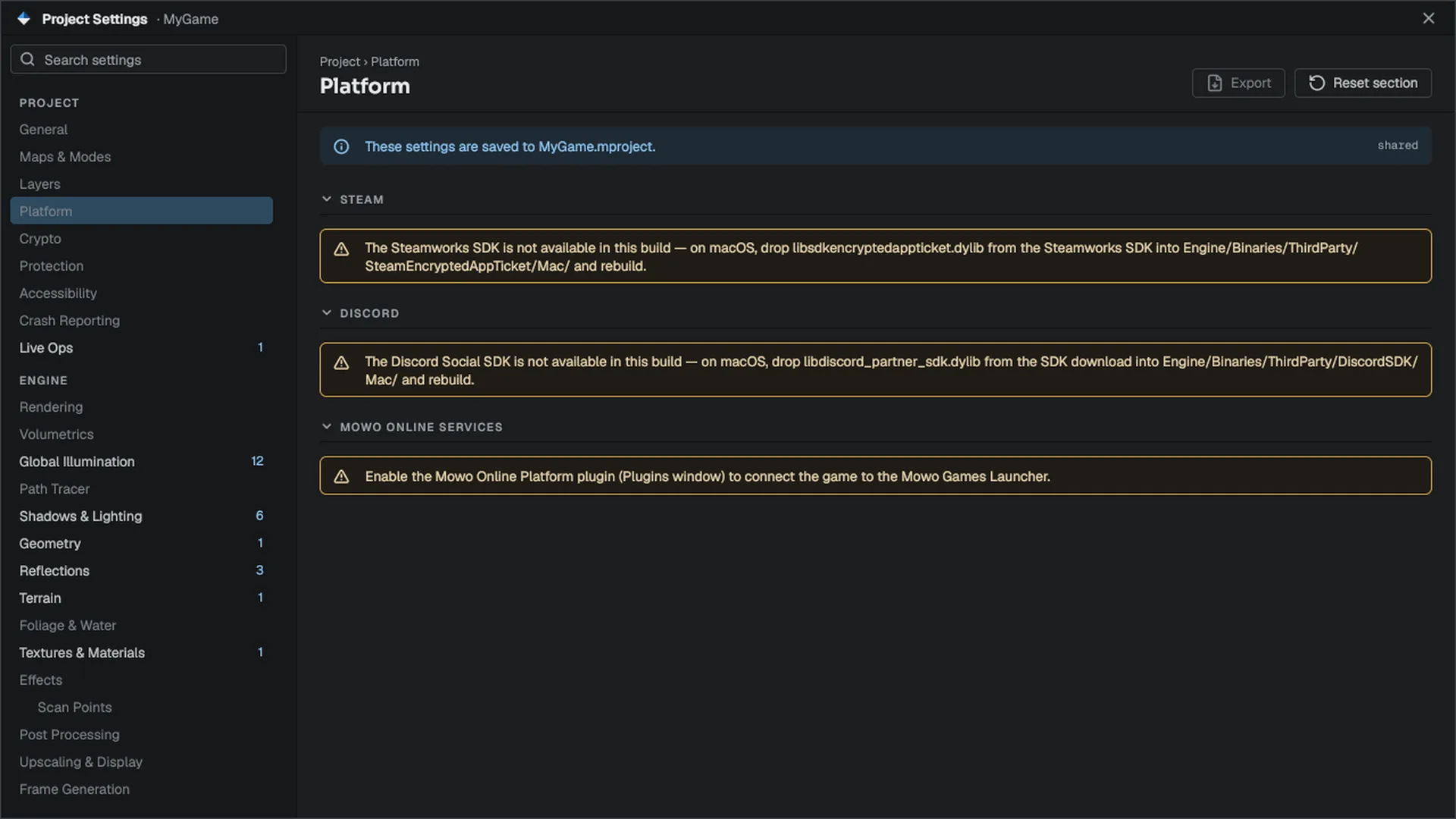
Project › Platform in Project Settings. - Save
Each section opens with a line that says what this editor session knows about the service: loaded and connected, loaded but not connected (services initialize in the game, not the editor), plugin disabled for the project, plugin missing from the install, or plugin enabled but built without its SDK. The rows below stay editable in every case, because they are settings for the game you ship, not for the editor.
The page writes the
platformsection of the.mprojectfile. The engine applies it throughFPlatformInit::Applywhenever the project opens.
The platform settings and their defaults:
| Key | Default | Meaning |
|---|---|---|
platform.steamEnabled | false | Bring up Steam |
platform.steamAppId | 0 | Steam App ID |
platform.discordEnabled | false | Bring up Discord |
platform.discordApplicationId | 0 | Discord application id |
platform.discordSocial | false | Ask for the communication scopes at sign-in (friends, lobbies, calls) |
platform.discordVoiceMode | 0 | Lobby call input: 0 voice activity, 1 push to talk |
platform.discordAutoJoinCall | true | Start the lobby call when a Discord lobby is created or joined |
platform.mowoOnlineEnabled | false | Bring up Mowo Online |
platform.mowoProductId | empty | The game's product id on Mowo ID |
platform.mowoRestartThroughLauncher | false | A start outside the launcher hands the start to the launcher and quits |
platform.defaultLobbyType | FriendsOnly | Visibility for new lobbies |
platform.defaultMaxPlayers | 4 | Session capacity the runtime and lobbies fall back to |
platform.requireTicketAuth | false | Clients send an encrypted app ticket on connect |
platform.allowDirectHosting | false | Network Privacy: false hosts through the Steam relay only; true also opens the direct UDP listener and exposes the host's IP |
platform.steamInputEnabled | false | Controllers through Steam Input action sets instead of the engine reading the pad |
platform.presenceDetailsFormat, platform.presenceStateFormat | empty | Rich presence lines, with {details} and {state} tokens |
platform.defaultLargeImageKey | empty | Default large image for rich presence |
platform.steamDisplayToken | empty | The #Token Steam shows in the friends list, from your presence localisation file |
Lobbies, invites and joining
When a Steam-enabled game hosts with createSteamLobby, the session creates a lobby and advertises the host's SteamID64 both in the lobby data and in the connect rich-presence key. A friend can then join from the friends list, the overlay invite, or a lobby. Each route ends in FNetSession::JoinSteamHost, which dials the SteamID64 and so takes the Steam P2P transport.
To receive invites, a game claims the invite handler with FNetSession::EnableInviteHandling. The standalone game does this at startup. An invite that arrives before a world exists is parked; read it with GetPendingInviteHost or ConsumePendingInviteHost from your menu.
- Friend clicks Join
- Platform invite callback
- Invite handler
- JoinSteamHost
- Steam P2P
Discord's Ask to Join and a Mowo Online join request whose connect string is a SteamID64 dispatch the same join, so both players still need Steam running for those; Discord and Mowo Online are the social surface. Any other Mowo Online connect string waits for your game in MMowoOnlineStatics::ConsumeMowoJoinRequest.
Relay hosting
The Steam plugin initializes Steam Datagram Relay network access at startup, so the first connection does not wait for the relay configuration. A listen server with Steam running hosts through the relay only and does not expose the host's IP. See Hosting on both for the ways to allow direct hosting.
Presence, stats and achievements from code
MPlatformSubsystem MPlatformSubsystem is a reflected engine subsystem over the platform layer, so its functions are callable from C++ and from Visual Scripting graphs. Every call is a safe no-op, or returns false, when the platform is missing or disabled.
#include "Core/Platform.h"
#include "Networking/Subsystems/MPlatformSubsystem.h"

static void OnWaveCleared(Mowo::MPlatformSubsystem& platform, int wave, int kills) {
	platform.SetRichPresence("Ruined Citadel", "Wave cleared");
	platform.SetStatInt("stat_kills", kills);

	if (wave >= 10) {
		platform.UnlockAchievement("ACH_WAVE_10");
	}
}
Rich presence goes to every available service, formatted through the project's presence formats. Achievements and stats are recorded locally first and work without any platform; see Steam features for them, presence keys and party groups, Steam Input, Remote Play Together and the Workshop. The subsystem also exposes:
- lobbies:
CreateLobby,JoinLobby,LeaveLobby,RefreshLobbyListand theGetLobby…Atgetters,ConnectToHost; - lobby metadata and roster:
SetLobbyDataandSetLobbyJoinable(host only; publish the map or difficulty and close the lobby once a run starts),GetLobbyData, and the roster throughGetLobbyRosterCountwithGetLobbyRosterIdAt,GetLobbyRosterNameAtandIsLobbyRosterHostAt; - leaderboards:
UploadLeaderboardScore(board, score, keepBest)then pollWasLeaderboardUploadOk;RequestLeaderboard(board, range, first, count)with range 0 global, 1 around the local player, 2 friends, then pollIsLeaderboardPendingand readGetLeaderboardCountwith theGetLeaderboard…Atgetters. One leaderboard call runs at a time. Steam provides them today; - session adverts:
AdvertiseSession,ClearAdvertisement; - Steam game recording:
AddTimelineEvent,SetTimelineMode,StartGamePhase,EndGamePhaseand related calls; - hardware:
GetPlatformHardware,GetRecommendedQualityPreset,IsRunningUnderProton; - Discord:
IsDiscordReady,AuthorizeDiscord,IsDiscordAuthorized; - Discord friends and invites:
GetDiscordFriendCountwithGetDiscordFriend…At(presence 0 offline, 1 online elsewhere, 2 in this game),SendDiscordInvite,GetPendingDiscordInviteCount,GetPendingDiscordInviteSenderAtandAcceptDiscordInvite, which joins through the same path as a Steam invite. They need the player to sign in with the social scopes, whichdiscord.Socialturns on (off by default: a presence-only game keeps the smaller consent screen). Written against the 1.10 headers and covered by mock rows, but not yet run against a live Discord client. Lobbies, voice calls, linked channels, provisional accounts and relationships are on Discord Social.
Mowo Online
Mowo Online connects a game to the Mowo Games Launcher that started it. The plugin wraps the MOS SDK (mos_sdk), an engine-free shared library with a C API in the MowoOnlineServices module, which talks to the launcher over a loopback connection Engine/Source/Runtime/MowoOnlineServices/Public/mos/mos_sdk.h. Packaging ships mos_sdk beside the game whenever the plugin is enabled.
The service comes up only when the project enables it and the launcher started the game. With Restart Through Launcher on, a start outside the launcher opens mowo-games://launch/<productId> and quits, so the launcher can start it again with a session. Set the environment variable MOS_NO_RESTART=1 to skip that hand-off for local runs.
While running, the plugin ticks the SDK every frame, places the launcher overlay over the game window, points cloud saves at the game's SaveGames folder (unless the game chose another), and quits the engine when the launcher asks it to. Through IOnlineService it provides presence, session adverts, achievements (stats set achievement progress), the overlay callback, cloud files and a Mowo ID access token as the session ticket. It never becomes the transport identity: Steam keeps lobbies, P2P and ticket authentication.
MMowoOnlineStatics exposes the rest to C++ and Visual Scripting. Every function answers false or empty when the game was not started by the launcher:
| Functions | Area |
|---|---|
IsMowoOnlineAvailable, IsMowoOnlineConnected | State |
GetMowoUserId, GetMowoHandle, GetMowoLocale, GetMowoAuthToken | The signed-in player and a token for your backend |
UnlockMowoAchievement, SetMowoAchievementProgress, IsMowoAchievementUnlocked | Achievements |
SetMowoPresence, ClearMowoPresence | Presence with an explicit connect string |
GetMowoFriendCount, GetMowoFriendIdAt, GetMowoFriendHandleAt, IsMowoFriendOnlineAt, IsMowoFriendJoinableAt, InviteMowoFriend | Friends and invites |
ConsumeMowoJoinRequest, ConsumeMowoInvite, AcceptMowoInvite, DeclineMowoInvite | Incoming joins and invites |
OpenMowoOverlay, ShowMowoNotification, IsMowoOverlayOpen | The overlay (home, friends, notifications, achievements, settings, invite) |
SetMowoCloudSaveDirectory, GetMowoCloudSaveDirectory, RequestMowoCloudSync, HasMowoCloudConflict, ResolveMowoCloudConflict | Cloud saves |
A game not built with the engine can link mos_sdk directly: include mos/mos_sdk.h, call MOS_Initialize, and call MOS_Tick once per frame on the game thread; every callback runs inside MOS_Tick.
Steam extras
- Workshop. The player's subscribed, installed Workshop items load as mod folders. Each one is verified like a local mod, so a Workshop item gets no more trust than one in
Saved/Mods. See Steam features. - On-screen keyboard.
IOnlineService::ShowTextInputopens the Big Picture keyboard, or the Steam Deck's floating keyboard over a focused Arc text field. - Steam Input. Action sets, the player's own bindings and glyphs per action; see Steam features.
GetGamepadFamilyandGetGamepadGlyphPathstill report the controller family (including Steam Deck) and a glyph image per button.
Encrypted app tickets
Steam Encrypted App Ticket validation lives in the engine's Networking module, not in the plugin, because it needs only Valve's ticket library and no running Steam client SteamTicketValidator.
- The client sends a ticketWith
platform.requireTicketAuthon, the client requests an encrypted app ticket from Steam after connecting and sends it, framed with an auth tag, as its first packet FClientAuth. - The server validates it
SteamTicketValidator::ValidateTicketdecrypts the ticket with the app's secret key, checks the App ID and ownership, and returns the player's SteamID and VAC status. - The server admits or drops the peerThe dedicated server also refuses a SteamID that is already connected. Until a peer is authenticated, its packets never reach the simulation, and a peer that sends no valid ticket is dropped after 15 seconds.
On MowoServer, validation turns on when you pass both an App ID and the key:
MowoServer.exe --port=7777 --appid=480 --ticket-key-file=C:\secrets\ticket.keyThe key comes from the Steamworks partner site (App Admin, Auth and Security). The key file holds 32 raw bytes or 64 hex characters. Keep it out of source control.
Without --appid and a key, the dedicated server accepts every connection without authentication and logs that validation is disabled.
Status
In development The Steam integration is complete in code, but the two-machine live Steam runbook (lobbies, invites, tickets, cloud saves, achievements, presence and Steam Input between two real accounts) has not been run yet. Treat Steam sessions as untested outside Play in Editor until it has.
Related
- Steam features for achievements, presence, Steam Input, Remote Play Together and the Workshop.
- Sessions and hosting for
--join-steam. - Dedicated server for the Steam game server.
- Voice chat for following Discord mute and deafen.
- Discord Social for Discord sign-in, lobbies, voice calls and linked channels.
- API:
IOnlineService,FOnlineServices,FPlatformInit,MPlatformSubsystem,SteamTicketValidator,FClientAuth.
Engine sources
This page describes behavior implemented in these files of the engine repository, checked against commit 500cf5785.
- Engine/Plugins/SteamPlatform/SteamPlatform.mplugin
- Engine/Plugins/DiscordPlatform/DiscordPlatform.mplugin
- Engine/Plugins/MowoOnlinePlatform/MowoOnlinePlatform.mplugin
- Engine/Source/Runtime/MowoOnlineServices/Public/mos/mos_sdk.h
- Engine/Source/Runtime/Networking/Public/Networking/OnlineService.h
- Engine/Source/Runtime/Networking/Public/Networking/PlatformInit.h
- Engine/Source/Runtime/Networking/Public/Networking/Subsystems/MPlatformSubsystem.h
- Engine/Source/Runtime/Networking/Public/Networking/SteamTicketValidator.h
- Engine/Source/Runtime/Networking/Public/Networking/ClientAuth.h
- Engine/Source/Runtime/Core/Public/Core/ProjectLayout.h