 Mowo
Cooking content
What mbt cook does to each asset type, how it packs .meaf archives, cooks for a target platform, follows cook rules, and splits output into chunks.
Cooking turns a project's Content/ folder into the bytes a shipped game reads. Asset packages are built for the target, text MDF becomes binary MDF, loose source textures, meshes and audio become .mtex, .mmodel and .maudio, and everything is packed into .meaf archives. mbt package runs the same cook as part of building a release; see Shipping.
Run a cook
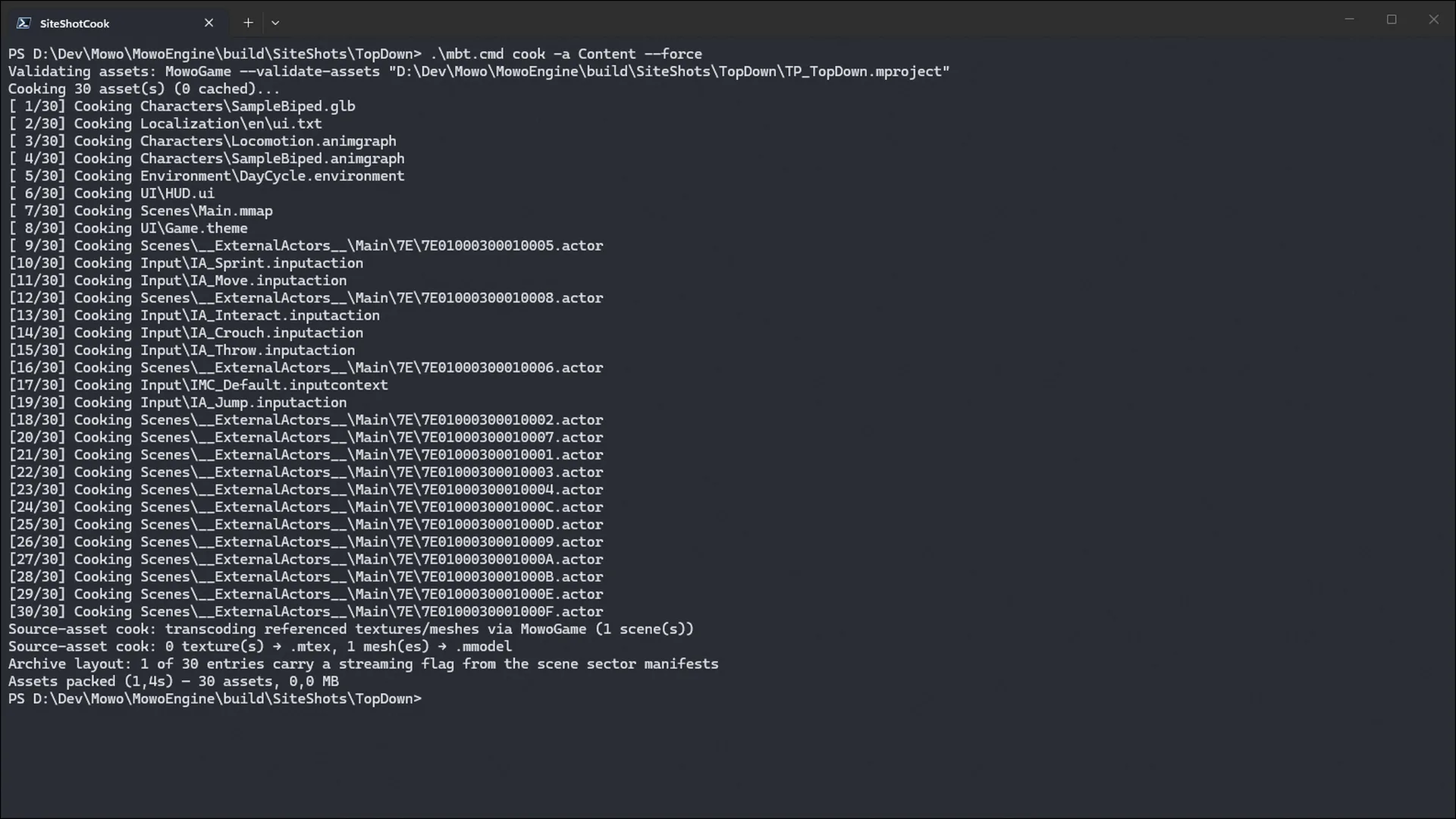
From the project folder, or any folder below it:
./mbt.cmd cookmbt finds the project by walking up from the working directory and cooks its Content/ folder. Without -o, the archive goes to the cook directory set in Config/Packaging.ini, or to Saved/Cooked/Content.meaf when none is set (Saved/Cooked/<Platform>/Content.meaf with --platform).
The cook is incremental. Results are cached in .mbt-cache, and an unchanged asset is not cooked again. Pass --force to recook everything.
The cook runs native tools from the engine build: MowoGame (validation, packages, textures and meshes, dependency and cook-rule queries), MdfTool (MDF), MaudioTool (audio) and MeafBuilder (packing). Build them first. Without MdfTool or MowoGame the cook stops with an error; --allow-raw packs texture and mesh sources raw instead. Without MaudioTool audio packs raw with a warning. --config picks which build of the tools runs (dev, then debug by default).
What happens during a cook
- Validate assets
- Resolve cook rules
- Cook per asset
- Cook packages
- Pack .meaf
- Split into chunks
- Validate
MowoGame --validate-assetsruns the same validators the editor runs after every save. Any Error-severity issue fails the cook. The step is skipped with a note whenMowoGameor the.mprojectcannot be found.--no-validateturns it off. - Resolve cook rules
The Asset Manager's primary asset rules decide what must ship (
AlwaysCook) and what must not (NeverCook). See Cook rules. - Cook each file
Each file goes to the cooker that claims its extension. Plugin cookers register first, then the built-in ones, so the MDF validation gate always wins.
- Cook packages
Binary asset packages are cooked in a staging folder by
MowoGame --cook-packages, never inContent/, so your packages keep the source data a reimport compares against. - Pack
MeafBuilderpacks the staged tree into the archive. Every key is prefixed withContent/, orPlugins/<Name>/for an enabled plugin's content, so keys read exactly like the paths levels store. - Copy baked probes
Baked reflection probes in the project's derived data cache are copied next to the archive, so a packaged game loads them instead of capturing at runtime.
What each asset type becomes
| Input | Cooked form | Done by |
|---|---|---|
Binary packages (.mesh, .skmesh, .skel, .anim, .tex, .sound, …) | The same package, built for the target: texture mips, quantized mesh streams, compressed animation keys, the target's audio codec, editor-only bulk stripped | MowoGame --cook-packages |
Text assets and levels (.mat, .prefab, .mmap, .actor, .ui, .item, …) | Binary MDF under the same name | MdfCooker, through MdfTool |
Loose .png, .jpg, .jpeg, .bmp, .tga | <source>.mtex, block-compressed with mips | MowoGame |
Loose .fbx, .gltf, .glb, .obj | <source>.mmodel | MowoGame |
Loose .wav, .ogg, .mp3, .flac | <source>.maudio | AudioCooker, through MaudioTool |
| Anything else | Unchanged bytes | PassthroughCooker |
A cooked loose file appends its extension to the source name: a level asks for Content/Audio/music.ogg and the runtime finds Content/Audio/music.ogg.maudio. When a loose texture or mesh has a cooked form, the source is left out of the archive. Cooking is also a gate: a text file that does not parse fails the cook with its line:col error, so malformed data never reaches a build.
Texture compression
A texture's import settings, in its .tex package or its sidecar, decide its compression, maximum size, mip filter, alpha coverage and color space. Auto resolves to BC6H for HDR, BC5 for normal maps and BC7 for everything else. On a mobile target, LDR textures cook to ASTC 6x6.
Cook for a platform
--platform cooks for a target: win-x64, linux-x64, osx-arm64, android-arm64 or ios-arm64. A mobile target cooks ASTC textures and Opus audio. With --platform the cook also builds the target's Shaders.meaf beside the archive, unless you pass --no-shaders.
./mbt.cmd cook --platform android
./mbt.cmd cook --platform win-x64 --audio-codec opus
--audio-codec (pcm16, pcm24, float, opus) re-encodes every clip over its import settings. A sound's own per-platform override, set in the Sound editor, wins over both.
Options
| Option | Default | Effect |
|---|---|---|
-a, --assets <dir> | Content/ | Folder to cook |
-o, --output <file> | see above | Output .meaf path |
-c, --compression | Fast | None, Fast, Default or Best |
-f, --force | off | Recook every asset |
--scenes <list> | Cook only what these comma-separated levels reference | |
-p, --platform <target> | host | Cook for a target platform |
--audio-codec <codec> | per clip | Re-encode every clip to this codec |
--astc | off | Cook LDR textures to ASTC 6x6 instead of BC7 and BC5 |
--no-shaders | off | With --platform, skip Shaders.meaf |
--strict-refs | off | Fail when a reference cannot be resolved to a file |
--allow-raw | off | Pack texture and mesh sources raw when their transcode cannot run |
--no-validate | off | Skip the asset-validation gate |
--mdf-text | off | Pack MDF as text instead of binary, for debugging |
--raw-assets | off | Pack texture and mesh sources as they are, for debugging |
--meaf-encrypt-key <file> | Encrypt the archive with a 32-byte key file | |
--meaf-key-id <n> | 0 | Key id stored in the archive header |
--meaf-sign-key <file> | Sign the archive with a 64-byte secret key file | |
--config <build> | dev, then debug | Which build of the native tools to run |
The mbt CLI reference lists every option.
Cook only what your levels use
A full cook packs everything under Content/. A selective cook packs only what a set of entry levels reference, so a release carries no unused art:
./mbt.cmd cook --scenes Content/Maps/Level01.mmap
./mbt.cmd cook --scenes "Content/Maps/A.mmap,Content/Maps/B.mmap"
MowoGame --cook-deps walks each level, following materials to textures, prefabs to their contents, and ids through the asset registry. It reads Config/Redirects.ini, so a level that names an old path still reaches the right file. glTF buffers and images and OBJ material chains are added, so a multi-file model ships whole. AlwaysCook levels join the entry levels; a NeverCook level never enters.
Cook rules
The Asset Manager's primary asset rules, in DefaultGame.ini, mark assets that must always ship (even when no cooked level references them) and assets that must never ship (a debug level, test art) FPrimaryAssetManager:
[/Script/Mowo.AssetManagerSettings]
+PrimaryAssetTypesToScan=(PrimaryAssetType="Map",AssetClass="World",Directories=("Content/Maps"),Rules=(ChunkId=1,CookRule=AlwaysCook))
+PrimaryAssetBundles=(PrimaryAssetId="Map:Rooftop",BundleName="UI",Assets=("Content/UI/HUD.ui"))
AlwaysCook and DevelopmentAlwaysCook primaries ship with every asset of their bundles; a NeverCook primary is left out even though Content/ holds it. Both mbt cook and mbt package apply the rules. mbt asset primary <project> lists the primary assets, their chunks and their cook rules.
Fail on broken references
By default a reference that resolves to nothing only warns, so a project in progress still cooks. Pass --strict-refs in CI and release builds to make it an error:
./mbt.cmd cook --strict-refsSplit the archive into chunks
A Config/Chunks.ini file splits the cooked output into several archives: chunk 0 is Content.meaf, and chunk N is Content_chunkN.meaf. The cook also writes a chunks.json report next to the archives.
[Chunk 1]
+Scenes=Content/Maps/Level02.mmap
+Dirs=Content/Music
+Plugins=ExpansionPack
BudgetMB=500| Key | Meaning |
|---|---|
+Scenes= | A level, plus everything it references |
+Dirs= | Everything under a content folder |
+Plugins= | Everything in an enabled plugin's content |
BudgetMB= | A size budget. The cook warns when the chunk goes over it |
An asset claimed by several chunks goes to the lowest-numbered one. An asset no chunk claims goes to chunk 0. A chunk declared twice fails the cook.
Instead of writing the file by hand, you can give primary asset types a ChunkId in their rules and run mbt asset primary <project> --write-chunks to generate it. A primary asset's chunk spreads over its hard dependencies. The generator only replaces a file it wrote itself (it marks it with a header comment), never one a person wrote. An older Config/Chunks.mdf is still read.
Related
- Archives for what is inside a
.meafand how the game mounts it. - Derived Data Cache for the editor-side cache that makes repeated loads fast.
- Asset formats for packages and the cooked binary formats.
Engine sources
This page describes behavior implemented in these files of the engine repository, checked against commit 7c4a1b166.
- Engine/Source/Runtime/AssetFormats/Public/AssetFormats/AssetPackageCook.h
- Engine/Source/Runtime/AssetSystem/Public/AssetSystem/PrimaryAssetManager.h