 Mowo
Flow control and node kinds
How the Visual Scripting VM decides what runs and in what order, plus every node kind grouped by what it does.
Flow-control nodes sit on the exec path and decide what runs next. This page explains the execution model first, then covers every node kind the engine defines. There are 78, in the VisualScriptNodeKind enum VisualScriptNodeKind.
How execution works
- Event fires
- Push entry node
- Pop and run node
- Push next exec targets
- Stack empty or suspended
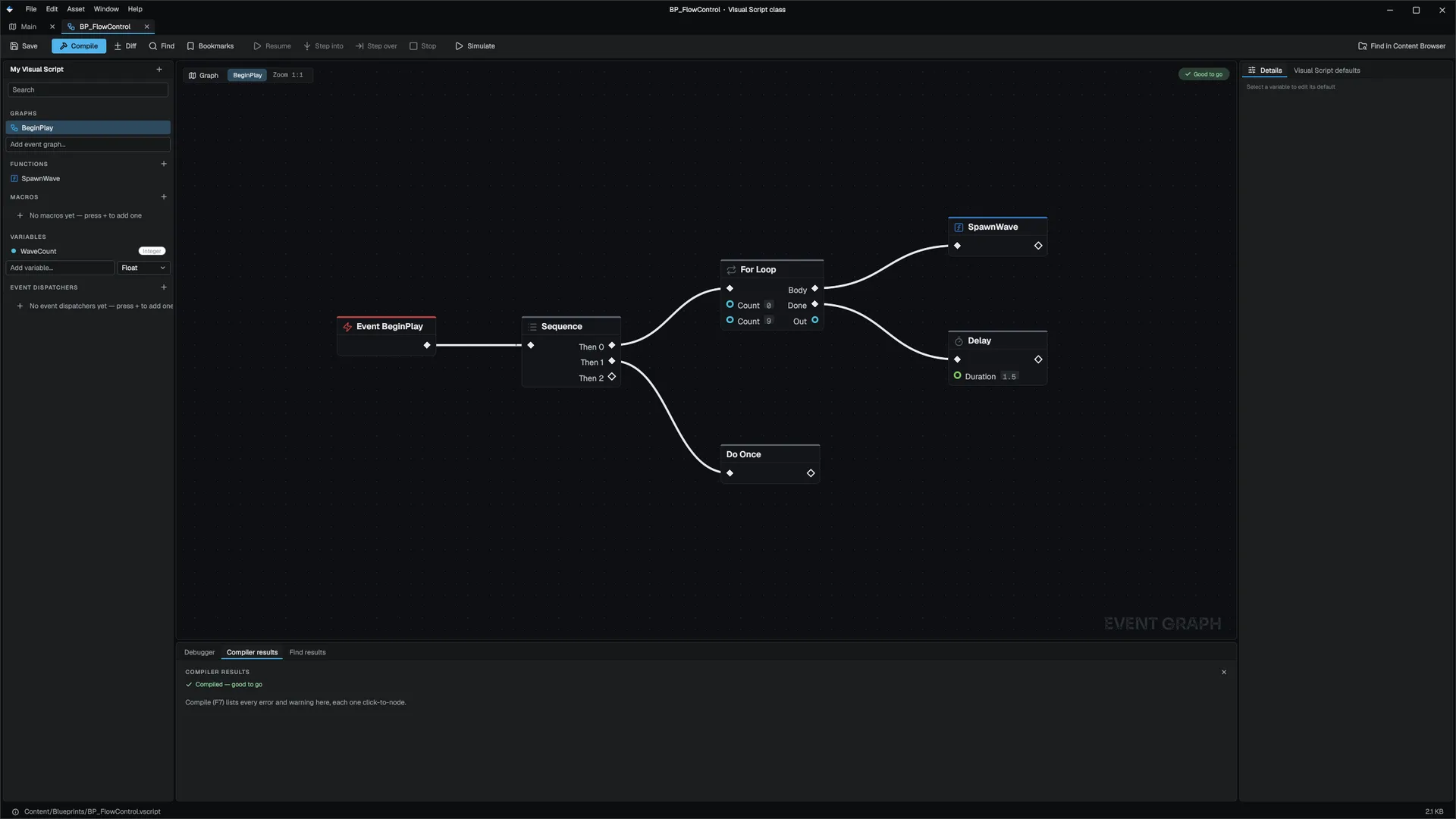
The VM does not recurse in C++. It keeps an explicit stack of work items VisualScriptExecItem. A Sequence pushes a "resume at output N" item. A loop pushes its current iteration and its Completed target. Because the whole run is data, three things work:
- A Sequence runs each output's whole chain before starting the next one.
- Break Loop finds its enclosing loop on the stack, even from inside a macro.
- A Delay can save the stack and the node outputs computed so far, return to the game, and resume on a later frame.
Data pins are pulled, not pushed. When a node needs an input, the VM evaluates the pure node wired into it at that moment.
Two guards stop runaway graphs. A run that executes more than 2,000,000 steps stops with "exec guard tripped". A function call chain deeper than 64 stops with "function recursion too deep".
Branching and ordering
| Node | What it does |
|---|---|
| Branch | Reads a bool and continues on True or False. |
| Sequence | Fires its outputs in order. Each output's chain finishes before the next starts. |
| Switch On Value | Compares the selector with each case value and takes the first match, or Default. |
| Switch on Enum / Name / String | The same comparison, typed for an enum, an FName or a string selector. |
A switch compares cases in order and takes the first one that is equal. That covers ints, enums and strings with one rule.
Loops
| Node | What it does |
|---|---|
| For Loop | Runs Loop Body Count times with the index on its output, then continues on Completed. |
| While Loop | Runs Loop Body while its condition is true, rechecking each pass, then Completed. |
| For Each Loop | Runs Loop Body once per array element. Pin 0 is the element, pin 1 the index. |
| Break Loop | Leaves the innermost running loop and continues on that loop's Completed output. |
Latches
Latches keep state on the instance, so they remember across calls and across event graphs.
| Node | What it does |
|---|---|
| Do Once | Passes the first time only. A reset input re-arms it. |
| Do N | Passes the first N times. Its output counts the fires. A reset input clears the count. |
| Flip Flop | Alternates between output A and output B. |
| Gate | Passes only while its gate is open. |
| Set Gate | Opens or closes a named gate, or toggles it. |
| Multi Gate | Takes one output per call: in order, looping, or at random. |
A latch you give a name is one state for the whole class. That is how a Gate and the Set Gate that opens it address the same gate. An unnamed latch is keyed by its node index and its graph, so two unnamed Do Once nodes in different graphs never share state.
Latent nodes
Latent nodes suspend the graph and resume it on a later frame. The instance advances pending runs from its Tick.
| Node | What it does |
|---|---|
| Delay | Waits Duration seconds, then continues from where it stopped. |
| Timeline | Plays tracks over time and pulses Update every frame, then Finished. |
| Async Action | Starts a registered action and resumes on whichever output pin it fires later. |
Latent nodes only suspend in event graphs. Inside a function, a Delay or Timeline runs instantly, because a function call cannot yield. An Async Action inside a function logs an error and the chain after it does not run. Macros are inlined, so a latent node inside a macro does suspend. See Functions, macros and dispatchers.
Timeline
A Timeline has a length, an optional loop flag and any number of tracks. Float, Vector and Color tracks carry keyframe curves with Constant, Linear or Cubic interpolation per key, and each drives a value output. Event tracks carry key times and fire their own exec output when the playhead crosses one VisualScriptTimeline.
The exec input applies the control on the Control pin:
| Control | Value | Effect |
|---|---|---|
| Play | 0 | Play forward from the current position |
| PlayFromStart | 1 | Rewind and play forward |
| Reverse | 2 | Play backward |
| Stop | 3 | Stop |
| SetNewTime | 4 | Jump to the time on Param |
| SetPlayRate | 5 | Set the rate from Param |
Playback state lives on the actor, so a Stop fired from one graph stops a Timeline another graph started. A Timeline with no tracks runs as a single 0-to-1 pulse over its duration. Add tracks, toggle looping and edit curves from the node's context menu.
Async actions
An Async Action node starts a registered action and resumes the graph on whichever output pin the action fires, with the action's results on the node's data outputs. Some actions fire a pin more than once and keep listening. The shipped actions and their pins are listed in Node libraries.
Pure data nodes
| Node | What it does |
|---|---|
| Math (Pure Op) | One math or logic operation, chosen in the details. |
| Select | Picks one input by index. A bool selector picks option 1 for true, option 2 for false. |
| Is Valid | True for a live object, a non-empty string or a non-empty container. |
| Make Vector, Break Vector | Build a Vec3 from X, Y, Z, or split one. |
| Make Localized Text | A string looked up by namespace and key, with a source fallback. It re-resolves on every read, so a language change reaches running graphs. |
The math operations are Add, Sub, Mul, Div, Neg, Greater, Less, GreaterEqual, LessEqual, Equal, NotEqual, And, Or, Not, Min, Max, Clamp, Lerp, Abs, Sqrt, Mod, Pow, Floor, Ceil, Round, Sign, Sin, Cos, RandomInt, RandomFloat, Concat and ToString VisualScriptPureOp.
All 78 node kinds by category
| Category | Count | Kinds |
|---|---|---|
| Entry and layout | 3 | Event, Reroute, Comment |
| Calls | 4 | CallFunction, CallGraphFunction, CallOn, Return |
| Branching and ordering | 6 | Branch, Sequence, Switch, SwitchEnum, SwitchName, SwitchString |
| Loops | 4 | ForLoop, WhileLoop, ForEach, LoopBreak |
| Latches | 6 | DoOnce, DoN, FlipFlop, Gate, SetGate, MultiGate |
| Latent | 3 | Delay, Timeline, AsyncAction |
| Pure data | 6 | Pure, Select, IsValid, MakeVec3, BreakVec3, MakeText |
| Variables, parameters, properties | 7 | GetVar, SetVar, GetLocal, SetLocal, GetParam, GetProperty, SetProperty |
| Arrays | 9 | MakeArray, ArrayGet, ArrayLength, ArrayContains, ArrayFind, ArrayAdd, ArraySet, ArrayRemove, ArrayClear |
| Maps | 8 | MakeMap, MapGet, MapContains, MapLength, MapKeys, MapAdd, MapRemove, MapClear |
| Sets | 6 | SetAdd, SetRemove, SetContains, SetNum, SetClear, SetToArray |
| Objects and classes | 6 | Self, GetActorByName, GetActorByTag, Cast, ObjectEquals, ClassRef |
| Communication | 5 | Broadcast, BindDispatcher, UnbindDispatcher, FirePin, ImplementsInterface |
| Networking | 2 | HasAuthority, SwitchHasAuthority |
| Macros | 3 | MacroInstance, MacroInput, MacroOutput |
Notes on a few of them:
- Cast checks whether an object's class chain contains the named class. It continues on the success output with the object, or on the failure output with null.
- CallOn calls a function on the object in its Target pin. If the target's class has no reflected function of that name, it tries a visual function of that name on the target's class and runs it in the target's context.
- FirePin fires a named output pin through the world's wire table. Wired actors run the matching input-pin graph with the payload in
PinPayload. - HasAuthority is true on the server, in standalone play, and for a client-local actor that was never replicated. SwitchHasAuthority is the exec form, with Authority and Remote outputs.
- ClassRef carries a class name, not a pointer, so a class from a module that has not loaded yet is a warning at edit time and resolves at run time.
- MacroInstance never reaches the VM. Macros are inlined when the class registers.
The Visual Scripting API reference lists the VisualScriptNodeKind enum with each entry's source comment.
Next
- Functions, macros and dispatchers
- Debugging: step through these nodes one at a time.
Engine sources
This page describes behavior implemented in these files of the engine repository, checked against commit 5922e6e5e.
- Engine/Source/Runtime/VisualScripting/Public/VisualScripting/VisualScriptGraph.h
- Engine/Source/Runtime/VisualScripting/Public/VisualScripting/VisualScriptVM.h