 Mowo
MCP server for AI agents
Let an AI agent such as Claude Code drive the editor over the Model Context Protocol - setup, access levels, security, tools and custom tools.
The editor serves its own tools over the Model Context Protocol (MCP), so an AI agent such as Claude Code, or any MCP client, can work in the editor the way a person does: open and save levels, place and edit actors, read and write Visual Scripting graphs, start and stop Play, take screenshots and run tests. Every tool goes through an operation the editor already has, so an agent's edit is undoable and validated like a click.
Turning it on
| Transport | How | For |
|---|---|---|
| HTTP | Editor Preferences ▸ AI agents ▸ Enable MCP server (port 52801 by default; 0 picks a free port), or --mcp-port=<n> on the command line | Attaching to an editor that is already open |
| stdio | MowoEditor.exe --mcp-stdio --project <Project>.mproject | A client that launches the editor itself |
With stdio, the editor reads one JSON-RPC message per line on standard input, answers on standard output, logs to standard error, and closes when the client closes its input.
Each HTTP session gets a new bearer token. The editor writes the port, token and access level to Saved/Config/Editor/McpServer.json (per user, never committed; --mcp-endpoint-file=<path> picks another file). The status bar's AI agents popover shows the endpoint and token and copies the command that attaches Claude Code:
claude mcp add --transport http mowo-editor http://127.0.0.1:52801/mcp --header "Authorization: Bearer <token>"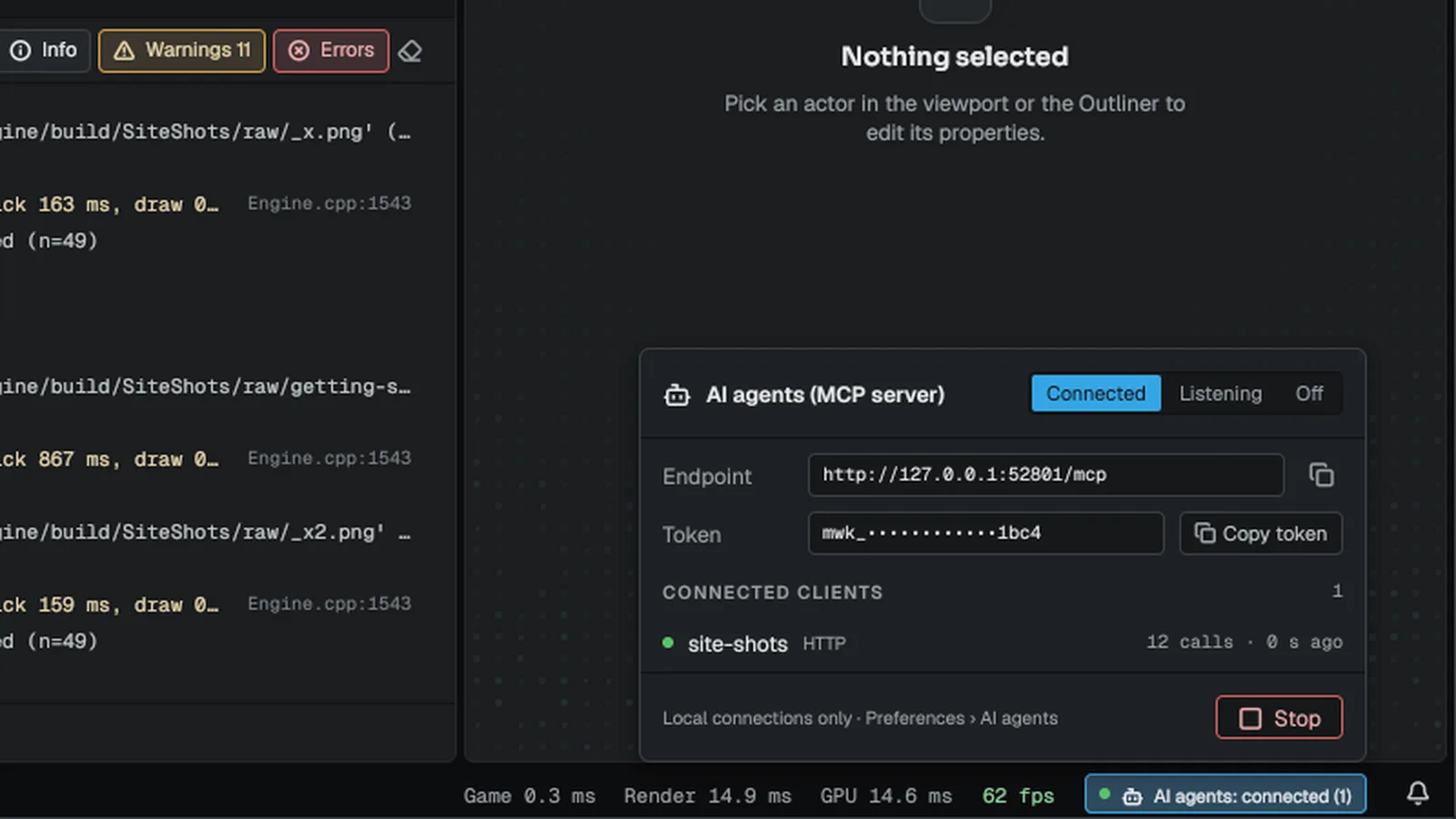
Editor Preferences ▸ AI agents
| Row | Effect |
|---|---|
| Enable MCP server | Starts or stops the listener on the next frame (editor.mcp.enabled) |
| Port | editor.mcp.port |
| Allow remote connections | Off listens on 127.0.0.1 only; on listens on every interface. Use it only on a network you trust |
| Access token | The running token, masked. Copy copies it; Rotate issues a new one on the same port |
| Commands agents may run | Read only (the default), Read + edit (no delete) or Everything |
Both transports start at the access chosen here. --mcp-access=read|edit|full on the command line changes it for that session. Nothing an agent can reach changes it.
Tools and access
Each tool has an access level. A tool above the allowed level is left out of the tool list, and calling it returns an error that names the preference.
| Access | Tools |
|---|---|
| Read | editor_status, list_actors, get_property, select_actor, camera_set, screenshot, open_asset, visual_script_read, visual_script_nodes, multiuser_status |
| Edit | open_level, new_level, save_level, spawn_actor, set_property, set_cvar, import_asset, pie_start, pie_stop |
| Full | delete_actor, console, run_script, run_tests, visual_script_write, editor_quit |
run_script runs an editor script. visual_script_write needs Full access because a Visual Scripting graph calls reflected functions and runs at the next Play: writing one is writing code.
Tools run on the editor's main thread between frames. A tool that needs frames, such as starting Play or taking a screenshot after a change, answers later on the same connection without blocking the editor.
Security
A tool that saves files and runs builds can execute code, so the server is locked down:
- Every HTTP request must carry the session's bearer token. A request from a browser page (a foreign
Origin) is refused even with the token. - Every path a tool takes must resolve inside the project, after following links. Network share paths are refused.
- Each tool writes only its own file type:
screenshota.png,save_levela.mmap,visual_script_writea.vscript. import_assetfrom outside the project needs Full access.set_cvarrefuses security settings (such aseditor.mcp.*,net.encrypt,net.psk) and anything the console itself may not set.run_testsand the scriptruncommand startmbtwithout a shell, and the test filter accepts a test name only.
Protocol
MCP 2025-06-18 over JSON-RPC 2.0: initialize, ping, tools/list and tools/call. The HTTP transport answers POST /mcp with application/json; batches are refused.
Adding your own tools
An editor plugin can register tools in FMcpToolRegistry. A tool has a name, a description, an input schema, an access level (Full when not set) and a handler that returns an FMcpToolResult. Arguments, schemas and results are FMcpJson values: Value(key, fallback) reads an argument and falls back when it is missing or of another type, Get(key) reaches a nested object, and Parse / Dump convert to and from JSON text, so a plugin needs no JSON library of its own. Return FMcpToolResult::Wait() to be called again next frame. Unregister the tool when your module shuts down. See Plugins and extensions.
#include <EditorFramework/McpServer.h>

#include <string>
#include <utility>

void RegisterCountTool() {
	Mowo::FMcpTool tool;
	tool.Name = "myplugin_echo";
	tool.Description = "Echo a message back to the agent.";
	tool.InputSchema = Mowo::FMcpToolRegistry::Schema({ { "message", "string" } });
	tool.Access = Mowo::EMcpToolAccess::Read;
	tool.Handler = [](const Mowo::FMcpJson& args, uint32_t) {
		return Mowo::FMcpToolResult::Text(args.Value("message", std::string()));
	};

	Mowo::FMcpToolRegistry::Get().Register(std::move(tool));
}

void UnregisterCountTool() {
	Mowo::FMcpToolRegistry::Get().Unregister("myplugin_echo");
}
Engine sources
This page describes behavior implemented in these files of the engine repository, checked against commit c1d08db53.
- Engine/Source/Editor/EditorFramework/Public/EditorFramework/McpServer.h