 Mowo
Montages and notifies
Play one-shot animations over locomotion with montages and slots, fire gameplay at exact frames with notifies, and land on targets with motion warping.
A montage is a one-shot animation played on top of whatever the animation graph is doing: an attack, a hit reaction, an interaction or an emote. The character keeps walking underneath, because the montage only overrides the pose by its blend weight. Notifies are markers on a clip or montage timeline that fire gameplay at an exact frame.
Montages
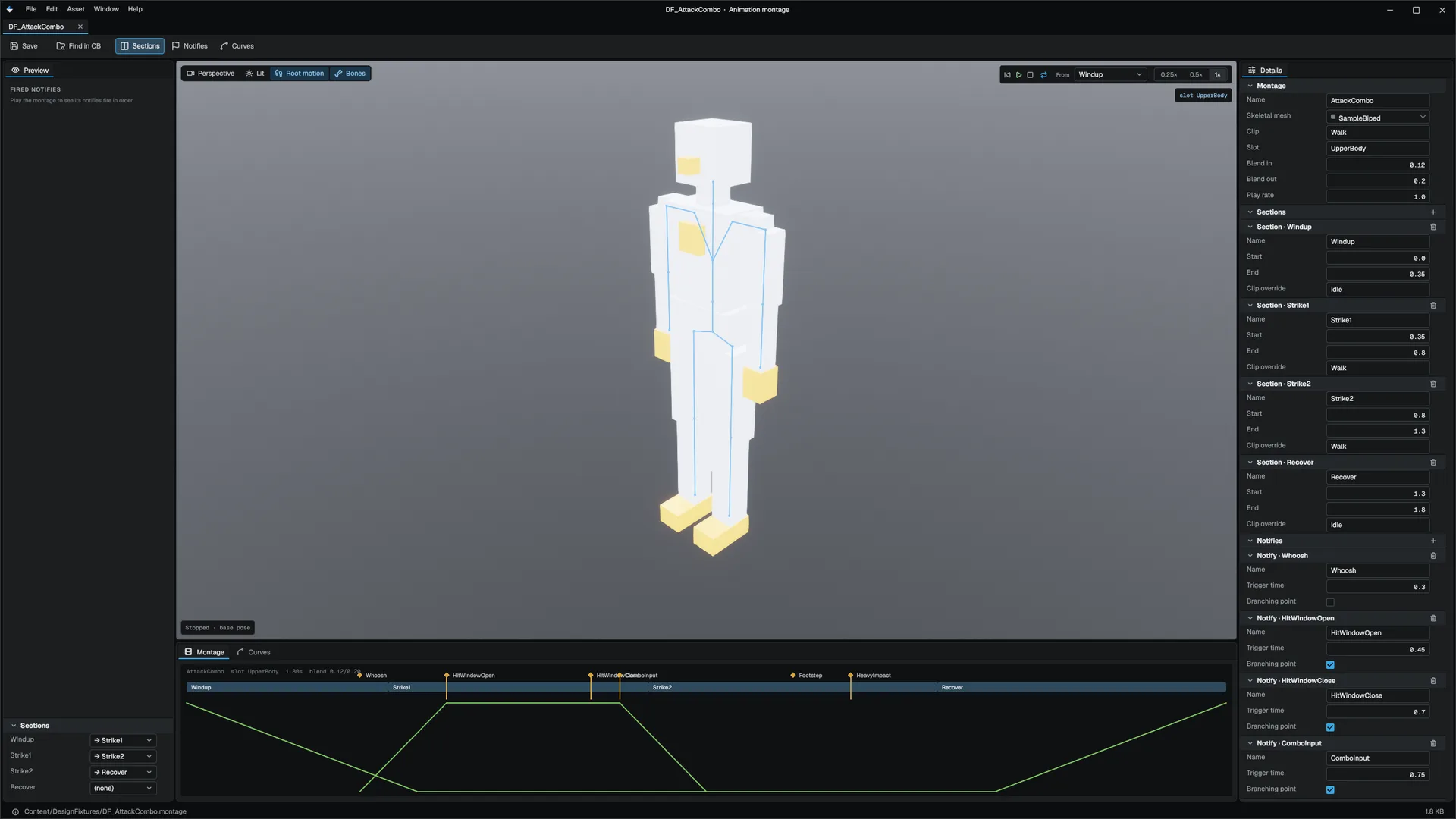
A montage plays clips split into named sections. It blends in, plays a section, optionally chains to the next one, and blends out. Montage
| Field | Meaning |
|---|---|
sections | Named time ranges. Each can name the section that follows (nextSection); an empty one blends out at its end. A section can play from its own clip, so one montage can chain a windup clip into a strike clip. |
blendInTime, blendOutTime, playRate | Timing |
slotName | Where it plays; DefaultSlot unless set |
notifies, curves | Markers and float curves on the montage's own timeline |
Montages are .montage assets, authored in the Montage editor. A montage's name, not its file path, is its identity, so moving the file does not break code that plays it or a networked session. FMontageDocument
Play a montage
List the montages a character can play in the Animator's Montage Assets field, then play them by name. From an actor, use MSkeletalMeshComponent; the same functions are Visual Scripting nodes. MSkeletalMeshComponent
| Function | Effect |
|---|---|
PlayMontage(name, startSection) | Plays a listed montage, from a section or from the start; false if the animator has no such montage |
StopMontage(slot, blendOut) | Blends out whatever plays on a slot; a negative blend uses the montage's own |
IsMontagePlaying(slot) | Whether a slot is busy |
GetMontageSection(slot) | The current section, or empty |
#include "Game/MSkeletalMeshComponent.h"

Mowo::MSkeletalMeshComponent* mesh = nullptr;

if (!mesh->IsMontagePlaying("DefaultSlot")) {
	mesh->PlayMontage("Attack", "");
}
For callbacks, work with the Animator's MontagePlayer directly. The Animator is an ECS component on the actor's backing entity. onSectionEnd fires as each section reaches its end, which is where a combo window opens, and onEnded fires once the montage has fully blended out. JumpToSection(name) jumps at once without a blend, and Stop() starts the blend-out. MontagePlayer
#include "Animation/Components/AnimatorComponent.h"
#include "ECS/World.h"
#include "Game/AActor.h"
#include "Game/MWorld.h"

#include <string>

Mowo::AActor* hero = nullptr;
Mowo::World* ecs = hero->GetWorld()->GetECSWorld();
Mowo::AnimatorComponent* animator = ecs->GetComponent<Mowo::AnimatorComponent>(hero->GetBackingEntity());

animator->montage.onSectionEnd = [](const std::string& section) {
};

animator->montage.onEnded = []() {
};
Slots
Each named slot is an independent montage player with an optional bone mask, so a full-body dodge and an upper-body reload can play at the same time. A montage plays on the slot it names; override that with AnimatorComponent::PlayMontageOnSlot, and restrict a slot with SetMontageSlotBoneMask. AnimatorComponent::PlayMontageOnSlot A Slot node in the animation graph decides where in the graph a slot's pose is composed; slots no node claims are blended on top at the end.
Branching points
A plain notify is handled after the frame's update, so a section jump decided from it lands a frame late. Mark a notify as a branching point and the update is split at its exact time, so a jump or stop decided there happens on the frame it was authored for. Montage::AddNotify
Notifies
A notify fires once each time playback crosses it, and loops are handled. A notify state has a begin and an end time and fires Begin, Tick and End. AnimNotify
Notifies are data-driven: set a notify's kind and the engine performs the action with no code.
| Kind | Action |
|---|---|
Sound | Plays the sound asset at the character, at the notify's volume |
Particle | Spawns the particle effect |
VisualScript | Raises the named event on the actor's Visual Scripting graph |
None | Fires only as a named animation event for code |
Author clip notifies, curves and settings per clip in the Skeletal Mesh editor. They are stored with the mesh. FAnimClipMetadata
To react in C++, register a callback on the Animator's eventCallbacks map under the notify's name, or set globalEventCallback to see every event. FAnimNotifyDispatcher::SetObserver sees every fired notify of every kind, which is how the editor timeline shows them. FAnimNotifyDispatcher
#include "Animation/Components/AnimatorComponent.h"

#include <string>
#include <unordered_map>

Mowo::AnimatorComponent* animator = nullptr;

animator->eventCallbacks["Hit"] = [](const std::string& name, const std::unordered_map<std::string, Mowo::AnimEventParam>& params) {
};
Motion warping
Motion warping bends a clip's root motion over an authored window so the character lands exactly on a gameplay target: a vault onto a ledge, a strike that closes the distance to an enemy. It needs root motion; see Animation.
- In the clip's settings, add a warp window: a target name, a start and end time, and whether translation and rotation warp.
- Before or during the window, set the target from gameplay with
AnimatorComponent::SetMotionWarpTarget(name, position, rotation). AnimatorComponent::SetMotionWarpTarget
While playback is inside the window, the remaining root motion is redistributed so the character reaches the target exactly at the window's end. With no target set, the clip plays unwarped.
Related
- Animation
- Weapons and melee for melee swings driven by notifies
- API: Animation module, Game module
Engine sources
This page describes behavior implemented in these files of the engine repository, checked against commit c1d08db53.
- Engine/Source/Runtime/Animation/Public/Animation/Montage.h
- Engine/Source/Runtime/Animation/Public/Animation/MontageDocument.h
- Engine/Source/Runtime/Animation/Public/Animation/AnimNotify.h
- Engine/Source/Runtime/Animation/Public/Animation/AnimClipMetadata.h
- Engine/Source/Runtime/Animation/Public/Animation/MotionWarping.h
- Engine/Source/Runtime/Animation/Public/Animation/Components/AnimatorComponent.h
- Engine/Source/Runtime/Game/Public/Game/MSkeletalMeshComponent.h
- Engine/Source/Runtime/Game/Public/AssetSystem/AssetPackageObjects.h