 Mowo
Voice chat
Proximity and radio voice over the session's own transport, with Opus, echo cancellation, 3D positioning, occlusion and an ADPCM fallback.
The VoiceChat engine module adds in-game voice to a session: microphone capture, encoding, a per-speaker jitter buffer and positional playback. It uses the session's existing connection on its own Voice channel, so there is no second socket to open or NAT to punch.
How voice flows
- Capture 20 ms
- Gate or push-to-talk
- Encode
- Voice channel
- Host relay
- Jitter buffer
- Decode
- 3D playback
- Capture runs at the active codec's rate in 20 ms mono frames: 48 kHz on Opus, 16 kHz on ADPCM FVoiceOpusCodec. Each frame is cleaned up (echo cancellation, noise suppression, automatic gain) before the gate reads it.
- Transport. Frames ride
NetworkChannel::Voice, which is unreliable and unsequenced so late frames can still be put back in order NetworkChannel. On the host, the speaker identity is always the sending peer, whatever the packet header claims. - Playback. Each speaker gets its own decoder and jitter buffer (3 frames target, 12 maximum). Decoded audio plays through an ordinary audio source on the Voice bus, so distance attenuation and occlusion work like any world sound.
Proximity and radio
A frame is sent on one of two channels:
| Channel | Behavior | Default input |
|---|---|---|
Proximity | Full volume within voice.NearRange (3 m), rolls off to silence at voice.HearingRange (22 m). Past that range the host does not relay the frame at all. | Hold V (VoiceProximity) |
Radio | Relayed to every player whatever the range, and played out of the receiving radios. | Hold Y (VoiceRadio) |
The character templates map VoiceProximity to V and VoiceRadio to Y. The radio key wins while both are held.
A proximity voice is shaped by three separate cues, so a listener can tell a far voice from a walled one:
- Distance lowers the level and the top end: the low-pass slides from
voice.DistanceLowPassNearat the near range tovoice.DistanceLowPassFarat the edge. - Walls muffle a speaker without line of sight, with the same occlusion query as world sounds (
voice.Occlusion). - Grain breaks the voice up past
voice.GrainStartof the hearing range, up tovoice.GrainMaxat the edge. A game can add its own reason for a voice to break up withSetGrainProviderFVoiceChatSystem::SetGrainProvider.
A radio transmission is not heard in anyone's head. It comes out of each receiving radio as a 3D source: your own radio at your belt (voice.RadioHeight above the pawn), always audible, and a teammate's radio if it is within voice.RadioSpeakerRange (12 m) of you. Radio audio plays through the 300 to 3400 Hz telephone band (voice.RadioBandPass). The talker's mouth stays an ordinary proximity source, so someone standing next to them hears them speak into it. On the host, each receiving radio is also reported to the AI as a noise (voice.RadioAINoise), so creatures hear a handset go off in the dark. Every character pawn with a NetworkObjectComponent carries a radio.
- Hysteresis. A listener enters a speaker's relay set at the hearing range but leaves only 15% past it, so someone pacing the edge does not flicker in and out.
- Fail open. If a position cannot be resolved (for example a pawn not yet spawned), the player is heard rather than silenced.
Codecs
| Codec | Format | Notes |
|---|---|---|
Opus (FVoiceOpusCodec) | 48 kHz mono, 20 ms, VBR 32 kbps | Deep redundancy (DRED) carries up to 500 ms of past speech in each packet, so a burst of loss is rebuilt instead of concealed. Inband FEC is used when DRED is off. DTX sends nothing through silence. |
ADPCM (FVoiceAdpcmCodec) | 16 kHz mono, 20 ms, 4 bits per sample | 163 bytes per frame. Each frame decodes on its own, so a lost frame never affects the next FVoiceAdpcmCodec. |
The module links Opus only where its archive is vendored and otherwise compiles the Opus codec as an unavailable stub; voice.Codec auto then selects ADPCM.
Opus binaries are vendored for Windows x64 and macOS only, so Linux builds run voice on ADPCM. Every peer in a session must use the same codec: frames from a peer on a different codec are refused, not decoded, and counted in FVoiceStats::framesCodecMismatch. An explicit request for Opus on a build without it fails rather than silently downgrading.
Transmit modes
- Push-to-talk (default). Frames transmit only while the key is held.
- Open mic. An energy gate opens above
voice.GateOpenRms, stays open abovevoice.GateCloseRms, and holds forvoice.GateHoldSecondsso gaps between words do not clip.
SetSelfMuted(true) silences the outgoing stream in either mode. SetPeerMuted, SetPeerVolume and SetMasterVoiceVolume control what you hear.
With voice.FollowPlatformMute on (the default), muting yourself in Discord closes the gate, and deafening there also silences incoming voice. This state is kept apart from in-game mute: unmuting in Discord never unmutes a player who also muted in the game.
While the player is in a Discord lobby call (Discord Social), the in-game microphone is kept off as well, so one voice is not sent twice; voice.MuteDuringPlatformCall turns that off for a game that wants both.
Capture processing
Every captured frame goes through FVoiceProcessor FVoiceProcessor (SpeexDSP) before the gate and the encoder, whether or not it is transmitted:
- Echo cancellation subtracts the voices the speakers played from what the microphone heard, so a player on open speakers does not send everyone's voices back. It models echoes up to
voice.EchoTailMs. Game sound effects are not cancelled. - Noise suppression learns steady noise (fans, hum, hiss) in the silences and pushes it down by
voice.NoiseSuppressDb. - Automatic gain levels a quiet or loud microphone toward
voice.AutoGainTarget, adding at mostvoice.AutoGainMaxDb.
Each stage switches on its own; a headset user has no echo to cancel. Changing the input device resets what the processor has learned.
Voice fragments for mimics
For a creature that answers in the players' voices, the host can keep short utterances (0.4 to 3 seconds, the last six per talker) in memory with voice.MimicryCapture FVoiceFragmentBuffer. Nothing is written, logged or uploaded. Each client stamps its consent on every frame it sends while voice.MimicryConsent is on (the default), and a frame without it makes the host forget that talker's fragments. Capture is off by default and takes only consenting, unmuted talkers.
Configure voice from code
FVoiceChatSystem is an ECS system on the scene's world.
#include "Core/Platform.h"
#include "ECS/World.h"
#include "VoiceChat/FVoiceChatSystem.h"

#include <cstdint>

static void ShowSpeakerIcon(uint32_t peerId, bool speaking) {
	(void)peerId;
	(void)speaking;
}

static void ConfigureVoice(Mowo::World& world) {
	Mowo::FVoiceChatSystem* voice = world.GetSystem<Mowo::FVoiceChatSystem>();

	if (!voice) {
		return;
	}

	voice->SetHearingRange(3.0f, 30.0f);
	voice->SetMode(Mowo::EVoiceMode::OpenMic);
	voice->SetEnergyGate(0.035f, 0.02f, 0.35f);

	voice->AddSpeakingChangedHandler([](const Mowo::FVoiceSpeakerInfo& info) {
		ShowSpeakerIcon(info.peerId, info.speaking);
	});
}
FVoiceSpeakerInfo also carries the channel, whether the voice is positional, its distance, audibility, occlusion, grain and cutoff, so a HUD can tell "someone nearby is talking" from a named radio call. IsSpeaking(peerId), IsAnyoneSpeakingNearby() and GetSpeakers() answer the same questions as queries, and the VoiceSpeakingChanged Visual Scripting pin fires on the speaker's pawn.
From Visual Scripting, MVoiceChatStatics MVoiceChatStatics mutes and sets the volume of a player (SetPlayerVoiceMuted, SetPlayerVoiceVolume), reports IsPlayerSpeaking, and reads and sets the local player's mimicry consent.
Settings
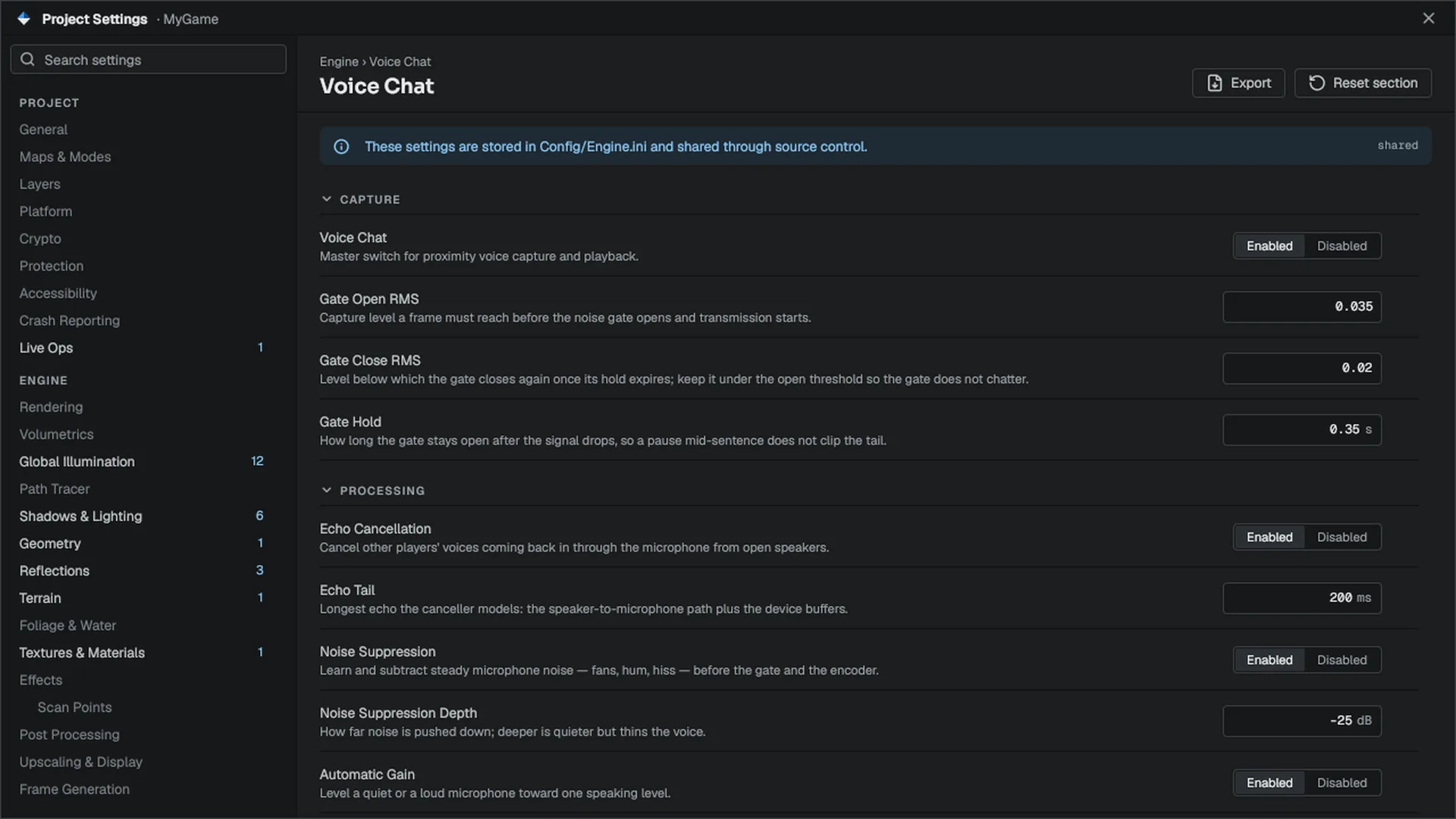
Every player-facing control is a console variable, read once per frame. That lets a settings screen, the console, config files and save games all drive voice the same way. In the editor they appear in Project Settings on the Engine › Voice Chat page.
| Cvar | Default | Meaning |
|---|---|---|
voice.Enabled | true | Master switch for capture and playback |
voice.Mode | 0 | 0 push-to-talk, 1 open mic |
voice.InputDevice | empty | Capture device id. Empty uses the system default. |
voice.InputGain | 1.0 | Gain applied before the gate measures level |
voice.OutputVolume | 1.0 | Master volume for incoming voice |
voice.GateOpenRms, voice.GateCloseRms, voice.GateHoldSeconds | 0.035, 0.02, 0.35 | Open-mic gate |
voice.HearingRange | 22 | Meters past which proximity voice is silent and not relayed |
voice.NearRange | 3 | Meters of full volume before rolloff |
voice.Rolloff | 1.0 | Attenuation curve exponent |
voice.Occlusion | true | Muffle speakers without line of sight |
voice.DistanceLowPassNear, voice.DistanceLowPassFar | 20000, 3500 | Low-pass cutoff in Hz at the near range and at the edge |
voice.GrainStart, voice.GrainMax | 0.5, 0.6 | Where grain starts (fraction of hearing range) and how strong it gets |
voice.RadioSpeakerRange | 12 | Meters out to which another player's radio is heard |
voice.RadioHeight | 1.2 | Height of a pawn's radio above its origin |
voice.RadioBandPass | true | Play radio through the telephone band |
voice.RadioVolume | 1.0 | Radio playback volume |
voice.RadioAINoise | 0.6 | Loudness of the noise AI hears from a playing radio (host only) |
voice.EchoCancellation | true | Cancel other players' voices coming back through the microphone |
voice.EchoTailMs | 200 | Longest echo the canceller models |
voice.NoiseSuppression, voice.NoiseSuppressDb | true, -25 | Stationary noise suppression and its depth |
voice.AutoGain, voice.AutoGainTarget, voice.AutoGainMaxDb | true, 0.25, 30 | Automatic gain and its target and limit |
voice.MimicryConsent, voice.MimicryCapture | true, false | Allow the host to keep fragments of your voice; keep them (host) |
voice.Codec | auto | auto, opus or adpcm |
voice.OpusBitrate | 32000 | Opus target bits per second, redundancy included |
voice.OpusRedundancyMs | 500 | Deep redundancy per packet. 0 turns it off and FEC on. |
voice.OpusFec | true | Inband FEC, used only while redundancy is off |
voice.OpusDtx | true | Send nothing through silence |
voice.FollowPlatformMute | true | Follow Discord mute and deafen |
voice.MuteDuringPlatformCall | true | Keep the in-game microphone off during a Discord call |
voice.BytesPerSecond | 12000 | Hard outgoing cap per client. Frames over it are dropped, never queued. |
Game code that links the module can use FVoiceSettings::Read() and FVoiceSettings::Apply() FVoiceSettings for a typed view of the same values, and FVoiceSettings::IsOpusAvailable() to grey out the Opus option where it is missing FVoiceSettings.
Relayed voice is charged against each client's replication byte budget up to net.voice_budget_share of it, so talking never starves world updates.
Related
- Replication for the shared byte budget.
- Online platforms and Discord Social for Discord.
- API:
FVoiceChatSystem,FVoiceSettings,FVoiceOpusCodec,FVoiceAdpcmCodec,FVoiceSpeakerInfo.
Engine sources
This page describes behavior implemented in these files of the engine repository, checked against commit 500cf5785.
- Engine/Source/Runtime/VoiceChat/Public/VoiceChat/FVoiceProcessor.h
- Engine/Source/Runtime/VoiceChat/Public/VoiceChat/FVoiceRadioFilter.h
- Engine/Source/Runtime/VoiceChat/Public/VoiceChat/FVoiceGrainFilter.h
- Engine/Source/Runtime/VoiceChat/Public/VoiceChat/FVoiceFragmentBuffer.h
- Engine/Source/Runtime/VoiceChat/Public/VoiceChat/FVoiceJitterBuffer.h
- Engine/Source/Runtime/VoiceChat/Public/VoiceChat/MVoiceChatStatics.h
- Engine/Source/Runtime/VoiceChat/Public/VoiceChat/FVoiceChatSystem.h
- Engine/Source/Runtime/VoiceChat/Public/VoiceChat/FVoiceOpusCodec.h
- Engine/Source/Runtime/VoiceChat/Public/VoiceChat/FVoiceAdpcmCodec.h
- Engine/Source/Runtime/VoiceChat/Public/VoiceChat/FVoiceSettings.h
- Engine/Source/Runtime/Networking/Public/Networking/NetworkTypes.h