 Mowo
Shadows
Cascaded and virtual shadow maps for the sun, the local shadow atlas, soft shadows, MegaLights, SDF far shadows and ray-traced sun shadows.
Mowo layers several shadow techniques. Every tier has cascaded shadow maps for the sun and an atlas for local lights. Higher tiers add soft penumbrae, virtual shadow maps, stochastic shadows for many lights and ray-traced sun shadows. Each layer falls back to the one below it where it cannot answer.
Which technique runs where
| Technique | Lights | Low | Medium | High | Epic | Cinematic |
|---|---|---|---|---|---|---|
| Cascaded shadow maps | Sun | 2 cascades, 1024 | 3 cascades, 2048 | 4 cascades, 2048 | 4 cascades, 4096 | 4 cascades, 4096 |
| Local shadows | Spot, point, rect | Atlas, 16 views | Atlas, 32 views | Atlas, 48 views | Virtual pages, 128 views | Virtual pages, 128 views |
| Soft shadows (PCSS) | All shadowed lights | — | — | on | on | on |
| SDF far sun shadows | Sun, past the cascade range | — | on | on | on | on |
| Cheap fallback for over-budget lights | Local lights | on | on | on | — | — |
| Virtual shadow maps | Sun | — | — | — | on | on |
| MegaLights | Local lights past the budget | — | — | — | on | on |
| Ray-traced sun shadows | Sun | — | — | — | — | on |
| Cloud shadows | Sun, raymarched clouds | — | — | on | on | on |
Tier values come from. Contact and capsule shadows are covered on the Lights page.
The main settings are on Project Settings > Engine > Shadows, and the player's settings screen has Shadow Map Method, Shadow Map Size, Shadow Distance, MegaLights and Ray-Traced Sun Shadows rows.
Sun: cascaded shadow maps
The sun renders into a 2×2 atlas of cascades, one tile per cascade. The cascade range is r.Shadow.MaxDistance (default 150 world units); a scene's World Settings shadow distance overrides it when set. The shadow fades out over the last 15% of the range instead of cutting off.
Each cascade is fitted to a bounding sphere and snapped to whole texels, so shadow edges do not crawl as the camera moves (r.Shadow.StableFit, default 1). Static casters are cached per cascade and redrawn only when the cascade moves or a static caster in it changes (r.Shadow.CsmStaticCache, default 1); each frame then draws only skinned and moving casters on top.
| cvar | Default | Meaning |
|---|---|---|
r.Shadow.Resolution | tier | Per-cascade tile size, 256 to 8192. The atlas is recreated live. |
r.Shadow.Cascades | tier | Cascades rendered, 1 to 4 |
r.Shadow.MaxDistance | 150 | Sun shadow range in world units |
r.Shadow.CsmStaticCache | 1 | Cache static casters per cascade |
Local lights
Spot, point and rect lights that cast shadows compete for a shared budget each frame. Every light is scored by its projected size and brightness, and the most important light gets the most resolution. A point light uses six views, one per cube face. The tier caps how many views a frame may render (r.Shadow.MaxLocalViews). A light that misses the budget is handed to MegaLights where it is on, gets a cheap screen-space shadow below Epic (r.MegaLights.CheapMode), or otherwise shades unshadowed.
Hand-overs between lights fade over a few frames, and a light that lost its slot waits before competing again, so lights at the budget boundary do not flicker.
Up to High: the atlas
Below Epic, local shadows render into tiles of one atlas, between r.Shadow.LocalMinTile and r.Shadow.LocalTileSize pixels. Tiles whose light and casters did not change are not redrawn (r.Shadow.LocalCache, default 1), so a static scene redraws no tiles after the first frame.
Epic and up: virtual pages
At Epic and Cinematic each local shadow view is a sparse virtual map of 128-texel pages (r.Shadow.Local.Virtual). Only pages under a receiver the camera can see are resident, and they stay resident until their light or casters change. A second layer keeps each page's static depth, so a page under a moving character redraws only the moving caster (r.Shadow.Local.Virtual.TwoLayer). r.Shadow.Local.VirtualMaxPages (default 16, 2048 texels) bounds the largest map. Set r.Shadow.Local.Virtual 0 to use the atlas at any tier.
Per-light shadow settings
These fields are in the Shadows category of a light:
| Field | Meaning |
|---|---|
| Cast Shadows | Whether the light casts shadows. On by default. |
| Shadow Bias Scale | Multiplier on the light's shadow bias. Above 1 removes acne; below 1 tightens contact at some acne risk. The virtual shadow map ignores it, because its bias is computed exactly. |
| Shadow Resolution Bias | Moves a local light's shadow size up or down by whole power-of-two steps (−2 to +2), within the tier's limits. |
| Shadow Near Plane | Near clip of a local light's shadow projection in metres (default 0.1). Raise it when a large light clips nearby geometry into its own shadow. |
Soft shadows (PCSS)
From High up, shadows use percentage-closer soft shadows: sharp where the occluder touches the receiver and wide where it is far. The penumbra width comes from the light's size:
- Directional light: Source Angle (degrees).
- Spot and point lights: Source Radius (metres). Area lights use their width and height.
A size of 0, or r.Shadow.Soft 0, restores the fixed filter kernel. The penumbra is capped in shadow-map texels by r.Shadow.MaxPenumbraTexels; r.Shadow.BlockerSamples and r.Shadow.FilterSamples set the tap counts.
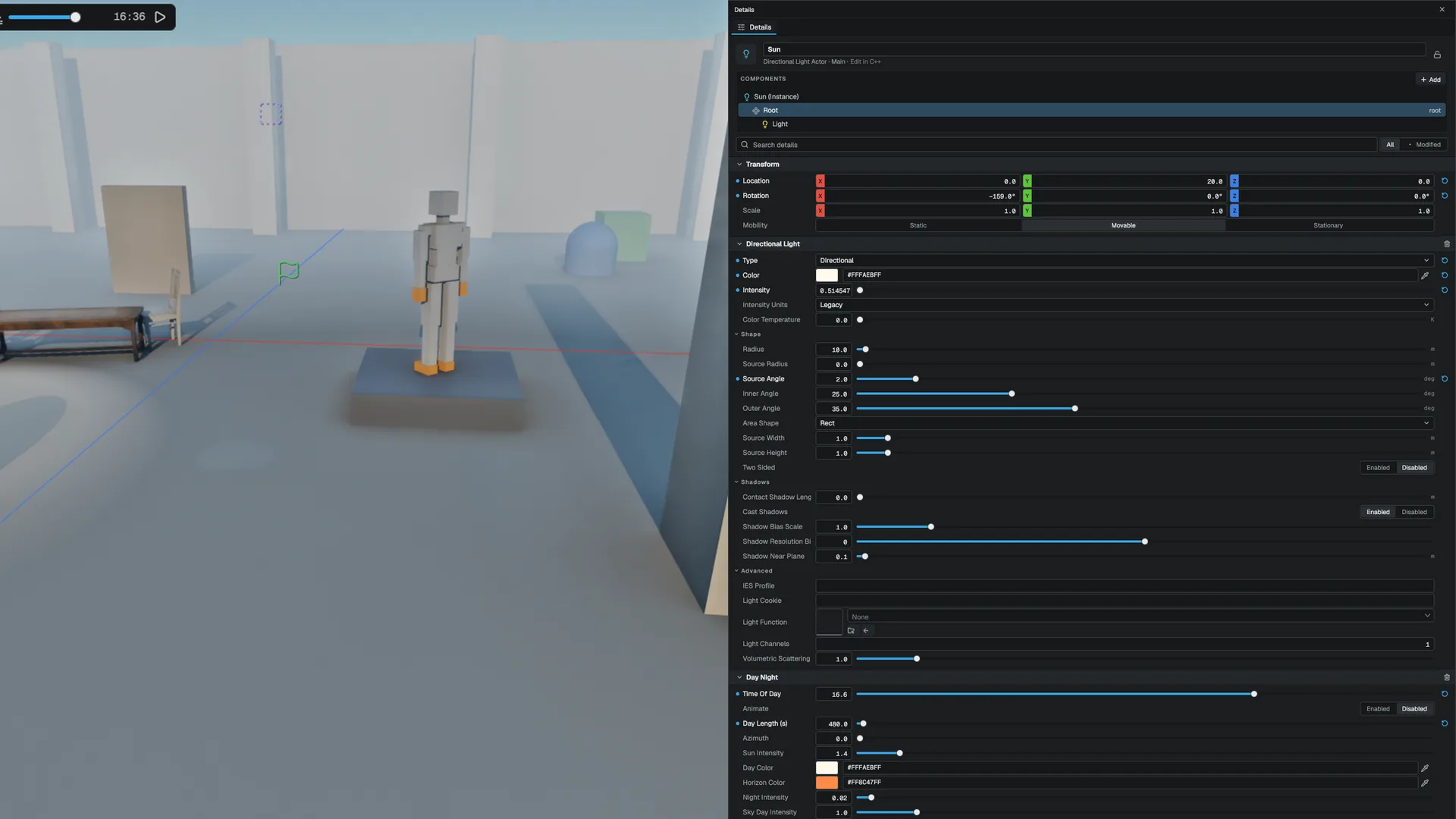
Give the sun a soft shadow
- Use High or above
PCSS is a High and up feature. Force it on a lower tier with
r.Shadow.Soft 1. - Set the Source Angle
Select the directional light, open Shape in the Details panel and raise Source Angle. Larger values give wider penumbrae farther from the contact point.
- Check the ceiling
If very distant occluders still look sharp, the penumbra is hitting
r.Shadow.MaxPenumbraTexels. Raise it with care: it widens the filter.
Virtual shadow maps for the sun
At Epic and up the sun also renders into a virtual shadow map: a clipmap of camera-anchored levels over a shared page pool. Only pages under visible receivers get memory, static casters render once into cached pages, and moving or skinned casters re-render their pages. The resolve traces several short rays across the sun's disc through the map for soft, contact-hardening shadows (r.VSM.SmrtRays).
Where virtual pages cover a pixel, they decide the sun shadow. Where they do not (an unmapped or stale page, past the coarsest level), the cascades answer. At most r.VSM.PageBudget pages are redrawn per frame, so a sun move never hitches; stale pages show the cascade shadow until they are redrawn.
GPU foliage and terrain are not drawn into virtual pages, so their shadows come from the cascades. Once the virtual map is steady, the cascades draw only terrain and GPU foliage (r.VSM.CsmCasters).
r.VSM forces the layer on (1) or off (0) at any tier; -1 follows the tier.
SDF far shadows
Past the cascade range, the sun does not fall back to fully lit from Medium up. It cone-traces the distance field toward the sun, using the light's Source Angle as the cone (r.Shadow.SdfFar, r.Shadow.SdfFarSteps). The distance field is centred on the camera and covers a limited range, so this helps most in dense interiors and scenes with a short shadow distance.
Ray-traced sun shadows
At Cinematic, a pre-pass casts r.RTShadows.Samples rays per pixel inside the sun's disc through the ray-tracing scene and accumulates them over frames. The lighting reads the result instead of the cascade and virtual-map lookup, so contact shadows are exact with no cascade seams and no bias to tune. Past the cascade fade the result is combined with the SDF far shadow.
- It needs ray query. On D3D12 and Vulkan it uses a ray-tracing pipeline whose hit groups alpha-test masked casters exactly; on Metal it uses an inline ray query.
- It runs on the primary view only; secondary editor views keep the cascades.
- Force it on another tier with
r.RTShadows 1.
See Ray tracing.
Many shadowed lights: MegaLights
The budget bounds how many local lights get a shadow map. MegaLights, at Epic and Cinematic in a project that turns on MegaLights (Project Settings > Rendering > Features, off for a new project), takes the shadow-casting lights that lost the budget and shades them stochastically: each pixel importance-samples a few of them (r.MegaLights.Samples), traces one shadow ray per sample, then denoises over time and space (r.MegaLights.Denoise). The deferred lighting pass skips those lights, so nothing counts twice. Shadow rays use the ray-tracing scene when one exists and a screen-space depth march otherwise.
MegaLights is a sampling and denoising implementation, not a full ReSTIR stack. Expect visible noise at one sample per pixel, and note that lights shaded by MegaLights ignore their light function.
Light a scene with hundreds of lamps
- Use Epic or force MegaLights
Turn on MegaLights in Project Settings > Rendering > Features, then switch to Epic or set
r.MegaLights 1. - Mark the lights as shadow casters
Turn on Cast Shadows on each light. The most important lights still get shadow maps; the rest are shaded by MegaLights.
- Add a ray scene for better occlusion
With any ray-traced feature active, MegaLights traces against the ray-tracing scene instead of the depth buffer.
Cloud shadows
Raymarched clouds (Epic and up; lower tiers draw a 2.5D cloud plane) build a sun-space transmittance map of the cloud layer and multiply it into the sun term and the volumetric fog (r.Clouds.Shadows). r.Clouds.ShadowStrength blends it and r.Clouds.ShadowFootprint sets the area it covers around the camera.
Casters and receivers
The mesh's Cast Shadows toggle decides whether it casts in every shadow system. Alpha-masked cutouts cast through their mask. Alpha-blended meshes with Cast Shadows on cast a partial, dithered shadow in proportion to their opacity (r.Shadow.Translucent, default 1). A mesh with Receive Shadows off skips every shadow term on its pixels.
Translucent surfaces and water receive the same shadows as opaque ones: the sun's cascades with soft shadows, the virtual shadow map where it covers them, SDF far shadows, cloud shadows, and the local shadow of every point, spot and Rect light. MegaLights shades opaque pixels only, so a light it manages shadows a translucent surface with a short screen-space ray (up to 4 m) instead.
Limits
- Translucent surfaces get no contact or capsule shadows, and the screen-space ray that stands in for MegaLights only sees occluders that are on screen.
- The virtual shadow maps do not draw GPU foliage, terrain or materials with world-position offset; those shadows come from the cascades.
- SDF far shadows only reach as far as the distance field.
- Area-light shadows are a projection from the light's centre, not a true area solve.
API reference
- SceneRenderer module:
FShadowAtlasAllocator,FLocalVsmPagePool,FShadowTileCache,SceneRenderer::Options - Renderer module:
DirectionalLight,SpotLight,PointLight,RectLight - Console variables
Engine sources
This page describes behavior implemented in these files of the engine repository, checked against commit 02a961ac2.
- Engine/Source/Runtime/SceneRenderer/Public/Renderer/ShadowAtlasAllocator.h
- Engine/Source/Runtime/SceneRenderer/Public/Renderer/LocalVsmPagePool.h
- Engine/Source/Runtime/SceneRenderer/Public/Renderer/ShadowTileCache.h
- Engine/Source/Runtime/SceneTypes/Public/SceneTypes/Components/LightComponent.h
- Engine/Source/Runtime/SceneTypes/Public/SceneTypes/Components/MeshRendererComponent.h