 Mowo
Physics
Rigid bodies, colliders, collision channels, character movement, scene queries and constraints on top of Jolt Physics.
Mowo simulates physics with Jolt Physics. You describe bodies with reflected ECS components, a PhysicsSystem steps the simulation at a fixed rate, and a PhysicsWorld answers ray casts, sweeps and overlaps. Each scene has its own physics world.
How a frame is simulated
The physics step runs at a fixed 1/60 s. Frame time accumulates, and the system takes as many fixed steps as fit, up to a cap. Engine/Source/Runtime/Core/Public/Core/Constants.h
- Frame delta
- Accumulator
- Sync kinematic poses
- Jolt step (1/60 s)
- Character controllers
- Interpolate render poses
- Collision events
| Console variable | Default | Effect |
|---|---|---|
p.MaxSubsteps | 8 | Maximum fixed steps per frame. Extra time is discarded so a long hitch cannot snowball. |
p.AsyncTick | off | Steps Jolt on a worker thread. Poses arrive one frame late, and any call that reaches Jolt in between waits for the step. |
p.Deterministic | off | Single-threaded Jolt jobs and contact events sorted by body pair, for bit-identical replays on the same binary and CPU |
p.Threads | -1 | Upper bound on Jolt worker threads; -1 uses the whole engine pool |
p.VelocitySteps | 10 | Solver velocity iterations per step (Jolt's default). More settle tall stacks and piles harder; fewer make the step cheaper. Read when the world comes up |
p.PositionSteps | 2 | Solver position iterations per step (Jolt's default): how hard penetrations are pushed apart. Read when the world comes up |
p.CharacterEdgeRemoval | off | Character controllers spend extra effort removing ghost contacts on the internal edges of a triangle mesh, so a capsule slides over seams instead of catching. Read when a controller is created |
p.OverlapDuringPhysics | on | Runs the frame's physics steps on a worker while the DuringPhysics actor tick group runs |
p.Debug | off | Master switch for the physics debug visualizer; p.DebugShapes, p.DebugContacts, p.DebugCOM, p.DebugAABB, p.DebugVelocity and p.DebugConstraints pick what it draws |
p.Stats | 0 | Logs a physics stats snapshot every N frames |
Max Substeps, Async Physics Tick, Velocity Steps, Position Steps and Character Mesh Edge Smoothing are also on the Engine › Physics page of Project Settings.
The solver steps trade stability for cost. The solver-steps-test row stacks sixteen 5 kg boxes and measures how far the top box ends up from where it should rest after four seconds: 0.38 m at 2 velocity and 1 position step, 0.038 m at the default 10 and 2, and 0.009 m at 30 and 6. Raise the counts for tall piles and towers; leave them alone for ordinary scenes.
Dynamic bodies render at a pose interpolated between the last two physics steps, so motion stays smooth at any refresh rate. Kinematic bodies, static bodies and character controllers are written without interpolation. PhysicsSystem
Determinism is a same-machine guarantee for replays and server rewind. Multiplayer is server-authoritative; nothing promises that two machines step to the same bits.
Make something physical
A physical object needs a collider for its shape. Add a rigid body to make it move.
- Add a Collider
Pick a shape:
Box,Sphere,Capsule,Cylinder,Tapered Capsule,Tapered Cylinder,Mesh,ConvexHullorHeightField, and size it.Radiusis the top end of a tapered shape andBottom Radiusthe other;Heightis the full length including the caps. ColliderComponent - Add a RigidBody
Choose
Static,KinematicorDynamicand set mass, friction, restitution and damping. RigidBodyComponent - Pick a collision preset
Set Collision Preset on the collider (see below).
Customexposes the per-channel responses. - Play
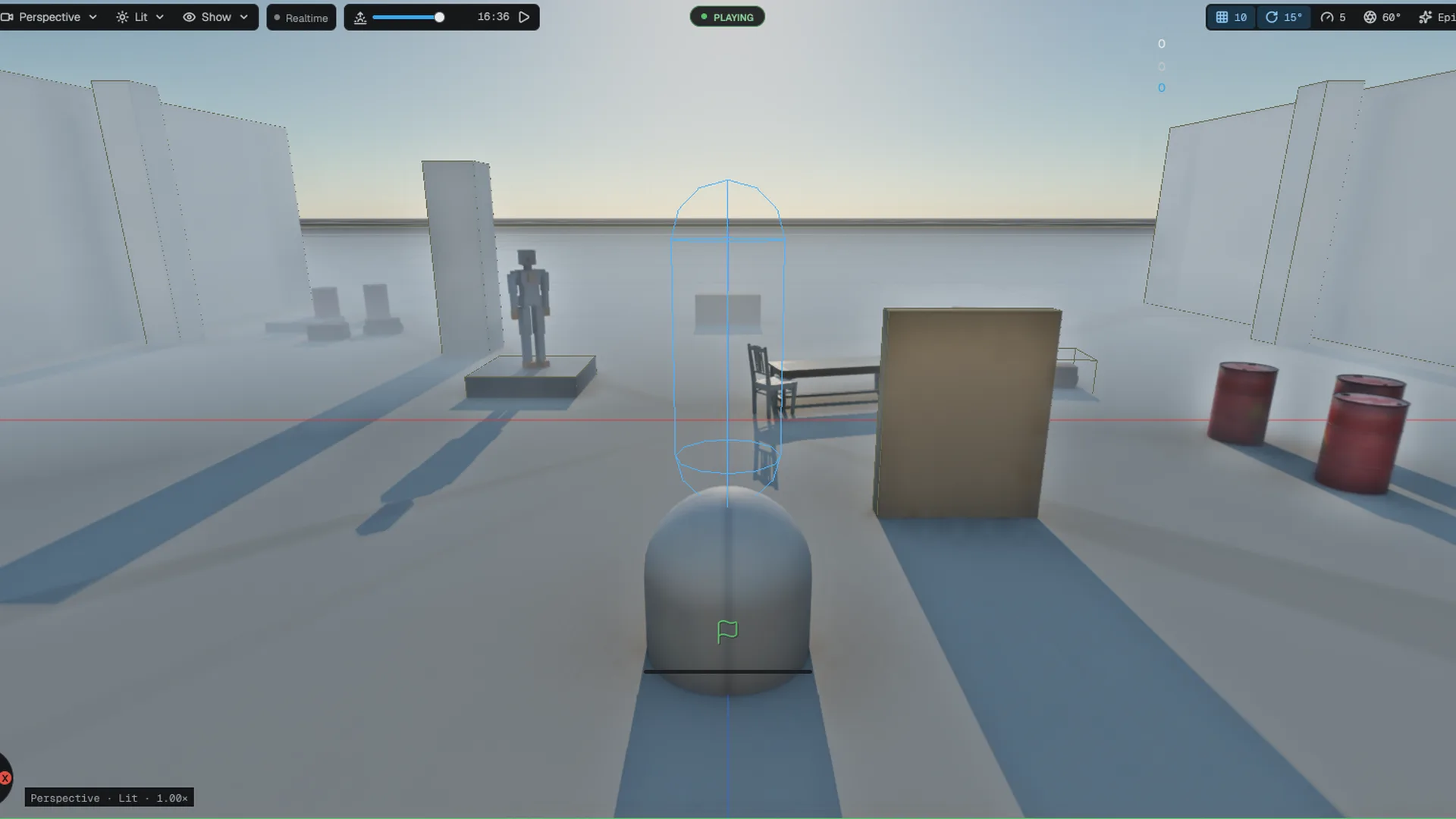
Press Play; dynamic bodies fall and collide. Turn on
p.Debugto see shapes.
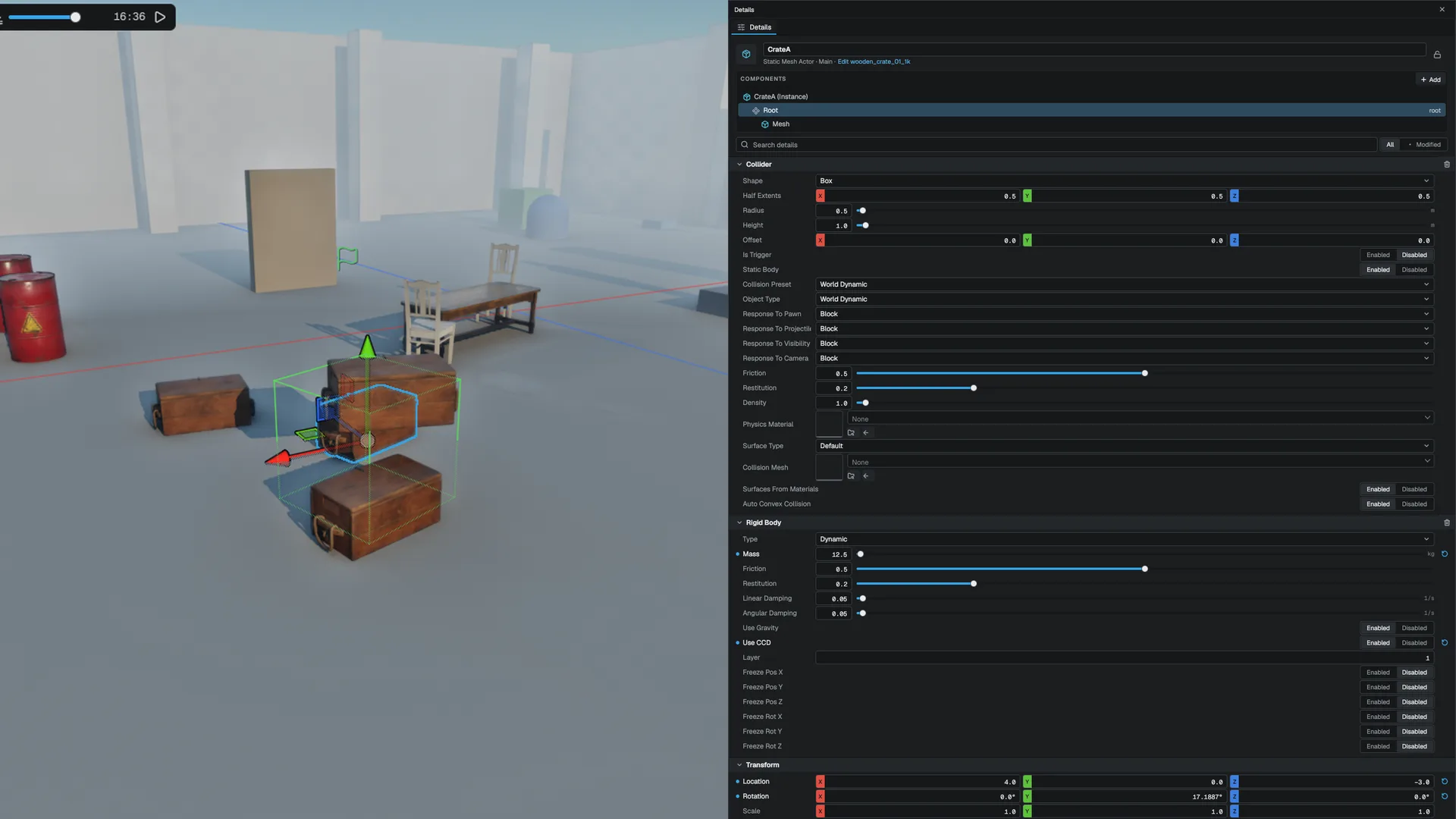
Useful RigidBodyComponent fields:
| Field | Notes |
|---|---|
type | Static, Kinematic or Dynamic |
mass | In kilograms |
friction, restitution | Override the collider's material only when moved off their defaults (0.5 and 0.2) |
linearDamping, angularDamping | Per second |
useGravity, useCCD | Gravity and continuous collision detection |
gravityScale | Multiplies gravity for this body: 0 floats, 2 falls twice as hard, negative rises. useGravity off still wins |
maxLinearVelocity, maxAngularVelocity | Speed caps in m/s and rad/s. Lower the linear one on a light fast prop so it cannot cross a thin wall in one step |
inertiaScale, centerOfMassOffset | Make a body resist or ease spinning, and move its centre of mass (a low offset self-rights a bottle). Read when the body is created |
allowSleeping, startAsleep | Keep a body awake, or place a settled prop asleep so it costs nothing until touched |
applyGyroscopicForce | Gyroscopic precession for fast spinners such as a thrown axe |
freezePositionX/Y/Z, freezeRotationX/Y/Z | Lock individual axes |
Compound colliders
One collider can hold several parts. The shape at the top of the component is the first part; Compound Shapes lists more, and each part has its own Shape, size, Offset and Rotation (degrees, applied about the part's own centre). Add parts with the + on the array row: a table with a drawer, a dumbbell, a chair. A selected collider draws every part in the viewport, rotated as built. Parts are saved with the scene and reloaded exactly, and editing a part rebuilds the body.
Compound Mode picks the Jolt structure behind them. Static builds the fastest tree and is right for anything whose parts never change. Mutable builds a compound Jolt can edit after the body exists, at a small cost per query; choose it only when a part will change at runtime. Parts of Mesh, HeightField and ConvexHull kind are not available as compound parts; use a primitive.
Bodies with a Mesh or HeightField collider are forced to Static, because Jolt cannot simulate them, and a warning is logged. Use ConvexHull for moving objects.
Collision channels
Colliders use an Unreal-style channel model. Engine/Source/Runtime/Physics/Public/Physics/CollisionChannel.h
- Object channels say what a body is:
WorldStatic,WorldDynamic,Pawn,PhysicsBody,Projectile,Trigger. - Trace channels are for gameplay queries:
Visibility,Camera,Weapon. - Responses are
Ignore,OverlaporBlock, one per channel. - Presets are named response sets:
NoCollision,WorldStatic,WorldDynamic,Pawn,PhysicsActor,Trigger,Projectile,Ragdoll, orCustom.
When two bodies meet, the pair ignores if either side ignores, blocks only if both block, and otherwise overlaps. An overlapping pair produces trigger events, not a physical response. A trace channel lets the same wall stop a Visibility trace while a Camera trace passes through it.
Characters
Characters do not use rigid bodies. They move with a kinematic character controller and a movement component with walking, falling, swimming, ladder and mantling modes. See Character movement.
A character honours the contact modifiers of what it touches: it can jump up through a one-way platform and is carried by a conveyor. It also stands on, and is carried by, a moving platform. Turn on Collide With Characters on the CharacterController component to make characters block each other even when they have no physical presence.
Scene queries
For new code, use the filtered query API on PhysicsWorld: QueryRay, QueryRayMulti, QuerySweep, QuerySweepMulti and QueryOverlap. PhysicsWorld An FQueryFilter selects a trace channel (or a layer mask), a list of bodies to ignore, whether sensors count, and whether static or dynamic bodies are included. Each FQueryHit already carries the entity behind the body and the surface type. Engine/Source/Runtime/Physics/Public/Physics/PhysicsQuery.h
#include "Core/Platform.h"
#include "ECS/World.h"
#include "Game/AActor.h"
#include "Game/MWorld.h"
#include "Physics/PhysicsQuery.h"
#include "Physics/PhysicsSystem.h"

static bool TraceAhead(Mowo::AActor* self, const Mowo::Vec3& direction, float range, Mowo::FQueryHit& hit) {
	Mowo::MWorld* world = self->GetWorld();
	Mowo::World* ecs = world ? world->GetECSWorld() : nullptr;
	Mowo::PhysicsSystem* physics = ecs ? ecs->GetSystem<Mowo::PhysicsSystem>() : nullptr;

	if (!physics) {
		return false;
	}

	Mowo::FQueryFilter filter;
	filter.channel = Mowo::ECollisionChannel::Weapon;
	filter.Ignore(physics->GetQueryBodyForEntity(self->GetBackingEntity()));

	return physics->GetPhysicsWorld().QueryRay(self->GetLocation(), direction, range, filter, hit);
}A ray that starts inside a shape hits it at distance 0. Any trace fired from a character, such as a weapon or sight line, must ignore that character's own body. PhysicsSystem::GetQueryBodyForEntity returns the right body for both rigid bodies and characters. PhysicsSystem
Beyond the closest hit, the filtered API offers:
- Existence tests.
QueryRayAny,QuerySweepAnyandQueryOverlapAnystop at the first body that qualifies and answer yes or no, which is all a spawn-point or line-of-sight check needs. - Point test.
QueryPointreports every body whose shape contains a point. - Ordered overlaps.
QueryOverlapreturns the bodies nearest first, withdistancemeasured from the centre of the query volume. - By profile.
FQueryFilter::SetProfilequeries as a probe with a collision preset (Ragdoll,Projectile, ...): a body is reported unless the pair would ignore each other, and a single-hit query stops only on a pair that would block. - Complexity.
complexityrestricts a query to simple collision (primitives and hulls, what characters and props hit) or complex collision (triangle meshes and terrain, what bullets and decals want). - Back faces.
backFacesset toIgnoremakes rays and sweeps skip back faces, and a ray skips the convex shape it starts inside;Collidereports them, so a ray fired from inside a box hits the inside face it leaves through. The default keeps each query's usual behaviour: a single ray hits a shape it starts inside at distance 0. - Triggers. Sensors are skipped unless
ignoreSensorsis cleared.
Multi queries report every overlap the trace passed through, in order, followed by the blocking hit. For hundreds of rays per frame, FTraceBatch sets up the filter once and spreads the rays across worker threads.
For quick checks from gameplay code and Visual Scripting, MGameplayStatics offers LineTraceByChannel, SphereTraceByChannel, their multi-hit forms, and OverlapSphereActors and OverlapBoxActors, which resolve hits to actors. LineTraceAny, SphereTraceAny, AnyOverlapSphere and AnyOverlapBox are the yes-or-no forms, PointOverlapActors lists the bodies at a point, and OverlapSphereByProfile takes a preset name such as Pawn. SetTraceComplexity (0 both, 1 simple only, 2 complex only), SetTraceBackFaces and SetTraceIgnoreTriggers set how the traces that follow behave, and ResetTraceOptions puts them back. MGameplayStatics
Contact events
For gameplay volumes, use MTriggerComponent or the placeable ATriggerActor; see Components.
For contacts between bodies, subscribe to PhysicsSystem::OnCollisionEnterEvents(). Each event names the entity and carries a CollisionInfo with the other entity, the contact point and normal, the relative velocity and the estimated impact impulse. PhysicsSystem::OnCollisionEnterEvents
#include "Physics/PhysicsSystem.h"

Mowo::PhysicsSystem* physics = nullptr;

physics->OnCollisionEnterEvents().Add([](uint64_t entityId, const Mowo::CollisionInfo& info) {
	if (info.impulse > 50.0f) {
	}
});SetOnCollisionEnter and its siblings hold a single callback each, and engine systems already claim them. Setting your own replaces theirs. Use the multicast event above.
Retune a live body
The RigidBody fields above are read when the body is created. To change a running body, use FPhysicsBodyTuning from C++ (SetGravityScale, SetMaxLinearVelocity, SetMaxAngularVelocity, SetAllowSleeping) or, from Visual Scripting and Wolang, MPhysicsStatics: SetActorGravityScale, SetActorMaxLinearVelocity and SetActorAllowSleeping. Each updates the component too, so a later body rebuild keeps the value. Raising the gravity scale of a body that settled while it was zero wakes it. FPhysicsBodyTuning
Push a body
PhysicsWorld applies forces and impulses to a body handle: AddForce, AddImpulse, AddForceAtPosition and AddImpulseAtPosition. Combine it with a trace to make a prop react to a shot at the point it was hit. PhysicsWorld
#include "Physics/PhysicsQuery.h"
#include "Physics/PhysicsSystem.h"

static void ShootProp(Mowo::PhysicsSystem& physics, const Mowo::Vec3& from, const Mowo::Vec3& direction) {
	Mowo::FQueryFilter filter;
	filter.channel = Mowo::ECollisionChannel::Weapon;

	Mowo::FQueryHit hit;

	if (!physics.GetPhysicsWorld().QueryRay(from, direction, 100.0f, filter, hit)) {
		return;
	}

	physics.GetPhysicsWorld().AddImpulseAtPosition(hit.bodyID, direction * 30.0f, hit.location);
}
The prop needs a Dynamic rigid body. Static and kinematic bodies ignore impulses.
Force fields and blasts
A ForceField component turns an entity into a volume that pushes the dynamic bodies inside it. Pick a Type, a Shape (sphere with Radius, or a box with Half Extents that follows the entity's rotation), a Strength and a Falloff (None, Linear or Quadratic toward the edge). ForceFieldComponent
| Type | What it does |
|---|---|
Radial | Pushes bodies away from the centre; a negative strength is a gravity well |
Directional | A constant push along Direction, in the entity's frame: a conveyor, a draft, a current |
Vortex | Swirls bodies around the entity's up axis; Inward Strength pulls them toward it |
Wind | Strength is a wind speed in m/s. Bodies are dragged toward it with Drag, so they never exceed it; Turbulence adds gusts at Turbulence Frequency |
Strength is a force in newtons; turn on As Acceleration to read it as m/s² so heavy and light bodies move alike. A body is inside when its centre of mass is. Fields act through the persistent-force channel, so the effect does not depend on how many fixed steps a frame runs.
For a one-off blast, FPhysicsForceFields::ApplyRadialImpulse in C++ and MPhysicsStatics::ApplyRadialImpulse in Visual Scripting and Wolang push every dynamic body in a radius with an impulse that fades to the edge; upwardsBias lifts the blast origin so props rise as well as scatter. MPhysicsStatics::AddActorForce and AddActorTorque push one actor for the current frame. FPhysicsForceFields
Contact modifiers
A ContactModifier component changes how one body behaves in its contacts, without touching the bodies it meets. It works on static, kinematic and dynamic bodies and needs a Collider. ContactModifierComponent
One Waylets other bodies pass through the platform from below and from the sides and land on the face pointing alongUp Axis(local to the body, so a tilted or rotating platform works). A body moving up through the platform faster than 0.5 m/s is let through; one that is dropped onto it or rests on it is blocked.Surface Velocityis a conveyor: anything in friction contact with the body is carried at that velocity (in the body's local space) while the body itself stays put. A body that was placed asleep on a belt stays asleep until something wakes it.Mass Scalechanges the mass the body presents in contacts only. A scale of 100 makes a prop that others cannot shove; 0.1 makes one that yields to a touch. Gravity and the body's own momentum are unchanged.
Character controllers read one-way and surface velocity too, through their own contact path. A character can jump up through a one-way platform and lands on it; standing on a conveyor carries it along. Mass scale does not apply to characters: a character pushes bodies with its Mass and Max Strength, set on the CharacterController component. The modifiers cost nothing in a world that has none.
Constraints
A ConstraintComponent joins an entity's rigid body to another entity, or to the world when none is connected. Types are Fixed, Hinge, BallSocket, Distance, Slider, SixDOF, Cone, Pulley, Gear, RackAndPinion and Path. ConstraintComponent
- Anchors are local to each body, measured from its center of mass.
SixDOFsets each linear and angular axis toFree,LimitedorLocked, and each axis can have a position or velocity motor.breakForceandbreakTorque(0 means unbreakable) let a joint snap. A break sets the component'sbrokenflag and broadcastsPhysicsSystem::OnConstraintBroken(). PhysicsSystem
Joint types
| Type | What it does | Fields |
|---|---|---|
Fixed | Welds the two bodies in their current pose | anchors |
Hinge | One free axis, optional limits and a motor | axisA, axisB, hingeLimit*, hingeMotor* |
BallSocket | A shared point, free rotation | anchors |
Distance | Keeps the anchors between a minimum and maximum distance, optionally springy | distanceMin, distanceMax, springFrequency |
Slider | One free translation axis with limits | axisA, axisB, distanceMin, distanceMax |
SixDOF | Per-axis Free, Limited or Locked, with motors | linearMotion*, angularMotion*, *Motor* |
Cone | A shared point whose two twist axes may drift apart by at most a half angle | axisA, axisB, coneHalfAngle |
Pulley | A rope over two fixed world points; one side rising pulls the other down | pulleyFixedPointA, pulleyFixedPointB, pulleyRatio, pulleyMinLength, pulleyMaxLength |
Gear | Couples the spin of the owner and the connected body by tooth count; the pair turn in opposite directions | axisA, axisB, gearTeethA, gearTeethB |
RackAndPinion | Couples the owner's spin to the connected body sliding along a rail | axisA (pinion), axisB (rack), rackTeeth, rackLength, pinionTeeth |
Path | Constrains the owner to a curve through pathPoints, with optional rotation locking, friction and a motor along the path | pathPoints, pathLooping, pathRotation, pathFriction, pathMotor* |
Gear and RackAndPinion mount their own axle (and rail) for the two bodies, hinged to the world at the anchors and axes you give, so one Constraint on the owner is the whole assembly. They need a connected body. A gear train with a middle wheel puts one Constraint on each meshing pair. Pulley fixed points are world positions. Path points are in the connected body's space, or world space when the owner is pinned to the world, and the owner is placed on the closest point of the path when the joint is built. A path with fewer than two points builds nothing.
Authoring a joint
Pick the other body in the Connected Body row of the Details panel: a drop-down of the scene's actors, with None pinning the owner to the world. The reference is stored as the actor's identity, so it survives saving and reloading the scene, entering Play, and duplicating or pasting a set of actors that includes both ends of the joint (the copy joins the copied partner, not the original).
- Collide Connected (on by default) decides whether the two joined bodies still collide with each other. Turn it off for a hinged door that would otherwise fight the frame it hangs on. The check is skipped entirely when no joint turns it off.
- Switching a joint off removes it and wakes its bodies; switching it on again rebuilds it from where the bodies are now.
- While a joint is selected the viewport draws both anchors, the axis of each side, a line between them and the joint's limits: the hinge arc, the slider's travel, the distance spheres, the six-axis linear box and twist range. The cone, pulley, gear, rack and path types draw their cone, rope, wheels, rail and curve. A joint with a break threshold turns from orange to red as its load approaches the limit; a broken joint is red and a switched-off one grey.
- A joint with a break threshold records the force and torque it carried last step in
loadForceandloadTorque.
From Visual Scripting and Wolang, MConstraintStatics switches a joint on and off, re-points it at another actor, toggles collision between the joined bodies, changes its break thresholds, reads its load, drives a hinge motor and re-forms a snapped joint with ResetConstraint. MConstraintStatics
Physics materials and surfaces
Each collider carries a physics material: friction, restitution, density and a surface type. When RigidBodyComponent::mass is 0, the mass comes from the collider's volume and density. frictionCombine and restitutionCombine (Average, Minimum, Maximum, Multiply) decide how two touching materials blend. PhysicsMaterial
To author a material once and reuse it, save it as a .physmat asset and reference it from the collider. A referenced asset replaces the collider's inline values. FPhysicsMaterialAsset
The surface type answers "what is this made of": Default, Concrete, Stone, Metal, Wood, Dirt, Grass, Gravel, Sand, Snow, Ice, Water, Mud, Glass, Carpet or Flesh. Footsteps, impact effects, decals and the scanner all read it from the hit. A mesh collider can carry one surface per triangle, and a terrain takes each collision square's surface from its heaviest painted layer. Engine/Source/Runtime/Physics/Public/Physics/SurfaceType.h
| Where | Read |
|---|---|
| A scene query | FQueryHit |
| Under a character | CharacterControllerComponent::groundSurface |
| Any body and sub-shape | PhysicsWorld::GetSurfaceAt |
Visual Scripting can read and change an actor's material, friction, restitution and surface through MPhysicsStatics. MPhysicsStatics
Static-mesh collision
A Mesh or ConvexHull collider with no vertices of its own takes its geometry from a mesh asset: the path in collisionMeshPath, or the entity's own mesh when that is empty. Sub-meshes named with Unreal's collision prefixes become collision instead of geometry and are never drawn: Engine/Source/Runtime/Physics/Public/Physics/MeshCollision.h
| Prefix | Becomes |
|---|---|
UCX_ | A convex hull |
UBX_ | A box sized from the piece's bounds |
USP_ | A sphere that encloses the piece |
UCP_ | A capsule along local Y |
A hull collider on a concave mesh with no authored collision is split into several hulls automatically. Set the hull budget in the Static Mesh editor's collision view. Cooked shapes are shared between every instance of the same mesh. Engine/Source/Runtime/Physics/Public/Physics/CollisionCooking.h
Voxel colliders and async cooking
A game that builds its world from a grid of cells (a block terrain, a destructible wall) should not turn every chunk into a triangle mesh: the mesh costs milliseconds to build on the game thread and has to be rebuilt on every edit. A voxel chunk body collides against the grid itself. Engine/Source/Runtime/Physics/Public/Physics/PhysicsVoxel.h
Mowo::FVoxelColliderDesc chunk;
chunk.origin = Vec3(0, 0, 0);      // minimum corner of the grid
chunk.voxelSize = 0.25f;           // metres
chunk.Resize(32, 32, 32);          // cells, all empty
chunk.SetSolid(3, 0, 5, true);     // one bit per cell

FPhysicsBodyId body = world.CreateVoxelChunkBody(chunk);   // static
world.UpdateVoxelChunk(body, editedChunk);                 // after an edit
Rays, sweeps, overlaps, point queries, dynamic bodies and character capsules all work against it. Under the hood each exposed cell face is two triangles with the silhouette edges marked active, the same flag a baked mesh carries, so a character walking across a flat floor of cells meets one flat surface, not a diagonal normal at every seam. A cell enclosed on all six sides is skipped. UpdateVoxelChunk swaps the bit grid on the existing body, moves its bounds in the broad phase and wakes the bodies resting on it; nothing is remeshed. The body is static and must not be scaled.
A chunk edge is treated as open: two chunks that meet at the same height have a silhouette edge along the border. Cloth does not collide with voxel chunks.
Hull, mesh and compound shapes can be cooked ahead of their bodies on the job system at background priority. Engine/Source/Runtime/Physics/Public/Physics/PhysicsShapeCook.h
FPhysicsShapeCookTicket ticket = FPhysicsShapeCooker::CookTriangleMesh(vertices, indices);

// later, on the game thread
if (ticket.IsReady()) {
    FPhysicsShapeBodyDesc desc;
    desc.shape = ticket.Get();
    world.CreateBodyFromShape(desc);
}
CreateBodiesFromShapes and CreateVoxelChunkBodies add a whole set through Jolt's prepare and finalize pair, and rebuild the broad phase once when the batch has 64 bodies or more (the threshold is a parameter). The bodies a ColliderComponent creates still build their shape on the game thread.
Physics interactables
One reflected component, PhysicsInteractable, turns a body into a door on a real hinge, a lever or valve with a progress threshold, a mass-gated pushable, or a breakable that reacts to weapon damage and hard impacts. Place APhysicsInteractableActor for a ready-made one. Engine/Source/Runtime/Game/Public/Game/Components/FPhysicsInteractableComponent.h
From Visual Scripting or C++, MPhysicsInteractableStatics opens and closes doors (SetDoorOpen, IsDoorOpen), engages levers, reads progress, and breaks objects (BreakObject, IsBroken). MPhysicsInteractableStatics
Simulation level of detail
When the scene has a focus point (the main camera by default), dynamic bodies farther than p.LODSleepRadius (150 m) are put to sleep and stay asleep until the focus comes back within p.LODWakeRadius (120 m). Bodies that were already asleep are left alone. p.LOD 0 turns this off. Set the focus yourself with PhysicsSystem::SetSimulationFocus. PhysicsSystem::SetSimulationFocus
Snapshots, rollback and replication
The physics world can be saved and restored whole, which is what rollback netcode, time rewind and "undo the last second" need. Turn on Deterministic Physics in Project Settings under Physics first: jobs then run in a fixed order, so the same inputs replay to the same bits on the same build and CPU. Rollback Snapshot Frames sets how many whole-world snapshots the ring keeps; each is a full copy of every body, constraint and the contact cache that warm-starts the next step.
From Visual Scripting or Wolang, call CapturePhysicsSnapshot(tick) once per tick, RestorePhysicsSnapshot(tick) to go back, and ResimulatePhysics(fromTick, toTick) to restore a tick and step forward to another. GetPhysicsChecksum and GetPhysicsSnapshotChecksum(tick) return a hash of the state as 16 hex digits; two peers that simulated the same inputs get the same string, so comparing them catches a desync. A snapshot is the world before its tick is simulated, and capturing a tick drops every later one, because a corrected past invalidates what was recorded after it.
In C++, FPhysicsResimulator::Run does the same with a callback that runs before each replayed step, the place to re-apply that tick's forces and impulses. It records every replayed tick back into the ring and reports the first tick whose state differs from the first run, so an input that changed shows up as a divergence at the tick after it and a non-deterministic step shows up as a mismatch with unchanged inputs.
For bodies one peer owns, PhysicsWorld::GetBodyState and ApplyBodyState read and write a body's pose, velocities and sleep state under a key you choose (an entity or net id), and ApplyBodyStates restores just a chosen set. FPhysicsBodyReplication turns those states into a packet: position to the millimetre, velocities to 1 cm/s, orientation in 16 bits per component, and each field only when it differs from the baseline the receiver already holds. A sleeping body costs a few bytes. FPhysicsSnapshotCodec does the same for whole-world snapshots, lossless against an earlier one. The client side of a replicated, predicted body is FPhysicsBodyReplication::Reconcile, which removes a fraction of the position and orientation error per call and snaps outright past a distance or angle; from a graph, CorrectActorBody(actor, serverPosition, serverVelocity, blend, snapDistance) does it for one actor.
Debug views and stats
With p.Debug 1 the physics world draws itself over the viewport. Each aspect has its own switch under Project Settings, Physics, Debug Draw, or as a console variable:
| Console variable | Draws |
|---|---|
p.DebugShapes | collider wireframes; sleeping bodies are dimmed |
p.DebugAABB | world-space bounding boxes |
p.DebugCOM | a cross at each centre of mass |
p.DebugVelocity | linear velocity arrows |
p.DebugContacts | contact normals, red for new contacts and orange for persisting ones |
p.DebugConstraints | constraint anchors |
p.DebugVehicles | each wheel's suspension travel and contact normal |
p.DebugIslands | a box around each island, the awake bodies joined by a contact or a constraint, each in its own colour |
p.DebugBroadPhase | each body's bounds tinted by its object layer, dimmer for the non-moving broad phase |
stat physics opens an overlay with the body count against the budget, the dynamic, kinematic and static split, how many are active and how many sleeping, the island count, contacts, constraints and the last and average step time. The island count is only worked out while the overlay or the island view is on, so the panel costs nothing when hidden. PhysicsStats
More physics
- Character movement: the character controller and its movement modes
- Vehicles, cloth and ragdolls: wheeled and tracked vehicles, cloth and soft bodies, ragdolls and physical animation
- Destruction: fractured and voxel destructibles
Related
- Components for how reflected components work
- Entity-component system for systems and phases
- Project settings
- Console variables
- API: Physics module, Game module
Engine sources
This page describes behavior implemented in these files of the engine repository, checked against commit 72eec6f7f.
- Engine/Source/Runtime/Physics/Public/Physics/PhysicsSystem.h
- Engine/Source/Runtime/Physics/Public/Physics/PhysicsWorld.h
- Engine/Source/Runtime/Physics/Public/Physics/PhysicsQuery.h
- Engine/Source/Runtime/Physics/Public/Physics/CollisionChannel.h
- Engine/Source/Runtime/Physics/Public/Physics/Components/RigidBodyComponent.h
- Engine/Source/Runtime/Physics/Public/Physics/PhysicsBodyTuning.h
- Engine/Source/Runtime/Physics/Public/Physics/PhysicsForceFields.h
- Engine/Source/Runtime/Physics/Public/Physics/PhysicsSnapshot.h
- Engine/Source/Runtime/Physics/Public/Physics/Components/ForceFieldComponent.h
- Engine/Source/Runtime/Physics/Public/Physics/Components/ColliderComponent.h
- Engine/Source/Runtime/Physics/Public/Physics/Components/ConstraintComponent.h
- Engine/Source/Runtime/Physics/Public/Physics/Components/CharacterControllerComponent.h
- Engine/Source/Runtime/Physics/Public/Physics/PhysicsDebug.h
- Engine/Source/Runtime/Core/Public/Core/FStatDisplay.h
- Engine/Source/Runtime/Core/Public/Core/Constants.h
- Engine/Source/Runtime/Game/Public/Game/MTriggerComponent.h
- Engine/Source/Runtime/Game/Public/Game/MGameplayStatics.h
- Engine/Source/Runtime/Physics/Public/Physics/PhysicsMaterial.h
- Engine/Source/Runtime/Physics/Public/Physics/PhysicsMaterialAsset.h
- Engine/Source/Runtime/Physics/Public/Physics/SurfaceType.h
- Engine/Source/Runtime/Physics/Public/Physics/MeshCollision.h
- Engine/Source/Runtime/Physics/Public/Physics/CollisionCooking.h
- Engine/Source/Runtime/Physics/Public/Physics/PhysicsShapeCook.h
- Engine/Source/Runtime/Physics/Public/Physics/PhysicsVoxel.h
- Engine/Source/Runtime/Game/Public/Game/Components/FPhysicsInteractableComponent.h
- Engine/Source/Runtime/Game/Public/Game/MPhysicsInteractableStatics.h
- Engine/Source/Runtime/Game/Public/Game/MPhysicsStatics.h
- Engine/Source/Runtime/Game/Public/Game/MConstraintStatics.h