 Mowo
Actors and the world
Write AActor subclasses, spawn and destroy them in an MWorld, and control when and how often they tick.
An actor (AActor) is a gameplay object you can place in a scene or spawn at runtime. It owns a tree of components, has a transform, and goes through a fixed lifecycle. A world (MWorld) holds the actors of one scene, drives that lifecycle and ticks them every frame. MWorld
How an actor comes to life
Registering an actor and starting play are two separate steps. Registration happens when you spawn an actor or when a scene loads. It creates the backing ECS entity and lets components publish their state, so a placed actor is visible and selectable in the editor without playing. BeginPlay only runs when the world begins play. AActor
- SpawnActor or scene load
- Backing entity created
- OnConstruct
- RegisterComponents
- BeginPlay
- Tick (every frame)
- EndPlay
| Stage | When it runs | Put here |
|---|---|---|
OnConstruct() | After the backing entity exists, before BeginPlay. The editor runs it again when instance properties change. | State derived from properties. Keep it idempotent. AActor |
RegisterComponents() | At registration, including scene load | Nothing gameplay-related. The default calls OnRegister on every component. |
BeginPlay() | Once per play session, when the world begins play, or during registration if the world is already playing | Gameplay startup |
Tick(float) | Every frame while playing (unless paced or disabled) | Per-frame logic |
EndPlay() | When the actor leaves the world | Teardown |
Each actor begins play at most once per play session. A Play, Stop, Play cycle in the editor runs BeginPlay exactly once per cycle. MWorld
When you override RegisterComponents, BeginPlay, Tick or EndPlay, call the base class version. The defaults are what forward the call to your components. AActor
Write an actor
This actor builds a root and a mesh in its constructor, exposes two tunable properties, and swings a panel open over time.
#pragma once

#include "Core/TObjectPtr.h"
#include "Game/AActor.h"
#include "Game/MSceneComponent.h"
#include "Game/MStaticMeshComponent.h"
#include "Math/MathUtils.h"
#include "Math/Quat.h"
#include "Math/Vec3.h"

#include <algorithm>

namespace Mowo {

MCLASS()
class ASwingDoor : public AActor {
public:
	MGENERATED_BODY()

	ASwingDoor() {
		MSceneComponent* root = CreateDefaultSubobject<MSceneComponent>("Root");
		SetRootComponent(root);

		m_Panel = CreateDefaultSubobject<MStaticMeshComponent>("Panel");
		m_Panel->meshType = "cube";
		m_Panel->AttachTo(root);
	}

	void BeginPlay() override {
		AActor::BeginPlay();
		m_Angle = 0.0f;
	}

	void Tick(float deltaSeconds) override {
		AActor::Tick(deltaSeconds);

		if (m_Angle >= OpenAngle) {
			return;
		}

		m_Angle = std::min(m_Angle + OpenSpeed * deltaSeconds, OpenAngle);
		m_Panel->localRotation = Quat::FromEuler(Vec3(0.0f, m_Angle * DEG2RAD, 0.0f));
	}

	MPROPERTY(EditAnywhere) MCATEGORY("Door")
	float OpenAngle = 90.0f;

	MPROPERTY(EditAnywhere) MCATEGORY("Door")
	float OpenSpeed = 45.0f;

private:
	MPROPERTY() TObjectPtr<MStaticMeshComponent> m_Panel;

	float m_Angle = 0.0f;
};

}
A few things to note:
CreateDefaultSubobject<T>(name)constructs a component, names it and adds it to the actor. Use it in constructors. AActor- The actor's transform is its root scene component's transform.
SetLocation,SetRotationandGetActorTransformread and write that root. AActor - Attaching a scene component to another makes its transform relative to the parent. MSceneComponent
m_Panelis held in aTObjectPtrinside anMPROPERTY, which keeps the reference visible to the garbage collector. See Objects and garbage collection.- Keep one reflected class per header and name the file after the class. The header tool reports a reflected type whose name does not match the header as an error.
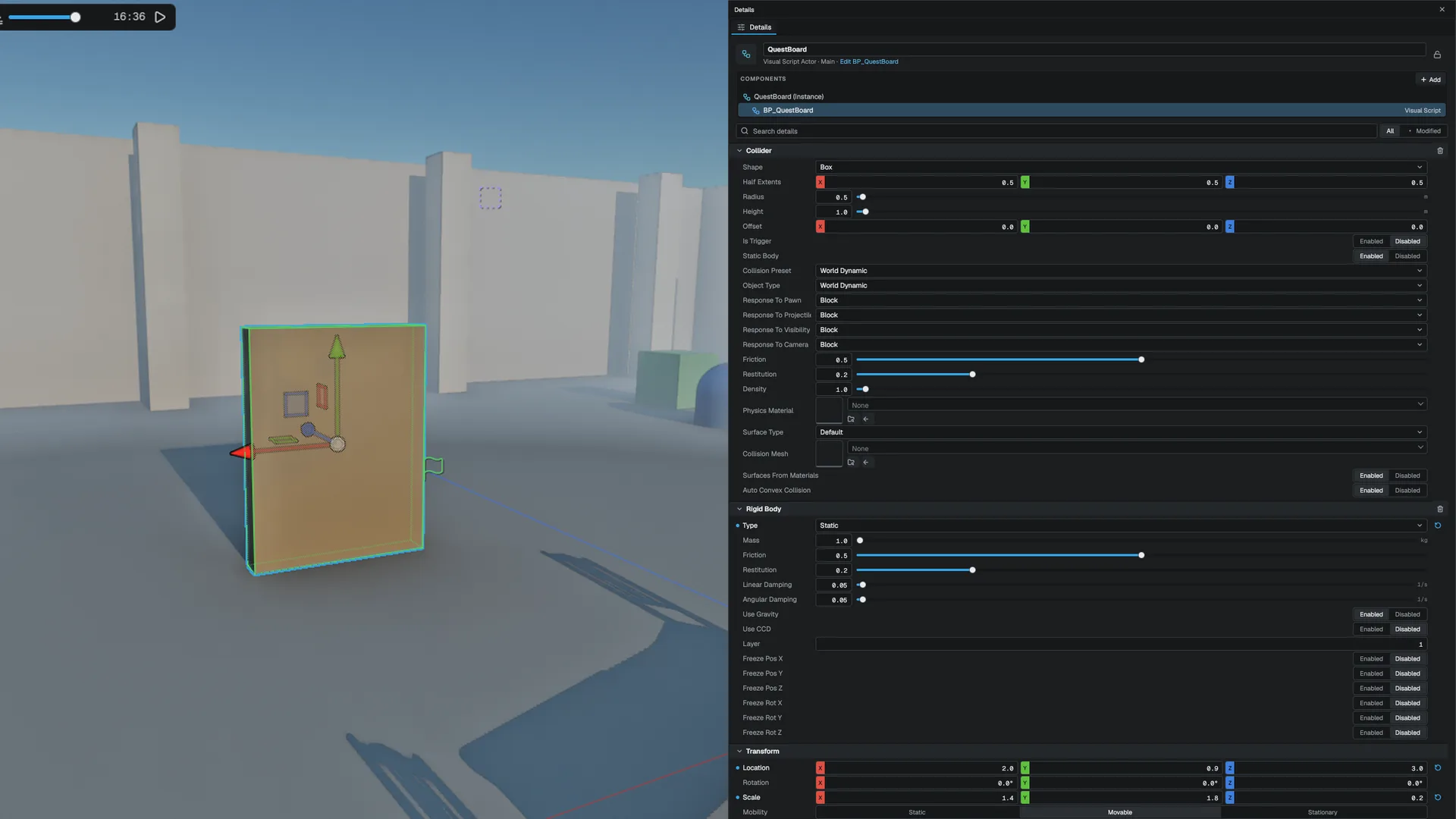
The Details panel shows your MPROPERTY fields too. Mark a field EditAnywhere and it gets an editable row in a section named for the actor's class; mark it VisibleAnywhere and the row is read-only. A field that differs from the class default is marked and has a reset arrow, an edit is one undo entry, and the value is saved with the scene. The same goes for the properties of the components on the actor, one section per component. A field of type TSubclassOf<T> gets a class picker listing the classes that derive from T. See Edit your C++ properties in Details.
Fields of the engine's own ECS-backed components (lights, meshes, cameras and the like) and of AActor, MActorComponent and MSceneComponent themselves are edited through the reflected component sections, not in this one. A MCLASS that overrides RefreshMirror or PullFromMirror is treated the same way.
Spawn and destroy actors
MWorld::SpawnActor<T>() constructs an actor, registers it, and returns a TWeakObjectPtr. If the world is already playing, the new actor begins play during registration. MWorld
#include "Core/FName.h"
#include "Core/MClassRegistry.h"
#include "Game/APointLightActor.h"
#include "Game/MWorld.h"
#include "Math/Vec3.h"

static void SpawnLamps(Mowo::MWorld* world) {
	Mowo::TWeakObjectPtr<Mowo::APointLightActor> lamp = world->SpawnActor<Mowo::APointLightActor>();

	if (lamp.IsValid()) {
		lamp->SetLocation(Mowo::Vec3(0.0f, 3.0f, 0.0f));
	}

	Mowo::FActorSpawnTransform where;
	where.Location = Mowo::Vec3(4.0f, 3.0f, 0.0f);

	Mowo::MClass* cls = Mowo::MClassRegistry::Get().FindByName(Mowo::FName("APointLightActor"));
	Mowo::AActor* second = world->SpawnActorByClass(cls, {}, &where);

	if (second) {
		world->Destroy(second);
	}
}
The spawn functions:
| Function | Use it when |
|---|---|
SpawnActor<T>() | You know the C++ type at compile time |
SpawnActorByClass(cls, preRegister, transform) | You have a runtime MClass, for example from a name. The pose is applied before OnConstruct and BeginPlay. MWorld |
SpawnActorFromTemplate(name, ...) | You want an instance of a named template registered in FActorTemplateRegistry MWorld |
Destroy(actor) | You want the actor gone. It calls EndPlay, removes the actor from the list and deletes it. MWorld |
Do not keep a raw AActor* across frames. Store the TWeakObjectPtr that SpawnActor returns and check IsValid() before use. A weak pointer turns invalid as soon as its target is destroyed or collected.
EndPlay does not take a reason parameter. Read it with GetEndPlayReason(): Destroyed, RemovedFromWorld, PlayEnded or WorldTornDown. Override Destroyed() for logic that should run only on an explicit MWorld::Destroy. AActor
Class defaults
Every reflected class has a class default object (CDO). SpawnActorByClass copies the CDO's reflected values onto the new actor, and the scene writer saves only the properties that differ from it. Raising a default in C++ therefore reaches every placed instance that never overrode that field. MObject Only value properties take part in this; pointers and containers are rebuilt by constructors and BeginPlay.
Control ticking
Each actor ticks in one of four groups. The default is PrePhysics.
| Group | Runs |
|---|---|
PrePhysics | Before the physics step (default) |
DuringPhysics | Also before the step, after PrePhysics. Mowo does not split the step. |
PostPhysics | After the ECS update, so bodies have their new poses |
PostUpdateWork | Last |
Set these in the constructor:
| Setting | Effect |
|---|---|
primaryTickGroup | Which group the actor ticks in |
canEverTick = false | The actor never enters the tick schedule. Use it for static scenery. AActor |
tickInterval | Seconds between ticks. Tick receives the accumulated delta, so integrating code stays correct. AActor |
CustomTimeDilation | Per-actor multiplier on top of the world's time dilation. 0 freezes the actor. |
AddTickPrerequisite(other) | Tick after other within the same group. Cycles fall back to registration order. AActor |
Tick in the editor
ShouldTickInEditor() returns false by default. Override it to return true and implement TickInEditor(dt) to have the edit world tick the actor, within the ed.TickBudgetMs budget, for edit-mode previews. IsEditorWorld() (on the actor and on MWorld, with MWorld::IsPlayWorld() as its opposite) tells constructor and OnConstruct code which world it is in. AActor MWorld
Viewers
FViewerRegistry::GetViewers(world) returns every point of view a world is looked at from, with position, forward vector, field of view, clip planes, a viewport id and a kind: editor viewport, Play In Editor player or game camera. Use it for distance-based streaming, level of detail or generation in actors and scene systems alike, without knowing which host runs. FViewerRegistry
tickInterval is the cheapest way to cut cost for things that do not need per-frame updates, such as distant AI or ambient effects.
MWorld::Tick(dt) runs all four groups back to back with no physics between them. Only the scene's runtime path interleaves the physics step, so headless tools that call MWorld::Tick directly do not get the pre- and post-physics distinction. AActor
World time, pause and timers
The world presents the engine's frame clock rather than owning one. Use GetTimeSeconds(), GetDeltaSeconds(), SetPaused() and SetTimeDilation() for global time. SetWorldPaused() and SetWorldTimeDilation() add a second, per-world axis; a paused world fires no timers and ticks no actors. MWorld
Timers set through GetTimerManager() belong to the world and die with it, so they cannot fire into a torn-down actor. MWorld
#include "Core/FTimerManager.h"
#include "Game/MWorld.h"

static Mowo::FTimerHandle s_Fuse;

static void ArmFuse(Mowo::MWorld* world) {
	world->GetTimerManager().SetTimer(s_Fuse, []() {
		s_Fuse = Mowo::FTimerHandle();
	}, 3.0f, false);
}
A non-looping timer clears itself after it fires; pass true as the last argument for a looping one. FTimerManager
World subsystems
A world subsystem is a singleton scoped to one world. MWorld::GetSubsystem<T>() creates it on first use, calls Initialize(world), and destroys it with the world. MWorld Derive from MWorldSubsystem and override Initialize and Deinitialize. Engine/Source/Runtime/Core/Public/Core/MSubsystem.h
Tags
Actors carry hierarchical gameplay tags such as Damage.Physical.Slash. HasTag matches hierarchically, so a query for Damage matches that actor; HasTagExact does not. Tags are stored as strings so they serialize and show in the Details panel. AActor
Transforms and hierarchy
On the ECS side, every entity's position lives in a TransformComponent. Its rotation is stored in radians and edited in degrees, and there is no dirty flag: the transform system compares against the last values it saw. TransformComponent The world copies each actor's root transform into its entity every frame, so you normally never touch this component for actor-based code.
Parenting between entities uses a linked-list RelationshipComponent. Never edit its links directly. Use the static functions on HierarchyHelpers: SetParent, RemoveParent, IsAncestorOf, GetChildren and ForEachDescendant. HierarchyHelpers
Pool short-lived actors
Spawning and destroying hundreds of projectiles or impact markers costs entity creation and garbage-collection work. FActorPool keeps instances of one class and recycles them. FActorPool
#include "Core/FName.h"
#include "Core/MClassRegistry.h"
#include "Game/MWorld.h"
#include "Gameplay/ActorPool.h"
#include "Math/Vec3.h"

Mowo::MWorld* world = nullptr;
Mowo::FActorPool pool;
pool.Initialize(world, Mowo::MClassRegistry::Get().FindByName(Mowo::FName("ADecalActor")), 32);

Mowo::AActor* marker = pool.Acquire();
marker->SetLocation(Mowo::Vec3(1.0f, 0.0f, 2.0f));
pool.Release(marker);
pool.Shutdown();Initializebuilds the prewarm instances and parks them out of the world.Acquireresets the instance to its class defaults and registers it again, soOnConstructandBeginPlayrun as for a fresh spawn. An empty pool grows on demand.ReleaserunsEndPlayand removes the backing entity. Weak pointers to a released actor stay valid, because the object is still alive.MWorld::EjectActorandMWorld::AdoptActorare the two transitions the pool uses, if you need your own pooling scheme. MWorld::EjectActor
Find actors
MLevelStatics answers the usual "what is near me" questions, and Visual Scripting exposes the same functions as nodes. MLevelStatics
| Function | Returns |
|---|---|
FindActorByName(name) | The actor with that name, or null |
FindNearestActorOfClass(class, origin) | The nearest actor of a class or subclass |
FindActorsOfClassInRadius, FindActorsWithTagInRadius, FindActorsInRadius | A count; read the results, nearest first, with GetFoundActor(i) and GetFoundActorDistance(i) |
GetActorCount() | How many actors the world holds |
Placeable actors
Everything you place in the editor is an actor. The Game module ships a thin actor class per placeable concept, such as AStaticMeshActor, APointLightActor, ACameraActor, AAmbientSoundActor, AParticleEmitterActor, ADecalActor, ATriggerActor and APlayerStart. Each is a root scene component plus the component that owns the matching ECS data. FPlaceableActorRegistry lists them for the editor's Place Actors panel. A class you write becomes placeable by deriving from a placeable actor class. FPlaceableActorRegistry
How actors are saved
An actor is saved on the scene entity that backs it. The Actor block stores the class name and only the properties that differ from the class default object, or from the actor's template when it was spawned from one. FActorTemplateRegistry
Entity "Door" {
    Transform {
        position: vec3(0.0, 0.0, 4.0)
    }
    Actor {
        class: "AStaticMeshActor"

        Component "Mesh" {
            class: "MStaticMeshComponent"

            Properties {
                meshType: "cube"
            }
        }
    }
}
Change levels
MGameplayStatics::TravelToScene(path) loads another scene and tears the current one down. Every actor in the current scene is destroyed, so finish cleanup first. MGameplayStatics Under it, FTravelManager::RequestTravel queues the change for the host to apply at a safe point. FTravelOptions::CarryPlayerState carries the player's health and movement mode into the new scene. FTravelManager To keep data across levels, store it on the game instance; see Gameplay framework.
Related
- Components for actor components and ECS components
- Gameplay framework for game modes, pawns and controllers
- Outliner and Details for editing placed actors
- Play in editor for how Play and Stop drive
BeginPlayandEndPlay - API: Game module, Core module, Components module
Engine sources
This page describes behavior implemented in these files of the engine repository, checked against commit 38224a3a8.
- Engine/Source/Runtime/Game/Public/Game/FViewerRegistry.h
- Engine/Source/Runtime/Game/Public/Game/AActor.h
- Engine/Source/Runtime/Game/Public/Game/MWorld.h
- Engine/Source/Runtime/Game/Public/Game/MSceneComponent.h
- Engine/Source/Runtime/Core/Public/Core/MSubsystem.h
- Engine/Source/Runtime/Core/Public/Core/FTimerManager.h
- Engine/Source/Runtime/Core/Public/Core/MObject.h
- Engine/Source/Runtime/Components/Public/Components/HierarchyHelpers.h
- Engine/Source/Runtime/Components/Public/Components/TransformComponent.h
- Engine/Source/Runtime/Game/Public/Gameplay/ActorPool.h
- Engine/Source/Runtime/Game/Public/Game/MLevelStatics.h
- Engine/Source/Runtime/Game/Public/Travel/FTravelManager.h
- Engine/Source/Runtime/Game/Public/Game/MGameplayStatics.h
- Engine/Source/Runtime/Game/Public/Game/PlaceableActorRegistry.h
- Engine/Source/Runtime/Game/Public/Game/FActorTemplateRegistry.h
- Engine/Source/Runtime/Core/Public/Core/TSubclassOf.h