 Mowo
Visual Scripting
Build gameplay classes by wiring nodes. Learn how a graph becomes a spawnable class, how it runs in the editor and in a packaged game, and where its limits are.
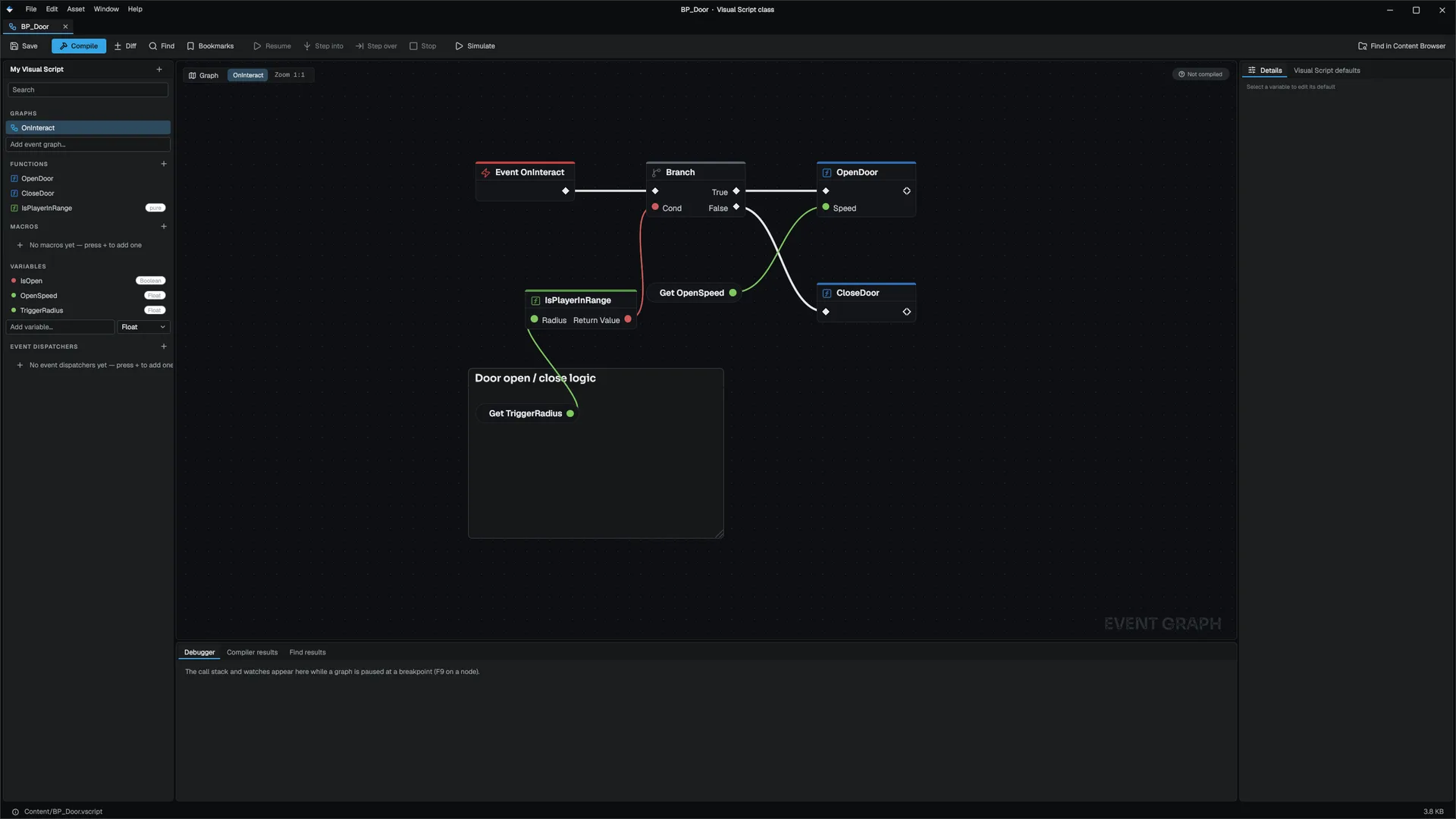
Visual Scripting lets you build gameplay logic by wiring nodes on a canvas instead of writing C++. The result is a real gameplay class: it has a name, it spawns, it ticks, it replicates, and other code finds it by name. If you have used Unreal Blueprints, the model is familiar.
Visual Scripting does not replace C++. C++ stays the base gameplay layer. A visual class calls reflected C++ functions, reads and writes reflected properties, and adds per-object behavior that does not belong in engine code.
In code and on disk, the runtime is the MowoEngine.VisualScripting module, a class is saved as a .vscript file, the C++ types start with VisualScript (VisualScriptVM, VisualScriptClass, AVisualScriptActor), and the IDE debugger uses the mowo-visual-script debug type. The docs use those names wherever you type or search them.
What you get
- Event graphs, functions with parameters and locals, pure functions, macros that are inlined when the class loads, and multicast event dispatchers.
- Classes that derive from an actor, pawn, character, player controller, game mode or game state, or from another visual class.
- Every
MFUNCTIONon every reflected C++ class as a node, with no registration step VisualScriptNodeCatalog. - Latent nodes (
Delay,Timeline, async actions) that suspend a graph and resume it on a later frame. - Replicated variables, RepNotify and RPC functions for multiplayer.
- Hot reload: a clean compile swaps the class under running actors, and they keep their variable values.
- A debugger with breakpoints, conditions, logpoints, stepping and live values in the editor, plus a Debug Adapter Protocol (DAP) server for VS Code.
- A text
.vscriptfile per class that diffs and merges like source code.
How a class runs
- .vscript file
- Index and parse
- Expand macros, validate
- Register synthetic MClass
- Spawn backing class
- VM runs event graphs
- The file. Each class lives in one
.vscriptfile under the project'sContent/folder. It holds the parent class, event graphs, variables, functions, macros, dispatchers, interfaces and component slots. See The .vscript file format. - Registration. The class registry resolves the parent, inlines every macro, runs the load validator and builds a synthetic
MClassVisualScriptClassRegistry. From then on,MClassRegistry::FindByNameandMWorld::SpawnActorByClasstreat it like a native class. - The backing class. The Visual Scripting module sits below the gameplay layer, so it cannot see
AActor. The gameplay layer registers one native backing class per base, and every instance spawns as the backing class for its nearest native parent:
| Parent, or anything derived from it | Spawns as |
|---|---|
ACharacter | AVisualScriptCharacter |
APawn | AVisualScriptPawn |
APlayerController | AVisualScriptPlayerController |
AGameMode | AVisualScriptGameMode |
AGameState | AVisualScriptGameState |
AActor, or a native class with no backing of its own | AVisualScriptActor |
- Execution. Each backing class owns an
FVisualScriptRuntime: the variable store, event dispatch, latent runs, replication and component slots FVisualScriptRuntime. On each lifecycle event the backing class runs its native base's code first, then the event graph of that name on the VM. The VM runs on an explicit exec stack, not the C++ call stack, which is why aDelaycan suspend a graph and resume it later VisualScriptVM.
In the editor
When a project opens, the editor indexes every .vscript under Content/ and keeps the index in Intermediate/VisualScriptClassIndex.mdfb. A file whose size and modification time have not changed is not opened again. A class registers the first time something asks for it by name, with its parents first, so a spawn, a placed actor or a child class finds it as if every class had loaded up front FVisualScriptClassIndex. Anything that lists classes, such as the action palette, registers every pending class first.
In a packaged game
There is no native back end: a packaged game runs every visual class on the same VM as the editor. Before the start scene loads, FVisualScriptRuntimeLoader queues every staged .vscript, from the loose Content/ folder or from the cooked archive, and each class registers when first asked for, parents first FVisualScriptRuntimeLoader. The cook always includes every .vscript under the content root, because scenes reference classes by name, not by path.
Hot reload
When you compile a class without errors, the editor pushes it live. The registry keeps the same MClass object and swaps the definition behind it. Each running instance notices the swap on its next graph run and rebinds without being respawned:
- Variables you changed on the instance keep their values.
- Variables still equal to the old class default take the new default. This is how raising a default reaches every placed instance that never touched it.
- Pending
DelayandTimelineruns, andDo Once,Gateand other latch states, reset. Their state was keyed by node position in the old graphs. - Cross-actor dispatcher bindings move to the new definition.
In a multiplayer Play-In-Editor session, the server and the extra clients are separate processes. When you save a .vscript while the session runs, the editor reloads it and publishes the change on the session's reload channel, and every process of the session reloads the same class between frames FPieHotReload.
Lifecycle events
Name an event graph after one of these events and the instance runs it when the event fires. A class with no graph of that name pays nothing for it: an instance with no OnHit graph never subscribes to contacts, and one with no InputAction. graph never polls input.
| Graph name | Runs when | Values set for the graph |
|---|---|---|
OnConstruct | The actor is constructed. Component slots are applied here. | |
BeginPlay | Play starts, or the actor spawns into a running world. | |
Tick | Every frame. Read the frame time with MGameplayStatics::GetWorldDeltaSeconds. | |
EndPlay | The actor leaves play. | |
Destroyed | An explicit destroy, before EndPlay. | |
AnyDamage | The actor takes damage. | DamageAmount, DamageInstigator |
OnHit | A physics contact begins on the actor or one of its placed slots. | PinPayload (other actor), HitLocation, HitNormal, HitImpulse |
OnTriggerEnter, OnTriggerExit | Something enters or leaves the class's Trigger component slot. | PinPayload (other actor) |
InputAction.<Name> | The input action started this frame. Add .Released or .Held for completion or every triggered frame. | InputActionValue |
A class opts into death by declaring a Bool variable named IsDead.
Any other graph name is an input pin: an entry point that C++, a timer, level wiring or another actor can fire by name. See Calling C++.
Current limits
- Containers do not cross into C++. An array, map or set cannot be passed to or returned from a reflected function. Read the elements out and pass those.
- Struct values need a registered struct. A struct parameter works when the struct is a copyable
MSTRUCT(orFTransform). Any other type is refused at the call. - Variables pick from four types in the editor. The Add variable field offers Bool, Int, Float and String. Containers appear when a write node first fills a variable.
- No delta time in
Tickscope. Read it withGetWorldDeltaSeconds.
Where to go next
The API reference for the module is at Visual Scripting API. The UI side of Visual Scripting (screen controllers and bindings) is in UI.
Engine sources
This page describes behavior implemented in these files of the engine repository, checked against commit 5922e6e5e.
- Engine/Source/Runtime/VisualScripting/Public/VisualScripting/VisualScriptGraph.h
- Engine/Source/Runtime/VisualScripting/Public/VisualScripting/VisualScriptClass.h
- Engine/Source/Runtime/VisualScripting/Public/VisualScripting/VisualScriptClassRegistry.h
- Engine/Source/Runtime/VisualScripting/Public/VisualScripting/VisualScriptClassIndex.h
- Engine/Source/Runtime/VisualScripting/Public/VisualScripting/VisualScriptVM.h
- Engine/Source/Runtime/VisualScripting/Public/VisualScripting/VisualScriptNodeCatalog.h
- Engine/Source/Runtime/Game/Public/Game/VisualScriptRuntime.h
- Engine/Source/Runtime/Game/Public/Game/FVisualScriptRuntimeLoader.h
- Engine/Source/Runtime/Game/Public/Game/PieHotReload.h