 Mowo
Templates
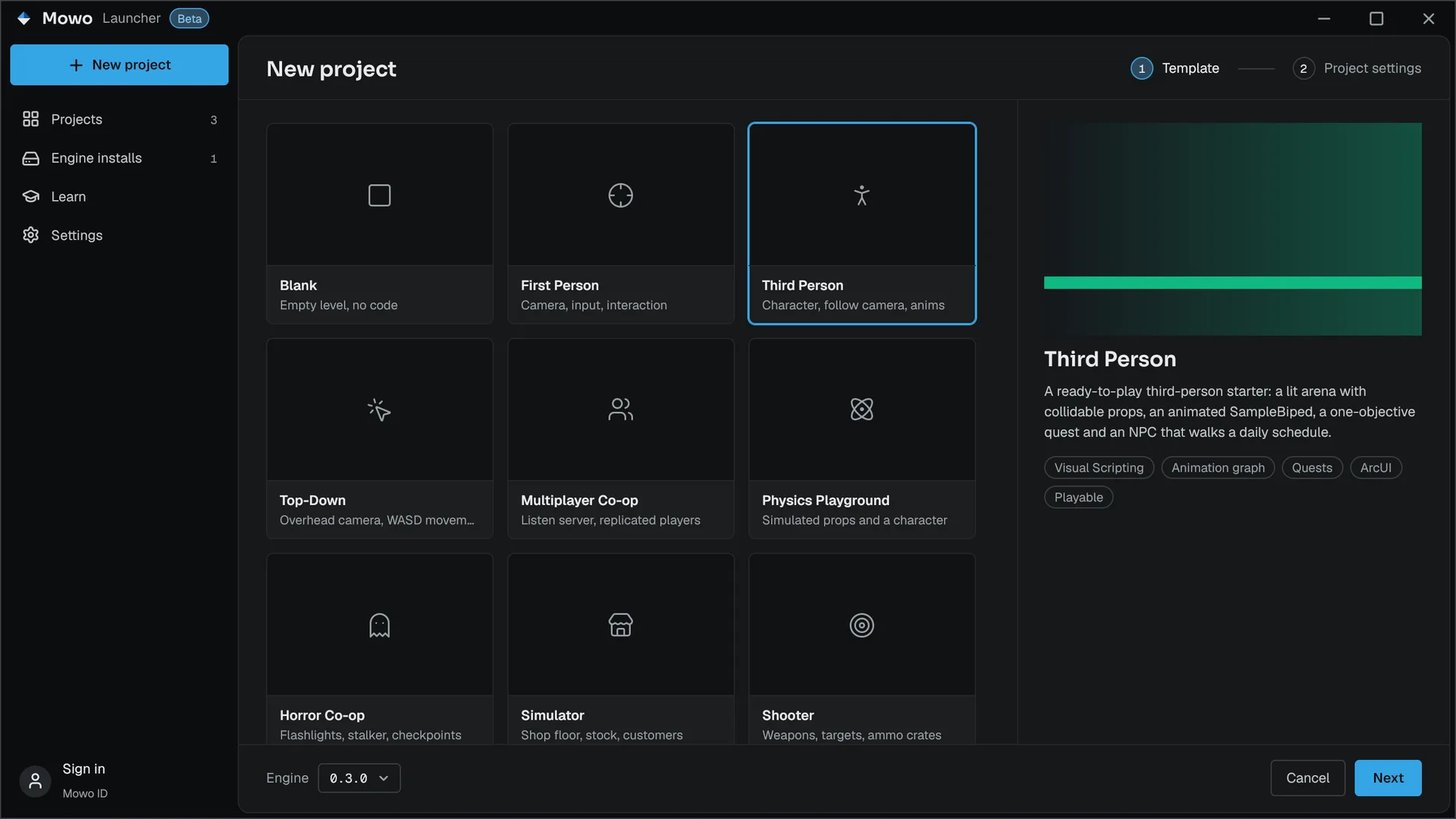
The project templates the launcher offers, what each one plays like out of the box, how its game module takes over, and how a template folder is described.
A template is a complete Mowo project under Templates/TP_<Name>/, beside the Engine/ folder. Creating a project from one copies the folder and renames it after your project. The engine ships 10 of them. Each folder has a README.md with its controls and a tour of its content.
The templates
Every template starts on Content/Scenes/Main.mmap. Every playable template's manifest starts on an engine game mode, so it plays before you build any C++. Its own game module carries a second game mode, the one you switch to once the module is built.
| Template | What you get | Starts with | Module game mode |
|---|---|---|---|
| Blank | An empty world: a floor and a sun, no code | none | none |
| First Person | A lit room, a carryable crate, an item pickup and a sliding door driven by a Visual Scripting class | AFirstPersonGameMode | AFirstPersonPlayerGameMode |
| Third Person | A lit arena, an animated SampleBiped, a one-objective quest and an NPC on a daily schedule | AThirdPersonGameMode | AThirdPersonPlayerGameMode |
| Top-Down | A walled arena under a steep follow camera, world-relative movement and a shrine you can use | ATopDownGameMode | ATopDownPlayerGameMode |
| Multiplayer Co-op | A listen server: one player hosts, others join, each gets a replicated third-person character | AThirdPersonGameMode | ACoopGameMode |
| Physics Playground | Stacks of simulated crates on a launch plate, a bouncy and a heavy ball, a ramp | AThirdPersonGameMode | APhysicsPlaygroundGameMode |
| Horror Co-op | A dark facility lit by the players' flashlights, a checkpoint and a wandering stalker that can hear you | AFirstPersonGameMode | AHorrorGameMode |
| Simulator | A small shop: carryable stock, a register, a customer on a schedule and a till HUD | AFirstPersonGameMode | ASimulatorGameMode |
| Shooter | A firing range: a hitscan rifle, a projectile launcher, target dummies and ammo crates | AFirstPersonGameMode | AShooterGameMode |
| Wolang Starter | A lit floor with a Wolang script actor that bobs in place and a script component that logs on a timer; Scripting enabled, no C++ | none | none |
The launcher shows them in that order (by SortKey) and labels every one except Blank Playable. It also tags a template with Visual Scripting, Animation graph, Quests or ArcUI when its content holds such assets.
Controls
The first-person and third-person sets share their bindings. Each template's Config/Input.ini and Content/Input/ assets hold them.
| Input | First Person, Horror Co-op, Simulator, Shooter | Third Person, Co-op, Physics Playground | Top-Down |
|---|---|---|---|
| W A S D | Move | Move, camera-relative | Move, world-relative |
| Mouse | Look | Orbit the follow camera | |
| Space | Jump | Jump | Jump |
| Left Ctrl / Left Shift | Crouch / sprint | Crouch / sprint | |
| E | Interact, pick up, drop | Interact, pick up, drop | Interact |
| Q | Throw what you carry | Throw what you carry |
The Shooter replaces throwing with weapons: left mouse fires (hold for full auto on the rifle) and R reloads. In the Simulator and Horror Co-op, the right mouse button also throws.
Switch to the module's game mode
The engine game modes give you the stock pawn. The template's module subclasses it: for example, the First Person module adds AFirstPersonPlayer, whose camera drops while crouched, and the Horror Co-op module adds AHorrorPlayer, which carries the flashlight.
- Build the module
In the editor, choose Build › Compile Game Module. See Your first build.
- Set the game mode
Open Edit › Project Settings…, go to Maps & Modes and set Game Mode Class to the template's module game mode from the table above.
In Horror Co-op, the stock first-person pawn has no flashlight, and the level has no directional light. Build the module and switch to AHorrorGameMode before you judge the lighting.
Host and join a co-op session
Multiplayer Co-op and Horror Co-op run as a listen server. Start the host and the clients with the player host and your project's manifest:
MowoGame.exe --project MyGame.mproject --host-session --port 7777
MowoGame.exe --project MyGame.mproject --connect <host-ip> --port 7777
In the editor, the Play menu's Play As Client runs several clients for you. See Multiplayer.
What is not finished
The template READMEs list their open seams. The ones you notice first:
- Shooter: the arena has no music, and the dummies count their kills but nothing shows a score.
- Simulator: the till amount is a HUD binding that Open Shift sets through a Visual Scripting graph. Nothing earns money yet.
- Horror Co-op: the stalker wanders on a schedule. It hears noise but does not investigate it, and the far-door stinger sound has no trigger.
How a template is described
Config/TemplateDefs.ini tells the launcher how to present the template and how a copy becomes your project. It is read by FTemplateDefs, under the section [/Script/AssetSystem.TemplateProjectDefs]:
[/Script/AssetSystem.TemplateProjectDefs]
Category=Games
DisplayName="First Person"
Subtitle="Camera, input, interaction"
Description="A ready-to-play first-person starter: ..."
Icon=crosshair
SortKey=10
bPlayable=True
bAllowProjectCreation=True
ModuleGameModeClass=AFirstPersonPlayerGameMode
+FoldersToIgnore=Binaries
+FoldersToIgnore=Build
+FoldersToIgnore=Intermediate
+FoldersToIgnore=Saved
+FoldersToIgnore=Media
+FilesToIgnore="%TEMPLATENAME%.mproject"
+FilesToIgnore="Config/TemplateDefs.ini"
+FolderRenames=(From="Source/%TEMPLATENAME%",To="Source/%PROJECTNAME%")
+FolderRenames=(From="Source/%PROJECTNAME%/Public/%TEMPLATENAME%",To="Source/%PROJECTNAME%/Public/%PROJECTNAME%")
+FilenameReplacements=(Extensions=("cs","cpp","h"),From="%TEMPLATENAME%",To="%PROJECTNAME%",bCaseSensitive=True)
+ReplacementsInFiles=(Extensions=("cs","cpp","h","md"),From="%TEMPLATENAME%",To="%PROJECTNAME%",bCaseSensitive=True)| Key | Meaning |
|---|---|
Category | Launcher grouping, Games by default |
DisplayName, Subtitle, Description | The card and preview text |
Icon | A Lucide icon id, drawn when Media/ has no image |
SortKey | Order in the launcher, low first (default 1000) |
bPlayable | Adds the Playable tag |
Language | Cpp, VisualScripting or Wolang: the wizard's language filter. Without it a template with Source/ is C++, one with a Scripts/ package is Wolang, and any other is Visual Scripting |
bAllowProjectCreation | False hides the template from the launcher |
ModuleGameModeClass | The module's own game mode, the one to switch to after building |
+Tags | Extra tags for the preview |
+FoldersToIgnore, +FilesToIgnore | What stays behind when the folder is copied |
+FolderRenames | Folders that move, such as Source/TP_FirstPerson to Source/<Project> |
+FilenameReplacements | Text replaced in file names with the listed extensions |
+ReplacementsInFiles | Text replaced inside files with the listed extensions |
%TEMPLATENAME% is the template folder's name and %PROJECTNAME% the new project's; both also come as _UPPERCASE and _LOWERCASE forms. A file already at the destination is kept, never overwritten. A template with Source/ needs a project name that is a C++ identifier, because it becomes the module and target names Engine/Source/Runtime/AssetSystem/Public/Project/TemplateDefs.h.
The new project's start scene and starting game mode come from the template's own TP_<Name>.mproject. Media/TP_<Name>.png is the card icon and Media/TP_<Name>_Preview.png the preview image. The preview is a real capture of the template's start scene on Direct3D 12 at 1920 by 1080, downscaled to a 16:9 PNG of 960 by 540 under 400 KB, taken from the scene's own spawn camera. The launcher draws it in a 16:9 well, so keep that aspect when you replace it with your own. template-matrix-test fails for a preview under 20 KB, off 16:9, or nearly flat.
Add your own template
Copy a template folder to Templates/TP_<YourName>/, rename its .mproject, Source/TP_<Name>/ and target files to match, and edit Config/TemplateDefs.ini. The launcher lists every folder under Templates/ whose Config/TemplateDefs.ini allows project creation, so it appears the next time the launcher starts.
Next steps
- Project layout for the folders every project has.
- Your first scene to edit the template's level.
Engine sources
This page describes behavior implemented in these files of the engine repository, checked against commit 0215df434.
- Engine/Source/Runtime/AssetSystem/Public/Project/TemplateDefs.h
- Templates/TP_Blank/Config/TemplateDefs.ini
- Templates/TP_Blank/TP_Blank.mproject
- Templates/TP_FirstPerson/Config/TemplateDefs.ini
- Templates/TP_FirstPerson/TP_FirstPerson.mproject
- Templates/TP_FirstPerson/README.md
- Templates/TP_ThirdPerson/Config/TemplateDefs.ini
- Templates/TP_ThirdPerson/README.md
- Templates/TP_TopDown/Config/TemplateDefs.ini
- Templates/TP_TopDown/README.md
- Templates/TP_Coop/Config/TemplateDefs.ini
- Templates/TP_Coop/README.md
- Templates/TP_PhysicsPlayground/Config/TemplateDefs.ini
- Templates/TP_PhysicsPlayground/README.md
- Templates/TP_HorrorCoop/Config/TemplateDefs.ini
- Templates/TP_HorrorCoop/README.md
- Templates/TP_Simulator/Config/TemplateDefs.ini
- Templates/TP_Simulator/README.md
- Templates/TP_Shooter/Config/TemplateDefs.ini
- Templates/TP_Shooter/README.md