 Mowo
Classes and inheritance
Parents, backing classes and native parents, member resolution, class and native defaults, and component slots.
Every visual class has a parent: a native C++ class or another visual class. The class inherits graphs, functions, variables and component slots from it. This page explains how that chain resolves, which native class actually runs an instance, where class defaults live, how a class tunes the C++ class it extends, and how component slots give a class its mesh, light or trigger.
The parent chain
A class's parent defaults to AActor VisualScriptClass. When the class registers, the registry builds a synthetic MClass whose super class is the parent you named. A visual parent's own synthetic class chains down to the native root, so IsA, IsChildOf and SpawnActorByClass behave as they would for native classes.
- BP_HeavyDoor (visual)
- BP_Door (visual)
- AActor (native)
Backing classes
When the declared native parent is one of the engine's common bases, the instance is an object of a native backing class that carries the graphs. The registry matches the declared parent against the registered backings VisualScriptClassRegistry::AddBackingClass:
| Native parent | Backing class | What the class gets |
|---|---|---|
ACharacter | AVisualScriptCharacter | Character movement, health and ACharacter's functions on self |
APawn | AVisualScriptPawn | Possession and the controller link |
APlayerController | AVisualScriptPlayerController | Input routing and possession |
AGameMode | AVisualScriptGameMode | Match rules and player spawning |
AGameState | AVisualScriptGameState | Replicated match state |
AActor | AVisualScriptActor | The actor surface |
A visual child inherits its visual parent's backing. Every backing class owns one FVisualScriptRuntime and forwards its lifecycle there after its native base's own, so a Character class behaves like an Actor class in the graph and a Tick graph reads where the character has already moved FVisualScriptRuntime. C++ that needs the visual state of any object that runs a visual class asks FVisualScriptRuntime::Of(object).
A parent name that does not resolve yet is left alone, because it may be a visual class that registers later. Classes register parents first, whatever the file order.
Native parents
Any other reflected actor class works as a parent: your own ACharacter subclass, a first-person or third-person character, a camera rig, a vehicle. The instance is a real object of that class, built by its own constructor, so it keeps its components, its camera, its input binding and every C++ rule it had. A host component is attached to it and runs the graphs MVisualScriptHostComponent. The actor reports your visual class from GetClass(), so IsA, spawning by class and saving all name the visual class while a cast to the native class succeeds.
- BP_Hero (visual)
- AFirstPersonCharacter (native, built as itself)
- host component runs the graphs
The graphs see the lifecycle events the host receives: OnConstruct, BeginPlay, Tick, EndPlay and Destroyed, input action events, hit and overlap events, and every reflected function of the native parent on self. AnyDamage stays with the backing classes, because it hooks the actor's own damage function, which a host component cannot intercept.
A parent that is exactly one of the backing parents in the table above keeps using the backing class. Everything below that parent, such as your own ACharacter subclass, is hosted on itself.
Component classes
A class whose parent is MActorComponent is a component class. Add it to an actor like any component. Its graphs run against the actor that owns it: self is the owning actor, and the lifecycle events follow the component's own register, begin play, tick and end play.
A component class under a more specific native component, such as a mesh component, is not supported yet: the registry reports the parent as incompatible and reparents the class.
Native defaults
A visual class can retune its native parent without code. Native defaults are property and value pairs for the parent's reflected properties, set in the class and applied once the parent is built, before OnConstruct FVisualScriptNativeDefaults.
| Part | Rule |
|---|---|
| Path | Property on the parent itself, or Component.Property on one of its components. |
| Value | Text in the property's own form: 2.5, true, an enumerator name, 1 2 3 for a vector, a;b for a string list. |
| Inheritance | A child's entry for the same path replaces its parent's. |
| Instances | The values become the class default, so a placed instance saves only what it changes. |
A path that names no reflected property, a value that does not read as the property's type (abc for a float, 1.5x) and a property type with no text form yet (object references, structs, arrays) are errors: the class logs each one when it registers and keeps the native value. A project can have at most 512 visual classes hosted on native parents; the next one fails to register with an error. Native defaults are stored in the .vscript file as NativeDefault blocks, see the file format.
In the Content Browser, New > Visual Script Class lists the common bases, then Other Actor Class and Component Class, which list every reflected actor or component class the project and engine define.
How members resolve
Lookups walk from the child to the root and take the nearest match. That gives Blueprint-style overriding:
| Member | Rule |
|---|---|
| Event graphs | A child graph named BeginPlay replaces the parent's BeginPlay. |
| Functions | A child function replaces the parent's function of the same name. |
| Macros | A child can use any macro in its chain. |
| Variables | A child redeclaring a variable replaces its default. Instances are seeded root first, then each child. |
| Dispatchers, interfaces | Found anywhere in the chain. |
| Component slots | Parents first. A child slot with the same name replaces the parent's type and defaults. |
A child's graph replaces the parent's graph of the same name. There is no automatic call to the parent version.
The load validator
When a class registers, a validator checks every graph against what it can actually call FVisualScriptClassValidator. A blocking issue is one that would abort the graph part-way: a call to a function that does not exist, an argument-count mismatch, a link past the end of the node table, a macro that survived expansion. A blocked graph does not start at all, instead of running until the broken node with half its side effects applied, and the log names the class, graph and node.
Blocking is per graph: a class with one broken event still runs its sound ones, and a blocked function is refused at the call site. Everything else is advisory: an undeclared variable read, an unknown dispatcher, a class reference or call whose owning class is not loaded yet (a plugin or game module may bring it later). A child inherits a block on a parent graph unless it overrides that graph. A hot reload that fixes the graph unblocks it.
Class defaults
Each variable's default is the class default. An instance keeps a copy of the defaults it was seeded with, and that copy decides what happens when the class changes:
- You change a default and compile
The registry swaps the definition behind the class.
- Each instance compares
On its next graph run, an instance compares each variable with the default it was seeded with.
- Untouched values follow
A value still equal to its old default was never overridden, so it takes the new default.
- Edited values stay
A value that differs is authored instance state. It survives the reload.
Per-instance overrides in a level
A placed instance can override variables marked Instance Editable in the level's Details panel. Only variables that differ from the class default are written to the scene, under VisualScriptVars on the actor. Component slot overrides are written under VisualScriptSlotOverrides as <slot>.<property>, and are read back before construction runs, so the class default cannot overwrite them. Reset a row to its default and the delta disappears from the scene.
Component slots
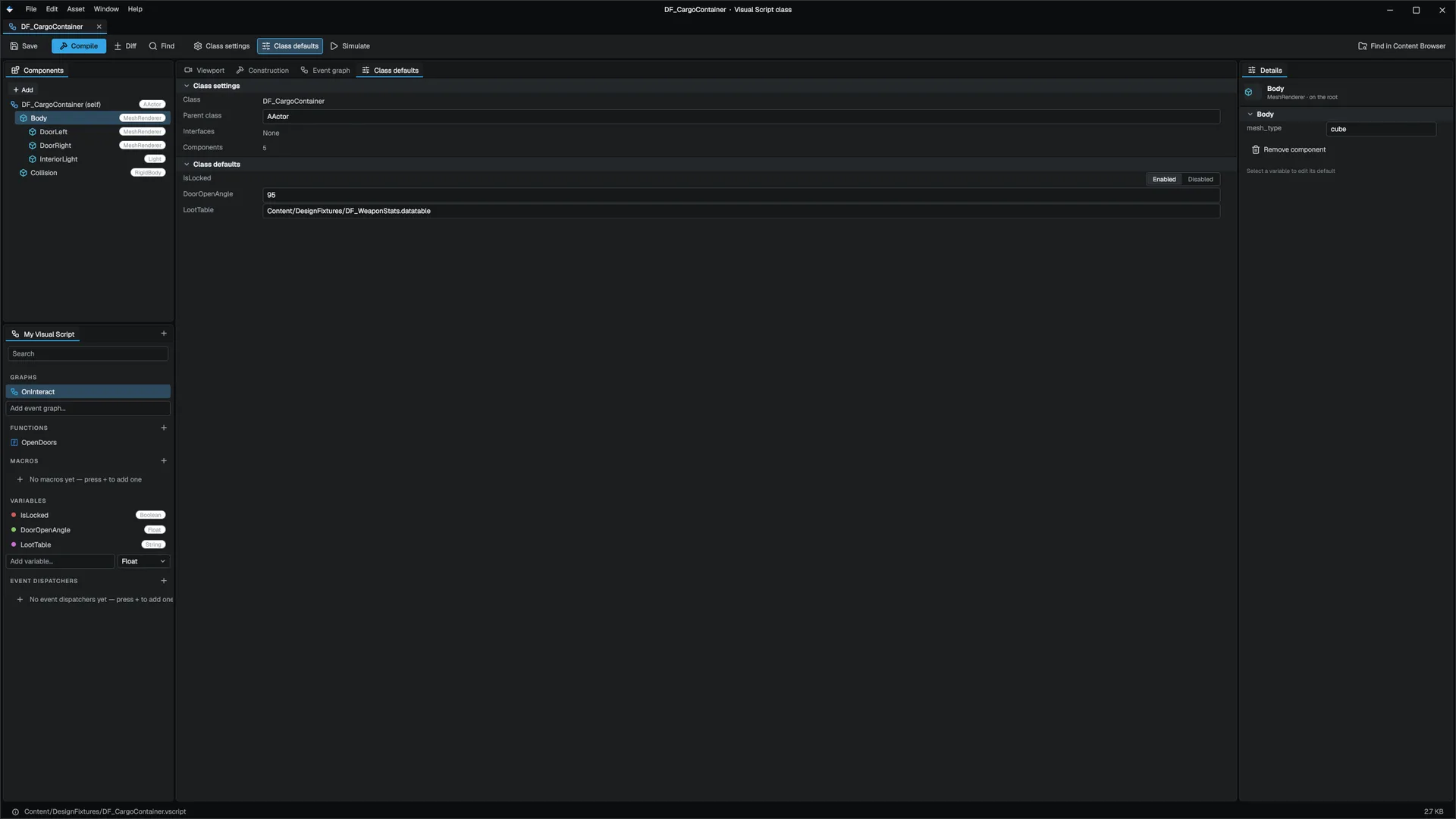
A component slot says "this actor carries component X with these defaults" VisualScriptComponentSlot. Slots are applied at OnConstruct, so every instance spawns with them attached.
Each slot has:
- a name, which is how children and instances override it;
- a component type, the reflected display name such as
MeshRenderer,LightorTrigger; - defaults, a list of property name and value pairs;
- optional placement: a location, rotation (radians) and scale, and an attach parent naming another slot.
A slot with no placement lands on the actor's own entity. A slot with a transform or an attach parent gets its own child entity under the actor. Attachment is resolved after every slot exists, so a slot may name a parent declared after it. Slot defaults cover bools, every integer width, floats, enums, vectors, quaternions, strings and asset paths. A property a slot default cannot express is reported by name.
A slot of type Trigger gives the actor a live trigger component and keeps it ticking, so overlaps run the class's OnTriggerEnter and OnTriggerExit graphs. The door how-to uses this.
Edit slots
- Add a component
In the Visual Scripting editor, click + in the My Visual Script header and pick a component, or use the Components panel once the class has one. A class with component slots opens in the class layout, with the Components panel and a Viewport tab that draws the slots.
- Set its defaults
Select the slot. Its property rows are the same reflected rows the level's Details panel uses.
- Save
Save. The editor writes the class and re-registers it, so placed instances pick up the change.
The standalone Actor Editor also edits a .vscript class's slots, their attach hierarchy and property defaults. Open it with Open With > Actor Editor in the Content Browser.
Interfaces
A class can list named interfaces it implements, in Class settings. Implements Interface reports whether a class does. With an object on its Target pin, it asks about that object: a visual class's declared interfaces, or a C++ class's MIMPLEMENTS list.
Next
- Calling C++: reach native code from a visual class and back.
- The .vscript file format: how all of this is stored.
Engine sources
This page describes behavior implemented in these files of the engine repository, checked against commit 500ca4e36.
- Engine/Source/Runtime/VisualScripting/Public/VisualScripting/VisualScriptClass.h
- Engine/Source/Runtime/VisualScripting/Public/VisualScripting/VisualScriptClassRegistry.h
- Engine/Source/Runtime/VisualScripting/Public/VisualScripting/VisualScriptClassValidator.h
- Engine/Source/Runtime/Game/Public/Game/VisualScriptRuntime.h
- Engine/Source/Runtime/Game/Public/Game/AVisualScriptCharacter.h
- Engine/Source/Runtime/Game/Public/Game/MVisualScriptHostComponent.h
- Engine/Source/Runtime/Game/Public/Game/VisualScriptNativeDefaults.h