 Mowo
Multi-user editing
Edit one level with several people at once - host or join a session, see each other's cameras and selections, and run a dedicated multi-user server.
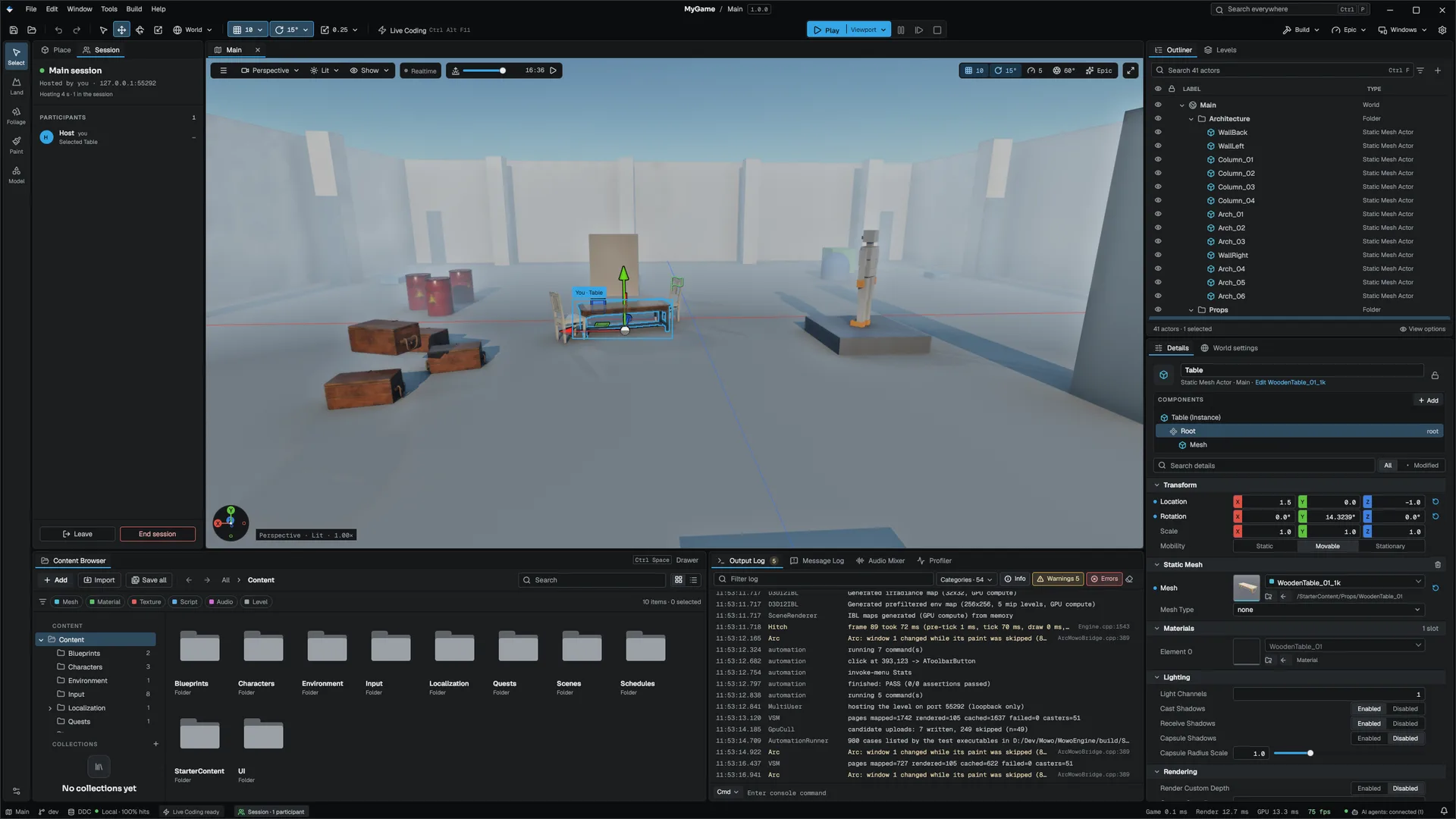
Several editors can work on one level at the same time. One editor (or a dedicated server) hosts the session, the others join it, and every placement, move, property edit, rename, reparent and delete one person makes appears in every other editor a frame or two later. Each person sees where the others are looking and what they have selected.
Starting a session
Tools ▸ Multi-User Editing ▸ Host Session… or Join Session… opens the session dialog; a switch at the top moves between the two.
| Field | Meaning |
|---|---|
| Session name | What the session announces on the network; the level's name by default |
| Listen | 0.0.0.0:<port> for the network or 127.0.0.1:<port> for this machine |
| Who can join | Same network, or This machine only |
| Session password | A random one is proposed; share it with whoever joins |
| Name and colour | How others see you |
| Lock actors while someone edits them | Off means no locks: the later edit wins |
| Field | Meaning |
|---|---|
| Address | host:port |
| On this network | Sessions being announced nearby, with who hosts them and how many are in; pick one to fill the address |
| Session password | The password the host shared |
| Name and colour | How others see you |
Before the host's level replaces yours, the open level's unsaved changes are stashed to Saved/MultiUser/Stashed/.
Your choices, except the password, are kept in Editor Preferences ▸ Multi-User Editing for next time. Leave Session disconnects; Who Is Here lists the others and their selections.
Hosting editors announce themselves once a second on UDP port 52811; a session that has gone silent for a few seconds drops off the Join list.
From the command line
| Options | |
|---|---|
| Host | --multiuser-host=<port> (0 picks a free one), --multiuser-lan, --multiuser-secret=<password> (random when absent), --multiuser-endpoint-file=<file> (writes the bound port) |
| Join | --multiuser-join=<address>:<port> with --multiuser-secret=<password> |
| Either | --multiuser-name=<name> |
While a session runs
The Session tab opens beside Place actors. It shows the session's name, host and address, how long you have been in it, and each participant: their colour, name, what they are doing (the actor they are editing, the actor they have selected, or flying the camera) and their round-trip time to the host. Leave leaves; End session, for the host, ends it for everyone.
- The viewport outlines every user's selection in their colour with a name tag, and draws each other user's camera as a frustum.
- The Outliner shows a lock in the holder's colour on actors another user has selected, with their name.
- Details shows <Name> is editing this actor… and keeps the properties read-only until they deselect it.
- The status bar's session item shows the participant count and your round-trip time.
How edits travel
- Joining late. A joining editor receives the level as it is now and opens it as a new, unsaved level. The host saves the level; a joined editor's Save As writes a copy.
- What travels. After each local edit, the editor publishes the actors whose state (name, parent, components) changed, or their deletion. An undo travels the same way, as an edit.
- Order. The host orders all edits and sends each one to every editor, its author included, so every editor converges on the same level.
- Conflicts. An actor another user has selected is locked to them. An edit to it is refused and put back, and the Output Log says who holds it. Without locks, the later edit wins, per actor.
Play in editor is local: while you play, your editor neither sends nor shows edits, and catches up when you stop.
Security
The session password authenticates both ends and encrypts all traffic. An editor without the password cannot join, and nothing on the network can read the level or inject an edit. A password a person chose can be guessed offline from a recorded handshake; the proposed random one cannot. The host closes any connection that sends malformed messages or exceeds size limits, and refuses edits that name network share paths. Hosting listens on loopback unless Who can join is Same network.
The password is the only gate. Everyone who has it can edit and delete any actor. Locks keep collaborators from overwriting each other; they are not a permission system.
Limits
- Only actors in the level travel. Assets such as materials and Visual Scripting classes are files; share them through source control.
- Conflicts are per actor: two users moving different actors never conflict, and two users editing the same unlocked actor means the later edit wins whole.
- One session per editor. A host editor that leaves ends the session for everyone; use a dedicated server to avoid that.
Dedicated server
MowoMultiUserServer hosts a session without an editor, so nobody has to keep one open. Editors join it exactly as they join an editor host, and it appears under On this network.
./mbt.cmd build -t MowoMultiUserServer
MowoMultiUserServer --name="Level art" --port=52810 --session-dir=D:/MultiUser/LevelArt| Option | Default | Meaning |
|---|---|---|
--port=<n> | 52810 | Port to listen on; 0 picks a free one |
--lan / --local | --lan | Every interface with a broadcast beacon, or loopback only |
--secret=<password> | random | Session password; a generated one is printed at start |
--name=<name> | The session name the beacon announces | |
--endpoint-file=<file> | Writes the bound port to the file | |
--session-dir=<dir> | memory only | Keeps the level and every edit there and restores them on the next start |
--no-locks | locks on | The later edit wins instead of refusing a held actor |
Ctrl+C saves the session and closes every connection.
The server has no level until an editor gives it one: the first editor to join an empty server sends its open level, and later joiners receive that level plus every actor edited since. With --session-dir, the folder holds Level.mmap (the seeded level), Session.json (the actor store, written a few seconds after the last edit and on shutdown) and OpLog.jsonl (an append-only audit trail of accepted edits). Saving the level is still an editor's job.
The edit log grows for the life of a session and every joiner replays it. To compact it, save the level from an editor and restart the server with an empty --session-dir.
Engine sources
This page describes behavior implemented in these files of the engine repository, checked against commit 3f3a08d31.
- Engine/Source/Editor/MultiUserServer/Public/MultiUser/MultiUserServer.h