 Mowo
Packaging and shipping
How mbt package turns a project into a self-contained folder a player can run, what a release build strips out, and where the output lands.
A package is the folder a player downloads and runs. It holds the game, its cooked content and every runtime file it needs, and nothing else: no editor, no engine sources, no developer tools. One command, mbt package, produces it from your project.
This page explains what that command does and what ends up in the folder. The other pages in this section cover the tasks around it: packaging step by step, choosing a link mode, protecting content, installers and signing, Steam, patches and DLC, crash reporting, and the Mowo Games Launcher.
How mbt package works
mbt package runs the whole pipeline in one process. Each step logs a numbered line, [1/6] to [6/6].
- Build C++
- Compile shaders
- Cook content
- Stage runtime
- Finalize
- Distributables
| Step | What happens |
|---|---|
| Build C++ | Builds the game host and its modules in the chosen configuration, plus the archive builder and the crash reporter. --skip-build reuses the binaries already in Engine/Binaries/<platform>/<config>. |
| Compile shaders | Compiles the engine's HLSL for the target platform's graphics APIs, plus the compiled material graphs in your Content/. --skip-shaders reuses the build tree's Shaders.meaf. |
| Cook content | Runs the asset-validation gate, then cooks Content/ and the enabled plugins' content into archives, and packs the baked reflection probes. See Content pipeline. |
| Stage runtime | Copies the host executable, the modules and vendor libraries its dependency closure needs, the enabled plugins, the engine content and the committed PSO cache. Writes the project's content keys into the staged host. |
| Finalize | Copies the project manifest and the asset registry, stages the allowlisted config files, bundles the Visual C++ runtime and, for a monolithic build, checks the host's import table. |
| Distributables | Writes BuildInfo.json, folds loose files into paks, builds the launcher, stamps version info and the icon, optionally wraps for Steam DRM, code-signs, signs modules, uploads symbols, writes the license notices and the file manifest, then builds the zip and the installer. |
A hard error in any step fails the run: a missing host executable, a cook that fails, a missing content key for a release package. Optional tools do the opposite. When signtool, WiX, steamcmd or sentry-cli is missing, that part is skipped with a log line and the package still completes.
Every option of mbt package is listed in the mbt command reference. This section explains the options in context.
Release is the default
mbt package builds the release configuration unless you pass -c. release and its profilable twin profile are the configurations a player receives: ThinLTO code generation, editor code compiled out, and MOWO_BUILD_RELEASE=1 and WITH_EDITOR=0 defined for every module. profile adds MOWO_BUILD_PROFILE=1, which keeps the log and the console's stat commands, with GPU timers available through r.GpuTimings, so you can profile the shipped code.
What this removes from the binary itself, not just from the folder:
- Editor-only code and reflection metadata (
WITH_EDITOR=0). - Engine asserts (
MOWO_WITH_ASSERTSis defined only indebug,debuggameanddev). - Author-side tools in the player, and every command-line switch that is not on the player allowlist. The command-line switches page of the reference lists what a release game keeps.
Logging also changes. A release build logs at Warning level and writes no log file unless the player passes --log or the shipped Config/Engine.ini sets logging.enabled. --log-floor info|warning|error compiles log lines below a level out of a release build altogether, format strings included.
No product executable carries test code, so a release build cannot report on itself. Judge a package from outside: launch it, read its log, check its exit code.
Where the output goes
The package lands in Saved/Packaged/<Product>/ under your game project, unless the project's Config/Packaging.ini sets another outputDir or you pass -o. <Product> is the manifest's build.outputName, then the manifest's file name; --name overrides both.
The output folder is deleted at the start of each run, but only when it already looks like a package (it has Binaries/, Content/Paks/, Data/ or a Game.mproject). A non-empty folder that does not look like one stops the run instead, so -o cannot delete an unrelated directory.
A Windows game package looks like this:
Saved/Packaged/
├── MyGame/                                the package: this is what ships
│   ├── MyGame.exe                         thin launcher (icon + version info)
│   ├── Binaries/win-x64/
│   │   ├── MyGame.exe                     the real game host
│   │   ├── MyGameCrashReporter.exe        the crash reporter
│   │   ├── MowoEngine.*.dll               engine and plugin modules, modular packages only
│   │   ├── *.mowosig                      module signatures, protected packages only
│   │   ├── SDL3.dll, ...                  vendor libraries the closure needs
│   │   ├── vcruntime140.dll, ...          app-local Visual C++ runtime
│   │   └── Upscalers/                     only when graphics.upscalers is on
│   ├── Content/Paks/                      hash-named .meaf archives, DLC/
│   ├── Config/                            Engine.ini, Input.ini, Redirects.ini, Default*.ini
│   ├── Engine/Config/                     the engine's Base*.ini layer
│   ├── Engine/Legal/ThirdPartyNotices.txt license texts of the bundled libraries
│   ├── Cache/PsoCache.mdfb                bundled pipeline cache
│   ├── installscript.vdf                  Steam install script for the VC++ redist
│   └── _CommonRedist/vcredist/2022/       VC_redist.x64.exe fallback
├── MyGame-1.0.0-release.zip               distributable zip
├── MyGame-chunks.json                     content report (not shipped)
├── MyGame-Manifest.txt                    sha256 + size of every shipped file (not shipped)
└── MyGame-symbols/<buildId>/              archived symbols (not shipped)
is the one place every packaged path is defined.
Game.mproject, BuildInfo.json, the asset registry and the list of shipped plugins do not sit loose at the root. They travel inside the engine pak, which the player reads before any file system is mounted.
Why the paks have hash names
Every archive in Content/Paks/ is named with a stable hash of the product name and the pak's logical name. The name says nothing about the contents, but it stays the same from build to build, so a patch compares the same files. What the runtime needs to know (kind, mount point, mount order) travels inside the archive as a reserved descriptor entry; nothing mounts by file name. Shaders get one pak per graphics API.
Without a Config/Chunks.ini, content splits by category: data, maps, textures, meshes and audio. Every pak mounts, so the split does not speed up loading. It keeps patches small: changing one texture rewrites only the textures pak. See Patches, chunks and DLC.
--iostore (or ioStore=true in Config/Packaging.ini) converts every staged pak into an IoStore container instead.
Baked reflection probes
With r.ReflectionProbes.Bake on (the default), the editor and development runs store each captured and prefiltered reflection probe in the project's derived data cache instead of capturing it again on the next level open. mbt package packs those baked probes from Intermediate/DerivedDataCache into a pak of their own, signed like the engine pak, so the shipped game loads them and never captures probes at run time. Open each level in the editor before packaging so its probes are baked.
Staging is an allowlist
The packager never copies the build folder and then deletes what should not ship. It resolves the dependency closure of the game host and copies exactly what that closure needs. Editor, test and tool binaries are never copied, and no .pdb ships.
A few things ship only when your project asks for them:
| Ships only when | What |
|---|---|
platform.steamEnabled is true in the .mproject | Steam runtime libraries |
platform.discordEnabled is true | Discord runtime library |
graphics.upscalers is true or a non-empty list | DLSS, FSR and XeSS runtimes, in Binaries/<platform>/Upscalers/ |
The plugin is enabled in Config/Plugins.ini, or on by default and not switched off | That plugin's module |
| The project turns on auto-subtitles | The speech recognizer, its model, ONNX Runtime and the ONNX Runtime WebGPU execution provider (on Windows with the engine's DXC beside it) |
The WebGPU provider is what lets inference run on the GPU. It adds 10.4 MiB on Windows plus 31.9 MB for dxcompiler.dll and dxil.dll, 15.7 MiB on Linux and 14.3 MiB on macOS. On Windows the package carries the engine's own DXC 1.9, not the DXC 1.8 the provider's package comes with: under the engine's D3D12 Agility SDK, DXC 1.8 failed to compile the provider's pipelines. On Linux the provider needs the system's Vulkan loader, libvulkan.so.1, at run time; without it inference stays on the CPU.
From the project's Config/ folder, Engine.ini, Input.ini and Redirects.ini ship, plus the Default*.ini layers and the target platform's folder; editor INIs and DefaultCrypto.ini stay behind.
Before the file manifest is written, the packager fails the run when the package carries, or a shipped binary imports, a runtime no player has: the debug C runtime or a sanitizer runtime. A debug or debug-asan build cannot reach a player by accident.
Packaged mode
When the player finds BuildInfo.json, or when its install folder is not writable, it runs in packaged mode. Saves, logs, crash reports and derived caches then go to the per-user product folder instead of the install folder, so a game installed under Program Files works without admin rights Engine/Source/Runtime/Core/Public/Core/FPaths.h.
Packaging from the editor
Build > Package Project… opens the packaging window, and Build > Cook Content… opens it in cook mode. It is a front end over the command line: it runs mbt package or mbt cook as a child process and shows its steps and log.
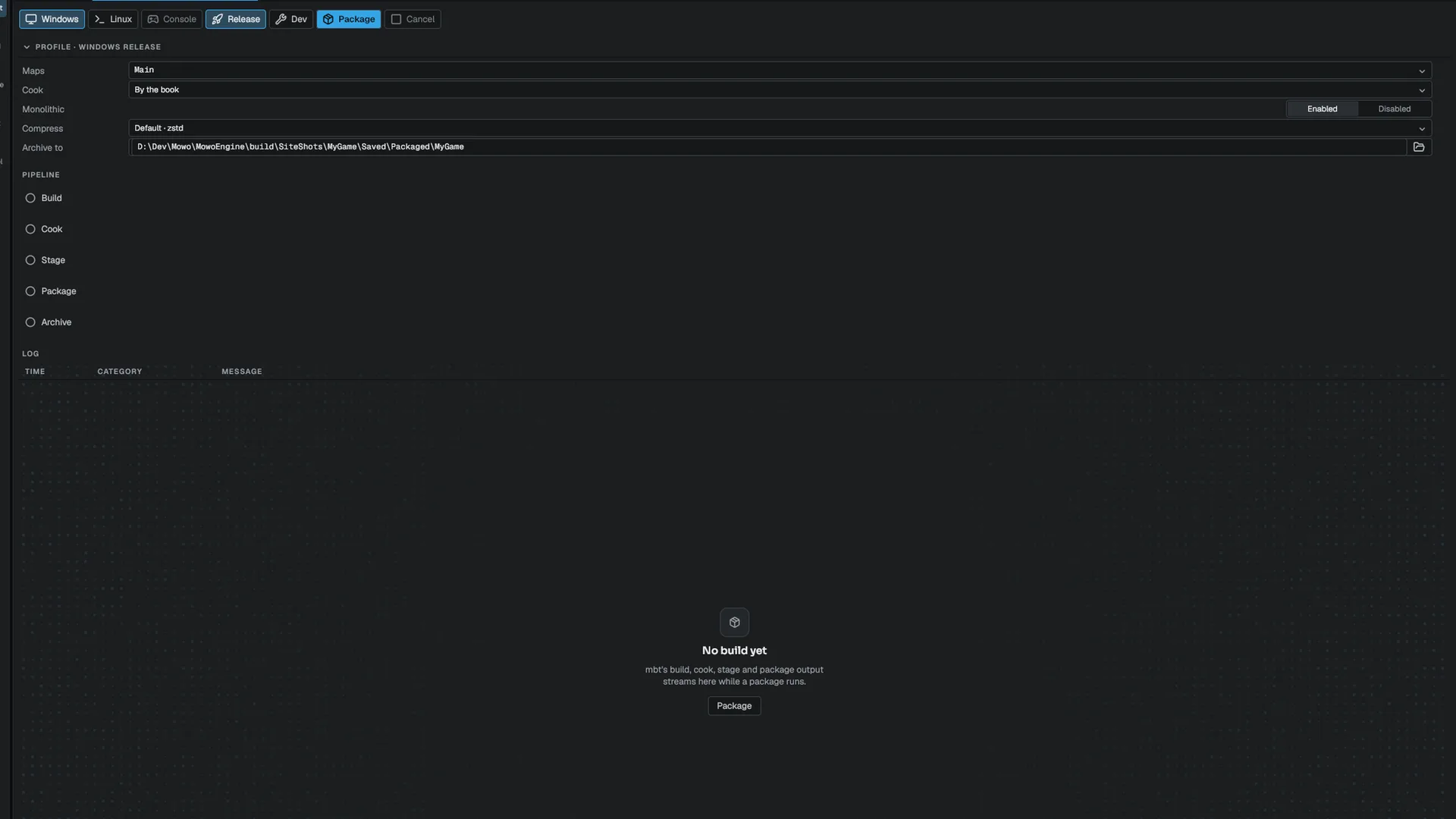
| Window control | mbt package option |
|---|---|
| Release / Dev on the toolbar | -c |
| Cook row: By the book, Skip C++ build, Skip C++ and shaders | none, --skip-build, --skip-build --skip-shaders |
| Monolithic row | --monolithic, or --modular when disabled |
| Compress row | --compression |
| Archive to row | --output |
The window packages for the machine it runs on, and only when that platform is one of the project's platforms. The Windows and Linux toolbar buttons add or remove a platform from that list; Console is disabled.
The team half of the window's settings is saved in the project's Config/Packaging.ini, which you commit. Package a game shows the file.
In this section
Engine sources
This page describes behavior implemented in these files of the engine repository, checked against commit 7f8f31f8d.
- Engine/Source/Runtime/Core/Public/Core/FPaths.h