 Mowo
Input
Enhanced-Input-style actions and mapping contexts, triggers and modifiers, binding callbacks in C++, and player rebinding.
Mowo's input system follows Unreal's Enhanced Input. You describe what the player can do as input action assets, describe which hardware triggers each action in input mapping context assets, and bind gameplay callbacks to actions and trigger events. Gameplay code never polls keys directly.
How input flows
Each frame, device state passes through the active mapping contexts, their modifiers and triggers, and ends as trigger events your callbacks listen to.
- Devices
- Active mapping contexts (by priority)
- Binding modifiers
- Action modifiers
- Triggers
- Trigger events
- MPlayerInput callbacks
The pieces:
| Piece | What it is |
|---|---|
Input action (.inputaction) | A named action with a value type: Button, Axis1D or Axis2D, plus optional modifiers and triggers InputActionAsset |
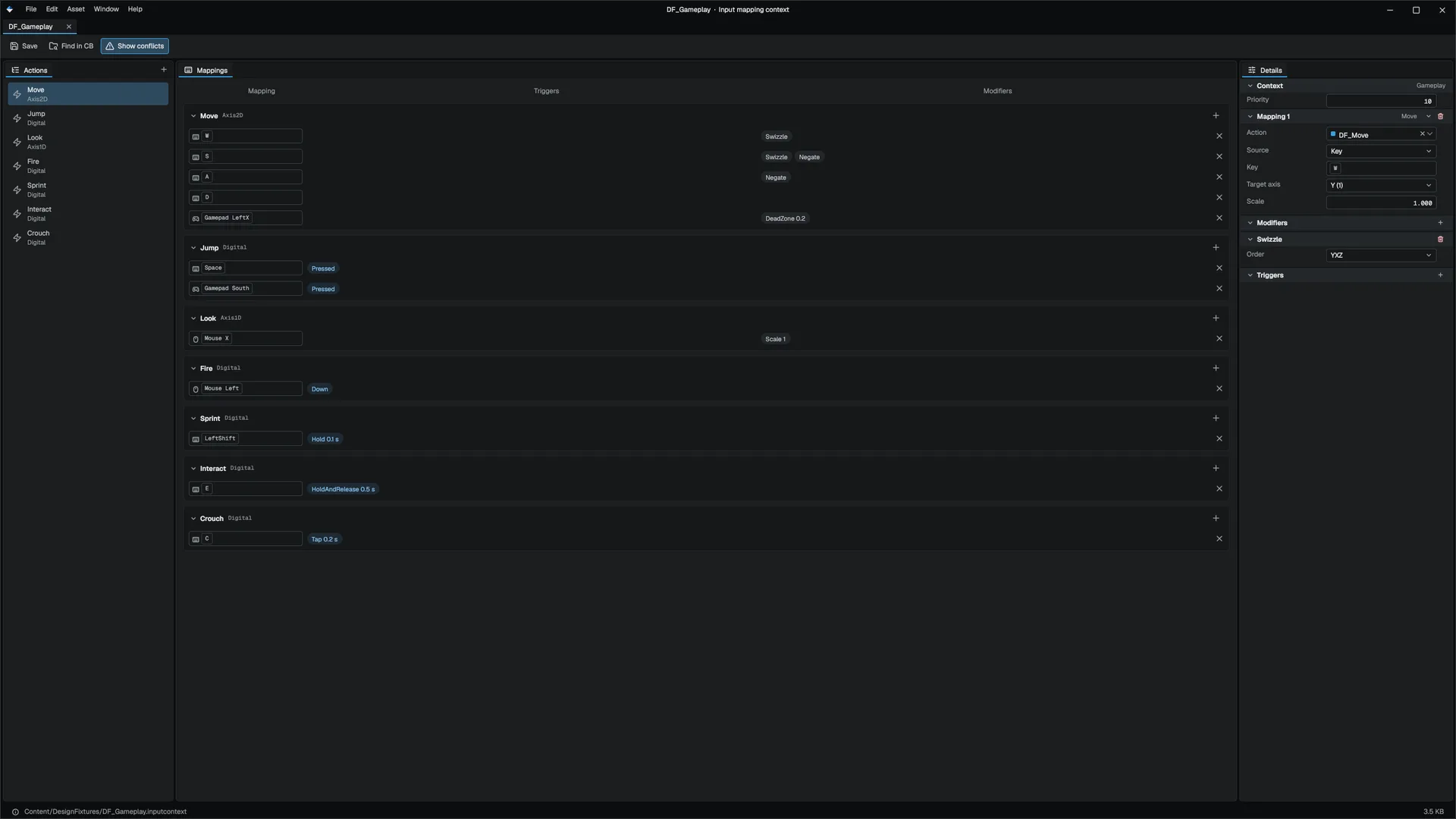
Input mapping context (.inputcontext) | A prioritized set of mappings from a device source to an action, each with its own modifiers and triggers InputMappingContextAsset |
MEnhancedInputSubsystem | The per-player object you add and remove mapping contexts through. Higher priority contexts are evaluated first. MEnhancedInputSubsystem |
MPlayerInput | The per-player binding list. APlayerController evaluates it every tick. MPlayerInput |
InputActionSystem | The engine-wide evaluator underneath, with the context stack and player overrides |
Both assets are created from the Content Browser's Add › New asset › More menu (Input Action and Input Mapping Context, also under New › More when you right-click an empty area of the asset view), and each opens in its own editor. See Asset editors.
Trigger events
Every evaluated action reports five events per frame. InputAction
| Event | Meaning |
|---|---|
Started | Actuation began this frame |
Triggered | The action fired this frame |
Ongoing | Actuated but not firing yet, for example a hold building up |
Completed | Stopped firing after firing at least once |
Canceled | Actuation ended without ever firing |
Bind input for a pawn
A pawn binds input in SetupPlayerInput, which the player controller calls on possession with a freshly cleared MPlayerInput. This character loads the project's default mapping context, activates it, and binds actions by name.
#pragma once

#include "Game/ACharacter.h"
#include "Game/APlayerController.h"
#include "Game/FControlRebinding.h"
#include "Game/MEnhancedInputSubsystem.h"
#include "Game/MPlayerInput.h"
#include "Input/InputAction.h"
#include "Math/Math.h"

namespace Mowo {

MCLASS()
class AExplorer : public ACharacter {
public:
	MGENERATED_BODY()

	void SetupPlayerInput(MPlayerInput* input) override {
		m_inputContext = FControlRebinding::LoadFromProject("Content/Input/IMC_Default.inputcontext");

		APlayerController* controller = dynamic_cast<APlayerController*>(GetController());

		if (controller && m_inputContext) {
			controller->GetEnhancedInput()->AddMappingContext(m_inputContext.Get(), m_inputContext->GetDefaultPriority());
		}

		input->BindAxis2D("Move", [this](Vec2 value) {
			AddMovementInput(Vec3(value.x, 0.0f, value.y));
		});

		input->BindAction("Jump", ETriggerEvent::Started, [this]() {
			Jump();
		});

		input->BindAction("Crouch", ETriggerEvent::Started, [this]() {
			Crouch();
		});

		input->BindAction("Crouch", ETriggerEvent::Completed, [this]() {
			UnCrouch();
		});
	}
};

}
Keep the mapping context alive for as long as it is active: the subsystem only holds a raw pointer to it. ACharacter provides the protected m_inputContext member for exactly this. ACharacter
MPlayerInput has two families of overloads. The ones taking a const InputActionAsset* bind to an action asset; the string overloads bind by action name, for code that has not adopted action assets. BindAxis and BindAxis2D fire every frame with the current value, which is 0 when idle. MPlayerInput
The engine's character templates load Content/Input/IMC_Default.inputcontext first and only build a C++ fallback context when that file is missing. Editing the asset in the editor changes their controls with no code change.
Modifiers and triggers
Modifiers change an input's value. They can sit on a single mapping, applied to the raw value, or on the action, applied to the combined value. InputAction
| Modifier | Effect |
|---|---|
Negate | Flips the sign |
Swizzle | Routes a value to the other 2D axis, or swaps X and Y at action level |
DeadZone | Lower and upper thresholds; radial on 2D action values |
Scale | Multiplies X and Y |
Smooth | Exponential smoothing over time |
ResponseCurve | Exponential response curve (exponent parameter) |
FOVScaling | Multiplies by a field-of-view factor, for aim sensitivity |
Triggers decide when an action fires. With no trigger, the action fires while it is actuated. InputAction
| Trigger | Fires |
|---|---|
Down | While actuated (the default) |
Pressed | Only on the frame actuation starts |
Released | Only on the release frame |
Hold | After duration seconds held; oneShot fires once instead of every frame |
Tap | On release, if the press was short enough |
Pulse | Every interval seconds while held |
ChordedAction | Only while another action (chordAction) is actuated |
HoldAndRelease | On release, if held at least duration seconds |
Combo | When a prerequisite action fired within interval seconds |
A Hold trigger with allowToggle set respects the player's hold-to-toggle accessibility setting (i.HoldToToggle): the first press latches the action on and the next releases it. Use it for crouch, sprint or aim, never for a charge. InputAction
Contexts and priority
- Add a context with
AddMappingContext(imc, priority)and remove it withRemoveMappingContext(imc). When the controller unpossesses its pawn, it clears all mapping contexts. - A context that consumes input blocks the contexts below it. APlayerController
- For named contexts defined in project config, use
APlayerController::PushInputContextandPopInputContext. The controller pops whatever it pushed atEndPlay. APlayerController
Player rebinding
A shipped game cannot write its own Config/ or Content/ folders, so player choices are stored as overrides in <project>/Saved/Config/InputUser.mdfb and re-applied on top of the shipped mappings each time contexts are rebuilt. InputActionSystem
- Use the shipped rebinding screen
ArcUI's rebinding screen, backed by
FArcRebindModel, lists every action of every context, captures a new key or button, reports conflicts, and resets per action or per context. It writes through the player tier. FArcRebindModel - Or write overrides yourself
Call
InputActionSystem::SetUserBindingand thenSaveUserBindings, as below. - Reset
ClearUserBinding,ClearUserBindings(one context) andClearAllUserBindingsrestore what the project data supplied. InputActionSystem
#include "Input/InputAction.h"
#include "Input/InputActionSystem.h"
#include "Input/KeyCode.h"

#include <string>

static bool RebindJumpToSpace(const std::string& contextName) {
	Mowo::InputBinding binding;
	binding.sourceType = Mowo::InputSourceType::Key;
	binding.key = Mowo::KeyCode::Space;

	Mowo::InputActionSystem& actions = Mowo::InputActionSystem::Get();
	actions.SetUserBinding(contextName, "Jump", { binding });

	return actions.SaveUserBindings();
}FControlRebinding edits and saves the mapping context asset in Content/. That is a development tool, for example a controls editor for your team. Players should go through the player tier above. FControlRebinding
Mouse settings and debugging
| Console variable | Effect |
|---|---|
i.MouseSensitivity | Multiplier on both mouse axes before any modifier (0.05 to 10) |
i.MouseInvertY | Inverts mouse Y |
i.HoldToToggle | Hold-to-toggle for Hold triggers marked allowToggle |
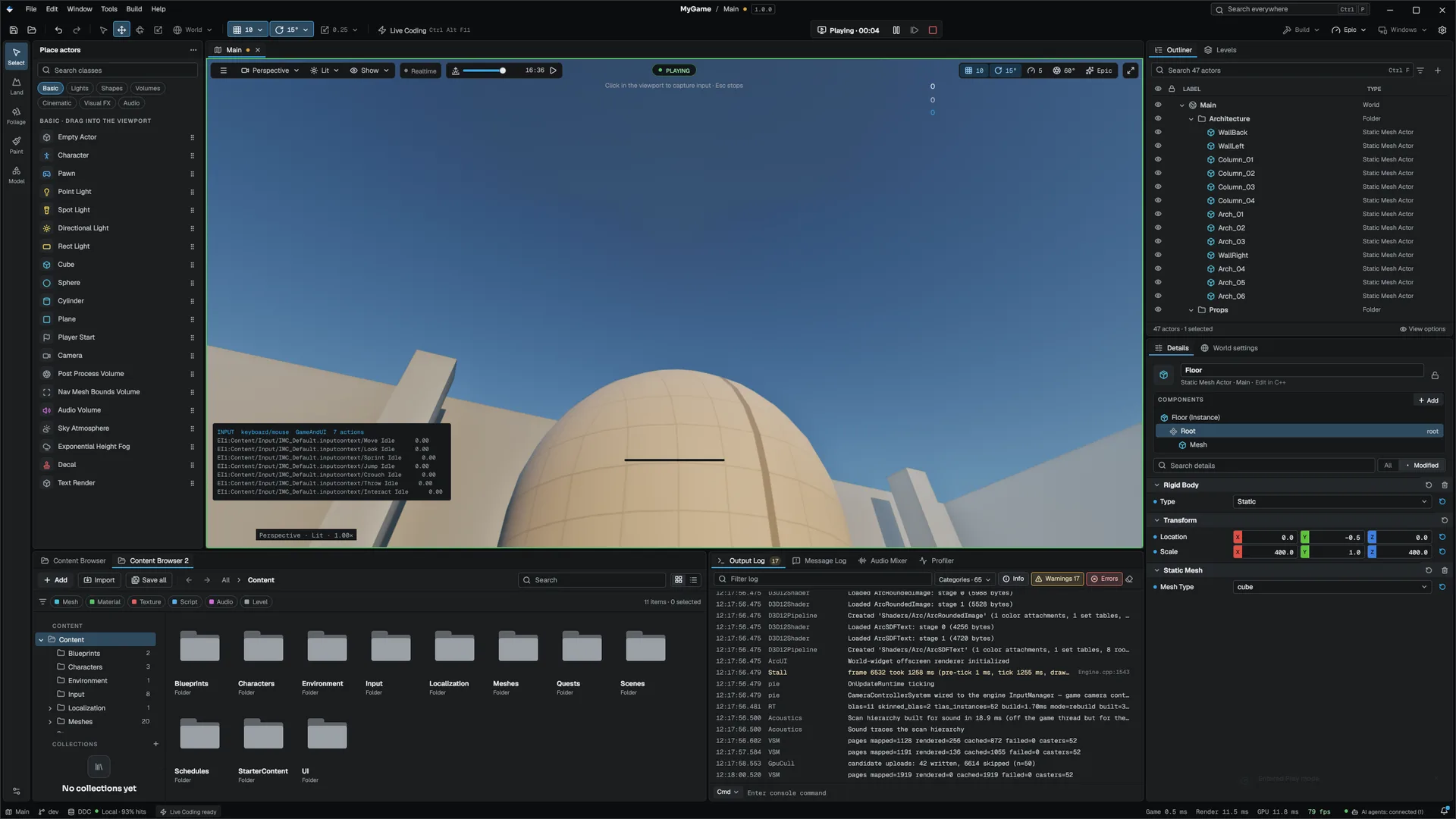
i.DebugOverlay | Draws a per-action overlay: context, phase, value and trigger events |
In the editor, the same overlay is a toggle named Input Debug in the viewport's menu.
Read input from Visual Scripting
MInputStatics gives graphs and C++ the same view of actions without a pawn: IsActionActive, WasActionTriggered, WasActionStarted, WasActionCompleted, GetActionValue and GetActionValue2D, plus PushContext and PopContext. MInputStatics
Game input and UI input
The input manager holds an input mode that decides whether device events reach gameplay while game UI is up. InputManager
| Mode | Gameplay receives |
|---|---|
GameOnly | Everything; the UI is fed nothing |
GameAndUI (default) | Everything the UI did not consume, so mouse-look does not turn behind an open widget |
UIOnly | Nothing; set it while a pause menu is open |
An event counts as consumed only when a widget handled it, not when a widget merely has focus or is hovered. Key and button releases always reach gameplay, so a key cannot stay stuck down.
Devices
- Deadzones belong to the device, not to each binding:
i.StickDeadzone(default 0.15) andi.TriggerDeadzone(default 0.05) apply to every pad, andi.Gamepad0.StickDeadzonetoi.Gamepad3.TriggerDeadzoneoverride one slot. Project Settings › Engine › Input writes them. Per-bindingDeadZonemodifiers still apply on top. - Gamepad slots: up to four pads, addressed by player slot. The player's slot choice is remembered per device in the same
InputUser.mdfbfile. - Rumble:
InputManager::RumbleGamepad(slot, low, high, ms)andRumbleGamepadTriggers.i.RumbleScalescales all rumble. - Motion: pads with a gyro or accelerometer (DualShock 4, DualSense, Switch, Steam Deck) report them through
InputManager::GetGamepadGyro(slot, sample)(rad/s) andGetGamepadAccel(m/s^2). The first read starts the pad's sensor stream, so a game that never asks pays nothing; each call returns false until the pad delivers the sensor.i.GamepadMotionturns the sensors off for every pad. Scripts read the same values throughMInputStatics::GetGamepadGyro,GetGamepadAccelandHasGamepadGyro. - Light bar:
InputManager::SetGamepadLed(slot, r, g, b)(0..1), orMInputStatics::SetGamepadLightColor, tints the light of pads that have an RGB LED (DualShock 4, DualSense, Steam Deck) and returns false on the rest. The colour is re-sent when the pad reconnects. Use it for scanner or health state; the colour is always a secondary cue. - Focus loss releases every held key and zeroes the axes, so nothing stays held after alt-tab.
Button prompts
InputManager::GetLastInputDevice() reports the family the player last used: keyboard and mouse, or an Xbox, PlayStation, Nintendo, Steam Deck or generic pad. Use it to pick prompt glyphs. MInputStatics::GetGamepadFamily() asks the online platform first, and GetGamepadGlyphPath(button) returns the platform's glyph image for a button named by Xbox position (A, LB, DPadUp); it is empty without a platform, so keep your own art as a fallback. ShowOnScreenKeyboard opens the platform's text keyboard. MInputStatics
Bindings on disk
Project-wide named contexts live in Config/Input.ini, one [Context Name] section per context with one +Action=(...) line per action. InputBindingsConfig reads and writes it. Player overrides go to Saved/Config/InputUser.mdfb and win over the project tier. InputBindingsConfig
Related## Related
- Gameplay framework
- Asset editors
- Play in editor
- Settings and accessibility for the shipped rebinding screen
- API: Input module, Game module
Engine sources
This page describes behavior implemented in these files of the engine repository, checked against commit 78247d651.
- Engine/Source/Runtime/Input/Public/Input/InputAction.h
- Engine/Source/Runtime/Input/Public/Input/InputActionSystem.h
- Engine/Source/Runtime/Game/Public/Game/MPlayerInput.h
- Engine/Source/Runtime/Game/Public/Game/MEnhancedInputSubsystem.h
- Engine/Source/Runtime/Game/Public/Game/APlayerController.h
- Engine/Source/Runtime/Game/Public/Game/ACharacter.h
- Engine/Source/Runtime/Game/Public/Game/FControlRebinding.h
- Engine/Source/Runtime/AssetSystem/Public/AssetSystem/Assets/InputActionAsset.h
- Engine/Source/Runtime/AssetSystem/Public/AssetSystem/Assets/InputMappingContextAsset.h
- Engine/Source/Runtime/ArcUI/Public/ArcUI/Settings/FArcRebindModel.h
- Engine/Source/Runtime/Input/Public/Input/InputManager.h
- Engine/Source/Runtime/Game/Public/Game/MInputStatics.h
- Engine/Source/Runtime/Core/Public/Core/ProjectLayout.h
- Engine/Source/Runtime/Input/Public/Input/InputBindingsConfig.h