 Mowo
Components
The difference between actor components and ECS components, how they connect, and how to write each kind.
Mowo has two kinds of component, and they are not interchangeable. An actor component is an object with state, methods and a lifecycle, attached to an actor. An ECS component is a plain data struct attached to an entity and processed in bulk by a system. Most gameplay code uses actor components; the engine uses ECS components for data that thousands of entities share.
Which one to use
| Actor component | ECS component | |
|---|---|---|
| Base | MActorComponent or MSceneComponent | A plain struct with MOWO_COMPONENT |
| Reflection | MCLASS() + MPROPERTY() | MOWO_REFLECTED_NAMED("Name") + field markers |
| Lives on | An AActor | An ECS entity |
| Behavior | Virtual methods: OnRegister, BeginPlay, TickComponent, EndPlay | None. A System processes it. |
| Garbage collected | Yes | No, owned by the ECS world |
| Good for | Per-actor logic, meshes, lights, cameras, health | Data many entities share, tight loops |
The engine's own header puts the split plainly: ECS components are plain data read by systems in tight loops, and actor components are object-oriented behaviors with state and methods. MActorComponent
How the two connect
Many actor components are a friendly face over an ECS component. When the actor registers, the component's OnRegister writes a mirror of its data onto the actor's backing entity. Engine systems then iterate that mirror. MActorComponent
- MStaticMeshComponent (actor)
- OnRegister
- MeshRenderer on the backing entity
- Scene renderer iterates MeshRenderer
Because OnRegister runs in the editor too, it must be safe outside play: no spawning actors, and nothing that starts ticking. Gameplay startup belongs in BeginPlay. MActorComponent
Actor components
MActorComponent is the base for behaviors with no position. MSceneComponent adds a local transform (localLocation, localRotation, localScale) and an attachment tree. Anything that has a place in the world, such as a mesh, a light or a camera, derives from MSceneComponent. MSceneComponent
Write an actor component
This component slowly rotates whatever scene component it is attached to.
#pragma once

#include "Game/MSceneComponent.h"
#include "Math/MathUtils.h"
#include "Math/Quat.h"
#include "Math/Vec3.h"

namespace Mowo {

MCLASS()
class MSpinnerComponent : public MSceneComponent {
public:
	MGENERATED_BODY()

	void BeginPlay() override {
		m_Angle = 0.0f;
	}

	void TickComponent(float deltaSeconds) override {
		m_Angle += DegreesPerSecond * deltaSeconds;
		localRotation = Quat::FromEuler(Vec3(0.0f, m_Angle * DEG2RAD, 0.0f));
	}

	MPROPERTY(EditAnywhere) MCATEGORY("Spinner")
	float DegreesPerSecond = 90.0f;

private:
	float m_Angle = 0.0f;
};

}
Add it in an actor's constructor with CreateDefaultSubobject<MSpinnerComponent>("Spinner") and attach it with AttachTo. Actors own their components and destroy them at EndPlay. AActor
Tick settings
Every actor component has three reflected tick fields. MActorComponent
| Field | Default | Effect |
|---|---|---|
tickEnabled | true | Set false to skip TickComponent without removing the component |
tickInterval | 0 | Seconds between ticks; the tick receives the accumulated delta |
tickGroupOverride | -1 | -1 ticks inside the owner's Tick. 0 to 3 pick an AActor::ETickGroup; the component then ticks after every actor in that group. |
Find components at runtime
FindComponent<T>()returns the first component of a C++ type, ornullptr. It is a linear scan, which is fine for typical actors. AActorGetComponentByClass(name)matches a class name or any ancestor, so"MSceneComponent"finds a mesh component.GetComponentByName(name)finds the component created under a name, such as"Root".
#include "Game/AActor.h"
#include "Game/MHealthComponent.h"

static float DamageTarget(Mowo::AActor* target, float amount, Mowo::AActor* instigator) {
	Mowo::MHealthComponent* health = target->FindComponent<Mowo::MHealthComponent>();

	if (!health || health->IsDead()) {
		return 0.0f;
	}

	return health->ApplyDamage(amount, instigator);
}
Engine actor components
A few ready-made actor components you will reach for early:
| Component | Purpose |
|---|---|
MStaticMeshComponent, MSkeletalMeshComponent | Draw a mesh |
MPointLightComponent, MSpotLightComponent, MDirectionalLightComponent | Lights |
MCameraComponent | A camera view |
MAudioComponent | A sound source |
MCharacterMovementComponent | Character locomotion, see Physics |
MHealthComponent | Clamped health with damage, heal, kill and revive MHealthComponent |
MTriggerComponent | A box or sphere volume with OnBeginOverlap and OnEndOverlap delegates MTriggerComponent |
MAbilitySystemComponent | Attributes, abilities and gameplay effects |
ECS components
An ECS component is a struct with the MOWO_COMPONENT macro, which gives it a stable ID from the DLL-safe component registry. Engine/Source/Runtime/ECS/Public/ECS/Component.h Reflection markers make it serializable and editable.
#pragma once

#include "Core/Platform.h"
#include "ECS/Component.h"
#include "Reflection/Reflect.h"

#include "BuoyComponent.generated.h"

namespace Mowo {

struct MOWO_REFLECTED_NAMED("Buoy") MCATEGORY("Gameplay") MOWO_TOOLTIP("Bobs the entity up and down around its start height.") BuoyComponent {
	MOWO_COMPONENT(BuoyComponent)

	MOWO_RANGE(0.0f, 5.0f) MOWO_STEP(0.01f) MOWO_UNITS("m")
	float amplitude = 0.25f;

	MOWO_RANGE(0.0f, 10.0f) MOWO_UNITS("Hz")
	float frequency = 0.5f;

	MOWO_RUNTIME_ONLY float phase = 0.0f;
	MOWO_RUNTIME_ONLY float baseHeight = 0.0f;
};

}
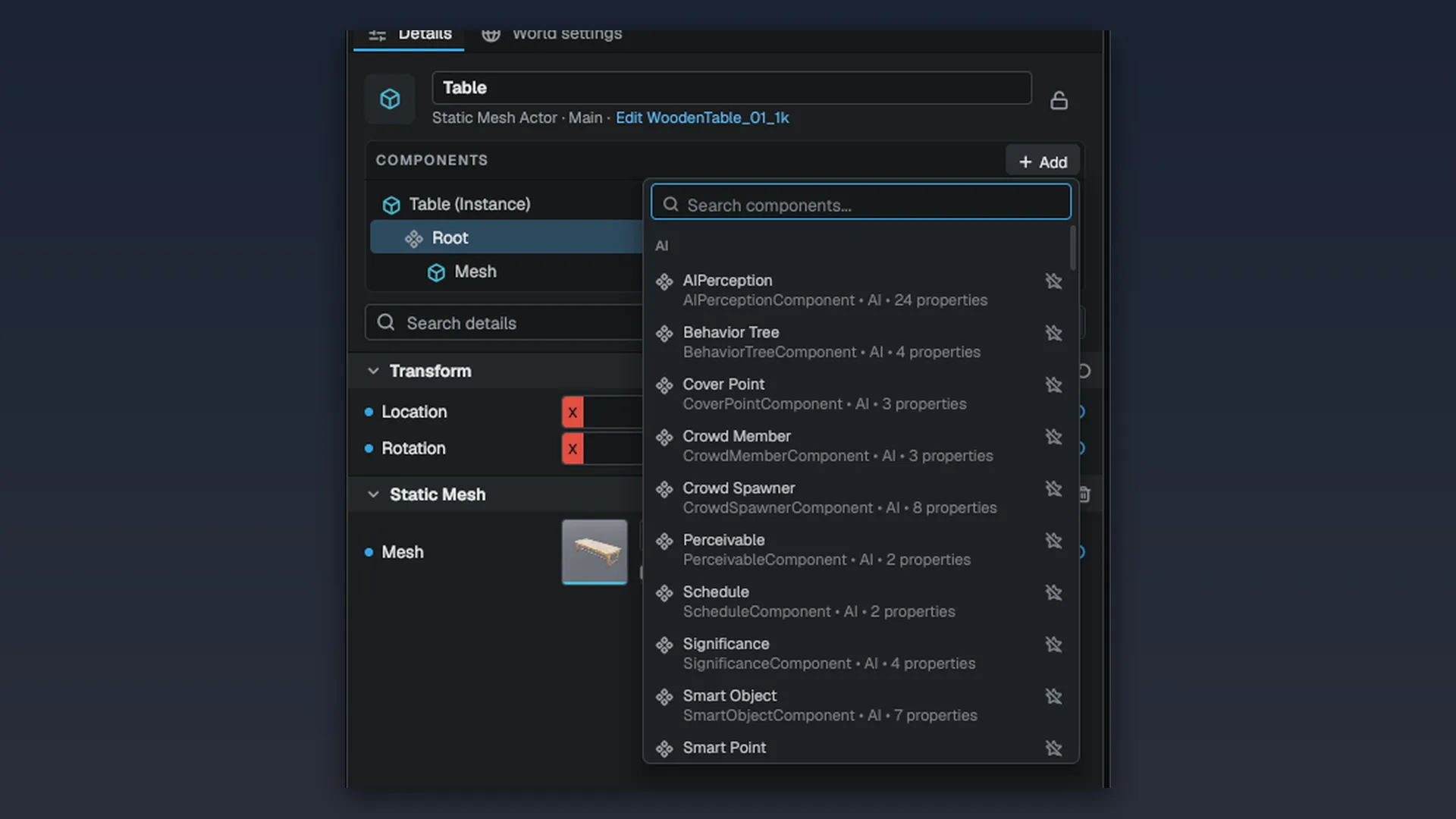
The struct-level markers do two jobs in the editor: MCATEGORY becomes the group in the Add Component menu, and a struct-level MOWO_TOOLTIP becomes the one-line description under the name. A component without a category lands in General. Engine/Source/Runtime/Reflection/Public/Reflection/Reflect.h
Field markers you will use most:
| Marker | Effect |
|---|---|
MOWO_KEY("name") | The key the field is saved under |
MOWO_DISPLAY("Label") | The label in the Details panel |
MOWO_RANGE(lo, hi), MOWO_STEP(s) | Slider range and drag step |
MOWO_UNITS("m") | The unit of the stored number. "rad" fields are shown and typed in degrees. Engine/Source/Runtime/Reflection/Public/Reflection/Reflect.h |
MOWO_COLOR | Color picker for a Vec3 or Vec4 |
MOWO_ASSET_REF | Asset picker for a path string |
MOWO_HIDDEN | Saved but not shown |
MOWO_READ_ONLY | Shown but not editable |
MOWO_RUNTIME_ONLY | Neither saved nor shown |
Engine components follow the same pattern. RigidBodyComponent, for example, is a reflected struct in the Physics category with mass, friction and damping fields. RigidBodyComponent
To make an ECS component do something, write a system that iterates it. See Entity-component system.
Add components in the editor
- Select an entity or actor
Pick it in the Outliner or the viewport.
- Open the Add Component picker
The picker searches every registered reflected component and groups results by category, with your favorites and recent picks listed above the groups.
- Edit the fields
The Details panel builds its rows from the reflection data, so a new field needs no editor code.
A reflected type only gets generated code when its module has header-tool codegen enabled and the type's name matches its header's file name. The game-module scaffold enables codegen for you; the naming rule is yours to follow. See Working with C++.
Triggers
MTriggerComponent is a box or sphere volume that tracks which actors are inside it. It resolves overlaps after the physics step, so it sees the poses physics just wrote. MTriggerComponent
| Field | Effect |
|---|---|
shape, halfExtents, radius | Box or sphere, and its size |
triggerOnce | Fire the begin event only once |
triggerEnabled | Turn the trigger off without removing it |
layerMask | Which layers count as overlapping |
#include "Game/AActor.h"
#include "Game/MTriggerComponent.h"

Mowo::AActor* door = nullptr;
Mowo::MTriggerComponent* trigger = door->FindComponent<Mowo::MTriggerComponent>();

trigger->OnBeginOverlap().Add([](Mowo::AActor* other) {
});

trigger->OnEndOverlap().Add([](Mowo::AActor* other) {
});IsOverlapping(actor), GetOverlapCount() and GetOverlappingActors() answer what is inside right now. ATriggerActor is the placeable version. Engine-level code without actors can use the plain TriggerVolume class instead. TriggerVolume
Movement components
Three stock movement behaviors are reflected ECS components, so you add them from the Add Component picker and edit them in Details. A gameplay movement system drives all three after the physics step. Engine/Source/Runtime/Game/Public/Movement/GameplayMovementSystem.h
| Component | What it does |
|---|---|
ProjectileMovement | Kinematic flight without a rigid body. Launches at initialSpeed along launchDirection, applies gravity (gravityScale), a maxSpeed clamp and homing toward homingTarget. Each step is swept as a sphere of collisionRadius (a ray at 0), so a fast round cannot skip through a thin wall. On a hit it stops, or with shouldBounce reflects with bounciness and friction until it drops below bounceStopSpeed. ProjectileMovementComponent |
RotatingMovement | A constant spin at rotationRate degrees per second, in local or parent space, optionally around pivotTranslation RotatingMovementComponent |
SpringArm | Holds its child entities at the end of an arm targetArmLength behind the entity. With doCollisionTest it sweeps a probeSize sphere and pulls in in front of walls; with enableCameraLag the end trails at cameraLagSpeed. Parent a camera to it for a third-person boom. Engine/Source/Runtime/Game/Public/Game/Components/SpringArmComponent.h |
Visual Scripting reaches these through MMovementStatics: set or read a projectile's velocity, stop it, give it a homing target, set a rotation rate, or set an arm's length. MMovementStatics
Splines
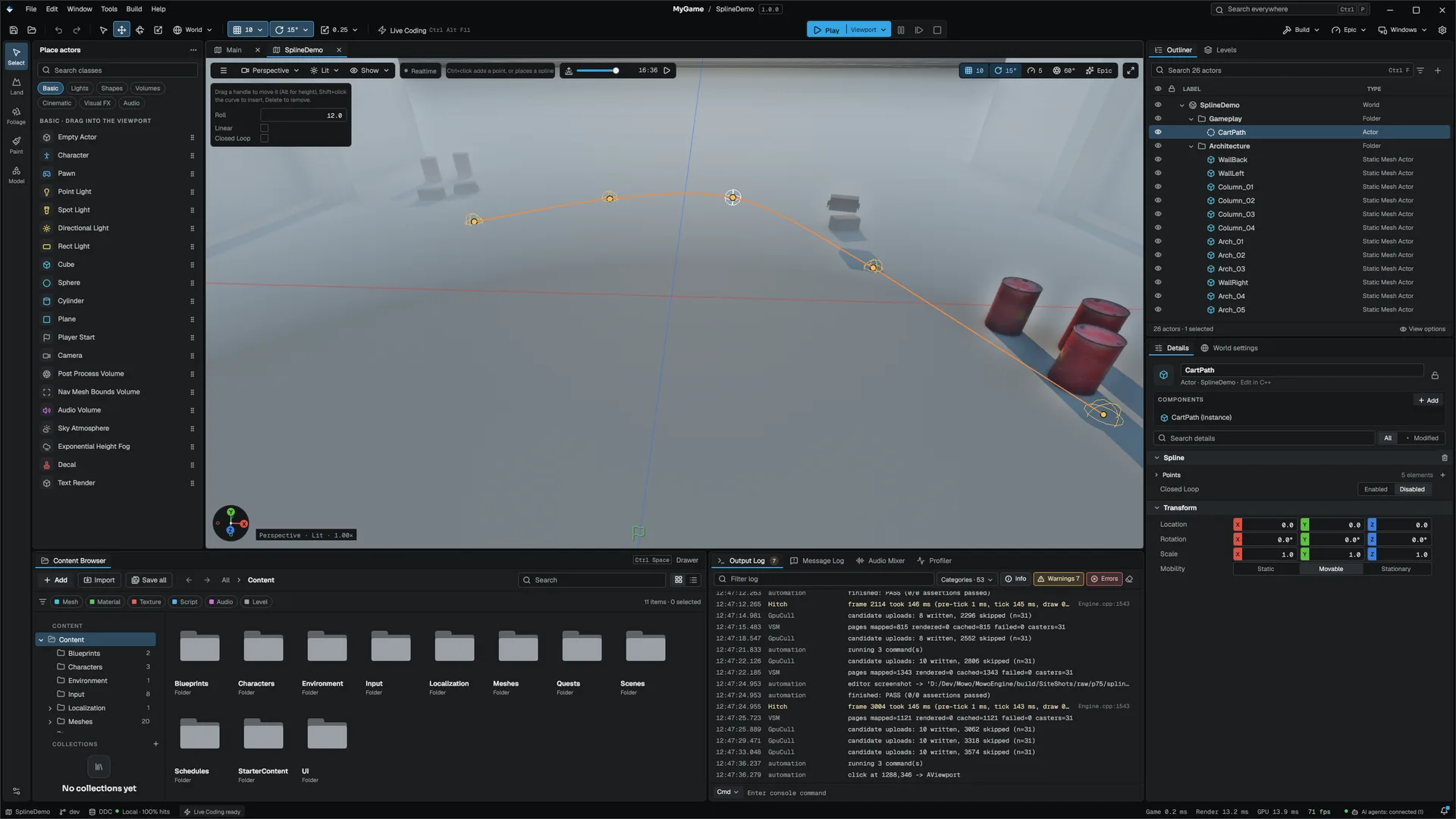
A Spline component is a curve through points in its owner's local space, for paths, rails, cables, camera tracks and scatter lines. Each point has a position, a roll, a cross-section scale and a Linear flag that makes the segment leaving it straight. closedLoop joins the last point back to the first. SplineComponent
On an actor, use MSplineComponent. Its functions take t from 0 to 1 over the whole spline: SampleWorld, DirectionWorld, RollAt, ScaleAt, SampleWorldByDistance and GetLength, plus AddPoint, SetPoint, ClearPoints and SetClosedLoop. MSplineComponent
#include "Game/MSplineComponent.h"
#include "Math/Vec3.h"

Mowo::MSplineComponent* rail = nullptr;
float length = rail->GetLength();
Mowo::Vec3 halfway = rail->SampleWorldByDistance(length * 0.5f);
(void)halfway;
For lower-level work, FSplineMath answers by input key: key k lies on the segment from point floor(k) to the next. Curved segments are uniform Catmull-Rom, so the curve passes through every point. KeyAtDistance gives constant-speed movement and ClosestKey finds the nearest point on the curve. FSplineMath
In the editor, select a spline actor and switch to Spline mode in the viewport. Drag a point to move it on the horizontal plane, Alt+drag to move it vertically, Shift+click the curve to insert a point, and Delete to remove one.
Related
Engine sources
This page describes behavior implemented in these files of the engine repository, checked against commit 5922e6e5e.
- Engine/Source/Runtime/Game/Public/Game/MActorComponent.h
- Engine/Source/Runtime/Game/Public/Game/MSceneComponent.h
- Engine/Source/Runtime/Game/Public/Game/AActor.h
- Engine/Source/Runtime/Game/Public/Game/MHealthComponent.h
- Engine/Source/Runtime/Game/Public/Game/MTriggerComponent.h
- Engine/Source/Runtime/Reflection/Public/Reflection/Reflect.h
- Engine/Source/Runtime/ECS/Public/ECS/Component.h
- Engine/Source/Runtime/Physics/Public/Physics/Components/RigidBodyComponent.h
- Engine/Source/Runtime/Game/Public/Game/MSplineComponent.h
- Engine/Source/Runtime/Components/Public/Components/SplineComponent.h
- Engine/Source/Runtime/Components/Public/Components/SplineMath.h
- Engine/Source/Runtime/Game/Public/Game/Components/ProjectileMovementComponent.h
- Engine/Source/Runtime/Game/Public/Game/Components/RotatingMovementComponent.h
- Engine/Source/Runtime/Game/Public/Game/Components/SpringArmComponent.h
- Engine/Source/Runtime/Game/Public/Movement/GameplayMovementSystem.h
- Engine/Source/Runtime/Game/Public/Game/MMovementStatics.h