 Mowo
Audio editors
Edit sound clips and their per-platform encoding, build sound cues and MetaSound synthesis graphs, shape attenuation curves, and mix in the Audio panel.
Four asset editors and one panel cover audio. Each editor uses the shared asset editor frame and keeps its own undo history. For how sounds play at runtime, see Gameplay.
Sound editor
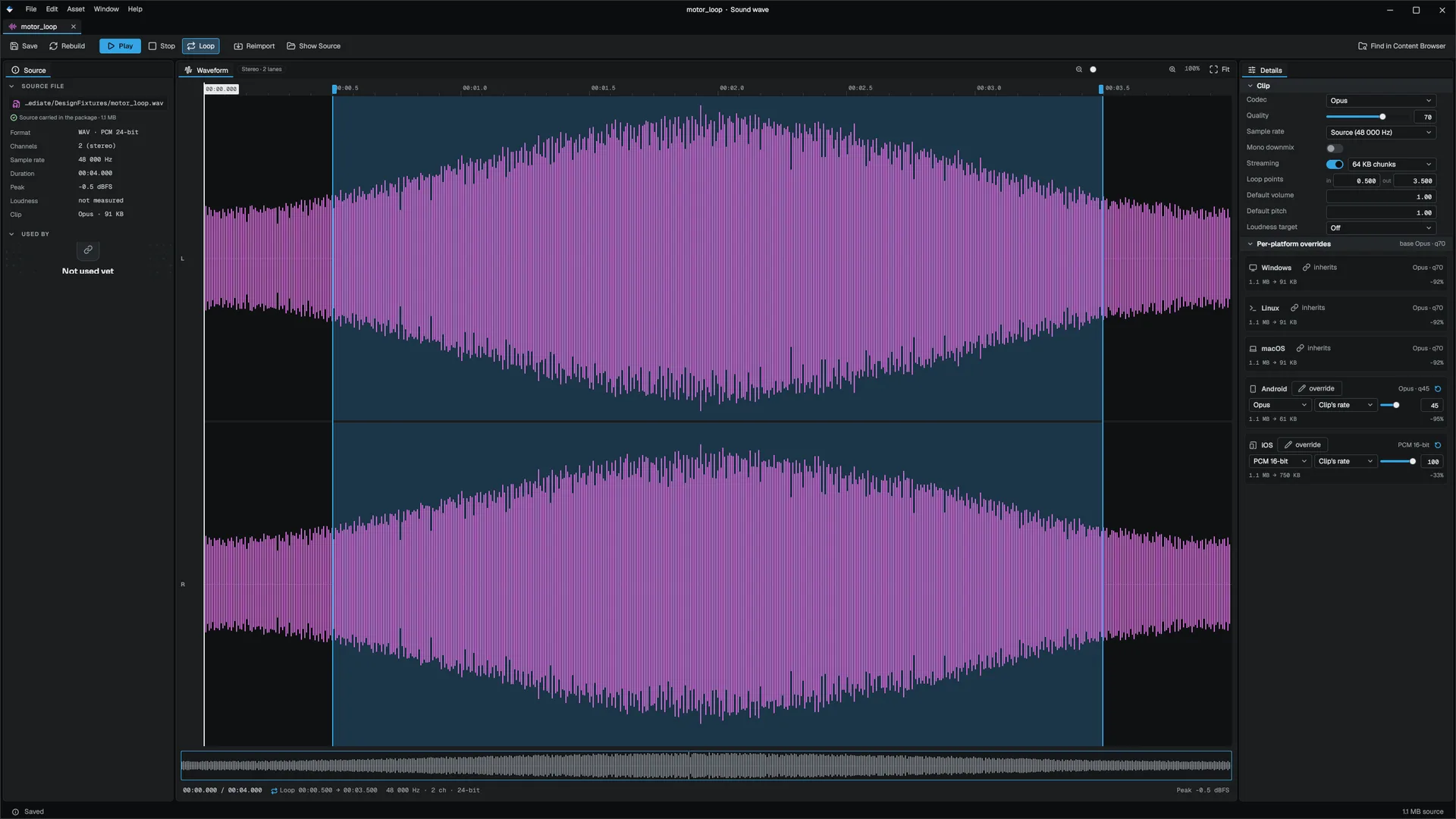
Double-click a .sound to open the Sound editor. It shows how the clip is encoded and what each platform's cook will produce. Save re-encodes the clip from the source audio the package carries, so encoding settings can change at any time without the original file.
| Toolbar | Effect |
|---|---|
| Save | Saves and re-encodes the clip |
| Rebuild | Encodes the clip for every platform and reports the sizes |
| Play / Stop | Previews the clip |
| Loop | Toggles the clip's default loop |
| Reimport | Reimports from the original source file |
| Show Source | Reveals the original source file |
The source panel reports facts: the source file (and whether the package still carries it), format, channels, sample rate, duration, peak, loudness, codec and size, and Used by, the assets that reference the clip.
The waveform shows one lane per channel. Click to seek; drag the loop handles to move the loop points (one undo entry). Zoom from 100% to 1600%, or Fit.
| Clip setting | Effect |
|---|---|
| Codec | PCM 16-bit, PCM 24-bit, PCM float or Opus |
| Quality | Compression quality 1 to 100; sets the Opus bitrate |
| Sample rate | The source rate, or a fixed rate from 8000 to 48000 Hz |
| Mono downmix | Mixes to one channel |
| Streaming | Streams from disk instead of staying resident, with the read size per request |
| Loop points | In and out, in seconds; an out point of zero means the end |
| Default volume, Default pitch | Applied to every playback |
| Loudness target | Off, or a LUFS target |
Per-platform overrides show a card per shipping platform (Windows, Linux, macOS, Android, iOS). A platform without an override inherits the clip's settings, except that Android and iOS cook as Opus. Press inherits to give a platform its own codec, sample rate and quality; the reset button removes the override. Each card shows the source size against the platform's encoded size once Rebuild has run.
Sound Cue editor
A .soundcue arranges sample playback as a node graph on the shared graph canvas. Audio flows from wave players through modifiers into the single Output.
| Node | Role |
|---|---|
| WavePlayer | A sound asset with a weight |
| Random | Picks one of its inputs, weighted, at play time |
| Mixer | Pools its inputs |
| Modulator | Randomizes volume and pitch within ranges |
| Attenuation | 3D playback with a minimum and maximum distance |
| Looping | Loops the result |
| Output | Cue-wide settings: bus, cooldown, maximum instances, captions and speech |
Edit values on the nodes themselves. Audition on the toolbar resolves the graph and plays it as the runtime would.
A sound cue plays one voice. Mixer pools its inputs like Random rather than layering them at once.
MetaSound editor
A .metasound generates audio procedurally, from oscillators, envelopes, filters and math nodes.
| Node | Role |
|---|---|
| Oscillator | Sine, saw, square or triangle tone |
| ADSR | Attack, decay, sustain, release envelope opened by a gate |
| LFO | A low-frequency control signal for modulation |
| Filter | Low-pass, high-pass or band-pass with cutoff and Q |
| Gain, Mixer, Add, Multiply | Scale, sum and combine signals |
| WavePlayer | Plays a sample into the graph, with rate and loop |
| GraphInput | A named float or trigger parameter gameplay drives |
| Output | The single sink |
Pins are typed: audio-rate pins carry sample buffers, control-rate pins carry one value per block. An unconnected input uses the node's inline default, so a half-wired graph is safe to save and audition. Audition compiles the graph and plays it; Stop ends it.
Sound Attenuation editor
A .attenuation asset describes how a sound fades with distance. Every setting is a row, and a graph above them plots the falloff for a listener straight in front of the source using the same function the audio system applies per voice. Saving updates sources playing in the level on their next tick.
The Audio panel
Window ▸ Audio is a mixer for the running editor: faders talk to the audio engine directly, so a change is audible at once, in Play too. Its cue section loads a cue through the same path a shipping game uses, so what you audition is what the game plays.