 Mowo
Particles and VFX
Particle emitters and their modules, CPU and GPU simulation, sub-emitters, collision, VFX graphs, trails and beams, and effects scalability.
A particle effect is an emitter whose behavior is built from a stack of modules. Emitters simulate and render the same way in the editor viewport, in play-in-editor and in the packaged game, so you see an effect where you place it.
Place an effect
Place an AParticleEmitterActor, or add an MParticleEmitterComponent to an actor and set particlePath to a .particle or .vfx asset. playOnAwake and loop control playback. MParticleEmitterComponent
On the ECS side, the ParticleEmitter component has Play(), Stop(), Restart() and Clear(). A non-zero seed makes the effect replay identically every time, on every machine. ParticleEmitterComponent
Author an emitter
Two asset types describe the same emitter model:
| Asset | Editor | Notes |
|---|---|---|
.particle | Particle editor: a module stack with curves and a live preview | One emitter |
.vfx | VFX Graph editor: nodes in Emitter, Spawn, Update and Render stages | A system: the graph plus any number of named extra emitters |
Both compile to the same runtime emitter, so a graph-authored emitter and a property-authored one behave identically. FVfxGraphCompiler
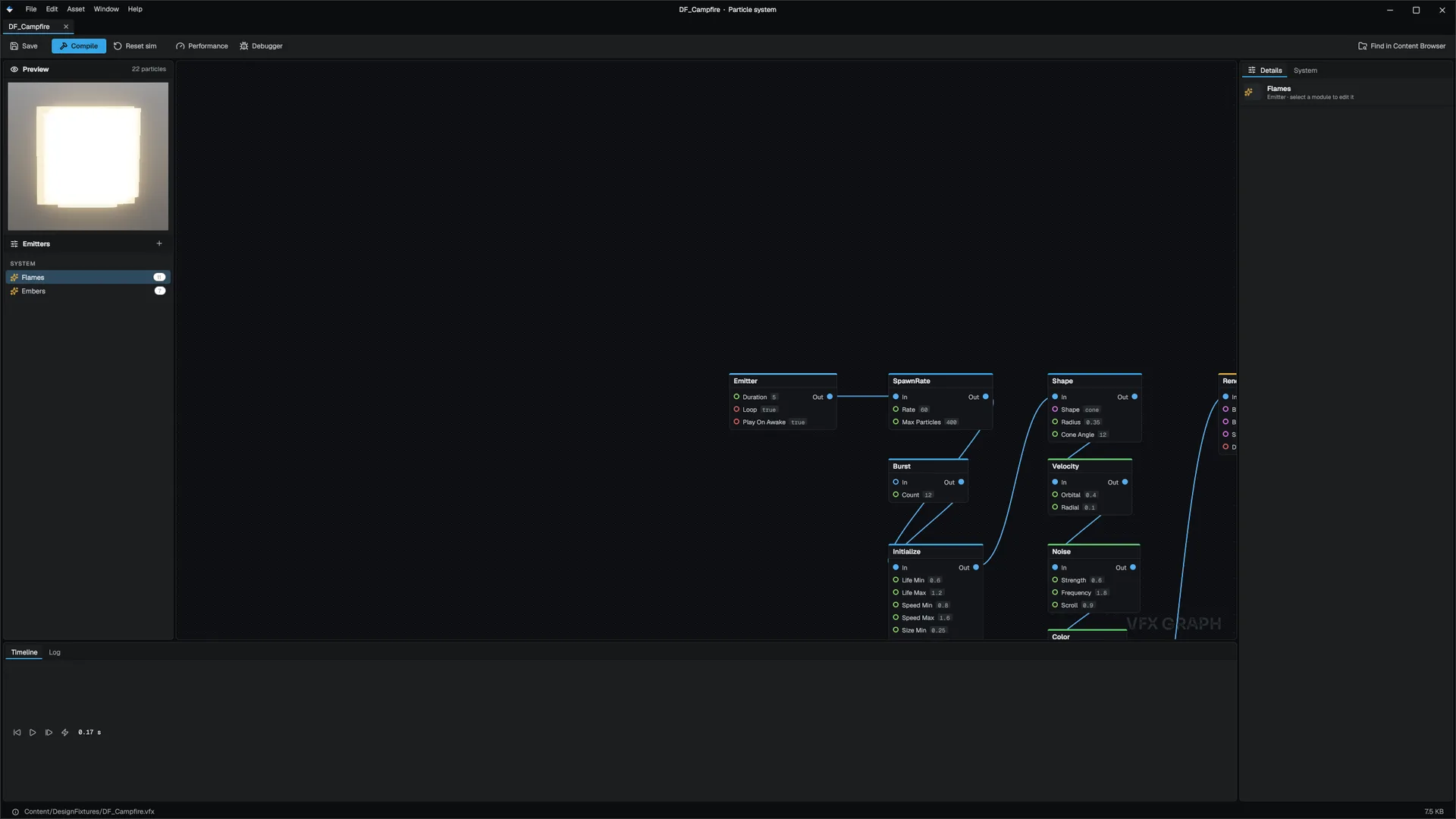
Emitter settings
| Group | Settings |
|---|---|
| Emission | Rate per second, max particles, a one-shot burstCount that fires once at start |
| Lifetime and start | Lifetime range, start velocity, speed, size and color |
| Simulation | CPU (default) or GPU |
| Rendering | Billboard or Mesh; Unlit or Lit shading; texture and flipbook (subUVColumns, subUVRows); soft particles (softFadeDistance); alpha, additive or multiply blending |
| Billboard alignment | Camera, Horizontal, Vertical or Stretched along velocity |
| Culling | cullDistance; 0 never culls |
Modules
| Module | Does |
|---|---|
Shape | Spawn volume: sphere, hemisphere, cone, box, circle, edge or point |
Velocity | Orbital and radial velocity, speed over life |
Color, Size | Gradients over life |
Force, Noise | Constant forces and turbulence |
Rotation | Spin |
Collision | Bounces off the scene |
Light | Turns the brightest particles into point lights |
Expression | A small script run on spawn or update, with up to four custom per-particle attributes (attr.name) |
SubEmitter | Spawns particles in a child emitter on a parent's birth, death or collision |
Sub-emitters
A SubEmitter module listens for Birth, Death or Collision events and spawns spawnCount particles into a child emitter at the event position: sparks that burst where a firework dies, puffs where debris lands. The child is another emitter of the same .vfx system (childEmitter) or a separate asset (childPath). It can inherit a share of the parent's velocity and color.
Collision
The Collision module treats each particle as a sphere of radius and bounces it with bounce and friction. It collides against the scene's distance field when one is available (Medium quality and up), which sees off-screen geometry, and falls back to the depth buffer. killOnCollide, lifetimeLoss and restThreshold shape the response. GPU emitters resolve collision the same way in their compute pass. Engine/Source/Runtime/Particles/Public/Particles/ParticleCollision.h
CPU or GPU simulation
| CPU | GPU | |
|---|---|---|
| Good for | Mesh particles, small and sorted effects | Large additive bursts: sparks, embers, magic |
| Mesh render mode | Yes | No, billboards only |
| Frustum culling and the fill budget | Yes | Distance from the emitter only |
GPU emitters are spawned on the CPU and aged, moved, collided, sorted and drawn on the GPU. Expression scripts run on both paths. CPU emitter trees simulate in parallel (fx.Particles.Parallel). ParticleSystem
Effects scalability
Particle cost in a real scene is mostly fill. The scalability tiers scale every emitter, so you author an effect once at the top tier:
| Console variable | Effect |
|---|---|
r.Effects.SpawnRateScale | Multiplies emission rates |
r.Effects.MaxParticleScale | Multiplies particle caps |
r.Effects.CullDistanceScale | Multiplies cull distances |
r.Effects.MaxActiveEmitters | Caps emitters drawn per view; 0 is unlimited |
r.Effects.OverdrawBudget | Caps the estimated fill, in screens of overdraw; 0 is unlimited |
r.Effects.LogStats | Logs submitted, culled and dropped emitters every N views |
An emitter that alone exceeds the overdraw budget still draws, so an effect never flickers out in front of the player. See Rendering for the quality tiers.
Trails, lines and beams
| Component | Draws |
|---|---|
TrailRenderer | A ribbon that follows a moving entity, such as a sword swing or a tracer TrailRendererComponent |
LineRenderer | A ribbon through authored points LineRendererComponent |
LaserBeam | A glowing beam along the entity's direction, up to maxLength LaserBeamComponent |
Related
- GPU simulation for swarms and fluids
- Weapons and melee for surface-aware impact effects
- Asset editors
- API: Particles module, Game module
Engine sources
This page describes behavior implemented in these files of the engine repository, checked against commit 5922e6e5e.
- Engine/Source/Runtime/Particles/Public/Particles/Components/ParticleEmitterComponent.h
- Engine/Source/Runtime/Particles/Public/Particles/ParticleSystem.h
- Engine/Source/Runtime/Particles/Public/Particles/ParticleModule.h
- Engine/Source/Runtime/Particles/Public/Particles/ParticleExpression.h
- Engine/Source/Runtime/Particles/Public/Particles/ParticleCollision.h
- Engine/Source/Runtime/Particles/Public/Particles/GPUParticle.h
- Engine/Source/Runtime/Particles/Public/Particles/VfxGraph.h
- Engine/Source/Runtime/Particles/Public/Particles/VfxGraphCompiler.h
- Engine/Source/Runtime/Particles/Public/Particles/VfxEmitterConfig.h
- Engine/Source/Runtime/Game/Public/Game/MParticleEmitterComponent.h
- Engine/Source/Runtime/Game/Public/Game/AParticleEmitterActor.h
- Engine/Source/Runtime/Game/Public/Game/Components/TrailRendererComponent.h
- Engine/Source/Runtime/Game/Public/Game/Components/LineRendererComponent.h
- Engine/Source/Runtime/Game/Public/Game/Components/LaserBeamComponent.h