 Mowo
Procedural content (PCG)
Scatter foliage, meshes, actors and level instances over the landscape or a volume with a deterministic node graph, in the editor or at runtime.
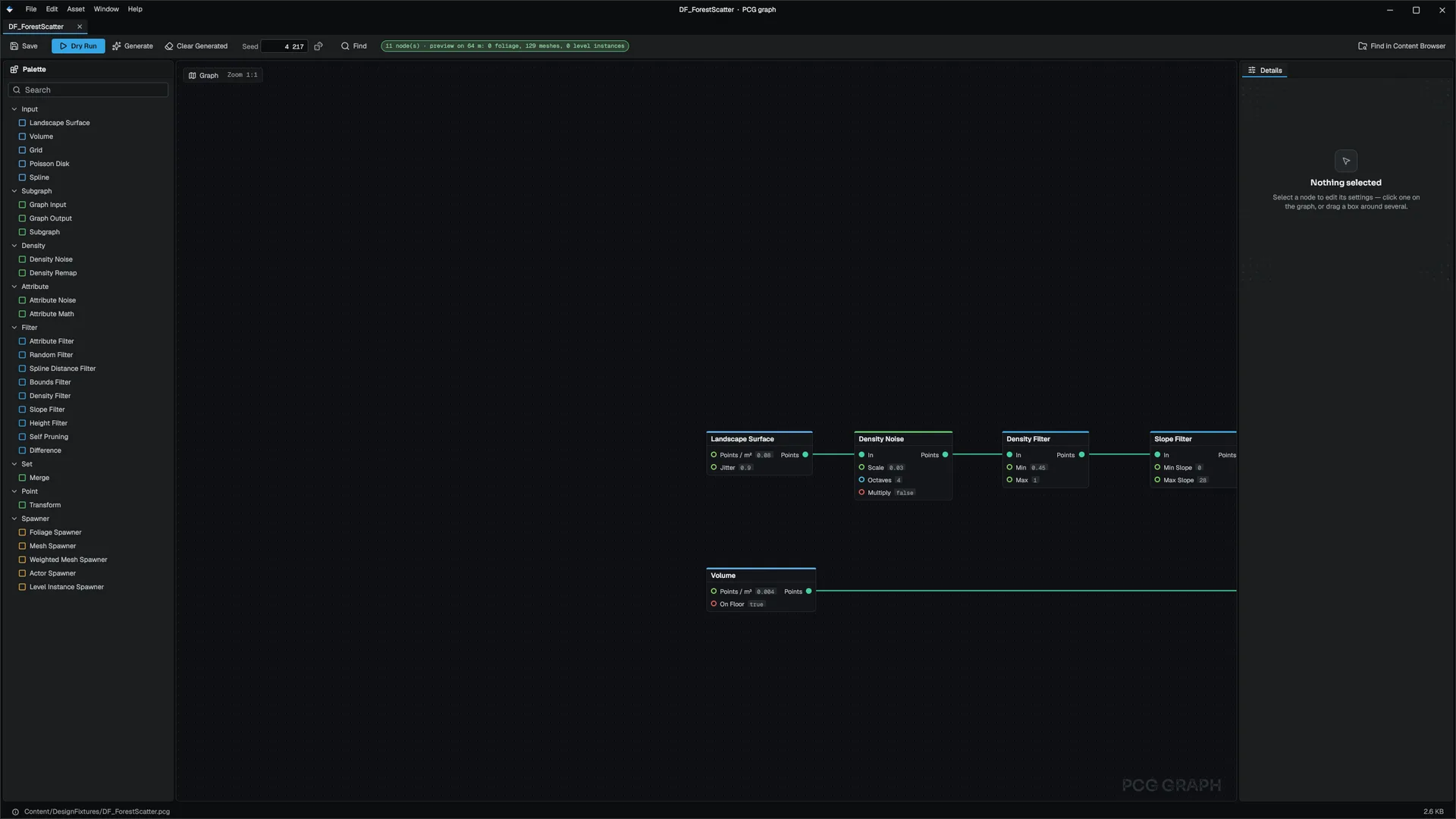
A PCG graph (.pcg) scatters content over the landscape or through a volume: foliage, mesh actors, gameplay actors and whole level instances. The same seed always produces the same result, on every machine.
The graph
Every node outputs one set of points. A point has a position, a surface normal, a density, a yaw, a scale and its own seed, plus up to eight named attributes. Nodes that read or write a value name it: density, scale, yaw, height, x, z, the read-only slope, seed, or an attribute. FPcgExecutor
| Category | Nodes |
|---|---|
| Input | Landscape Surface, Volume, Grid, Poisson Disk, Spline |
| Subgraph | Subgraph, Graph Input, Graph Output |
| Density | Density Noise, Density Remap |
| Attribute | Attribute Noise, Attribute Math |
| Filter | Attribute Filter, Random Filter, Spline Distance Filter, Bounds Filter, Density Filter, Slope Filter, Height Filter, Self Pruning, Difference |
| Set | Merge |
| Point | Transform (random scale, yaw and height offset) |
| Spawner | Foliage Spawner, Mesh Spawner, Weighted Mesh Spawner, Actor Spawner, Level Instance Spawner |
Spawners pass their input through, so one point set can feed several spawners. A Subgraph node runs another .pcg, so you can build a library of reusable scatter rules.
Create a graph from the Content Browser's New › PCG Graph. The graph editor shows each node's point count from a dry run as you edit, and Generate regenerates every PCG volume in the open level.
A PCG volume
Add a PCG component (category Environment) to an entity. PcgComponent
| Field | Effect |
|---|---|
graph | The .pcg to run |
seed | Mixed into every random choice |
extents | The volume around the entity; zero covers the whole landscape |
landscape | Which terrain to sample; empty uses the first |
generateInEditor, generateAtRuntime | When it runs |
maxPoints, maxMeshActors | Safety caps |
partitioned, partitionCellSize | Generate the volume as a grid of world-aligned cells (64 m by default), each on its own worker, so a large volume regenerates in parallel |
In the editor, a volume regenerates on its own when anything it depends on changes: the graph or a subgraph, the level's splines, the seed, the volume or the terrain. Before generating, it removes its previous output: foliage goes onto the volume's own painted-foliage component, and every spawned actor carries a PcgGenerated component naming the volume, so the next run removes exactly what it made. PcgGeneratedComponent
A regeneration reruns only the nodes after what changed. Each node's result is cached under a hash of its inputs, parameters, seed, bounds, landscape and splines, and a node whose hash matches a cached result reuses it. In a partitioned volume, each cell's unchanged nodes come from the same cache. FPcgCache
| Console variable | Default | Effect |
|---|---|---|
pcg.NodeCache | 1 | Reuse cached node results; 0 recomputes every node |
pcg.NodeCacheEntries | 512 | Node results kept across every volume before the least recently used is dropped |
At runtime
With generateAtRuntime, volumes generate once when play begins, in play-in-editor and in a packaged game. For a different world each run, call MPcgStatics::RegenerateWithSeed(seed); RegenerateAll() reruns with the current seeds. GetVolumeCount, GetGeneratedFoliageCount, GetGeneratedMeshCount and GetGeneratedLevelInstanceCount report the result. MPcgStatics
For whole levels built from rooms, see Level generation. For parametric single props, see Smart Props.
Related
- World building for painting foliage by hand
- World environment
- API: PCG module
Engine sources
This page describes behavior implemented in these files of the engine repository, checked against commit 5922e6e5e.
- Engine/Source/Runtime/PCG/Public/PCG/PcgGraph.h
- Engine/Source/Runtime/PCG/Public/PCG/PcgExecutor.h
- Engine/Source/Runtime/PCG/Public/PCG/PcgComponent.h
- Engine/Source/Runtime/PCG/Public/PCG/PcgGeneratedComponent.h
- Engine/Source/Runtime/PCG/Public/PCG/PcgGeneration.h
- Engine/Source/Runtime/PCG/Public/PCG/MPcgStatics.h