 Mowo
IK, retargeting and motion matching
Foot and hand IK, full-body IK, look-at and spring bones, control rigs, retargeting between skeletons, motion matching, morph targets and lip-sync.
These features adjust or replace the pose that the animation graph produces. Each is a reflected component placed next to the character's Animator, and the animation system runs them in a fixed order after blending: full-body IK, two-bone and chain IK, look-at and spring bones, then the control rig.
IK
The IK component bends animated limbs onto the world after the fact. IKComponent
| Goal type | Solver | Use for |
|---|---|---|
| Two-bone goal | Analytic root, mid and end, with an optional pole hint and joint angle limits | Arms and legs |
| FABRIK goal | Iterative, any chain length | Spines, tails, tentacles, fingers |
| Full-body setup | Several effectors sharing joints | A whole-body reach without the last chain winning the spine |
Full-body IK runs first, so foot IK still lands last and keeps the feet on the floor. FFullBodyIKSetup
Foot IK
A two-bone goal with autoFootRaycast traces down from the foot each frame and plants it on the ground:
| Field | Effect |
|---|---|
raycastUp, raycastDistance | Where the ray starts above the foot and how far it reaches |
groundOffset | Foot height above the hit point |
alignToNormal | Tilts the foot to the slope |
lockPlantedFoot, plantSpeed, unlockDistance, unlockBlendTime | Pins a planted foot so it does not slide, and releases it smoothly |
The component also drops the pelvis when one foot stands lower than the other, so a character on a step does not lock one leg straight.
Look-at and spring bones
The ProceduralAnim component adds secondary motion: look-at goals that aim a bone at a target (a world-space target, such as another actor, is converted for you), and spring-bone chains for ponytails, tails and straps that keep their own momentum. ProceduralAnimComponent
Control rigs
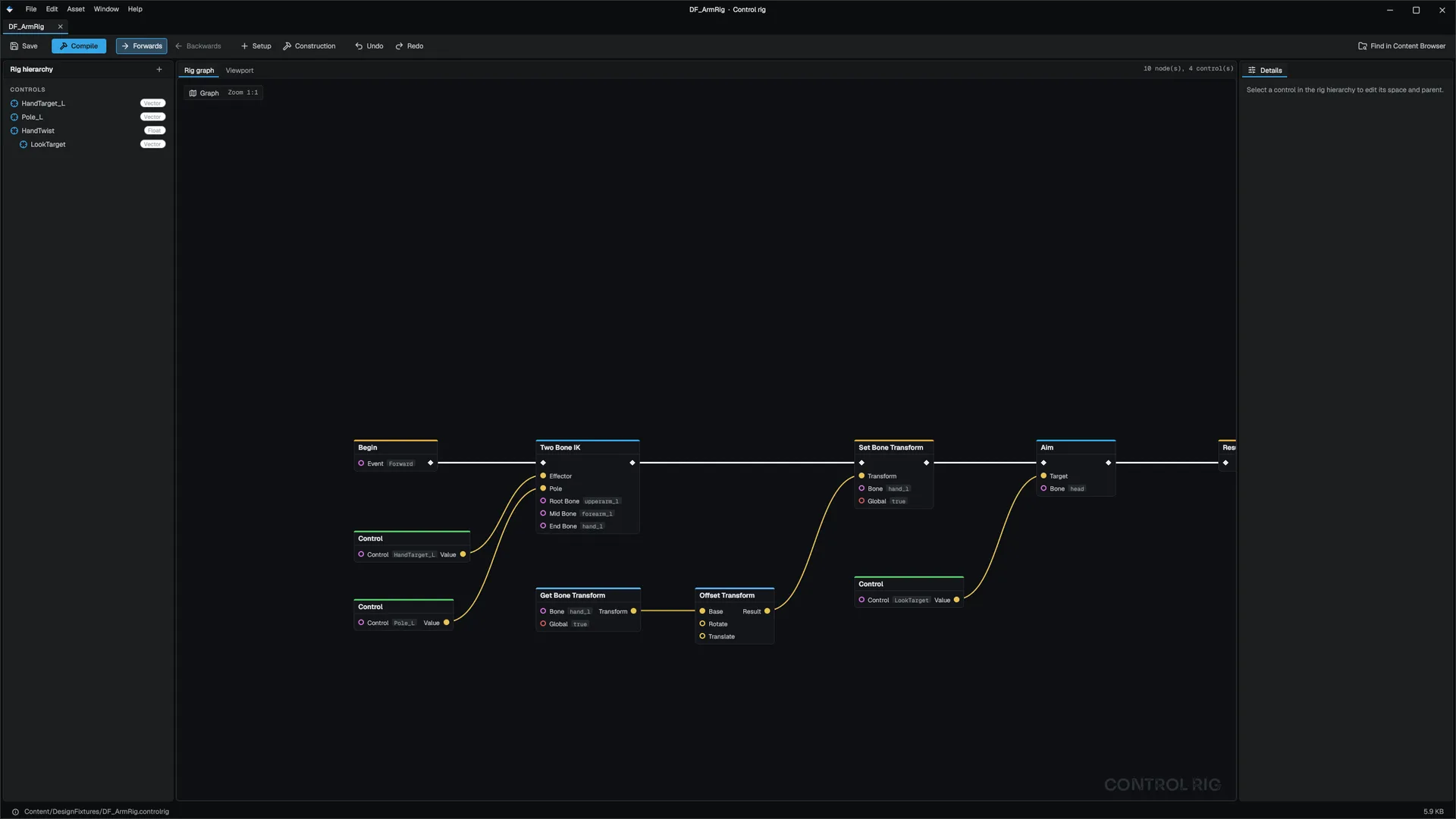
A control rig (.controlrig) is a node graph that edits the final pose. It reads the animated pose plus named controls that gameplay sets, and writes the output pose used for skinning. Nodes read and write bone transforms, solve two-bone IK, aim bones, offset and blend transforms, and do math. ControlRigComponent
Add a ControlRig component, point assetPath at the rig, and drive its controls from gameplay:
#include "Animation/Components/ControlRigComponent.h"
#include "Math/Vec3.h"

Mowo::ControlRigComponent* rig = nullptr;

rig->SetControlVector("HandTarget", Mowo::Vec3(0.3f, 1.1f, 0.4f));
rig->SetControlFloat("SpineLean", 0.3f);
A control's value can be expressed relative to the rig's component space, to a bone, or to another control, so a hand target authored relative to the forearm follows it. FControlRig
Retargeting
Retargeting plays animation authored for one skeleton on another with different proportions. Bones are paired by name. Each bone's rotation is replayed as a change from its own rest pose, bone lengths stay the target's, and root motion is scaled by the height ratio of the two rigs so feet do not slide. Unmatched target bones keep their rest pose. FRetargetMap
Add a Retarget component to the target character. Set heightRatio to override the measured ratio (0 measures it). For rigs whose names differ, author a Retargeter asset (.retarget) with name remaps, prefixes to strip and per-bone translation modes, and reference it in the component's Retargeter field. RetargetComponent FRetargetAsset
Motion matching
Motion matching replaces the state machine's choice of clip. Every frame of the database's clips is a candidate with a feature vector built from the future and past trajectory and a few bone positions and velocities. At each search, the character's current pose and desired trajectory are compared with the database, and the closest frame wins. Transitions are blended with inertialization. FMotionMatchingDatabase
The clips must carry root motion; an in-place clip has no trajectory. Build the database in code from a feature schema (which bones, which time horizons, which weights) and the clip list, then hand it to a MotionMatching component and feed it the desired velocity and facing from your movement code each frame. With no animation graph, motion matching drives the character; with one, only states flagged to use motion matching hand over the pose. MotionMatchingComponent
| Field | Default | Effect |
|---|---|---|
searchInterval | 0.1 s | Time between searches |
switchBias | 0.5 | How much better a candidate must be than continuing the current clip; stops jitter |
blendTime | 0.2 s | Inertialization window |
velocityHalfLife, facingHalfLife | 0.15 s, 0.1 s | Trajectory responsiveness; lower is snappier |
usePoseHistory | on | Searches from last frame's final pose, including IK and montages |
There is no editor asset for a motion matching database yet. You build it in C++ with FMotionMatchingDatabase::Build or BuildCached, which caches the result in the derived data cache.
Morph targets
The Morph component holds one weight per morph target of the mesh. With animDriven, curves in the playing clips drive the weights; with gpuCompute, the blend runs on the GPU. MorphComponent
Lip-sync
The LipSync component drives morph targets from the character's own audio while it plays. LipSyncComponent
| Mode | Drives |
|---|---|
Amplitude | The jaw target (jawTarget) from loudness, scaled by gain and smoothed by response |
Text | One of five visemes per letter of text, paced over the clip |
Both | Both layered |
Viseme target names default to viseme_aa, viseme_E, viseme_O, viseme_PP and viseme_FF. A name the mesh does not have is skipped, so a head with only a jaw still talks. Put it next to a Morph component and an audio source.
Related
- Animation
- Vehicles, cloth and ragdolls for physical animation
- API: Animation module, Game module
Engine sources
This page describes behavior implemented in these files of the engine repository, checked against commit 08e26df3d.
- Engine/Source/Runtime/Game/Public/Game/Components/IKComponent.h
- Engine/Source/Runtime/Animation/Public/Animation/IK/TwoBoneIK.h
- Engine/Source/Runtime/Animation/Public/Animation/IK/FABRIK.h
- Engine/Source/Runtime/Animation/Public/Animation/IK/FullBodyIK.h
- Engine/Source/Runtime/Game/Public/Game/Components/ProceduralAnimComponent.h
- Engine/Source/Runtime/Animation/Public/Animation/Procedural/ProceduralBones.h
- Engine/Source/Runtime/Animation/Public/Animation/ControlRig.h
- Engine/Source/Runtime/Animation/Public/Animation/Components/ControlRigComponent.h
- Engine/Source/Runtime/Animation/Public/Animation/Retargeting.h
- Engine/Source/Runtime/Animation/Public/Animation/RetargetAsset.h
- Engine/Source/Runtime/Game/Public/Game/Components/RetargetComponent.h
- Engine/Source/Runtime/Animation/Public/Animation/MotionMatching.h
- Engine/Source/Runtime/Animation/Public/Animation/Components/MotionMatchingComponent.h
- Engine/Source/Runtime/Game/Public/Game/Components/MorphComponent.h
- Engine/Source/Runtime/Game/Public/Game/Components/LipSyncComponent.h
- Engine/Source/Runtime/Game/Public/Gameplay/LipSyncSystem.h