 Mowo
Gameplay framework
Game modes, game state, player controllers, pawns and characters, and how a match starts when you press Play.
Mowo ships the same framework classes you know from Unreal: a game mode that holds the rules, a game state that holds match status, controllers that possess pawns, and a character class with movement built in. The framework is optional. A project that names no game mode class gets plain actors and nothing else.
The classes
| Class | Role |
|---|---|
AGameMode | The rules. Decides which pawn, controller and game state classes to spawn, and runs the match start. One per world. AGameMode |
AGameState | Match phase (WaitingToStart, InProgress, WaitingPostMatch) and elapsed time AGameState |
AController | A non-physical actor that possesses a pawn |
APlayerController | The human player's controller. Owns the player's input bindings and Enhanced Input subsystem. |
AIController | The AI controller, in the AINavigation module AIController |
APawn | An actor a controller can possess. Collects movement input. |
ACharacter | A pawn with a root, a character movement component and an ability system component ACharacter |
APlayerStart | A placed spawn point with a player index |
MGameInstance | A key-value store that survives scene loads and travel MGameInstance |
How a match starts
When the start scene begins play, the host looks up the project's game mode class by name and calls MWorld::InitializeGameMode. The packaged runtime and play-in-editor do this the same way. If the name is not a registered class, both log a warning and fall back to the base AGameMode. If the setting is empty, no framework actors are spawned.
- InitializeGameMode
- InitGame
- StartMatch
- Spawn game state
- Spawn player controller
- Spawn default pawn at a player start
- Possess + PostLogin
- Match InProgress
StartMatch spawns the game state, the player controller and the default pawn, possesses the pawn, fires PostLogin, and sets the match to InProgress. The pawn is placed at the APlayerStart whose player index matches the game mode's playerIndex, or the first one found. With no player start in the world, the pawn spawns at the origin.
On a dedicated server the game mode starts with spawnLocalPlayerOnStart off, so no local controller or pawn exists; each joining connection gets its pawn through RestartPlayer. AGameMode
Set up a playable character
- Create a pawn class
Derive from
ACharacterfor walking, jumping and crouching, or fromAPawnif you handle movement yourself. OverrideSetupPlayerInputto bind input. - Create a game mode
Derive from
AGameModeand setdefaultPawnClassin the constructor. LeaveplayerControllerClassandgameStateClassnull to use the base classes. AGameMode - Place a player start
Add an
APlayerStartto your start scene where the player should appear. - Pick the game mode in Project Settings
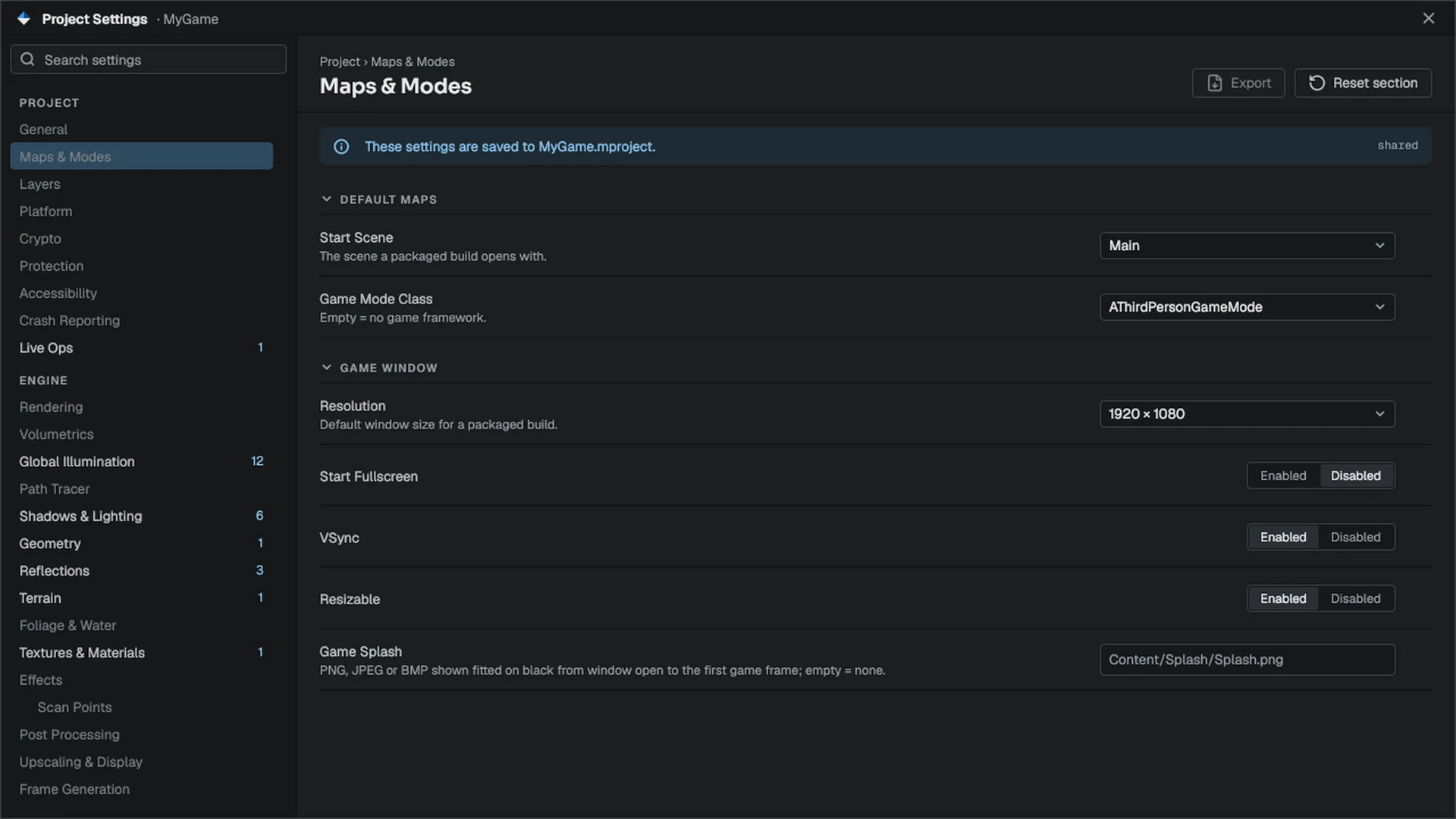
Open Project Settings, go to Project › Maps & Modes, and set Game Mode Class. The field lists the game modes the editor discovered; an empty value means no game framework.
- Press Play
Play-in-editor spawns the framework and possesses your pawn. See Play in editor.
The pawn
#pragma once

#include "Game/ACharacter.h"
#include "Game/MPlayerInput.h"
#include "Input/InputAction.h"
#include "Math/Math.h"

namespace Mowo {

MCLASS()
class ARunner : public ACharacter {
public:
	MGENERATED_BODY()

	void SetupPlayerInput(MPlayerInput* input) override {
		input->BindAxis2D("Move", [this](Vec2 value) {
			AddMovementInput(Vec3(value.x, 0.0f, value.y));
		});

		input->BindAction("Jump", ETriggerEvent::Started, [this]() {
			Jump();
		});

		input->BindAction("Sprint", ETriggerEvent::Started, [this]() {
			SetSprinting(true);
		});

		input->BindAction("Sprint", ETriggerEvent::Completed, [this]() {
			SetSprinting(false);
		});
	}
};

}
APlayerController clears its bindings and calls the new pawn's SetupPlayerInput every time it possesses one, so bindings never leak from a previous pawn. The string names refer to input actions; the Input page shows how to bind to action assets and activate a mapping context.
The game mode
#pragma once

#include "Core/MClassRegistry.h"
#include "Game/AController.h"
#include "Game/AGameMode.h"
#include "Game/APawn.h"
#include "Game/AThirdPersonCharacter.h"

namespace Mowo {

MCLASS()
class ARunnerGameMode : public AGameMode {
public:
	MGENERATED_BODY()

	ARunnerGameMode() {
		defaultPawnClass = MClassRegistry::Get().FindForType<AThirdPersonCharacter>();
	}

	void PostLogin(AController* controller, APawn* pawn) override {
		AGameMode::PostLogin(controller, pawn);
		m_Arrivals++;
	}

private:
	int32_t m_Arrivals = 0;
};

}
Replace AThirdPersonCharacter with your own pawn class. FindForType<T>() returns the reflected MClass for a C++ type. You can also bind OnPostLogin() and OnLogout() from outside the game mode instead of overriding the virtuals. AGameMode
The engine ships template game modes, such as AThirdPersonGameMode, that point the framework at a ready-made pawn and camera. Set the project's game mode class to one of them to get a playable character with no code. AThirdPersonGameMode
Possession
AController::Possess(pawn) releases the current pawn first, then calls the pawn's PossessedBy. Override OnPossess and OnUnPossess on a controller subclass to react. AController
A pawn gathers movement through AddMovementInput(direction, scale). The character movement component consumes the accumulated intent each frame; a plain APawn without one consumes it in its own Tick. APawn
ACharacter also implements IDamageable: TakeDamage routes into the ability system's Health attribute and returns the health actually removed. ACharacter
Input contexts on the controller
APlayerController::PushInputContext(name) and PopInputContext(name) activate named input contexts, for a menu or a vehicle, on top of the current ones. The controller remembers what it pushed and pops all of it at EndPlay, so a context cannot outlive its controller. APlayerController
Data that survives travel
Loading a scene tears the actor world down. Values that must survive, such as a chosen difficulty or a run seed, go in MGameInstance:
#include "Game/MGameInstance.h"

Mowo::MGameInstance& instance = Mowo::MGameInstance::Get();
instance.SetInt("Difficulty", 2);

int32_t difficulty = instance.GetInt("Difficulty", 1);
(void)difficulty;
The same store is reachable from Visual Scripting through its reflected functions. MGameInstance
Local multiplayer
FLocalPlayerManager tracks up to four local players, each with a gamepad slot, a player controller, a camera and a screen pane for split-screen. Engine/Source/Runtime/Game/Public/Game/LocalPlayer.h
Template characters
Three ready-made characters back the project templates. Each reads the input actions Move and Look (2D axes) and Jump, Sprint and Crouch (buttons). A missing action reads as zero, so a half-configured project stands still instead of failing. AThirdPersonCharacter
| Class | Camera | Movement | Tuning fields |
|---|---|---|---|
AThirdPersonCharacter | Orbit rig behind the pawn | Camera-relative, turns to face travel | lookSensitivity, turnSpeed |
AFirstPersonCharacter | At the eye point | Camera-relative on the ground plane, body follows the camera | lookSensitivity, eyeHeight AFirstPersonCharacter |
ATopDownCharacter | Fixed high camera, no Look | World-relative, faces travel | cameraDistance, cameraPitch, turnSpeed ATopDownCharacter |
Point a game mode at one of them (AThirdPersonGameMode, AFirstPersonGameMode, ATopDownGameMode), or subclass one and override what you need. The fields are editable in the Details panel.
The game mode's own class fields (defaultPawnClass, playerControllerClass, gameStateClass) are TSubclassOf properties with EditAnywhere, so a game mode placed or edited in the editor picks its pawn, controller and game state from a class picker, Visual Scripting classes included, instead of naming them in a constructor. The picker only offers classes that derive from the field's type. AGameMode
Subsystems
A subsystem is a singleton that lives as long as its scope and is created on first use. Engine/Source/Runtime/Core/Public/Core/MSubsystem.h
| Base class | Lifetime | Reach it with |
|---|---|---|
MEngineSubsystem | The whole process | GEngine->GetSubsystem<T>() |
MWorldSubsystem | One world | MWorld::GetSubsystem<T>() |
Override Initialize and Deinitialize. Do not rely on the order in which subsystems initialize; if one needs another, fetch it with GetSubsystem inside Initialize.
Framework classes in Visual Scripting
A Visual Scripting class can take AActor, APawn, ACharacter, AGameMode, AGameState or APlayerController as its native parent. The engine backs each with a thin class (AVisualScriptCharacter, AVisualScriptGameMode and so on) that runs the native lifecycle first and then the graph, so a graph-based character still gets capsule movement and health from ACharacter. AVisualScriptCharacter AVisualScriptGameMode See Visual Scripting.
Related
- Input for mapping contexts and bindings
- Character movement for movement modes
- Project settings
- Play in editor
- API: Game module, AINavigation module
Engine sources
This page describes behavior implemented in these files of the engine repository, checked against commit 38224a3a8.
- Engine/Source/Runtime/Game/Public/Game/AGameMode.h
- Engine/Source/Runtime/Game/Public/Game/AGameState.h
- Engine/Source/Runtime/Game/Public/Game/AController.h
- Engine/Source/Runtime/Game/Public/Game/APlayerController.h
- Engine/Source/Runtime/Game/Public/Game/APawn.h
- Engine/Source/Runtime/Game/Public/Game/ACharacter.h
- Engine/Source/Runtime/Game/Public/Game/APlayerStart.h
- Engine/Source/Runtime/Game/Public/Game/MGameInstance.h
- Engine/Source/Runtime/Game/Public/Game/AThirdPersonGameMode.h
- Engine/Source/Runtime/Game/Public/Game/LocalPlayer.h
- Engine/Source/Runtime/Game/Public/Game/MWorld.h
- Engine/Source/Runtime/AINavigation/Public/AINavigation/AIController.h
- Engine/Source/Runtime/Game/Public/Game/AFirstPersonCharacter.h
- Engine/Source/Runtime/Game/Public/Game/ATopDownCharacter.h
- Engine/Source/Runtime/Game/Public/Game/AVisualScriptCharacter.h
- Engine/Source/Runtime/Game/Public/Game/AVisualScriptGameMode.h
- Engine/Source/Runtime/Core/Public/Core/MSubsystem.h