 Mowo
Display, frame rate and HDR
Window modes, resolution, VSync, the frame-rate cap and HDR output for a shipped game, and the launch switches players can use.
A shipped game remembers how the player wants it displayed: window mode, monitor, resolution, refresh rate and VSync. The frame-rate cap and HDR output are console variables that the in-game settings screen exposes. This page covers what each setting does, where it is stored and how launch switches override it.
Where players change it
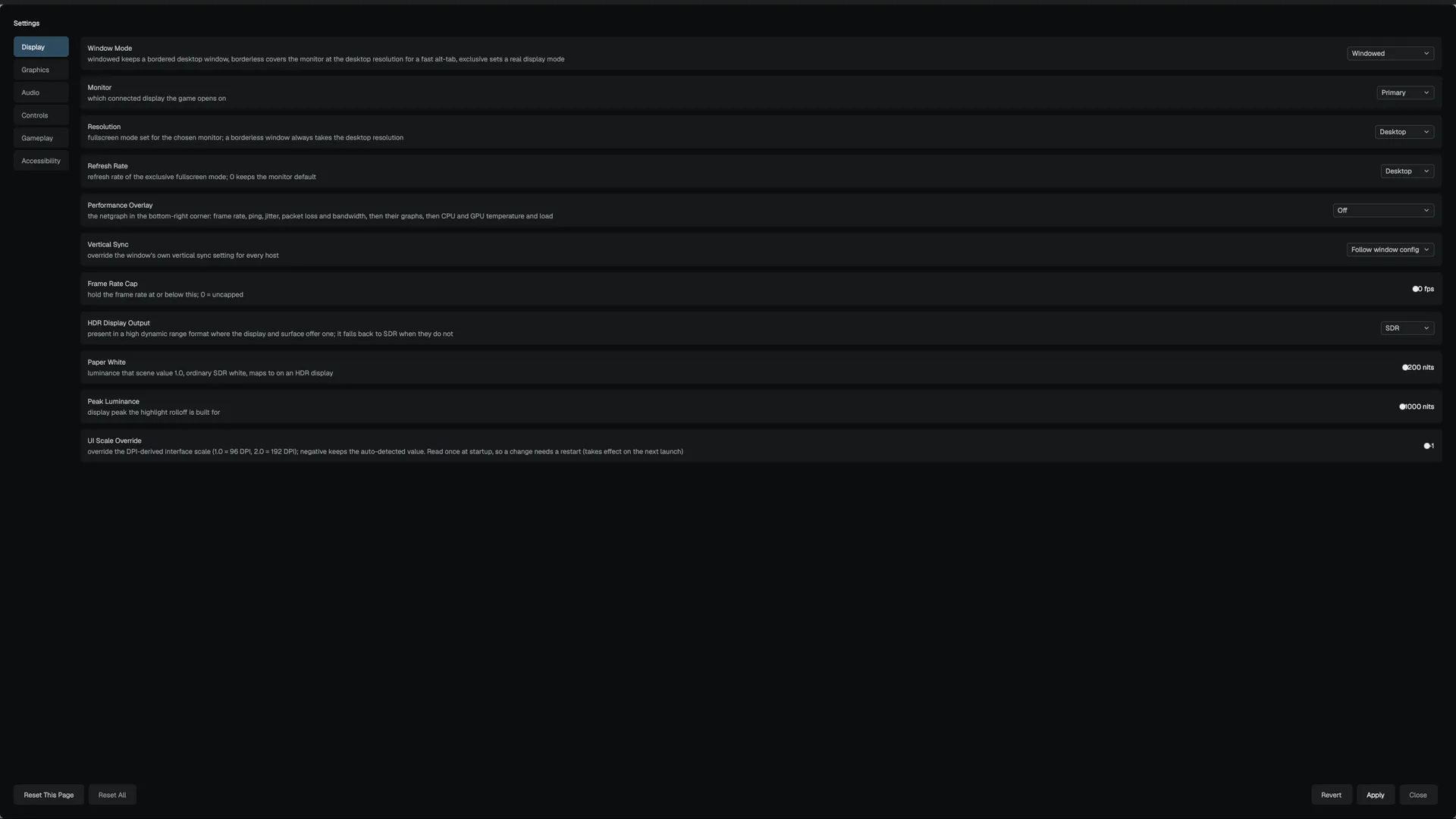
The player's settings screen has a Display category with these rows ():
| Row | Backed by |
|---|---|
| Window Mode, Monitor, Resolution, Refresh Rate | The persisted display configuration |
| Vertical Sync | r.VSync |
| Frame Rate Cap | t.MaxFPS |
| HDR Display Output, Paper White, Peak Luminance | r.HDROutput, r.HDRPaperWhiteNits, r.HDRMaxNits |
| UI Scale Override | arc.UIScale (read at startup) |
The Resolution and Refresh Rate lists come from the modes the selected monitor reports, with a Desktop entry that keeps the monitor's own mode. Building the settings screen itself is covered in the UI section.
Window modes
| Mode | Behaviour |
|---|---|
| Windowed | A bordered, movable, resizable window, centred on the target monitor at the chosen resolution. |
| Borderless fullscreen | A borderless window covering the monitor at its desktop resolution. Alt-tab is fast and no display mode is set. |
| Exclusive fullscreen | A real display-mode change to the chosen resolution and refresh rate. |
Where the choice is stored
The window mode, monitor, resolution, refresh rate and VSync are saved per user in Config/Display.ini under the game's app-data folder. Until the player changes something, the file records that nothing was chosen, and the game keeps its launch defaults.
On startup the player host reads Display.ini before it creates the window, so the first frame already has the right mode and VSync without a visible switch. Once the window and renderer exist, it applies the exact monitor, resolution and refresh rate ().
Launch switches
A packaged game accepts a short list of switches, even in a release build. These override the saved display settings for one run:
| Switch | Effect |
|---|---|
--fullscreen, --windowed, --borderless | Window mode |
--width=N, --height=N (also --resx, --resy) | Window size |
--vsync, --novsync, --no-vsync | VSync on or off |
--hdr, --nohdr | Sets r.HDROutput before the swapchain exists |
-d3d12, -dx12, -d3d11, -dx11, -vulkan, -metal | Graphics backend, see Backends |
--no-splash | Skip the project's Game Splash image; the game still opens on a black frame |
Every other switch, including --cvar=, is dropped in a release build ().
VSync and the frame-rate cap
r.VSync: 1 on, 0 off, -1 (the default) follows the window configuration. Changing it rebuilds the swapchain at the start of the next frame.t.MaxFPS: caps the frame rate. 0 is uncapped.- On D3D12,
r.D3D12.MaxFrameLatencysets how many presents may queue ahead of the display. 1 is the lowest latency.
For NVIDIA Reflex, AMD Anti-Lag 2 and Intel XeLL, see Upscaling and anti-aliasing.
HDR output
r.HDROutput switches the swapchain to an HDR format when the display and the OS offer one:
| Value | Mode | Swapchain format |
|---|---|---|
| 0 | SDR (default) | 8-bit sRGB |
| 1 | scRGB | RGBA16F, linear, 1.0 = 80 nits |
| 2 | HDR10 | 10-bit, PQ, Rec.2020 |
| 3 | Auto | scRGB if offered, otherwise HDR10 |
If the requested mode is not offered, the engine logs a warning once and stays SDR; it never fails. On Windows the surface lists HDR formats only while Windows HDR is turned on.
In HDR mode the tonemapper replaces the SDR curve with a highlight rolloff toward r.HDRMaxNits (default 1000). The grading chain runs before the display encode, in the same range LUTs are authored for. Scene value 1.0, ordinary SDR white, maps to r.HDRPaperWhiteNits (default 200). The post-tonemap targets switch to RGBA16F so the encode keeps its precision.
The swapchain also sends mastering metadata (primaries, white point, r.HDRMaxNits as peak and MaxCLL, paper white as MaxFALL) on D3D12, D3D11 and Vulkan, so the OS does not guess the range. Metal does not send it yet.
Limits
- Only the game runtime renders the scene in HDR. The editor viewport stays SDR, and the editor UI is composited as paper-white SDR inside the HDR swapchain.
- Frame generation has not been validated with HDR swapchains.
Accessibility
r.DisplayGamma (default 2.2, range 1.8 to 2.6) re-encodes the SDR image for a panel with a different gamma, so a darker panel gets its shadow detail back.
Related
- Quality tiers for the Graphics category of the same settings screen.
- Console variables for the full list.
Engine sources
This page describes behavior implemented in these files of the engine repository, checked against commit 4d3133579.
- Engine/Source/Runtime/RHI/Public/RHI/HdrMetadata.h
- Engine/Source/Runtime/RHI/Public/RHI/Renderer.h