 Mowo
Ray tracing
Hardware ray-traced reflections, ambient occlusion, sun shadows and Global Illumination gather, the ray-tracing scene, and the path-traced reference renderer.
Mowo uses hardware ray tracing to improve four real-time effects: reflections, ambient occlusion, sun shadows and the Global Illumination gather. MegaLights also traces its shadow rays against the same scene. Every one is optional: when the device has no ray query, or the ray-tracing scene is not ready, each falls back to its raster or screen-space version for that frame. A progressive path tracer uses the same scene as a reference.
Ray tracing is off for a new project, like Unreal's Support Hardware Ray Tracing. Turn it on in Project Settings > Rendering > Features > Ray Tracing (r.RayTracing.EnableForProject 1). While it is off no tier and no r.* cvar below enables a ray-traced feature, no ray-tracing scene is built, no ray-tracing pipeline compiles, the path tracer view mode stays dark and DLSS Ray Reconstruction does not run. The LiDAR scanner is gameplay, not rendering, and still builds the scene it traces.
Hardware requirements
Most ray tracing in Mowo is inline ray query: a pixel or compute shader traces rays itself, with no ray-tracing pipeline. Ray-traced sun shadows, and reflections when you ask for it, use a real ray-tracing pipeline with per-material hit shaders where the backend has one.
| Backend | Ray query | Ray-tracing pipelines |
|---|---|---|
| Direct3D 12 | Yes (DXR) | Yes |
| Vulkan | Yes (VK_KHR_ray_query) | Yes (VK_KHR_ray_tracing_pipeline) |
| Metal | Yes (intersection_query) | No |
| Direct3D 11 | No | No |
FRHIApiCeiling::SupportsRayTracing and SupportsRayTracingPipeline give the API ceiling; RendererCapabilities::SupportsRayQuery and SupportsRayTracingPipeline give the device answer. Check both: a Vulkan driver can expose ray query without the pipeline extension.
Which features, which tier
With Ray Tracing on in Project Settings:
| Feature | cvar | Replaces | On by default at |
|---|---|---|---|
| Ray-traced reflections | r.RTReflections | The world leg of screen-space reflections | Epic, Cinematic |
| Ray-traced AO | r.RTAO | GTAO | Epic, Cinematic |
| Hardware ray-traced GI gather | r.GI.HWRTGather | The distance-field trace of the screen-probe gather | Epic, Cinematic |
| Ray-traced sun shadows | r.RTShadows | The cascade and virtual-map lookup in lighting | Cinematic |
| MegaLights shadow rays | r.MegaLights | A screen-space depth march | Epic, Cinematic, when a ray scene exists |
Each cvar takes -1 for the tier value and 0 or 1 to force the feature.
Can this machine run it?
FRayTracingCapability::Query(feature) answers per feature, with the reason when the answer is no:
#include <RHI/RayTracingCapability.h>

const FRayTracingAvailability rt = FRayTracingCapability::Query(ERayTracingFeature::SunShadows);
if (!rt.Available) {
    ShowGreyed(rt.Reason);   // "Ray-Traced Sun Shadows is unavailable: this GPU or its driver does not report ray queries"
}
The features are Reflections, AmbientOcclusion, SunShadows and GiGather, and FRayTracingCapability::CVarName gives the switch each one reads (r.RTReflections, r.RTAO, r.RTShadows, r.GI.HWRTGather). Block names the first thing that rules the feature out, in the order a player can act on it: Backend (switch graphics API), DriverOrGpu (no ray query on this device), then ProjectSwitch (the game did not enable ray tracing in Project Settings). The player settings screen uses the same answers, so a missing option and a greyed one say the same thing.
You do not need Epic to try ray tracing. With the project switch on, on a High-tier machine with a capable GPU, set r.RTReflections 1 or r.RTAO 1. Each one builds the ray-tracing scene it needs.
The ray-tracing scene
SceneRenderer builds acceleration structures at the start of each frame whenever a consumer wants them: r.RTScene, or any of the features above.
- Bottom-level cache. One structure per mesh, built once and shared across instances and frames. New builds are limited per frame (
r.RTScene.BlasBudget, default 8), so a large scene streams in over a few frames instead of hitching. Built structures are compacted (r.RT.BLASCompaction). - Top-level structure. One per frame in flight. When only transforms change, it is refitted instead of rebuilt.
- Terrain joins as tiles of real triangles generated from the height texture (
r.RT.Terrain, default 1). - Foliage clumps near the camera join, up to
r.RT.Foliage.Distance(default 40) andr.RT.Foliage.MaxInstances(r.RT.Foliage, default 1). - Translucent geometry joins, visible only to reflection rays and, with
r.RT.TranslucentShadows, to shadow rays, where it occludes by its opacity (r.RT.Translucent, default 1).
Alpha-masked geometry is resolved per hit: where a pass can reach the material, it runs the material's own alpha test at the hit; otherwise it accepts the hit with probability equal to the mesh's average coverage.
Ray-traced reflections
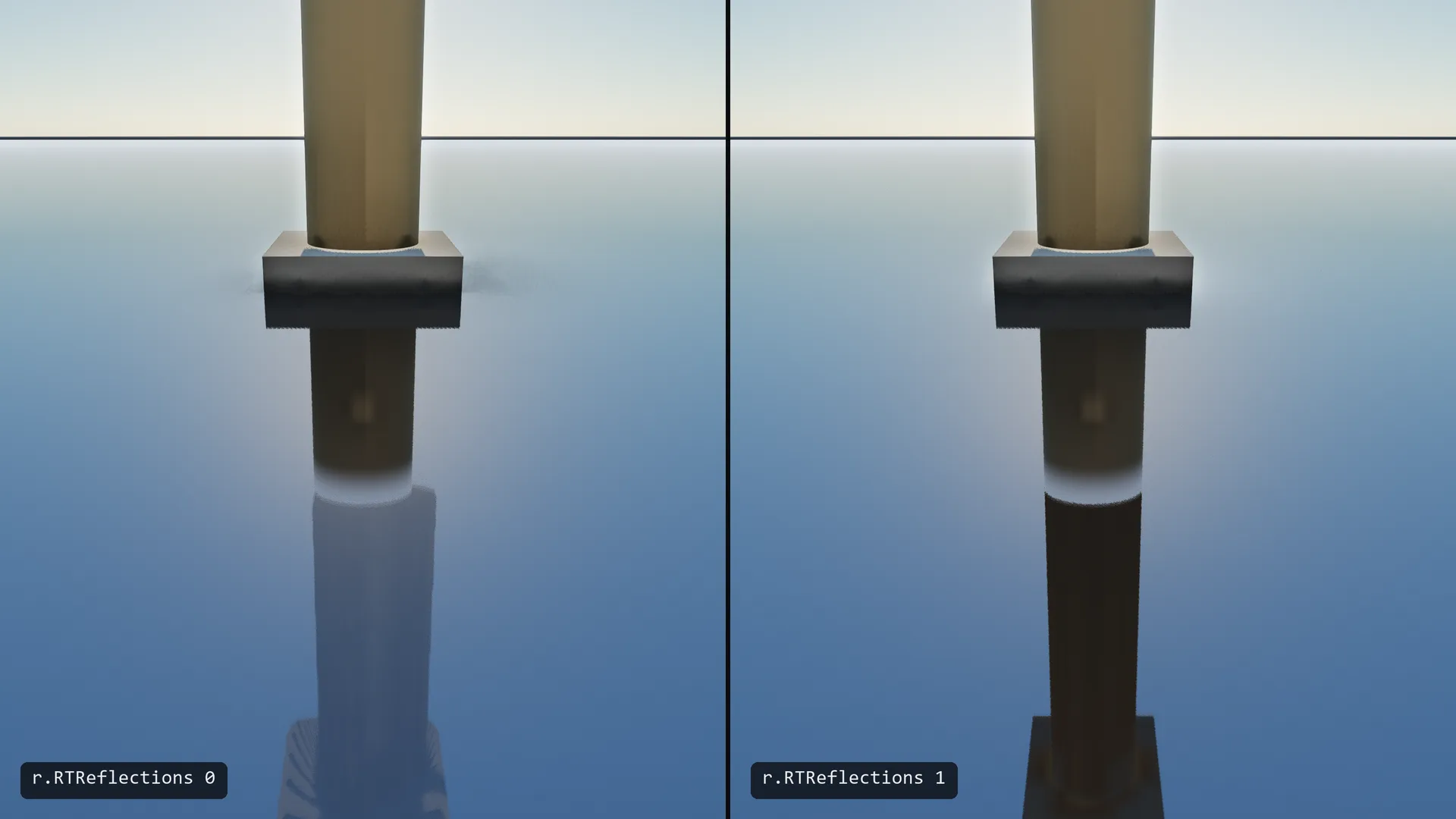
Ray-traced reflections share the screen-space reflections' inputs, output and denoiser. With r.Reflections.Continuation (default 1) each pixel shoots one ray: it marches the depth buffer first, and only rays that leave the screen or fail continue into the ray-tracing scene from where they stopped. Objects behind the camera and outside the screen reflect correctly.
| cvar | Default | Meaning |
|---|---|---|
r.RTReflections.RoughnessCutoff | tier | Rougher surfaces fall back to distance-field or environment reflections |
r.RTReflections.HitLighting | 1 | How a hit is shaded: 0 flat per-instance data, 1 the Global Illumination radiance cache with a near-hit blend |
r.RTReflections.Pipeline | 0 | Trace through a ray-tracing pipeline with per-material hit shaders instead of inline ray query. D3D12 and Vulkan only. |
r.RTReflections.SecondBounce | 1 | With the pipeline, a smooth metal hit traces one more reflection ray |
Ray-traced ambient occlusion
Ray-traced AO runs in the AO slot in place of GTAO and writes the same target. It casts r.RTAO.Rays rays per pixel (2 at Epic, 3 at Cinematic) and accumulates them over about 25 frames on a still pixel (r.RTAO.TemporalAlpha, default 0.96). It falls back to GTAO when the ray-tracing scene is unavailable.
GTAO and ray-traced AO read the shared AO radius differently: GTAO marches it in screen space, ray-traced AO uses it as a world-space ray length. So ray-traced AO multiplies it (r.RTAO.RadiusScale, default 4.2, which turns the default 0.5 radius into a 2.1 m ray) and applies a gain (r.RTAO.Calibration, default 1.32). With both defaults, the scene keeps the same average darkening when a tier change swaps GTAO for ray-traced AO. r.RTAO.Radius sets the ray length directly and overrides the product. The rays, radius scale, calibration and history are also in Project Settings > Engine > Global Illumination, under Ambient Occlusion.
Leave r.RTAO.RadiusScale at its default unless you are matching a different look. A longer ray adds occlusion, but with two or three rays a pixel it also adds noise; r.RTAO.Calibration changes the average darkening without that cost. The default was 12 in earlier versions; a project that sets the scale in its own config keeps its value, and only 4.2 is fitted to GTAO.
Sun shadows and the GI gather
These two are covered on their own pages:
Turn on ray tracing for your project
- Turn on the project switch
Project Settings > Rendering > Features > Ray Tracing. It is saved in
Config/Engine.ini; a project can also setr.RayTracing.EnableForProject=1under[ConsoleVariables]inConfig/DefaultEngine.ini. Global Illumination's hardware gather also needs Global Illumination on. - Use a backend with ray query
D3D12 or Vulkan on a capable GPU, or Metal. D3D11 has no ray tracing. See Backends.
- Choose Epic or Cinematic, or enable features one by one
Epic turns on ray-traced reflections, AO and the GI gather. Cinematic adds ray-traced sun shadows. On other tiers, set the individual cvars.
- Use the settings pages
Project Settings > Rendering has Reflection Method (screen space or ray traced). Players have Reflection Method, Ray-Traced Scene and Ray-Traced Sun Shadows rows in the Graphics settings.
- Check that it is working
Switch the viewport to the Reflections buffer view (
r.ViewMode 15). Objects outside the screen should now appear in mirrors. If nothing changed, the device has no ray query and the fallback is running.
Path tracer
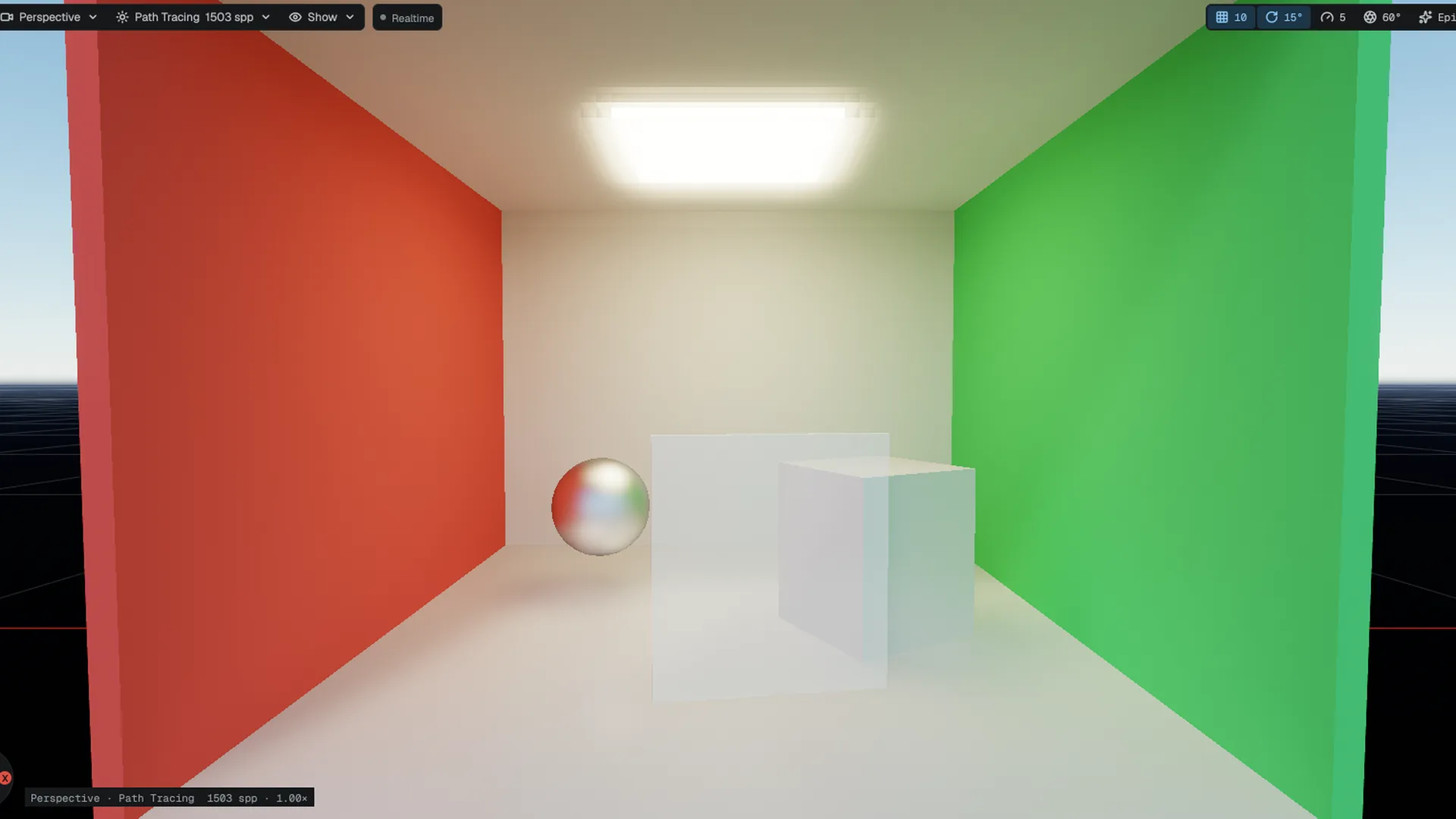
The path tracer is a progressive, physically based reference renderer. It accumulates samples across frames until the image converges, and it is what the real-time Global Illumination, reflections and shadows are checked against. It traces the same scene as the real-time features with a diffuse plus GGX specular BRDF, samples the material's albedo, normal and metallic-roughness maps at each hit (r.PathTracer.Textures), samples the sun and local lights directly, and reads the sky cubemap on a miss.
Use it
- Open the view mode
In the viewport's view-mode menu, choose Path Tracing under Reference. The viewport shows the sample count as it accumulates. Leaving the view mode returns to real time; the mode costs nothing when it is not selected.
- Hold the camera still
Accumulation restarts when the camera, the lights, the ray-tracing scene or a setting changes. Leave the view still until the noise clears; the denoiser keeps a fresh accumulation readable.
- Tune it
Use Project Settings > Engine > Path Tracer or the cvars below.
| cvar | Default | Meaning |
|---|---|---|
r.PathTracer.Enable | 0 | Force the tracer on in every view, the running game included, for offline capture. Session only: no config file applies it. |
r.PathTracer.SamplesPerFrame | 1 | Samples per pixel per frame, 1 to 16 |
r.PathTracer.MaxSamples | 4096 | Samples per pixel after which the converged image is held; 0 never stops |
r.PathTracer.MaxBounces | 8 | Bounces per path, 1 to 32 |
r.PathTracer.Denoise | 1 | Edge-aware denoiser over the accumulation; 0 shows the raw reference |
r.PathTracer.FireflyClamp | 256 | Per-sample brightness limit; 0 is unbounded. Raise it for very bright skies. |
r.PathTracer.FurnaceSky | 0 | Energy check: replaces the sky with a uniform one of this radiance and drops the other lights |
For a reference frame without the editor, render with a static camera and write a screenshot after N frames:
MowoGame.exe --project=MyGame.mproject --scene=Content/Maps/MyMap.mmap --screenshot=out.png --screenshot-frame=96 --cvar=r.PathTracer.Enable=1This needs a dev or debug build, because a release build drops --cvar= and --scene.
Path tracer limits
- It needs ray query and 64-bit shader integers. Metal reports no 64-bit shader integers today, so the path tracer does not run there.
- Diffuse and GGX only: clear coat, anisotropy, subsurface and area-light shapes are not sampled.
- Glass and water are not traced. Translucent surfaces, particles and world widgets are composited on top with raster shading.
- The environment is the sky cubemap. A scene lit only by a procedural sky with no cubemap reads black on a miss.
- It is a reference mode and is not meant to run at interactive frame rates.
API reference
- SceneRenderer module:
SceneRenderer::Options
Engine sources
This page describes behavior implemented in these files of the engine repository, checked against commit 47c78cd0a.
- Engine/Source/Runtime/RHI/Public/RHI/RendererAPI.h
- Engine/Source/Runtime/RHI/Public/RHI/RendererTypes.h
- Engine/Source/Runtime/RHI/Public/RHI/AccelerationStructure.h
- Engine/Source/Runtime/RHI/Public/RHI/RayTracingPipeline.h
- Engine/Source/Runtime/RHI/Public/RHI/BlasCompaction.h
- Engine/Source/Runtime/RHI/Public/RHI/ProjectRenderFeatures.h
- Engine/Source/Runtime/RHI/Public/RHI/RayTracingCapability.h